Solved

Google secops Integration setup

  • Oct 1, 2025 6:20 AM UTC
  • 3 replies
  • 279 views

DrVigilant
Forum|alt.badge.img+2

Hello Folks, I am running a google secops POC, so till now i have installed bindplane agent on Windows endpoints and connected their feed to google secops. The issue im facing is that im unable to collect the correct telemetry and also unable to collect the powershell telemetry data. I have these logs forwarded to google secops SIEM, but im unable to create a CASE which is basically SOAR. Ive tried using the chronicle connector but unable to push these alerts to soar and create a case. 
If possible please help me out to the earliest. 
Thank you

Best answer by SoarAndy

The connector will do “anything that fires as an Alert, ingest to SOAR”

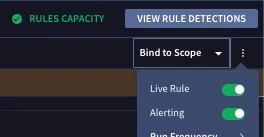
If you write the Rule, and enable Alerting, that’s all you need


View original

3 replies

cmorris
Staff
Forum|alt.badge.img+17
  • Staff
  • Oct 1, 2025 5:35 PM UTC

Is the PowerShell data flowing into SecOps? From there, you would create a detection rule based on the behaviors you wanted to alert on. You would set that rule to alerting and a case should be created via the connector from there.


DrVigilant
Forum|alt.badge.img+2
  • Author
  • New Member
  • Oct 4, 2025 5:27 AM UTC

Is the PowerShell data flowing into SecOps? From there, you would create a detection rule based on the behaviors you wanted to alert on. You would set that rule to alerting and a case should be created via the connector from there.

Yes, Powershell logs are present with alerting rules, but im confused with the connector to make it a case. What is the config to create the connector


SoarAndy
Forum|alt.badge.img+12
  • Bronze 1
  • Answer
  • Oct 10, 2025 1:03 PM UTC

The connector will do “anything that fires as an Alert, ingest to SOAR”

If you write the Rule, and enable Alerting, that’s all you need