Question

Google secops SAML SSO Setup with okta

  • December 1, 2025
  • 4 replies
  • 37 views

srajvansh
Forum|alt.badge.img+2

I am looking to setup SSO with Okta for our Google Secops tenant and following the google doc: https://docs.cloud.google.com/chronicle/docs/soar/admin-tasks/saml-soar-only/saml-configuration-for-okta but this just mentions SOAR.

Is that how the SecOps SSO works and moreover, there is no External authentication option under SOAR Setting → Advanced → External Authentication.

I also found this doc which mentions about the SSO setup with Okta: https://medium.com/@thatsiemguy/linking-okta-to-chronicle-secops-platform-c88ca530a515


which one should I really follow, would appreciate any responses on this? 

4 replies

cmmartin_google
Staff
Forum|alt.badge.img+11

The first link is a legacy document for standalone SOAR instances.  For a SIEM + SOAR instances you would use Workforce Identity Federation (WIF) as the the second link.


The caveat would be unless you had setup Google Cloud Directory Services to sync Okta identities into Cloud Identity, in which case you can use native Google Authentication.


srajvansh
Forum|alt.badge.img+2
  • Author
  • New Member
  • December 1, 2025

Thanks ​@cmmartin_google for your response. 

I am following the second article link as mentioned by yourself and it says that “If you have an existing Chronicle SecOps tenant, provide your Chronicle account team or Chronicle Partner the WORKFORCE POOL ID and WORKFORCE PROVIDER ID so they can complete the final part of the setup process”


Is it the respective google TAM team who supports us or what ?


cmmartin_google
Staff
Forum|alt.badge.img+11

The process is now self service, so you can follow - https://docs.cloud.google.com/chronicle/docs/onboard/configure-authentication - and there is no dependency on Google to complete the setup anymore.


I’ll update my blog (as that’s a few years old now).


JSpoorSonic
Forum|alt.badge.img+9
  • Bronze 3
  • December 11, 2025

You set up the SSO on the google admin page.

For Okta follow this;

Okta user provisioning and single sign-on  |  Cloud Architecture Center  |  Google Cloud Documentation


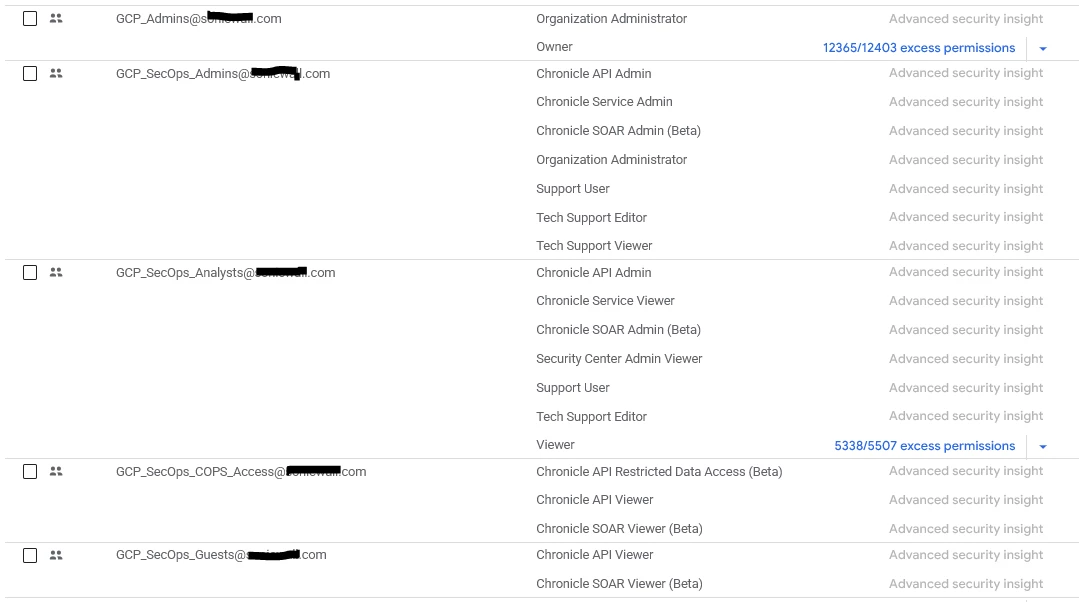
Then pull in / synchronize the groups you want to give access, you then grant these rights via IAM on the google project workspace.


I am doing something similar, but then with Entra ID.

Below are my Entra ID groups, that are synced to Google Org.