Question

Google SecOps Silent Host Monitoring Is not working as Expected

  • November 18, 2025
  • 8 replies
  • 161 views

anjananmasn

Hi Guys,

We tried to create a detection rule using the following document for Detect silent hosts by hostname.
https://docs.cloud.google.com/chronicle/docs/ingestion/silent-host-monitoring 


We have customized the query and make the following query.

rule Silent_Host_Detection {
meta:
description = "Detects hosts that have stopped sending logs for 5 minutes or more"
severity = "Medium"
category = "Host Monitoring"

events:
// Track events from the specific host in the last 60 minutes (scanning window)
$event.metadata.event_timestamp.seconds > timestamp.current_seconds() - 3600
$silent_hostname = $event.principal.hostname
$silent_hostname = "secops-local-testing-02"

match:
// Group by hostname over 60 minutes
$silent_hostname over 60m

outcome:
// Calculate the time difference in the outcome section
$max_event_time = max($event.metadata.event_timestamp.seconds)
$max_diff = timestamp.current_seconds() - $max_event_time
$hostname = array_distinct($silent_hostname)
$last_seen = $max_event_time
$severity = "Medium"
$description = "Host has stopped sending logs for 5+ minutes"

condition:
// Use the outcome variable in condition (5 minutes = 300 seconds)
$event and $max_diff > 300

}


We also set the run frequency as 1 hour.


After that we enabled the rule and started our test VM at 3:20 PM (Local Time) and a fake log generator to generate some fake logs. After that we turned off the VM at 5:05 PM (Local Time). when we check in the SecOps.

  • We have noticed a alert is generated at 4:30 ( Rule running Window 3:30 PM to 4:30 PM) even though their are logs in Google SecOps
  • But we did not see any alert for the rule running window 4:30 PM to 5:30PM even though their is no logs been ingested to google SecOps after 5:05 PM.


Please help me fix the issue we are facing.

Thank in Advanced.

8 replies

melissagr
Forum|alt.badge.img+1
  • Bronze 1
  • November 19, 2025

Hi,
The issue comes from the fact that your silent threshold is 5 minutes, but the rule runs only every 1 hour with a 60-minute match window.

That means the rule may:

  • trigger in a window where you still see some logs, and

  • miss a later window where the host is actually silent.

For a 5-minute inactivity check, the run frequency should be 5–10 minutes, not 1 hour. Once you lower the run frequency, the alert timing should match the real log gaps much better.


cmmartin_google
Staff
Forum|alt.badge.img+11

There was updated guidance on this feature recently released:

https://cloud.google.com/chronicle/docs/ingestion/silent-host-monitoring


1.  Introduction of a Latency Buffer: 

The documentation for the "Detect silent hosts by hostname" example rule now explicitly states that a 25-minute (1,500 seconds) buffer has been added. This buffer accounts for potential data indexing and query latency, ensuring that a host is deemed "truly silent" for more than 20 minutes before an alert is considered.


2.  Updated Detection Rule Logic (`shm_using_hostname`):
    *   The `outcome` section of the rule has been refined with new variables (`$current_time`, `$max_time`, `$max_time_date`, `$diff_seconds`) for more precise timestamp handling and calculation of the time difference.
    *   The `condition` for triggering an alert has been changed. Previously, it alerted if no events were received for more than 10 minutes (`$max_diff > 600`). The new condition now checks if the host has been silent for **more than 45 minutes** (`$diff_seconds > 2700`), which directly implements the 20-minute silence period plus the new 25-minute latency buffer.


Austin123
Forum|alt.badge.img+4
  • Bronze 3
  • November 24, 2025

Hi ​@cmmartin_google 

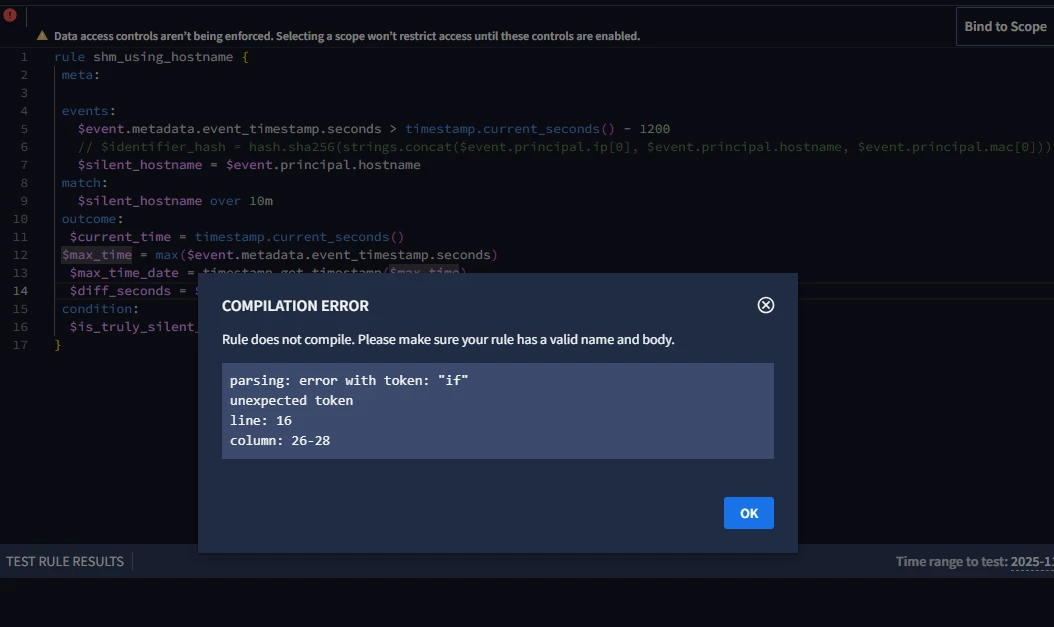
When we tried copying the YARA-L from the above-mentioned document, it showed an error.


cmmartin_google
Staff
Forum|alt.badge.img+11

Oh dear.  Thank you for bringing that up, and I’ll raise that back to folks to fix the example, but it should have been something like:

rule shm_using_hostname {
meta:

events:
$event.metadata.event_timestamp.seconds > timestamp.current_seconds() - 1200
// $identifier_hash = hash.sha256(strings.concat($event.principal.ip[0], $event.principal.hostname, $event.principal.mac[0]))
$silent_hostname = $event.principal.hostname
match:
$silent_hostname over 10m
outcome:
$current_time = timestamp.current_seconds()
$max_time = max($event.metadata.event_timestamp.seconds)
$max_time_date = timestamp.get_timestamp($max_time)
$diff_seconds = $current_time - $max_time
condition:
$event and $diff_seconds > 2700
}


Austin123
Forum|alt.badge.img+4
  • Bronze 3
  • November 24, 2025

Hi ​@cmmartin_google ,

Should I use the same logic for detecting when logs are not received for 24 hours or every 2 hours? Will it work.

And will it work for API and feeds ingestion as well if no logs are coming from the source.


Austin123
Forum|alt.badge.img+4
  • Bronze 3
  • November 26, 2025

Hi ​@cmmartin_google ,

Could you please share an update on this.

Thanks


cmmartin_google
Staff
Forum|alt.badge.img+11

I didn’t write these rules and am not immediately familiar with them I'm afraid, so I can’t provide a meaningful comment on them.  An observation, I would think the line 5 item would need to be greater than line 16 as otherwise I don’t see how the rule could fire, e.g., your lookback must be greater than the condition value.  For longer periods, I guess you would just need adjust those accordingly.

A YL2 rule would work irrespective of the ingestion mechanism.  


Austin123
Forum|alt.badge.img+4
  • Bronze 3
  • November 26, 2025

Hi ​@cmmartin_google ,

Really appreciate your response. We already tried (the line 5 item would need to be greater than line 16), but it didn’t work.

Kindly keep us informed of any future feature enhancements or rule updates.

Thanks