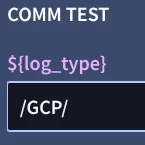
When creating a saved/dynamic search in Search Manager using the ${variable} placeholder syntax, the input box generated at runtime only supports exact string equality matching. There appears to be no way to pass a regex pattern (e.g., wildcard .*) through this input box to perform pattern-based matching on UDM fields.
Steps to Reproduce
- Navigate to Search Manager and create a new saved search with the following query:
metadata.log_type = ${log_type} - Save and run the search — an input box is correctly generated, prompting for a value for
log_type. - Enter a regex pattern as the value, e.g.:
.* - Observed result: The query executes as
metadata.log_type = ".*", treating the input as a literal string rather than a regex pattern. No results are returned (since no log_type literally equals.*).
Attempted Workarounds
Attempt 1: Replaced = with =~ operator for regex matching:
metadata.log_type =~ ${log_type}
Result: Compilation error:
lexer error: token recognition error at: '~' line: 1 column: 20-21 : invalid argument
This confirms =~ is not a valid operator in this query language.
Attempt 2: Used the re.regex() function instead:
re.regex(metadata.log_type, ${log_type})
Result: The query appears to compile, but the Search Manager no longer generates the input box for ${log_type} on save/load. This suggests the UI's placeholder-detection logic only recognizes ${variable} when used in the specific pattern <field> = ${<variable>}, and does not detect it when nested inside a function call.
- Is there a supported syntax for performing regex-based matching within a parameterized/dynamic search in Search Manager?
- If
re.regex()is the correct function for regex matching in UDM search generally, is there a different placeholder syntax or supported pattern that preserves dynamic input box generation when combined with this function?