

Question

help needed in verifying alerted IP NOT IN gcti

  • May 19, 2026
  • 2 replies
  • 54 views

NASEEF
Forum|alt.badge.img+9

Hello Team,

I am writing a rule to detect unknown IPs hitting our public-facing domains. In this rule, I only want to generate an alert when the source IP is not present in GCTI.

The reason is that we already have a separate rule that handles IPs found in GCTI, so I want to avoid duplicate detections.

Could someone please advise on the best way to implement a “NOT IN GCTI” condition within the rule?
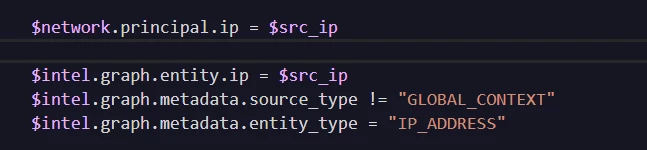
Is the below approach the correct way to verify that the principal IP generating the alerts is not present in GCTI? Also, is using the join with entity.ip the correct method for this check?
 

2 replies

hliu
Forum|alt.badge.img+5
  • Bronze 3
  • May 20, 2026

I believe the exclusion in Yara is similar to SPL’s, where != implies the existence of the compared field.

For your use case, you might want to use for the exclusion 

NOT $field = value

instead of

!=


rafaelramirez
Staff
Forum|alt.badge.img+5

Yes, using a NOT join against the gcti_feed graph entity is exactly the correct logic to achieve this. However, the exact syntax in YARA-L can be a bit tricky because of how Google SecOps handles negative joins across separate events.

If your rule structure isn't perfect, a standard NOT condition can accidentally drop valid alerts or cause the rule to fail compilation.


To cleanly check that an IP is not in GCTI, you should isolate the GCTI entity lookups into a separate variable in your $selection block, and then use the match section to enforce that the join yields no matches.

rule unknown_ip_hitting_public_domains {

  meta:

    author = "Security Operations"

    description = "Detects public-facing domain hits from IPs NOT listed in GCTI threat intelligence."

    severity = "Medium"

  events:

    // 1. Capture the network/web traffic to public domains

    $traffic.metadata.event_type = "NETWORK_CONNECTION" // Adjust to WEB_PROXY or HTTP as needed

    $traffic.target.hostname = /public-domain\.com/     // Your public domain criteria

    $traffic.principal.ip = $ip

    // 2. Query the GCTI threat intelligence graph

    $gcti.graph.metadata.entity_type = "IP_ADDRESS"

    $gcti.graph.metadata.vendor_name = "Google Cloud Threat Intelligence"

    $gcti.graph.entity.ip = $ip

  match:

    // This tracks the unique IP over a time window

    $ip over 5m

  condition:

    // The Magic: Trigger ONLY if the traffic event exists, but the GCTI record does NOT

    $traffic and not $gcti

}

