Solved

How can I parse Timestamp?

  • December 27, 2023
  • 5 replies
  • 26 views

Hello All,
Please help us parse the endTimeISO, startTimeISO and eventTimeISO from the below log.

"{\\"hostName\\":\\"ManageEngine Endpoint Central 11\\",\\"module\\":\\"System Manager\\",\\"priority\\":\\"Information\\",\\"timeDuration\\":\\"0\\",\\"application\\":\\"ManageEngine Endpoint Central 11\\",\\"computerName\\":\\"***-***\\",\\"domainName\\":\\"****\\",\\"viewerIp\\":\\"--\\",\\"eventTime\\":\\"1703582047178\\",\\"userIp\\":\\"--\\",\\"startTime\\":\\"1703582047178\\",\\"endTime\\":\\"1703582047178\\",\\"remarks\\":\\"****-****-***\\",\\"userName\\":\\"--\\",\\"startTimeISO\\":\\"2023-12-26T14:44:07.178+05:30\\",\\"endTimeISO\\":\\"2023-12-26T14:44:07.178+05:30\\",\\"eventTimeISO\\":\\"2023-12-26T14:44:07.178+05:30\\"}

Best answer by lukas-lr

Hi,
The above format is working, but we couldn't find the field date getting parsed. The date value is not getting mapped in the statedump.
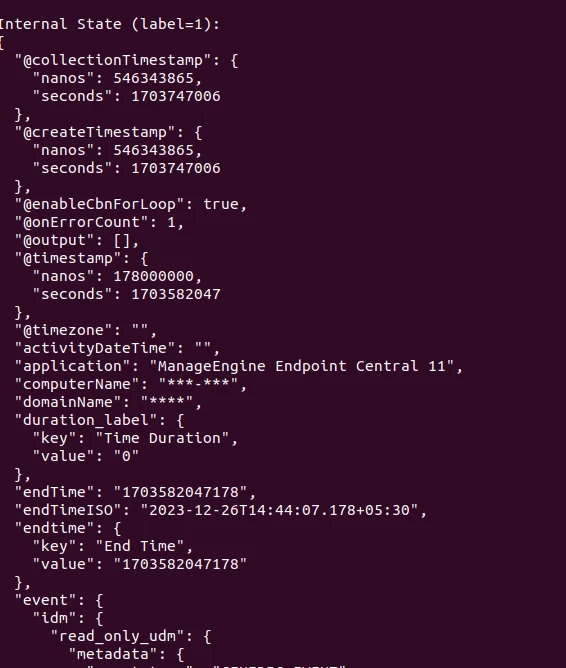
Can you please let us know how to parse as event time? 


Hi, the date filter should automatically set the "@timestamp" field, which is then used as the log timestamp in Chronicle

5 replies

Forum|alt.badge.img+4
  • Bronze 2
  • December 27, 2023

Hi manoj06,

After extracting the fields from the JSON, you can use one of


date { match => ["endTimeISO", "yyyy-MM-ddTHH:mm:ss.SSSZZ"] } date { match => ["startTimeISO", "yyyy-MM-ddTHH:mm:ss.SSSZZ"] } date { match => ["eventTimeISO", "yyyy-MM-ddTHH:mm:ss.SSSZZ"] }


to parse the date format and use the respective field as timestamp


Forum|alt.badge.img+5

Hi manoj06,

After extracting the fields from the JSON, you can use one of


date { match => ["endTimeISO", "yyyy-MM-ddTHH:mm:ss.SSSZZ"] } date { match => ["startTimeISO", "yyyy-MM-ddTHH:mm:ss.SSSZZ"] } date { match => ["eventTimeISO", "yyyy-MM-ddTHH:mm:ss.SSSZZ"] }


to parse the date format and use the respective field as timestamp


Hello Lukas,

This is showing error.

Error: LOG_PARSING_CBN_ERROR: "generic::internal: pipeline failed: filter date (4) failed: failed to parse date field --"

Thanks,


Forum|alt.badge.img+4
  • Bronze 2
  • December 27, 2023

Hello Lukas,

This is showing error.

Error: LOG_PARSING_CBN_ERROR: "generic::internal: pipeline failed: filter date (4) failed: failed to parse date field --"

Thanks,


Hi aravind,

Are you sure your date field always contains a valid date? If the format is unstable, you can add more formats to the match array. If it is not always a date, you could check for example with something like

if [date] =~ /\\d+-\\d+\\d+T\\d+:\\d+\\d+\\.\\d+\\+\\d+:\\d+/

for the format above (just typed this without trying, so there might be errors). Or you just do [date] != "" and [date] != "-"


  • December 28, 2023

Hi,
The above format is working, but we couldn't find the field date getting parsed. The date value is not getting mapped in the statedump.

Can you please let us know how to parse as event time? 


Forum|alt.badge.img+4
  • Bronze 2
  • Answer
  • December 28, 2023

Hi,
The above format is working, but we couldn't find the field date getting parsed. The date value is not getting mapped in the statedump.

Can you please let us know how to parse as event time? 


Hi, the date filter should automatically set the "@timestamp" field, which is then used as the log timestamp in Chronicle