We have completed Stage 2 of SOAR Migration for our SecOps environment using Cloud Identity integration.
However, I'm having trouble understanding the IAM mechanism as described in the documentation. Could you please explain it to me?
* My understanding of the requirements for SOAR Migration is as follows, but is this correct? (I'm concerned that the requirement to map the PERMISSION GROUP on the Group Mapping page and the mandatory assignment of predefined roles will limit the permission control of SOAR-side functions.)
* I've also heard that Workforce Identity integration doesn't have this restriction and allows operation with only custom roles. Why does the more native Cloud Identity integration have this restriction?
■IAM Roles
When accessing SecOps via Cloud Identity integration, it is absolutely necessary to assign one of the following three roles. I was previously told by support that this is required, like an entry ticket for SecOps.
roles/chronicle.soarAdmin
roles/chronicle.soarThreatManager
roles/chronicle.soarVulnerabilityManager
■SecOps Group Mapping
When using Cloud Identity integration, one of the three roles listed above must be registered in the IDP/USER GROUP column.(Individual email addresses can be accessed without explicit mapping.)
The fact that the column name is IDP/USER GROUP, yet an IAM Role needs to be registered here, is causing further confusion.
https://[secret].backstory.chronicle.security/sp-settings/idp-group-mapping
In our environment, we have registered the roles shown in the image below.
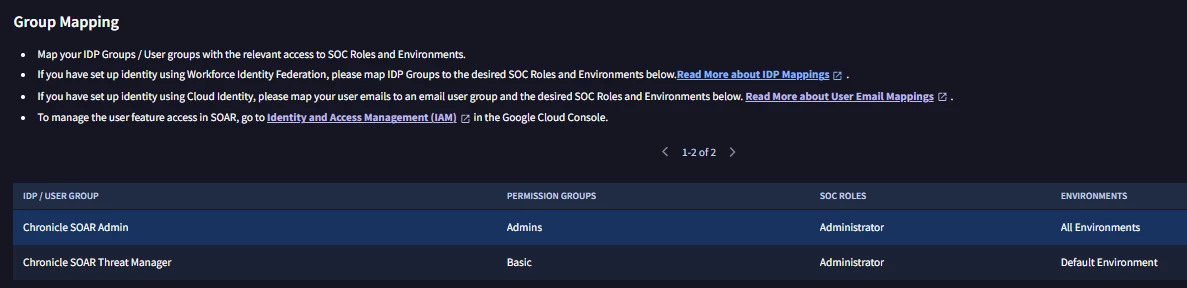
The PERMISSION GROUP column must be explicitly mapped to allow access to SecOps.