
How to check private IP range in SOAR playbook condition

  • December 13, 2024
  • 4 replies
  • 34 views

sudeep_singh
Forum|alt.badge.img+6

Hello All,
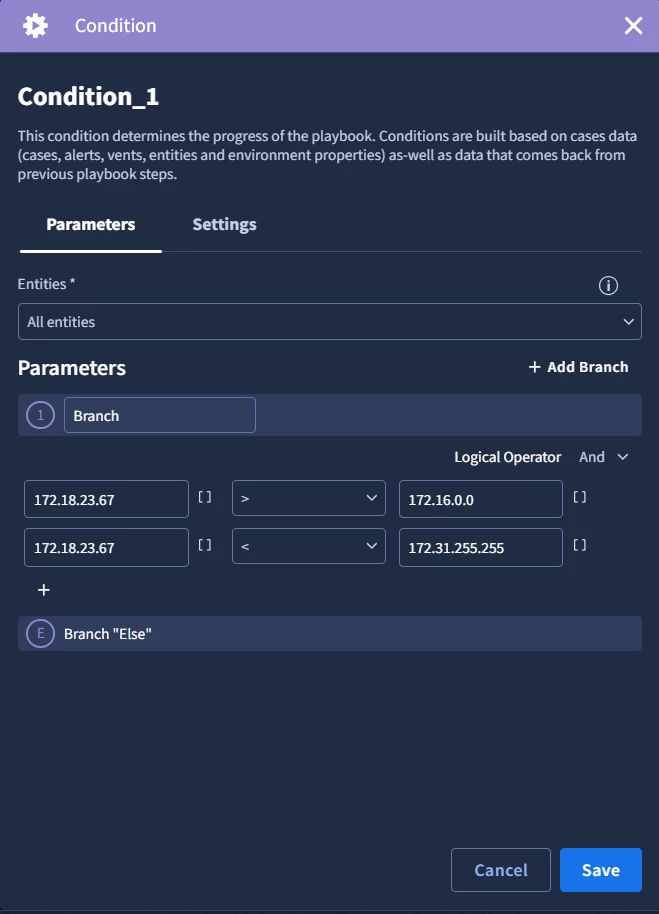
I want to check in the playbook condition whether the specified IP is in private IP ranges or not.

The method which I tried is not working as expected.
 

4 replies

cmorris
Staff
Forum|alt.badge.img+10
  • Staff
  • December 13, 2024

I would add these ranges to the internal networks within the SOAR settings -https://cloud.google.com/chronicle/docs/soar/admin-tasks/configuration/manage-networks. After doing that, they should be classified as internal entities.


sudeep_singh
Forum|alt.badge.img+6
  • Author
  • Bronze 1
  • December 16, 2024

I would add these ranges to the internal networks within the SOAR settings -https://cloud.google.com/chronicle/docs/soar/admin-tasks/configuration/manage-networks. After doing that, they should be classified as internal entities.


Hi @cmorris ,

I'm aware of this but my requirement is to check whether the alert triggered from the IP is Private range IP or not via playbook action. we have AbuseIPDB action in which the results will be there like ispublic:True/False, but i need any other action to verify the IP is private or not.


AymanC
Forum|alt.badge.img+13
  • Bronze 5
  • December 16, 2024

Hi @sudeep_singh,

How about creating a reference list with all of the IPs that are Private IPS. Within your Playbook action, using the 'is Value in Refrence List' action to perform the check.

Kind Regards,

Ayman


sudeep_singh
Forum|alt.badge.img+6
  • Author
  • Bronze 1
  • December 20, 2024

Hi @sudeep_singh,

How about creating a reference list with all of the IPs that are Private IPS. Within your Playbook action, using the 'is Value in Refrence List' action to perform the check.

Kind Regards,

Ayman


Hi @AymanC 

I know aboout it and but not all the time will login from office network, sometimes they may login from unknown network at that time how can i rely on reference list because the IP wont be available in the reference list right.




