Solved

I want to create an exclusion condition for an alert based on the values of multiple fields using YARA-L and a data table

  • July 28, 2025
  • 6 replies
  • 220 views

keiS
Forum|alt.badge.img+2

I need to create an exclusion setting based on the values of multiple fields in a YARA-L rule.

I've been trying and erroring using a data table, but I'm not getting anywhere so I'd appreciate any advice.

○What I want to do
If principal.user.email_addresses is aaa@sample.com and principal.ip is x.x.x.x, do not send an alert.

(I want these two fields to be an and condition, not an or condition)

If this cannot be done with a data table, could you tell me if there is another way to do it?

I look forward to your reply.


rule sample_rule {
meta:
author = "sample"
description = "testrule"
severity = "MEDIUM"

events:

$e.metadata.log_type = "GCP_CLOUDAUDIT"
($e.principal.user.email_addresses != %sample_rule.useremailaddresses or $e.principal.ip != %sample_rule.ip)

$user_id_for_match = $e.principal.user.userid

match:
$user_id_for_match over 1h

condition:
$e
}
 

Best answer by AbdElHafez


You will need to define the data table like this ;

ipEmail,ref
0.0.0.0_myemail@myexample.com ,GCP_CLOUDAUDIT

The first field is both ip and email concatenated with a “_” , the second field is any dummy string

The rule should be like this ;

rule sample_rule {

meta:

author = "sample"

description = "testrule"

severity = "MEDIUM"

events:

$e.metadata.log_type = "GCP_CLOUDAUDIT"

$user_id_for_match = $e.principal.user.userid


$e.principal.ip != ""

$e.principal.user.email_addresses !=""

strings.concat($e.principal.ip,"_",$e.principal.user.email_addresses) = $ipEmailPair


%sample_rule3.ref = $e.metadata.log_type

$ipEmailPair != %sample_rule3.ipEmail


match:

$user_id_for_match over 1h

outcome:

$ipEmailPair_ = array_distinct($ipEmailPair)


condition:

$e

}

For Not AND (NAND) Exclusion ;

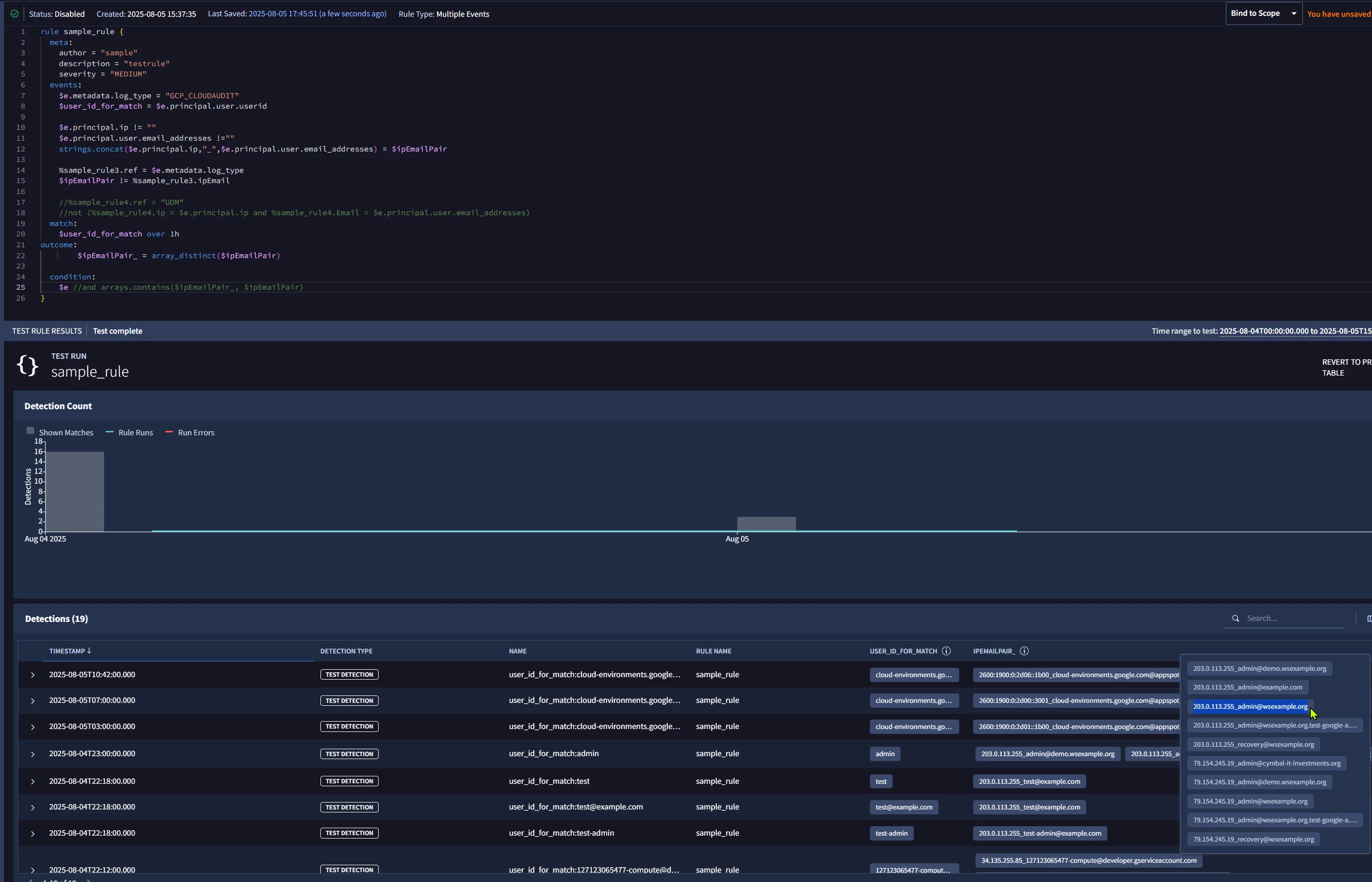
However as you could see, because both principal.ip and principal.user.email_addresses are repeated fields and you are matching using principal.user.userid so each user id will have a multi-list of IP-emails pairs, the rule will trigger if there is at least one pair that is not in your data table.

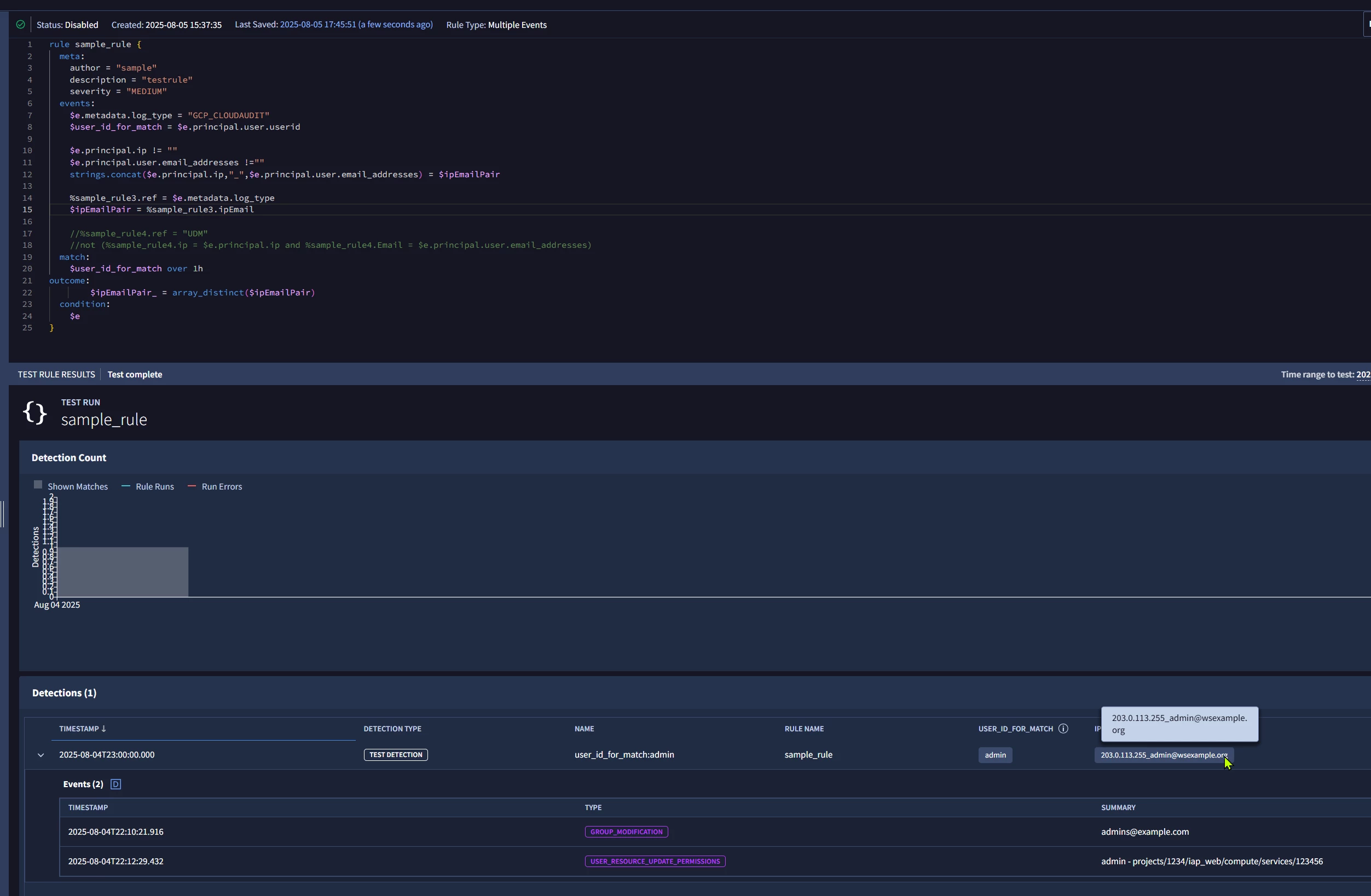
i.e. The highlighted alert had 10 pairs, 9 of them were not in the data table so the rule triggered.


For Equal Matching ; The rule will work as expected


Concatenating them in the parser should work but it won’t be a neat solution and will have the same effect.

6 replies

AbdElHafez
Staff
Forum|alt.badge.img+12
  • Staff
  • August 1, 2025

You could concatenate both strings in 1-field then use the concatenated field with any condition.


keiS
Forum|alt.badge.img+2
  • Author
  • Bronze 4
  • August 5, 2025

Thank you for your reply.
Let me confirm what you said.
Does that mean defining field joins in the parser? Or can they be joined using rules?


AbdElHafez
Staff
Forum|alt.badge.img+12
  • Staff
  • Answer
  • August 5, 2025


You will need to define the data table like this ;

ipEmail,ref
0.0.0.0_myemail@myexample.com ,GCP_CLOUDAUDIT

The first field is both ip and email concatenated with a “_” , the second field is any dummy string

The rule should be like this ;

rule sample_rule {

meta:

author = "sample"

description = "testrule"

severity = "MEDIUM"

events:

$e.metadata.log_type = "GCP_CLOUDAUDIT"

$user_id_for_match = $e.principal.user.userid


$e.principal.ip != ""

$e.principal.user.email_addresses !=""

strings.concat($e.principal.ip,"_",$e.principal.user.email_addresses) = $ipEmailPair


%sample_rule3.ref = $e.metadata.log_type

$ipEmailPair != %sample_rule3.ipEmail


match:

$user_id_for_match over 1h

outcome:

$ipEmailPair_ = array_distinct($ipEmailPair)


condition:

$e

}

For Not AND (NAND) Exclusion ;

However as you could see, because both principal.ip and principal.user.email_addresses are repeated fields and you are matching using principal.user.userid so each user id will have a multi-list of IP-emails pairs, the rule will trigger if there is at least one pair that is not in your data table.

i.e. The highlighted alert had 10 pairs, 9 of them were not in the data table so the rule triggered.


For Equal Matching ; The rule will work as expected


Concatenating them in the parser should work but it won’t be a neat solution and will have the same effect.


AbdElHafez
Staff
Forum|alt.badge.img+12
  • Staff
  • August 5, 2025

You could define the table as ;

ipEmail ref
ip1_email1 GCP_CLOUDAUDIT

First column will be the ip-email pair concatenated with “_”, the other column is any dummy value.

The rule should be like ;
 

rule sample_rule {

  meta:

  events:

    $e.metadata.log_type = "GCP_CLOUDAUDIT"

    $user_id_for_match = $e.principal.user.userid

    $e.principal.ip != ""

    $e.principal.user.email_addresses !=""

    strings.concat($e.principal.ip[0],"_",$e.principal.user.email_addresses[0]) = $ipEmailPair

    %sample_rule3.ref = $e.metadata.log_type //dummy match just to allow “!=” operator later

    $ipEmailPair != %sample_rule3.ipEmail

  match:

    $user_id_for_match over 1h

outcome:

        $ipEmailPair_ = array_distinct($ipEmailPair)

  condition:

    $e 
}


The rule will generate a list of IP Email pairs ($ipEmailPair_) per user id ($user_id_for_match), but also the rule will trigger if the list $ipEmailPair_ have any pairs that are not in the table.


i.e. if you added ip1_email1,”GCP_CLOUDAUDIT” in that table, the rule will trigger if a user id user1 has ip2_email2 and ip1_email1pairs within the hour since ip2_email2 pair is not in the data table.


keiS
Forum|alt.badge.img+2
  • Author
  • Bronze 4
  • August 7, 2025

Thank you for your reply.
I will try to verify the information you provided!
I will contact you once the verification is complete.


keiS
Forum|alt.badge.img+2
  • Author
  • Bronze 4
  • August 8, 2025

I tested it and was able to achieve what I wanted to do.

Thank you for your response!