Solved

Is Row-based join and enrichment from a Data Table where all identifying columns are REGEX type possible?

  • June 26, 2026
  • 5 replies
  • 84 views

blappy_fird
Forum|alt.badge.img+1

Hi community,

I'm building a YARA-L detection rule for registry-based persistence mechanisms in Google SecOps. I have a threat intel data table structured like this: 

Registry_Key (REGEX)

Registry_Value_Name (REGEX)

Registry_Value_Data (REGEX) Threat_Actor_Association (STRING) Malware_Association (STRING) Description (STRING)
SOFTWARE[\\]+Microsoft[\\]+Windows[\\]+CurrentVersion[\\]+Explorer[\\]+(Run|RunOnce) Persistence_Mechanism wscript(?:\.exe$)?\b.*\.(vbs|js)$ Threat_Actor Malware This persistence mechanism is employed by <malware>, used by <Threat_Actor>.


The REGEX columns are intentional and necessary — registry key paths vary significantly across log sources (to address backslash escaping inconsistencies like \\ vs \\\\), and registry value names and data can match multiple variants. I want to keep the REGEX columns as-is.

My goal is to:

  1. Filter events using all three REGEX columns (in regex %table.column nocase)
  2. Pull the enrichment columns (Threat_Actor_Association, Malware_Association, Description) from the matched row into the rule outcome

The problem I'm running into is that the platform requires a STRING column = equality join to establish the row context before enrichment column assignments are allowed. However:

  • All three identifying columns are REGEX type — in regex is column-based only and does not constitute a row join per the documentation
  • Registry_Value_Name values are themselves regex patterns (e.g. (\bVLC\b)|(\bWingetUI\b), ([A-Za-z0-9]{8}\.exe$)), not plain literals, so a STRING duplicate would not match the live UDM event via =
  • Registry_Key paths share the same key across multiple rows (e.g. many malware families persist under CurrentVersion\\Run), so they are not unique per row and cannot serve as a reliable join anchor
  • Registry_Value_Data has the same issues

Is there a supported YARA-L syntax or data table design pattern that allows enrichment from a row-based join when all identifying columns are REGEX type? Specifically:

  • Is there any way to use in regex as a row-based join, or is column-based the only behavior?
  • Does re.regex($e.field, %table.column) work as a row-based join? (We tried this and got expected string for arg 1 of regex at compile time)
  • Is there a recommended pattern for this kind of threat intel enrichment use case where the identifiers are inherently regex patterns?

This is kind of a feasibility project on my end since I do understand the same output can be achieved by just making multiple rules that have the malware or TA attribution written in the rule name or description, however I would just like to know if this is feasible because it would be a lot more easier (and cleaner) to create this kind of rule with data tables. 

Any guidance is greatly appreciated. Thank you in advance!
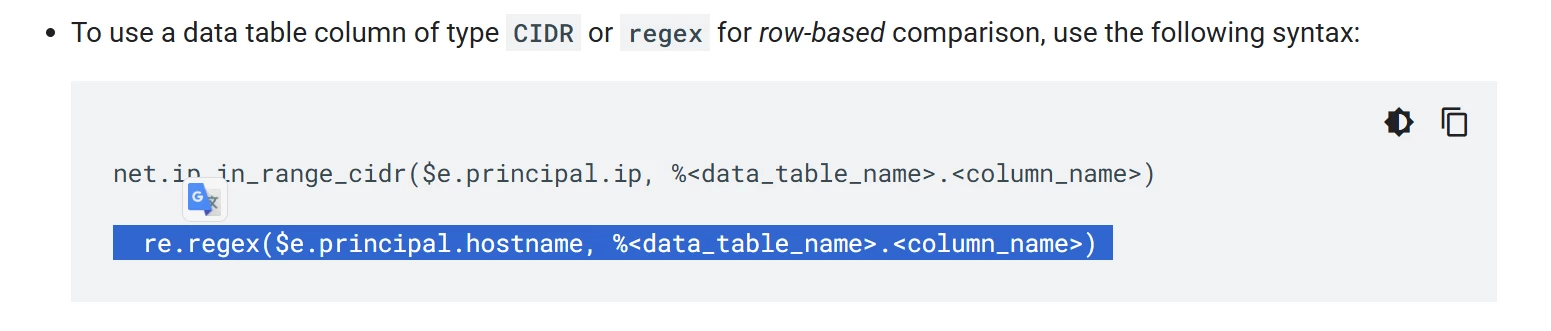
Best answer by hliu

The problem I'm running into is that the platform requires a STRING column = equality join to establish the row context before enrichment column assignments are allowed. 


regex for row-based comparison, per the docs:
https://docs.cloud.google.com/chronicle/docs/investigation/data-tables#link_udm_events_to_data_tables_using_row-based_comparison


hope it helps

5 replies

gkush
Staff
Forum|alt.badge.img+6
  • Staff
  • June 29, 2026

Hi ​@blappy_fird ,


I haven’t tried this with a Data Table, but I know that string joins are supported for UDM events.  For example, I have this in a rule working in my tenant now:


    re.capture($dlp.target.url, "chrome-extension://([^/]+)/") = $ext.target.resource_ancestors.product_object_id


If I’m reading your post correctly, the approach I’d be taking is finding the UDM field with the registry string and perform the match only on the matching registry entry in the Data Table.  At that point you should be able to apply additional logic to the other columns matching that row.  It looks like you’d have a matching join on all rows if you stick with the registry key name, and then you’d do filtering on matches in the other columns, if I’m following you.  


blappy_fird
Forum|alt.badge.img+1
  • Author
  • New Member
  • July 1, 2026

Hi ​@blappy_fird ,


I haven’t tried this with a Data Table, but I know that string joins are supported for UDM events.  For example, I have this in a rule working in my tenant now:


    re.capture($dlp.target.url, "chrome-extension://([^/]+)/") = $ext.target.resource_ancestors.product_object_id


If I’m reading your post correctly, the approach I’d be taking is finding the UDM field with the registry string and perform the match only on the matching registry entry in the Data Table.  At that point you should be able to apply additional logic to the other columns matching that row.  It looks like you’d have a matching join on all rows if you stick with the registry key name, and then you’d do filtering on matches in the other columns, if I’m following you.  


Hi ​@blappy_fird ,


I haven’t tried this with a Data Table, but I know that string joins are supported for UDM events.  For example, I have this in a rule working in my tenant now:


    re.capture($dlp.target.url, "chrome-extension://([^/]+)/") = $ext.target.resource_ancestors.product_object_id


If I’m reading your post correctly, the approach I’d be taking is finding the UDM field with the registry string and perform the match only on the matching registry entry in the Data Table.  At that point you should be able to apply additional logic to the other columns matching that row.  It looks like you’d have a matching join on all rows if you stick with the registry key name, and then you’d do filtering on matches in the other columns, if I’m following you.  


Hi ​@gkush , thank you so much for taking the time to respond!

I do understand the join functionality of using re.capture() to extract a value from a UDM field and equating it to a STRING column in a data table to establish a row-level join. That works well for a structured, predictable data that we can expect from UDM events. 

To further give context to  my inquiry, I have listed below a combination of factors that make this approach difficult to apply:

1. Log source inconsistency across a multi-tenant environment

We operate across a bunch of clients with varying EDR and log source configurations. The same registry key gets ingested differently depending on the source. For example:

\\REGISTRY\\MACHINE\\SOFTWARE\\Microsoft\\Windows\\CurrentVersion\\Run
HKLM\\SOFTWARE\\Microsoft\\Windows\\CurrentVersion\\Run
SOFTWARE\\Microsoft\\Windows\\CurrentVersion\\Run
SOFTWARE\\\\Microsoft\\\\Windows\\\\CurrentVersion\\\\Run

All four represent the same principal registry key (CurrentVersion\\Run - ref. https://learn.microsoft.com/en-us/windows/win32/setupapi/run-and-runonce-registry-keys), but none of them are string-equal to each other. To match reliably across all of these variants, we need REGEX columns in the data table since a plain STRING join would miss any variant that doesn't exactly match the stored value.

2. The registry key is not unique per row

Our threat intel dataset has multiple distinct malware families and threat actors that all persist under the same registry key. For example:

Registry_Key Registry_Value_Name Threat_Actor
SOFTWARE[\\]+Microsoft[\\]+Windows[\\]+CurrentVersion[\\]+(Run|RunOnce) monitoringservice kongtuke
SOFTWARE[\\]+Microsoft[\\]+Windows[\\]+CurrentVersion[\\]+(Run|RunOnce) SecurityService karstorat
SOFTWARE[\\]+Microsoft[\\]+Windows[\\]+CurrentVersion[\\]+(Run|RunOnce) SystemHealthCheck zionsiphon
SOFTWARE[\\]+Microsoft[\\]+Windows[\\]+CurrentVersion[\\]+(Run|RunOnce) (empty) Remcos RAT

If we join on the registry key, even after normalization via re.capture() , the join would match all four rows simultaneously for any event hitting that key path. The enrichment outcome variables would then aggregate Threat_Actor_Association values from all matching rows, returning [kongtuke, karstorat, zionsiphon, Remcos RAT] rather than the specific actor that we are trying to only match on

3. The identifying columns are themselves regex patterns, not literals

Even if the registry key uniqueness problem didn't exist, most of the other identifying columns in  Registry_Value_Name and Registry_Value_Data are not plain strings we can store and match via equality. They are regex patterns because threat actor TTPs evolve and registry value names and data are not rigidly defined. For example:

Registry_Value_Name:  \bavk(?:\.exe$)?\b
Registry_Value_Data: \Bluetooth\\Bluetoothservice(?:\.exe$)?\b | \\Adobe\\Scripts\\alien.ini(?:\.(exe|ini)$)?\b

A STRING duplicate of these values would be the regex pattern string itself \bavk(?:\.exe$)?\b which would never equal the literal value that we canexpect in a live UDM event like avk.exe.

4. A row number column doesn't solve the join problem

One workaround I considered was adding a Row_ID STRING column (e.g. 1, 2, 3) as a synthetic unique identifier per row. The problem is that a row number has no representation in the UDM event whatsoever as it is a property of the data table, not of the registry activity being detected. There is no UDM field we can extract or derive that would tell us which row number the event corresponds to, because that answer is precisely what we are trying to determine through the matching process itself. 


Given the constraints above, we are beginning to consider that this may be a platform-level limitation for this specific use case  where all identifying columns are regex-pattern-based, no single column is unique per row, and no UDM event field naturally maps to a row identifier. The alternative we are weighing is continuing with individual YARA-L rules per threat actor and malware family (one rule per persistence mechanism), where attribution and enrichment are embedded directly in the rule meta section and the detection logic is expressed using YARA-L's native inline regex syntax. This approach moves past all the challenges listed above entirely, though it trades the centralized management that data tables would have offered.

We are raising this here in case there is a syntax or design pattern we have overlooked, and also to flag this as a potential gap in data table functionality for regex-heavy threat intel use cases. Any insight from the team would be very much appreciated!


gkush
Staff
Forum|alt.badge.img+6
  • Staff
  • July 1, 2026

Hi again,

You certainly raise a number of interesting considerations there.  If I am reading you correctly, you are contending with multiple UDM fields that have variations on registry key values, and then you also want to be able to distinguish matches on them by subcategorization on the other columns in the Data Table, and some of those are regular expression values?


That’s an interesting problem.  I’m not sure what you’ve tried but this is what I’d be toying with:

  • Create a group value for all of the UDM fields that have registry keys and use a regexp pattern that tries to normalize across all variations.
  • Match the group value against the Data Table column with the registry key value
  • Set the data table types for Registry_Value_Name, and Registry_Value_Data to REGEXP
  • Those columns that are regexp patterns, use them as the definition for a regexp match against a UDM field

So for example, I have a situation where I have a domain name in some UDM fields and a URL in others, and I want to apply the same match to them all, so I did this:

    $domain = strings.to_lower(re.capture(

        strings.coalesce(

            $e.target.resource.attribute.labels["destination"],

            $e.target.url,

            $e.target.asset.hostname,

            "unknown"

        ),

        "(?:https?://)?(?:www\\.)?([^/:]+)"

    ))


That’s a little easier than what you’d need to do with matches on keys, but you could probably break it out into a couple of different variables and group them all together in one local variable.  Or not - you might want to consider using OR conditions.

The goal would be to match the registry key against the registry_key value in the Data Table, then you can pull the regex patterns from the other columns out and apply them as match conditions.  From what I’m seeing that applies to the registry_name and registry_value - so something like this:


events:

$e.metadata.event_type = "REGISTRY_MODIFICATION"


$keymatch = (<waves hands and uses strings functions to grab registry key values>)

$keymatch = %threat_intel.Registry_key //And this would be implemented as a string join most likely


// 1. Store the ACTUAL UDM data (strings) in variables

$registry_value_name = $e.target.registry.registry_value_name

$registry_value_data = $e.target.registry.registry_value_data


// 2. Filter the events using the variables

re.regex($registry_value_name, %threat_intel.Registry_Name_Value)

re.regex($registry_value_data, %threat_intel.Registry_Data_Value)


$threat_actor = %threat_intel.Threat_Actor


match:

   $keymatch, $registry_value_name, $registry_value_data, $threat_actor


The core idea I’m trying to convey is leveraging the data table patterns as regexp patterns, meaning the columns themselves need to be of type “REGEXP”, and the filtering UDM values using those patterns before, finally, using them as match conditions. This should break out your threat actors in the outcome variables.


This is something of a shoot-from-the-hip response but I hope it has something you can work with? 


hliu
Forum|alt.badge.img+5
  • Bronze 2
  • Answer
  • July 3, 2026

The problem I'm running into is that the platform requires a STRING column = equality join to establish the row context before enrichment column assignments are allowed. 


regex for row-based comparison, per the docs:
https://docs.cloud.google.com/chronicle/docs/investigation/data-tables#link_udm_events_to_data_tables_using_row-based_comparison


hope it helps


blappy_fird
Forum|alt.badge.img+1
  • Author
  • New Member
  • July 8, 2026

The problem I'm running into is that the platform requires a STRING column = equality join to establish the row context before enrichment column assignments are allowed. 


regex for row-based comparison, per the docs:
https://docs.cloud.google.com/chronicle/docs/investigation/data-tables#link_udm_events_to_data_tables_using_row-based_comparison


hope it helps


@hliu  Thank you very much for this, this was what I was looking for. Appreciate the suggestions as well ​@gkush, I was able to achieve what I intended to do with hliu’s suggestion. The re.regex function allows me to match on UDM fields by using the Data Table column value as the regular expressions (not manually written). Would look something like this:


re.regex($event.target.registry.registry_key , %DataTables.Registry_Key)
re.regex($event.target.registry.registry_value_data , %DataTables.Registry_Value_Data)


With this, I can now pull additional column values for the same matching row that matched on the UDM log.