Hi everyone,
I'm currently integrating Jira with Google Security Operations (Chronicle SOAR) using the native Jira integration, specifically the Sync Closure Job and Sync Comments Job.
The integration is working as expected in terms of synchronization:
- Jira issues are created and updated correctly
- Status changes are synced bidirectionally
- Cases/alerts are closed when the corresponding Jira issue is closed
However, I noticed an issue with the closure reason in SecOps:
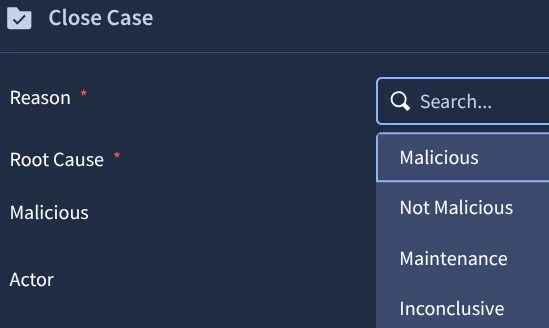
When a Jira issue is closed and synced back to SecOps, the alert/case is closed with:
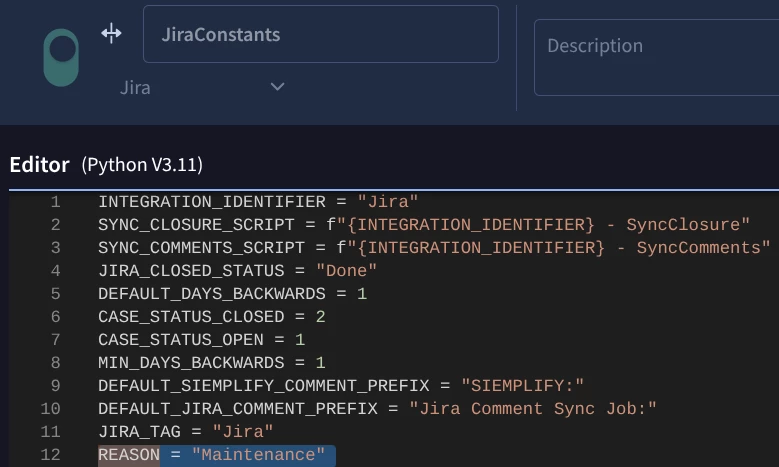
Reason: Maintenance
- Comment: "Alert was closed by Jira - SyncClosure"
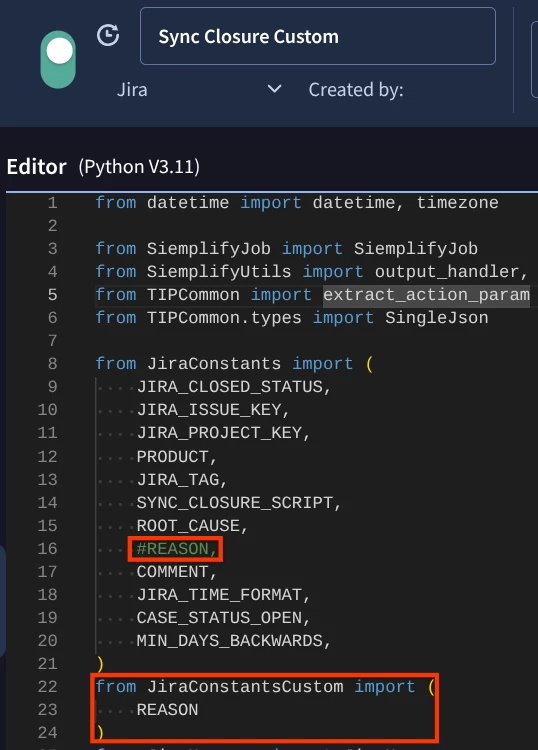
From reviewing the job script, it seems that the closure is performed using:
siemplify.close_alert(
    root_cause=ROOT_CAUSE,
    reason=REASON,
    comment=COMMENT,
    case_id=case_obj_id,
    alert_id=alert_id,
)
Where REASON appears to be a constant (likely defined in JiraConstants), rather than dynamically derived from the Jira issue (e.g., status or resolution).
Questions:
-
Is the
reasonvalue ("Maintenance") hardcoded in the native Jira integration? -
Is there any supported way to configure or override the close reason (e.g., map Jira status/resolution → SecOps reason)?
-
Can this be customized without creating a fully custom job?
-
Is there a recommended best practice for aligning Jira resolutions (e.g., Done, Won’t Fix) with SecOps close reasons (e.g., Resolved, False Positive)?
Additional context:
-
Using native Jira integration (not custom)
-
Sync Closure Job and Sync Comments Job enabled
-
No modifications to the default integration package
Any guidance or best practices would be greatly appreciated.
Thanks!