JIRA upload attachment issue

  • May 19, 2025
  • 18 replies
  • 71 views

Nagarjuna11
Forum|alt.badge.img+5

Hello All,

I have integrated a JIRA instance with SecOps SOAR. However, when uploading an attachment to a JIRA ticket through SecOps SOAR, I’m unable to upload the file. What should the file path be?

Thank you!

18 replies

ylandovskyy
Staff
Forum|alt.badge.img+16

Hey @Nagarjuna11 ,

Where is the file stored? Is it added as case wall attachment?


Nagarjuna11
Forum|alt.badge.img+5
  • Author
  • New Member
  • May 20, 2025

Hey @Nagarjuna11 ,

Where is the file stored? Is it added as case wall attachment?


yes i have uploaded to casewall. file name is Book1.xlsx what should be the file path is it  /tmp/Book1.xlsx


ylandovskyy
Staff
Forum|alt.badge.img+16

yes i have uploaded to casewall. file name is Book1.xlsx what should be the file path is it  /tmp/Book1.xlsx


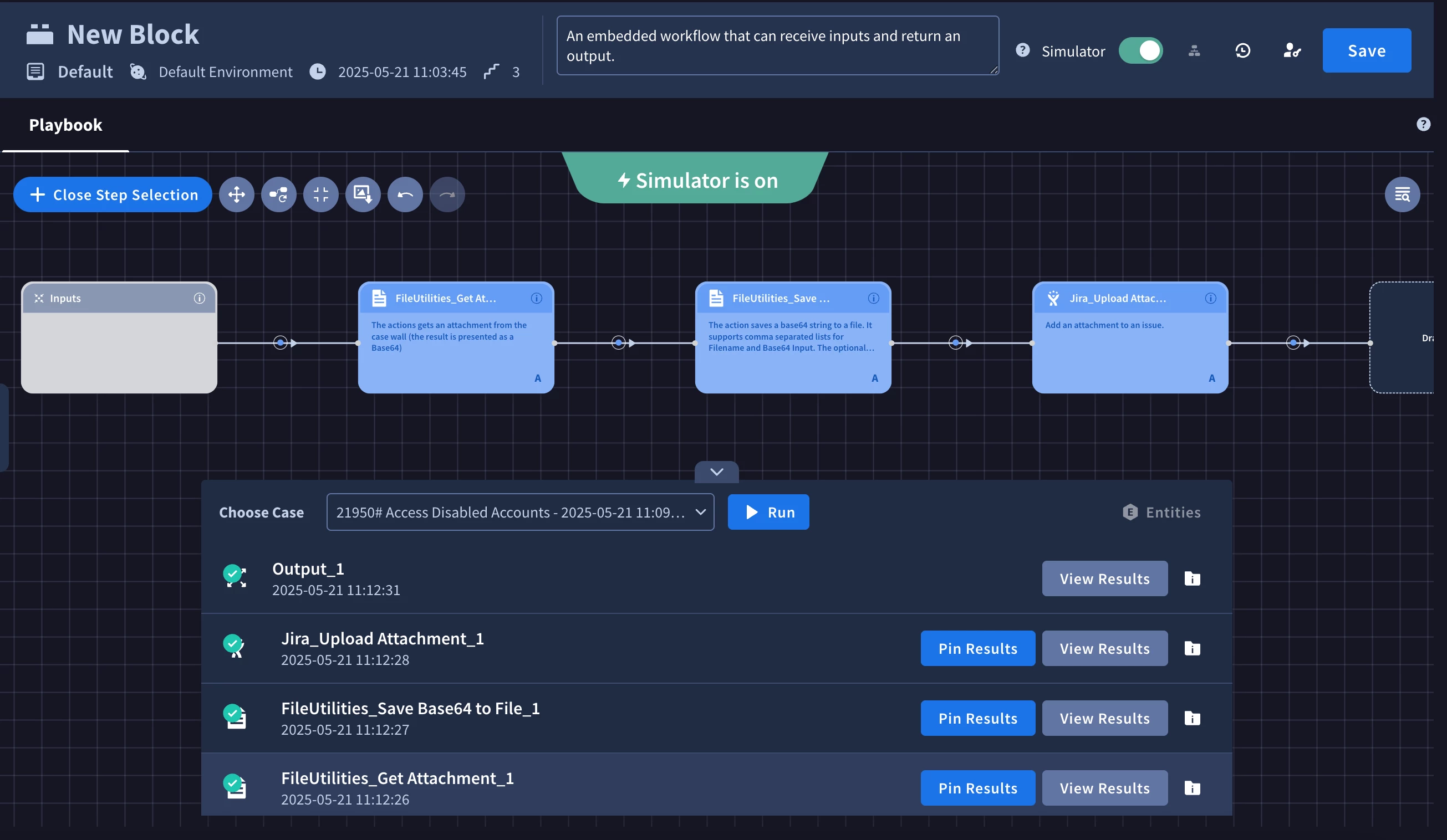
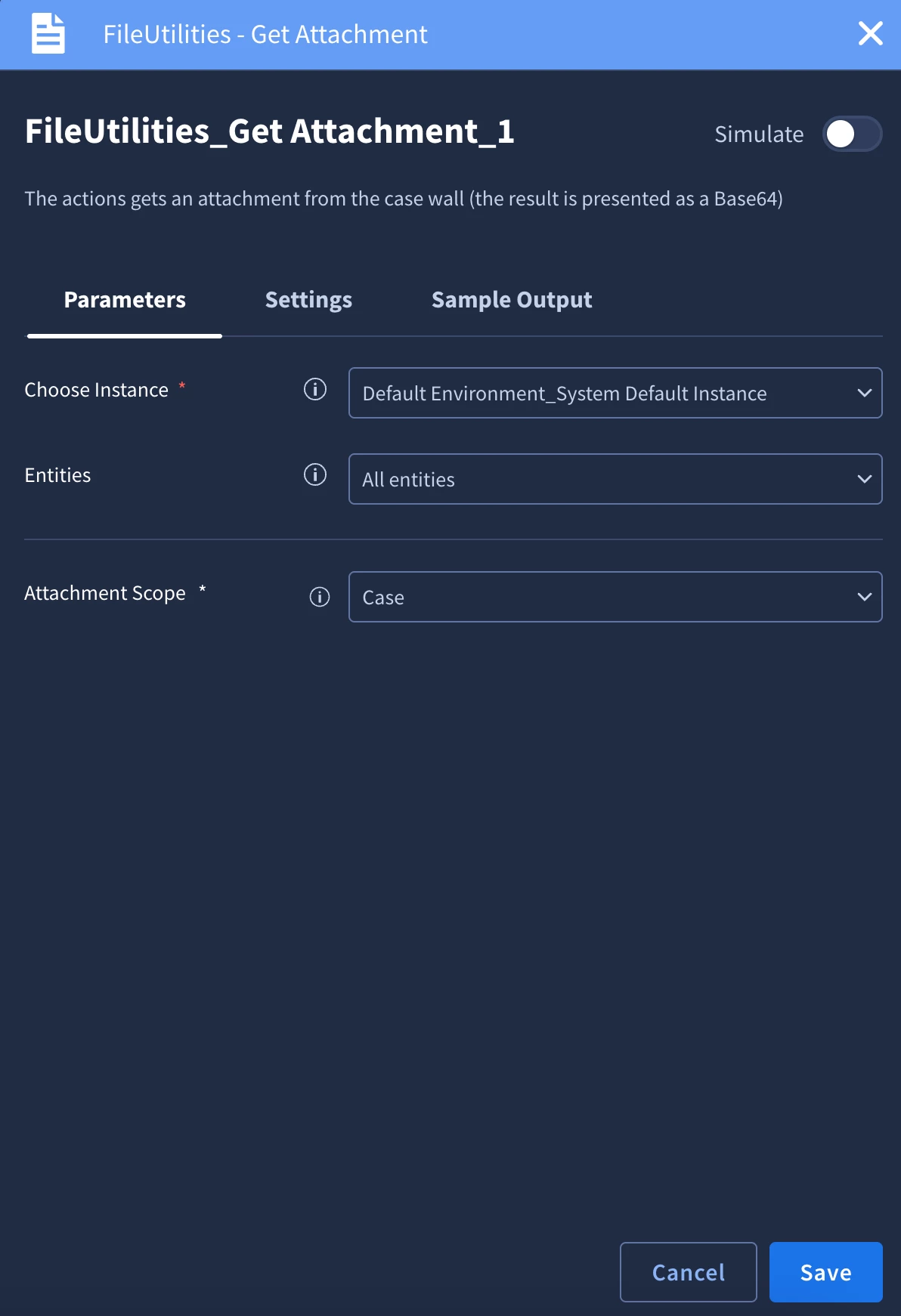
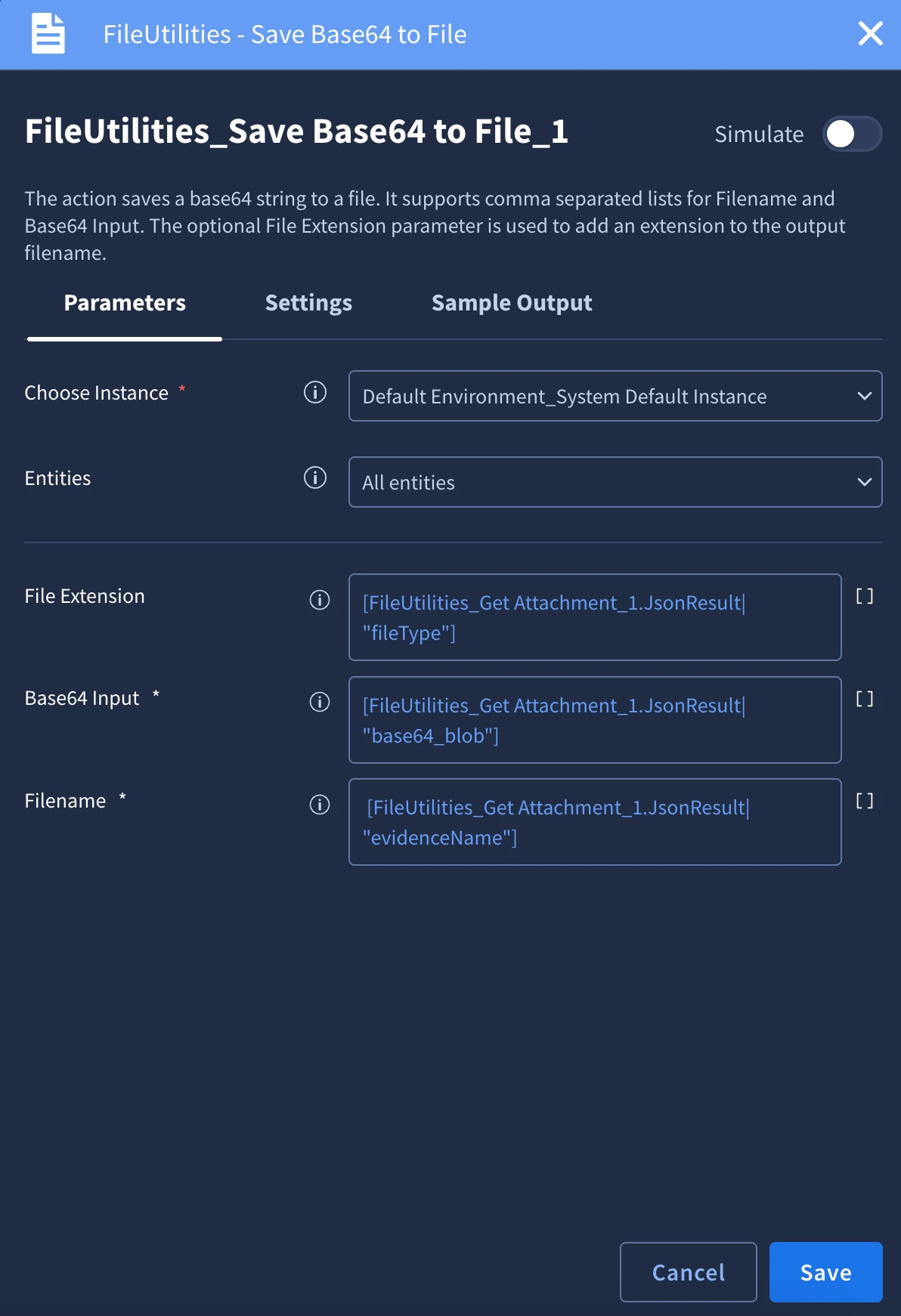
When the file is uploaded to case wall, it's not accessible via file system, but you can download and save it on the file system using "FileUtilities" Power Up.

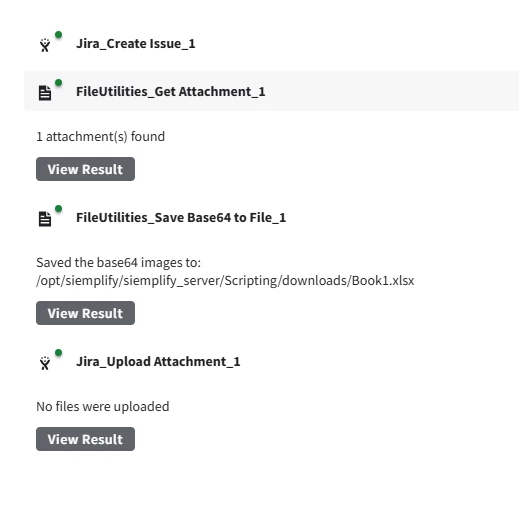
Your steps in the playbook will looks like this:


Nagarjuna11
Forum|alt.badge.img+5
  • Author
  • New Member
  • May 21, 2025

I followed the same steps, but the attachment was not uploaded successfully. Do I need to move the Jira ticket to 'In Progress' before uploading the attachment?


ylandovskyy
Staff
Forum|alt.badge.img+16

I followed the same steps, but the attachment was not uploaded successfully. Do I need to move the Jira ticket to 'In Progress' before uploading the attachment?


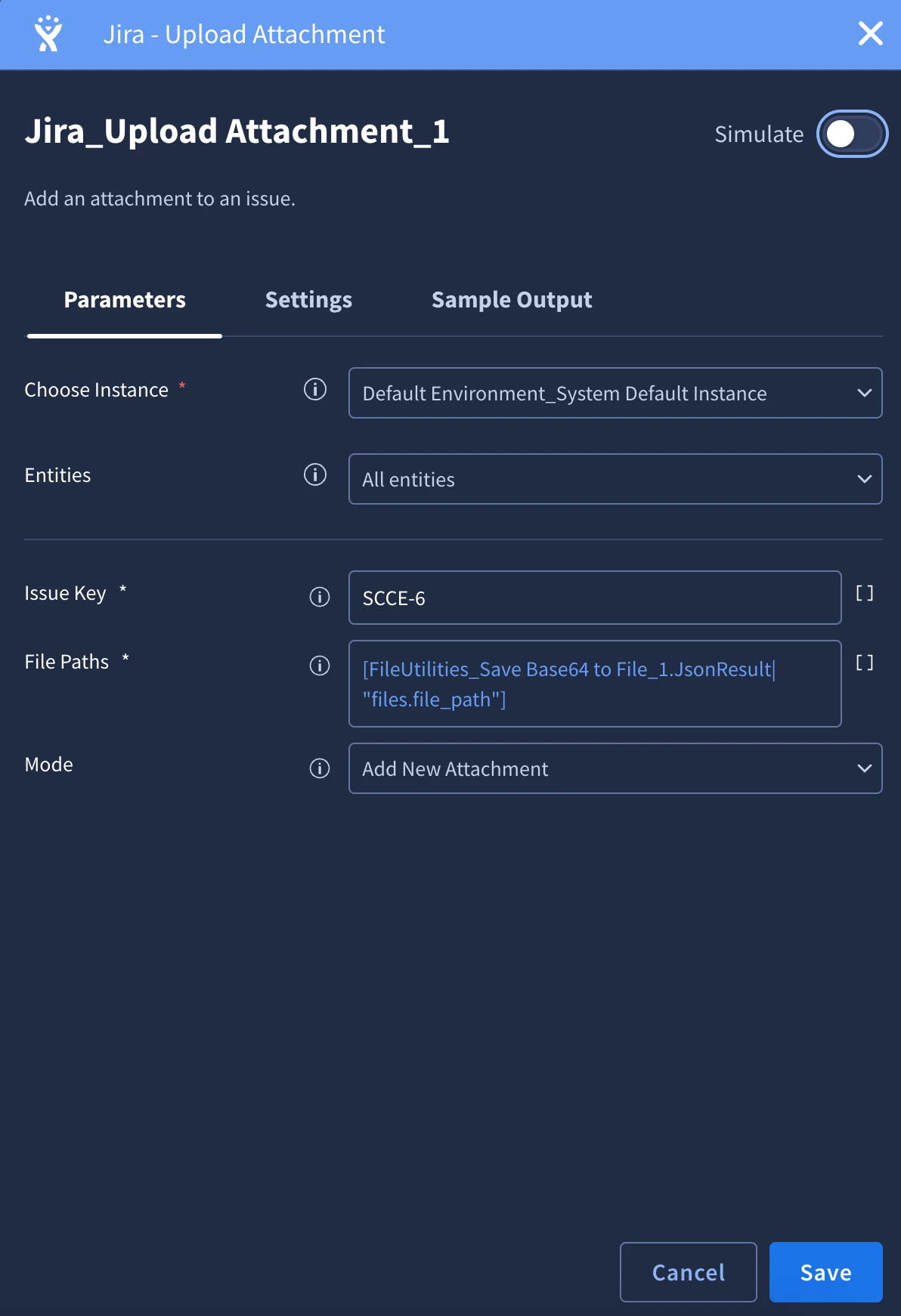
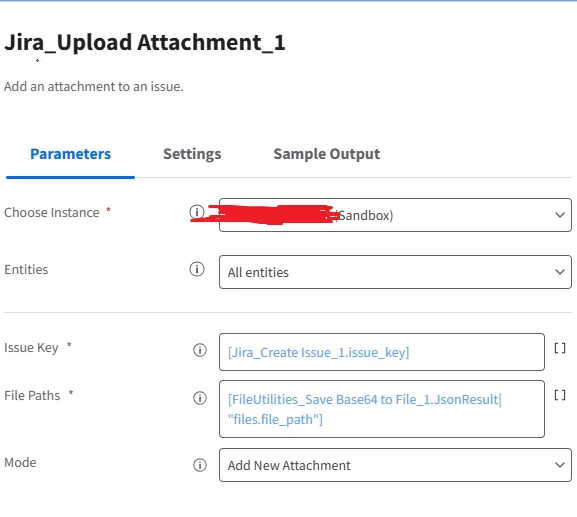
@Nagarjuna11 Can you share the configuration for "Upload Attachment"? Thanks


Nagarjuna11
Forum|alt.badge.img+5
  • Author
  • New Member
  • May 22, 2025

please find the screenshot


ylandovskyy
Staff
Forum|alt.badge.img+16

please find the screenshot


@Nagarjuna11 Okay, the next thing I would ask is to try to run the action from IDE, because it will show the logs.


Nagarjuna11
Forum|alt.badge.img+5
  • Author
  • New Member
  • May 22, 2025

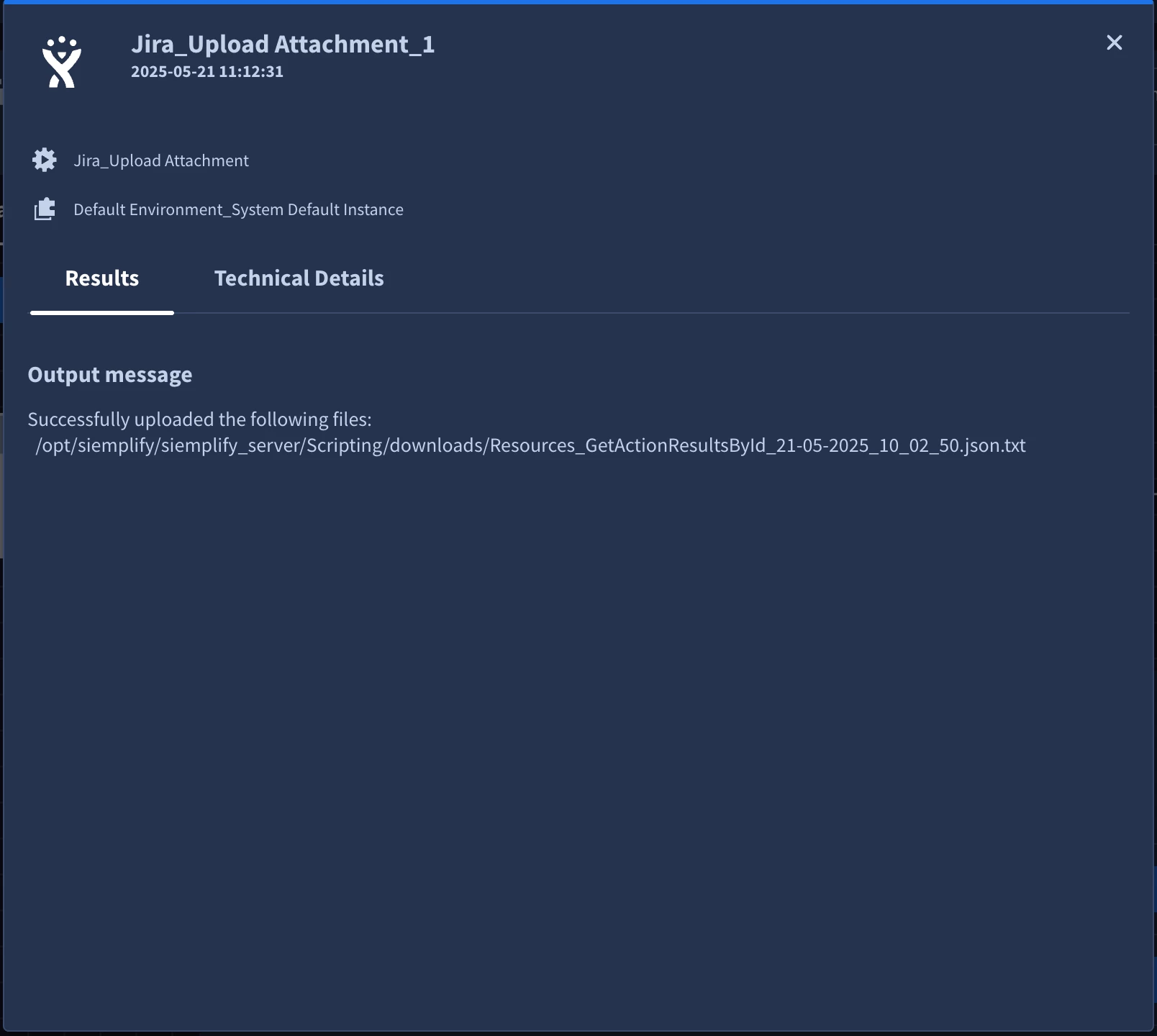
yes i checked in IDE i could see this message
exceptions.JiraManagerError: File /opt/siemplify/siemplify_server/Scripting/downloads/Book1.xlsx doesn't exist or not accessible due to restricted permissions


ylandovskyy
Staff
Forum|alt.badge.img+16

yes i checked in IDE i could see this message
exceptions.JiraManagerError: File /opt/siemplify/siemplify_server/Scripting/downloads/Book1.xlsx doesn't exist or not accessible due to restricted permissions


Can you try to add an image and see, if it will return the same error? Maybe, .xlsx format is the root cause of the problem.


Nagarjuna11
Forum|alt.badge.img+5
  • Author
  • New Member
  • May 23, 2025

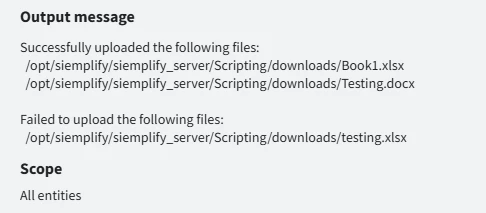
in some cases i can able to upload excel, word, png types. but again in some cases excel files i was'nt able to upload successfully.


Nagarjuna11
Forum|alt.badge.img+5
  • Author
  • New Member
  • May 23, 2025

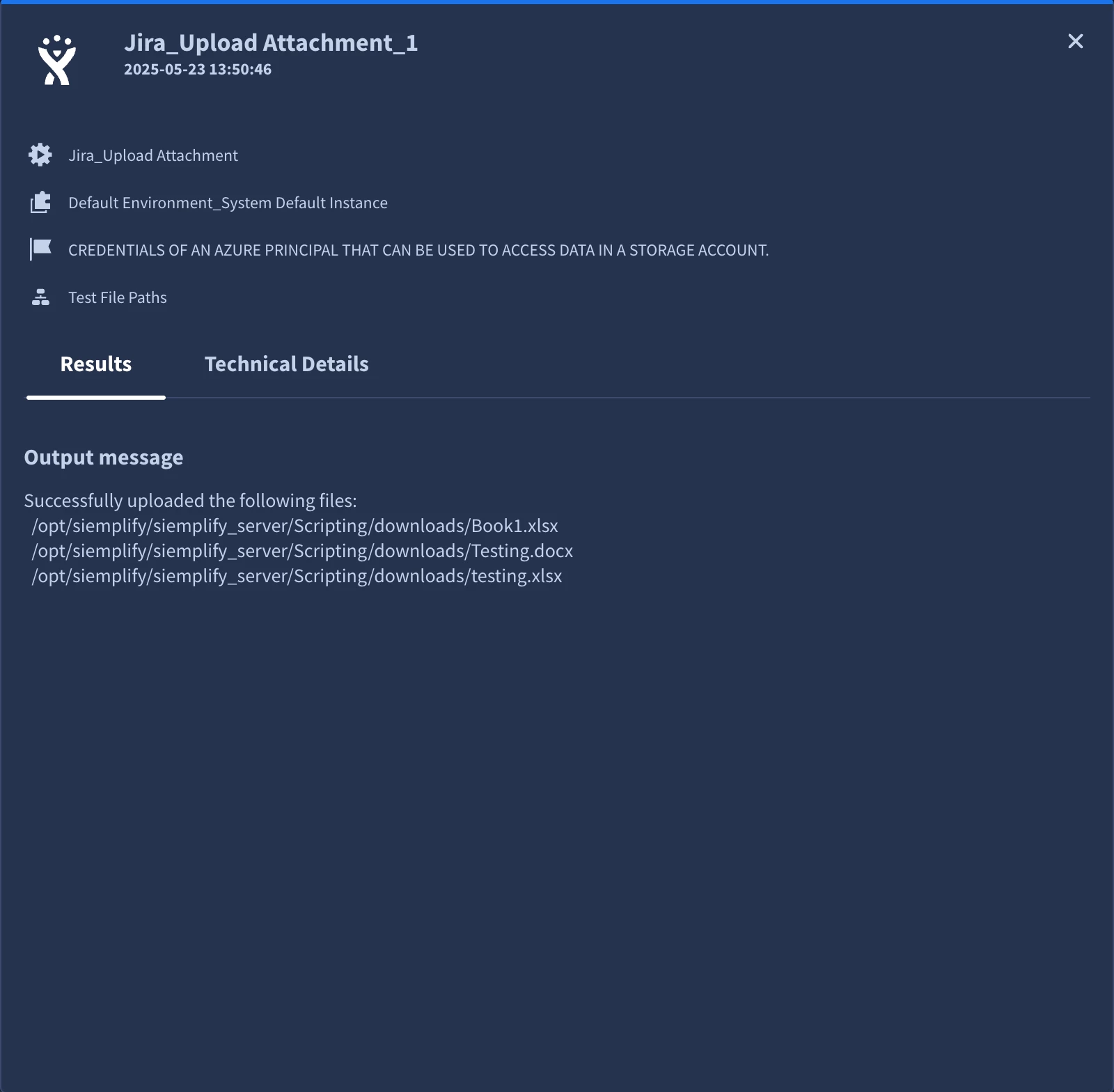
attaching the screenshot for your reference


ylandovskyy
Staff
Forum|alt.badge.img+16

@Nagarjuna11 ,

Can you run the action "Get Files as Base64" from FileUtilities Powerup on the same files? I would like to see, if that action will pick them up.


Nagarjuna11
Forum|alt.badge.img+5
  • Author
  • New Member
  • May 23, 2025

the three files it picked up but only two files were uploaded


ylandovskyy
Staff
Forum|alt.badge.img+16

@Nagarjuna11 I tried to reproduce the same identical situation, but for me it's still working as expected.

I will take it internally, but another thing that can be explored is installing the remote agent and running the integration from it. When integration is running from remote agent, then the platform will use the file system of the remote agent itself, instead of working with python pods, which should work better.

We are also working on updating the file management handling across Marketplace content, but currently can't provide more details or ETA.


Nagarjuna11
Forum|alt.badge.img+5
  • Author
  • New Member
  • May 23, 2025

@ylandovskyy Thanks for your response
I have some question son the approach:
 Can you share more details on how the remote agent file system will work in Jira action?
Will it be file system of the machine where remote agent is installed?
How to configure jira action to pick the file from the file system?


ylandovskyy
Staff
Forum|alt.badge.img+16

@ylandovskyy Thanks for your response
I have some question son the approach:
 Can you share more details on how the remote agent file system will work in Jira action?
Will it be file system of the machine where remote agent is installed?
How to configure jira action to pick the file from the file system?


The configuration of the actions will be the same, but instead of saving it on the file system of SecOps python pod, action will save it on the remote agent. And yes, it will be on the machine of the remote agent.


Nagarjuna11
Forum|alt.badge.img+5
  • Author
  • New Member
  • May 24, 2025

The configuration of the actions will be the same, but instead of saving it on the file system of SecOps python pod, action will save it on the remote agent. And yes, it will be on the machine of the remote agent.


Thanks for the insight.
This is interesting. I have Tanium integrated with remote agent, so when i run 'Download File action' do i have to provide Remote agent file system path for download path?
And how we can attach this file from remote agent to casewall?

This will be interesting to know

Thanks again 


ylandovskyy
Staff
Forum|alt.badge.img+16

Thanks for the insight.
This is interesting. I have Tanium integrated with remote agent, so when i run 'Download File action' do i have to provide Remote agent file system path for download path?
And how we can attach this file from remote agent to casewall?

This will be interesting to know

Thanks again 


@Nagarjuna11  When you will provide any path inside the action, it will install it on the remote agent file system. You can take the file and push it to the Case Wall using "Add Attachment" action under FileUtilities Powerup. 

But before adding it to case wall, you will need to convert the file into Base64 format.