Solved

Job Schedule to Check Log Source Status

  • June 6, 2026
  • 2 replies
  • 38 views

soaruser
Forum|alt.badge.img+6

How do I automate the process to send an email alert to team if log source is not reporting.

1.SOAR Dashboard: I have created a query to fetch last reported time of each log_type, but how do I trigger an email if last reporting time is greater than x hours or something?

  1. SOAR Job Script: Anyone has used this to automate this? 

Best answer by cmorris

Dashboard reports can be scheduled, but will not act with a trigger. While you could build a job to email a report, you would still need a trigger.

I would recommend using Cloud Monitoring for ingest notifications - https://docs.cloud.google.com/chronicle/docs/ingestion/ingestion-notifications-for-health-metrics#detect-collect-agents. You will have the option to specify notification channels - ex. Email, Slack, Webhooks. I have seen the webhooks used to then feed the ingest alert from GCP into the SOAR as well.

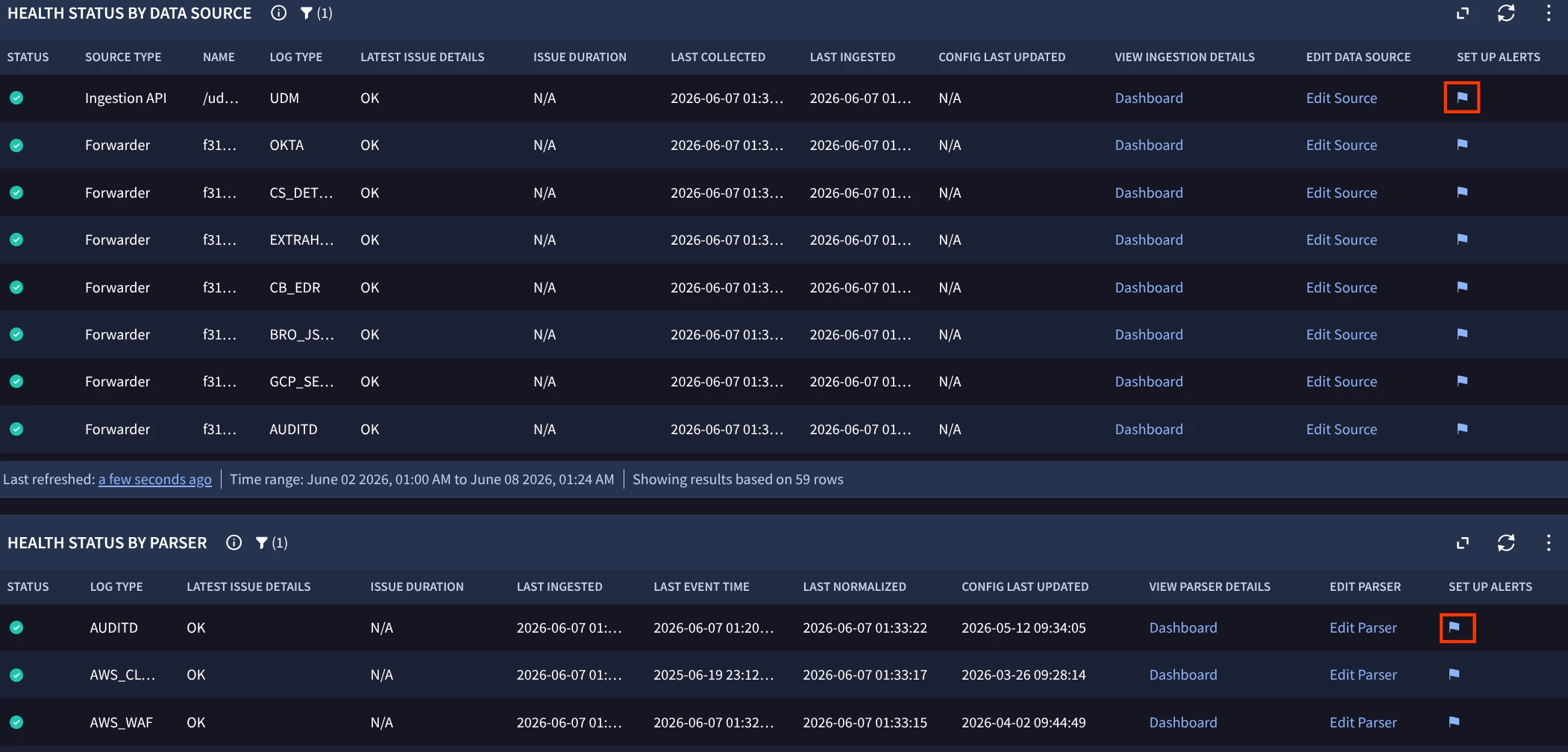
If you go to Dashboards > Health Hub, you will be able to see your sources and if you choose the alert flags from the screenshot below, you will be brought to a GCP with a template alerting policy for the source that you can then configure.

 

2 replies

cmorris
Staff
Forum|alt.badge.img+14
  • Staff
  • Answer
  • June 8, 2026

Dashboard reports can be scheduled, but will not act with a trigger. While you could build a job to email a report, you would still need a trigger.

I would recommend using Cloud Monitoring for ingest notifications - https://docs.cloud.google.com/chronicle/docs/ingestion/ingestion-notifications-for-health-metrics#detect-collect-agents. You will have the option to specify notification channels - ex. Email, Slack, Webhooks. I have seen the webhooks used to then feed the ingest alert from GCP into the SOAR as well.

If you go to Dashboards > Health Hub, you will be able to see your sources and if you choose the alert flags from the screenshot below, you will be brought to a GCP with a template alerting policy for the source that you can then configure.



soaruser
Forum|alt.badge.img+6
  • Author
  • Bronze 2
  • June 9, 2026

This is helpful.

Thanks a lot for your quick response.