Question

JSON Parser | How to properly parse occasional fields

  • October 15, 2025
  • 2 replies
  • 35 views

ashutoshrpareek
Forum|alt.badge.img

Hi ,

This is a question regarding JSON parser for SecOps.

Let's suppose this the log : 
 
{
   "field1" => "value1"
   "field2" => "value2"
   "field3" => "value3"
}
 
Above is the usual trend.
 
Now, we get a log like this : 
 
{
   "field1" => "value1"
   "field3" => "value3"
}
 
field2 doesn’t exist here, on this the parser will fail and give the error “field2 not found in state data”.
 
 For my parser, i do something like the following : 

json {
        source => "json_data"
        array_function => "split_columns"
        on_error => "invalid_json"
    }

//Initiated JSON log.


if ![invalid_json] {
        json {
            source => "json_data"
            target => "parsed_json"
        }
 
        mutate {
            gsub => ["json_data", "^\\{", "", "json_data", "\\}$", ""]
        }
 
         mutate {
            add_field => {
                "field1" => "%{[parsed_json][field1]}"
                "field2" => "%{[parsed_json][field2]}"

                "field3" => "%{[parsed_json][field3]}"
        
            }
            convert => {
                "download" => "string"
                "upload" => "string"
            }
        }
    }


//added the field for JSON.


Now, let’s say, the field2 is an IP.

I can just parse it in principal.ip. 

Now, the issue here is let’s say, in some logs, there is no field2. This throws an error, what I want is that if field2 is not found or empty, rather than throwing an error, it should just skip over that.


2 replies

mikewilusz
Staff
Forum|alt.badge.img+10
  • Staff
  • October 15, 2025

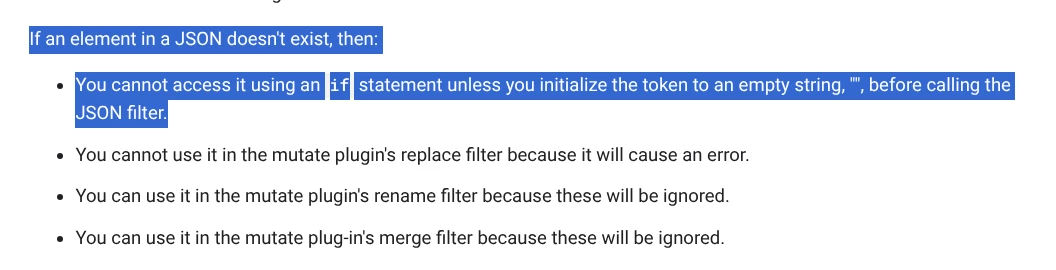
You’ll need to initialize the variable first, which is documented here in the parser documentation


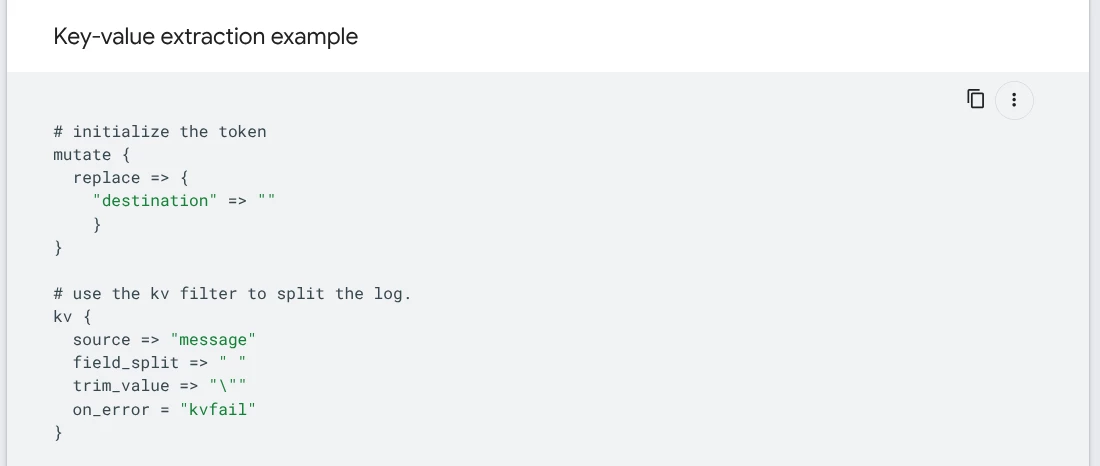
Earlier in the documentation is the below example that shows how to do this. You’ll do this for each of the JSON fields you want to test. If the field isn’t present in the JSON it will be now initialized as “” and you can do conditionals against it. If the field is present, it will then fill in the initialized variable with the JSON value. So in the below example if “destination” was in the JSON, it would be filled in with the value from the JSON. If it’s not present then destination will be empty.


https://cloud.google.com/chronicle/docs/reference/parser-syntax


-mike


SoarAndy
Staff
Forum|alt.badge.img+12
  • Staff
  • October 17, 2025

Mike knows more than me on this, but here is my code


filter{
mutate {
replace => {
"product_name" => ""
}
}
if [product_name] != "" and [product_name] != "null"{
mutate {
replace => {
"event1.idm.read_only_udm.metadata.product_name" => "%{product_name}"
}
}
}
}