Question

Log type for Windows logs : WINEVTLOG or WINEVTLOG_XML

  • January 15, 2026
  • 3 replies
  • 58 views

Forum|alt.badge.img+1

Hi Team,

In our environment, we are using the Bindplane agent to forward logs to the SecOps console.

The Bindplane agent is installed on each server and forwards logs to the Gateway, from where they are sent to the SecOps console.

We are currently trying to decide which parser should be used for Windows event logsWINEVTLOG or WINEVTLOG_XML.

Could someone please help us understand:

  • How to determine which log_type should be specified in the Bindplane processor configuration?

  • The key differences between WINEVTLOG and WINEVTLOG_XML

  • The pros and cons of using each parser, and recommended use cases

I’m new to SecOps and have done some initial research, but I couldn’t find clear documentation or articles explaining this in detail. Any guidance or best practices would be greatly appreciated.

Thanks in advance for your help.

3 replies

Eoved
Forum|alt.badge.img+8
  • Bronze 2
  • January 15, 2026

Hi,
The short answer is: use the WINEVTLOG parser.
WINEVTLOG_XML is mainly for legacy ingestion methods, such as NXLog in XML mode.

You can use the following documentation:

  • BindPlane:
    https://docs.bindplane.com/how-to-guides/google-secops/using-google-secops-with-bindplane-best-practices

  • Google:
    https://docs.cloud.google.com/chronicle/docs/ingestion/default-parsers/winevtlog#configure-bindplane-agent


Forum|alt.badge.img+1
  • Author
  • January 15, 2026

Hi ​@Eoved : Thanks for your response.

Below are the configurations we tested :

SecOps standardization processor in Bindplane Processor : WINEVTLOG

When WINEVTLOG is used as the log_type, no events are ingested into SecOps.

Events start appearing only after enabling the Raw Logs option in the Advanced Settings of the Windows Event Source configuration.

However, once Raw Logs are enabled, the entire payload is ingested into the Body field in Bindplane. This makes it difficult for us to apply additional processors/filters, such as dropping specific Event IDs.

Could you please suggest how we can address this issue or recommend the correct approach to handle filtering while using WINEVTLOG?


Eoved
Forum|alt.badge.img+8
  • Bronze 2
  • January 15, 2026

Hi,
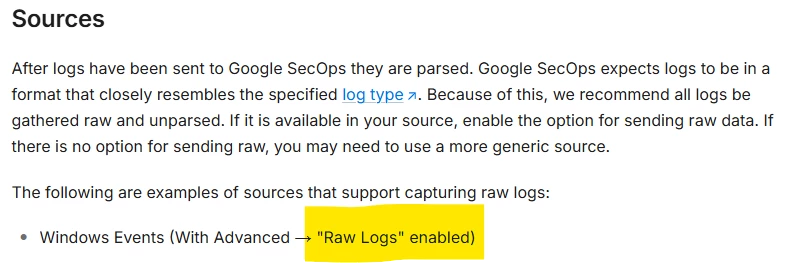
That’s correct  Raw Logs should be enabled, as described in the BindPlane documentation:


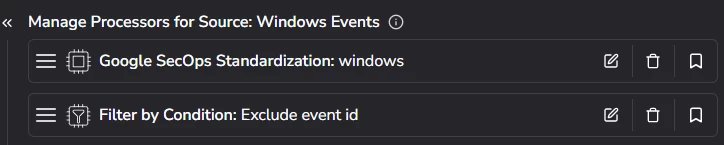
The raw logs are enabled on the source, while the filtering should be applied on Processor 1 (or Processor 2, but I assume that’s not the case here).


You can apply multiple actions on a single processor.

There are a couple of methods to reduce these Event IDs, but I’ll give you the straightforward options:
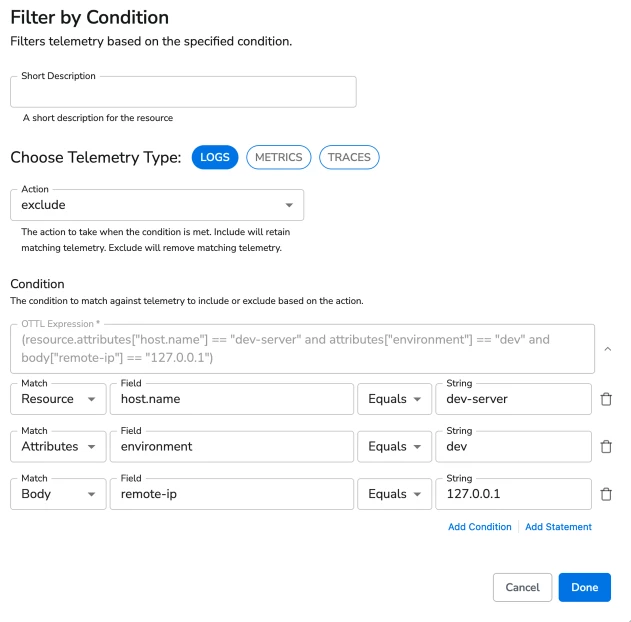
Filter by condition or filter by regex.
(Note: “Filter by condition” is available for Free and Enterprise licenses. BindPlane for Google customers must use “Filter by regex”.)

Choose the Event ID field you want to filter and apply an exclude filter.

You can use the following documentation:
https://docs.bindplane.com/integrations/processors/filter-by-condition
https://docs.bindplane.com/integrations/processors/filter-by-regex