
Maintain user-defined column size

  • Oct 8, 2024 11:06 AM UTC
  • 3 replies
  • 73 views

keso
Forum|alt.badge.img+7

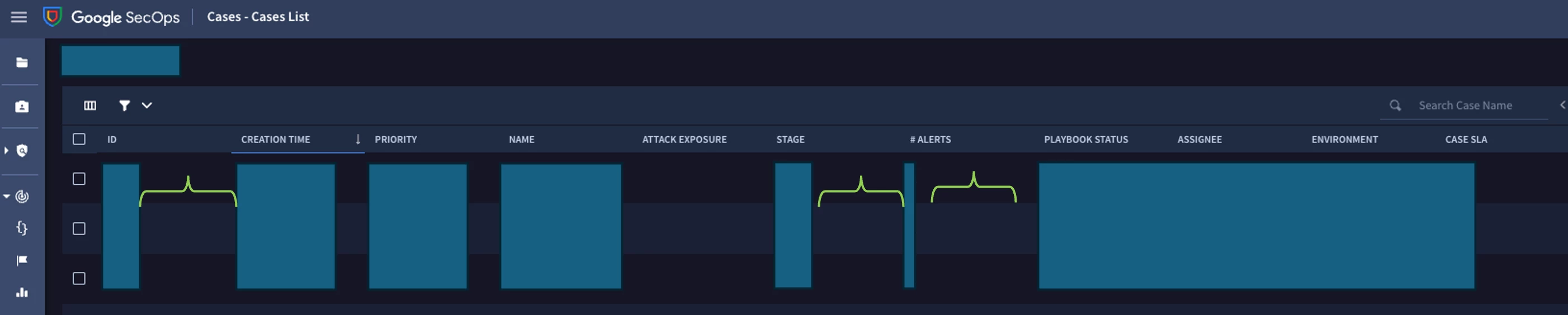
Hey, in several dashboards of Secops/Chronicle the size of the columns is really wide while others might be too narrow. It is possible to modify the size, but when the page is refreshed the changes are lost 😞

Some columns like "# ALERTS" or "ID" only show a number. Is there a way to save the size of the columns??? Thank you.
 

3 replies

dnehoda
Staff
Forum|alt.badge.img+19
  • Staff
  • Oct 10, 2024 7:01 PM UTC

Im not seeing the same behavior.  Is this in SOAR Dashboards?  


AymanC
Forum|alt.badge.img+14
  • Bronze 5
  • Oct 10, 2024 9:23 PM UTC

Hi @keso,

I've not come across a way to save the width of each column for each user - a functionality you will likely have to raise a feature request for.

Kind Regards,

Ayman


keso
Forum|alt.badge.img+7
  • Author
  • Bronze 5
  • Oct 11, 2024 7:12 AM UTC

Im not seeing the same behavior.  Is this in SOAR Dashboards?  


There are several. In Cases (there the columns behave as one, if a column is modified, all are modified). In Rules and Detections-> Rules Dashboard (there it is possible to modify one by one but the settings do not persist). In Detection->Alerts&IOCs (same as before). In Detection->Behavioral Analytics.