Question

Mapping Cases to Their Originating Source System in Google Chronicle

  • January 28, 2026
  • 3 replies
  • 66 views

havox
Forum|alt.badge.img+4

I am working on a custom dashboard in Google Security Operations (Chronicle) and need guidance on building a source system–wise backlog case count view. The requirement is to create a weekly trend graph that shows the number of open cases, grouped by the originating source system / detection source.

I am looking for clarification on the recommended UDM fields to identify the case source and the best approach to query only open cases and aggregate them on a weekly basis. Any sample queries or best practices for this use case would be appreciated.


3 replies

ar3diu
Forum|alt.badge.img+9
  • Silver 2
  • January 28, 2026

I’ve tried to build something similar based on this field,

case.alerts.metadata.soar_alert_metadata.product

but it was empty. But you could give it a try.

https://docs.cloud.google.com/chronicle/docs/reference/rest/v1alpha/Collection#soaralertmetadata


havox
Forum|alt.badge.img+4
  • Author
  • New Member
  • January 28, 2026

I tried your suggestion, but it returned empty results for many cases.

Then I had an idea: instead of relying purely on detection references, I tried to use the rule name as a pivot.

The idea was:

  • Extract the rule name from detections.detection.rule_name and case.name

  • Extract the log_type using detection field 

  • Correlate the both via rule_name and aggregrate the ;og_type as per the rule

Using this approach, I was able to get the rule name along with the log type successfully.
Base Approach:
reference : Listing rules that uses a specific log_type into a dashboard | Community

$detection_type = detection.type
$log_type = detection.collection_elements.references.event.metadata.log_type
$alert_state = detection.detection.alert_state
$name = detection.detection.rule_id
$rule_name = strings.to_lower(detection.detection.rule_name)
$summary = detection.detection.summary
detection.type = $type

match:
$rule_name, $detection_type, $alert_state, $log_type, $type, $summary


This worked and returned rule names with log types as expected,

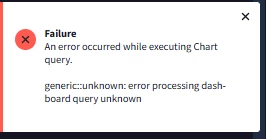
Then I attempted a multi-stage correlation between Cases and Detections using rule_name as the join key. Later, I discovered that Google Chronicle does not support correlating case_name and rule_name as single entities. Instead, aggregation functions such as arrays or array_distinct are required. Below is the error I encountered.


Concept query :

stage stage_1{
$case_name = case.display_name
$case_id = case.response_platform_info.response_platform_id
$case_rule_name = case.alerts.metadata.detection.rule_name
$case_product = case.alerts.metadata.soar_alert_metadata.product
$case_rule_name != ""

match:
$case_id, $case_name, $case_rule_name, $case_product
}

stage stage_2{
$log_type = detection.collection_elements.references.event.metadata.log_type
$alert_state = detection.detection.alert_state
$name = detection.detection.rule_id
$rule_name = strings.to_lower(detection.detection.rule_name)

match:
$rule_name, $log_type
}

$stage_1.case_rule_name = $stage_2.rule_name

outcome:
$case_id = $stage_1.case_id
$case_names = $stage_1.case_name
$case_rule_name = $stage_1.case_rule_name
$log_type = $stage_2.log_type

Do you have any other suggestions or alternative approaches to retrieve the source name (log type) for a case ?


ar3diu
Forum|alt.badge.img+9
  • Silver 2
  • January 29, 2026

I think I didn't understand the question well.

To get the case name, rule name and log type, you could try something like this

$case_name = case.display_name
$case_id = case.response_platform_info.response_platform_id
$case_rule_name = case.alerts.metadata.detection.rule_name
$case_product = case.alerts.metadata.soar_alert_metadata.product
$case_rule_name != ""

match:
$case_id, $case_name, $case_rule_name, $case_product
outcome:
$log_type = array_distinct(case.alerts.metadata.collection_elements.references.event.metadata.log_type)