



This is Part 1 of a four-part series on running many tenants on one Google SecOps instance. Part 1 sets up the mental model and the naming convention the rest of the series builds on. Part 2 covers getting telemetry in safely; Part 3 covers who sees what and where each alert lands; Part 4 covers writing detection and response content (rules and playbooks) that works correctly across tenants.
If you run security operations for more than one customer (a managed security service provider, a SOC watching several business units, a parent company monitoring its subsidiaries, or just a customer that requires strict isolation), you eventually reach the same fork. Do you stand up one Google SecOps instance per customer, or put everyone on a single shared instance and keep them apart logically?
The shared-instance model is appealing for various reasons:
- It is cheaper,
- It gives your analysts one console instead of many, and
- It allows for one (or many) well-written detections that protect every customer at once (if written appropriately, though)
However, it is also where teams quietly get multi-tenancy wrong, because "keep them apart" sounds like one job and for Google SecOps, it is really three…
This series is the end-to-end guide I kept looking for and never found in one place: how to take a single SecOps instance and run it as a clean multi-tenant platform, with one critical design idea carried from the moment a log is captured at the endpoint all the way to the generated alert on the analyst's screen triggering a playbook. Before we get to it, we need to be precise about what "keep them apart" actually means.
Multi-tenancy is three problems, not one
Putting many tenants on one instance asks you to solve three separate isolation problems. Any one of them can be correct while the other two are broken, which is exactly why a setup that looks fine in a demo leaks in production (and why many power users of Google SecOps often script this process).
The challenges exist in the three layers of all Google SecOps architectures:
- Ingestion layer: When a log lands in the instance, is there a way to identify one log's owner or origin from another? For example, if two fictional organizations named ACME and OSCORP want to ingest logs to our managed SOC, do we have a way to mark them? (Hey, the answer is easy, but applying it consistently isn't!)
- SIEM layer: Given correctly tagged data, can a user (e.g. an analyst) see only their own SIEM tenant information? For example, imagine we grant access to our console to an external user, like an ACME's analyst or an OSCORP's threat hunter. Can we make sure that both ACME and OSCORP users only see their data (and the features they should)?
- SOAR layer: Given correctly tagged data and correct SIEM data access, what about the alerts generated by the SIEM detection rules? In Google SecOps SOAR, that queue is an environment. For example, imagine a single global-scoped detection rule (we'll define that soon) that runs across all our tenants, ACME and OSCORP included. When it fires on ACME's data, can we make sure the resulting alert lands only in ACME's environment, and the same for OSCORP?
There are a lot of concepts here. But before defining each one, picture the failure surface. Tagging each tenant can be right while access is wrong. Data Access boundaries can be right while alert routing to an environment is wrong. And this is very important to grasp: Each layer has its own mechanism, its own configuration surface, and its own way to fail silently!
This is why many power users use scripting when multitenant-ing a Google SecOps instance. It's isolating three layers consistently, not one. If you don't treat multi-tenancy as a single switch, you undoubtedly will get at least one of the three wrong and everything falls apart.
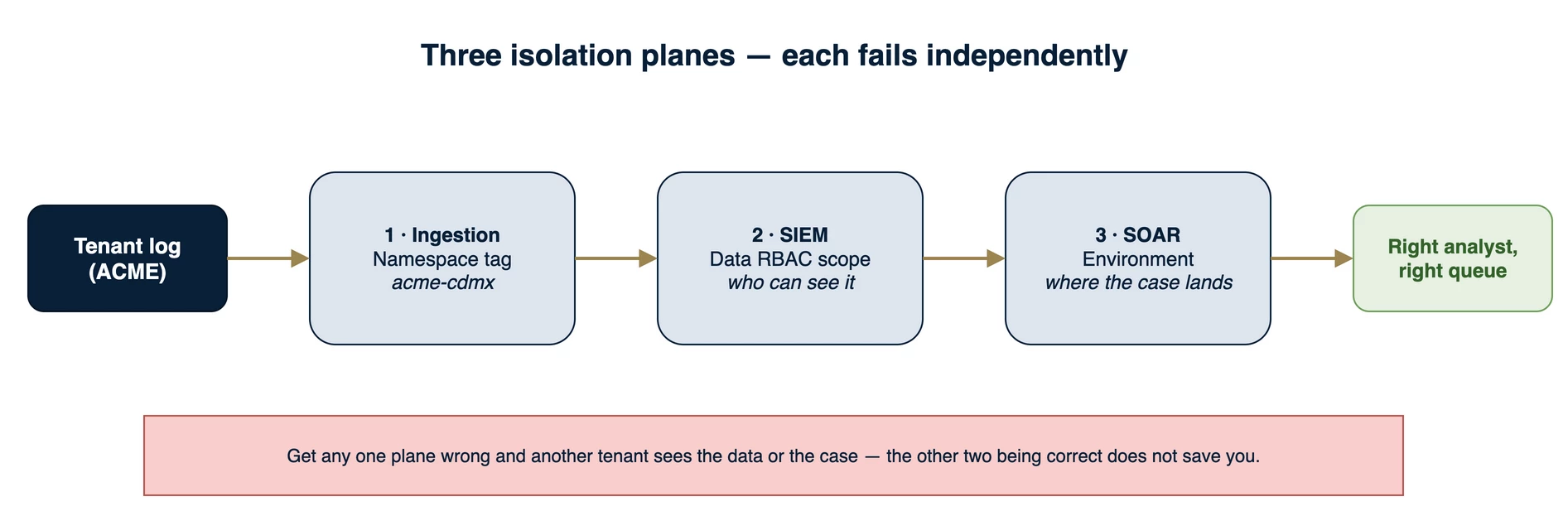
Figure 1 — The three isolation planes that must be correct in a shared instance: ingestion tagging, SIEM data access, and SOAR case routing. They fail independently, so each needs its own control.
Now, if you are wondering, here are the configurations we touch at each layer:
- Namespace at the ingestion layer. It is a special Ingestion Label that has a particular property: It blocks the correlation between assets with equal properties. You can read more about namespaces in Manage asset namespaces, but the important key about this custom field is that by design it aligns with the goal of isolating data, and it is the only field that also creates a correlation boundary in the entity graph (more on that below). A Custom Ingestion Label is a complement rather than a substitute. It does not separate the entity graph, but it can carry an extra marker that lets you express finer-grained access control inside a tenant, for example distinguishing a team or a device class within an organization unit. Part 3 develops that.
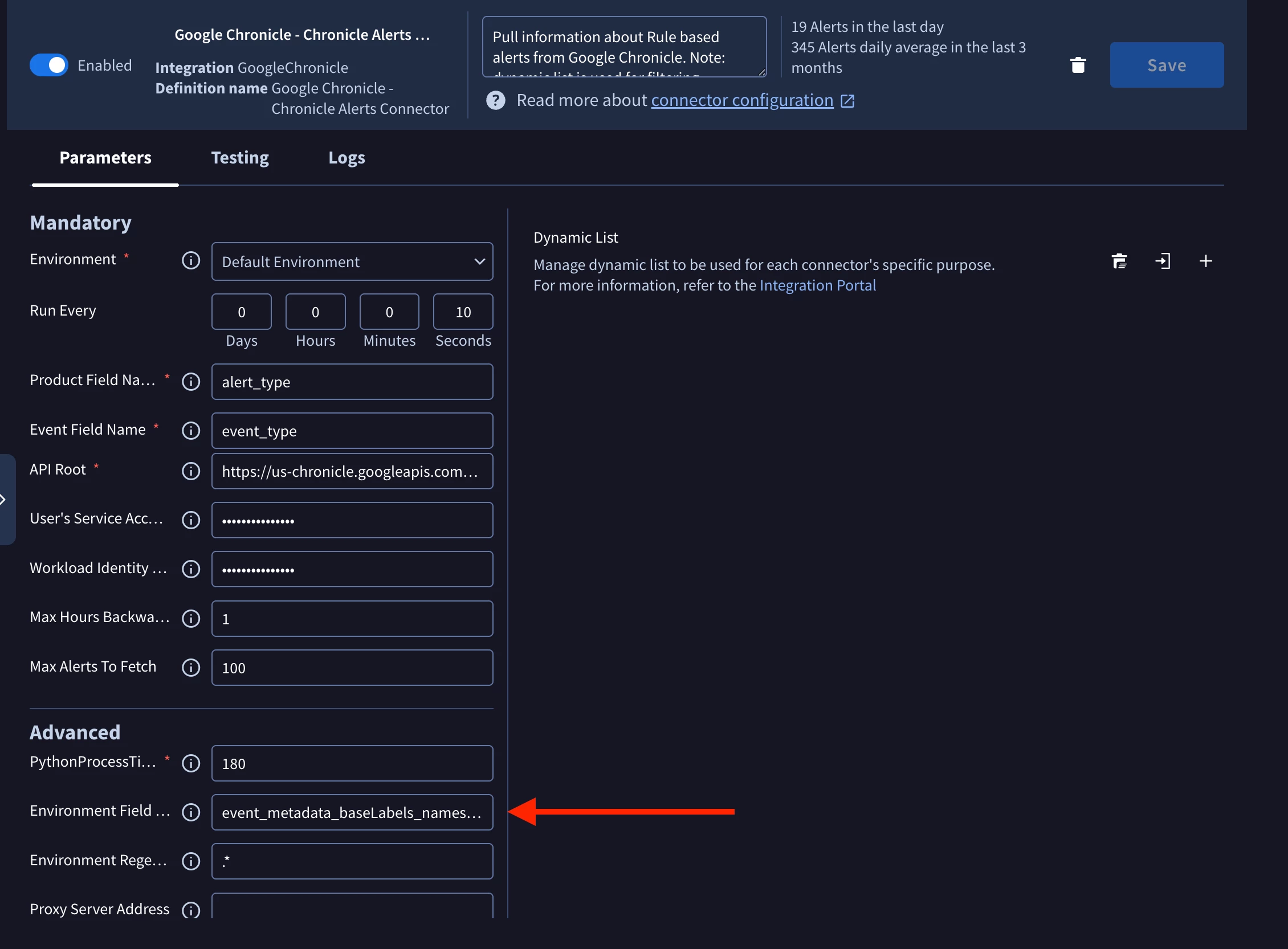
Figure 2 — Stamping the namespace at ingestion with Bindplane's Add Fields processor (Action: Upsert) on the chronicle_namespace field (we deliberately use Add Fields rather than the Google SecOps Standardization processor). Part 2 covers the ingestion mechanics in depth.
Note: There's another configurable field that we consider at the ingestion layer in Bindplane itself, but it is not mentioned here because it is not technically mandatory for the architecture to work. Don't worry, it is presented in the next section.
- Data RBAC Scope at the SIEM layer. It is the special mechanism that determines what data a user or group is allowed to read. Additionally, while not mandatory, Feature RBAC is also an important aspect to consider when granting access to users into a multi-tenant instance.
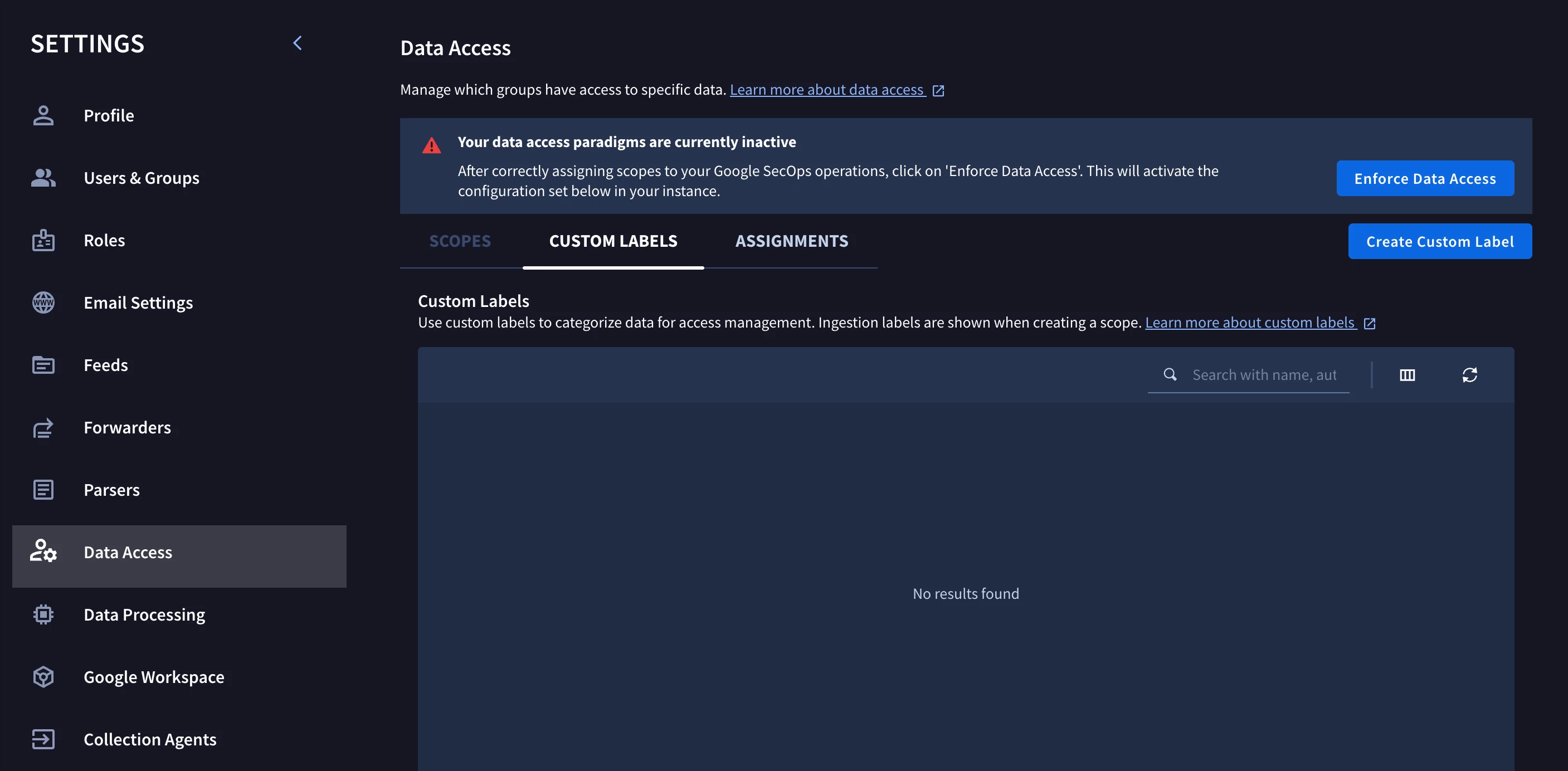
Figure 3 — The SIEM-side control: Settings → Data Access, home of Data RBAC scopes and custom labels. Here enforcement is still inactive.
- SOAR Environment at the SOAR layer. The environment is the SOAR-side equivalent of the Data RBAC scope, determining which content a user or group works with. A common mistake is to assume alerts live only in the SOAR. In fact, an alert exists as two separate objects, one in the SIEM and one in the SOAR, and the SOAR connector is what turns a Chronicle (or third-party) SIEM alert into its SOAR-side counterpart. Here we configure two things:
- the environment name (or alias), and
- the SOAR connector's Environment Field Name.
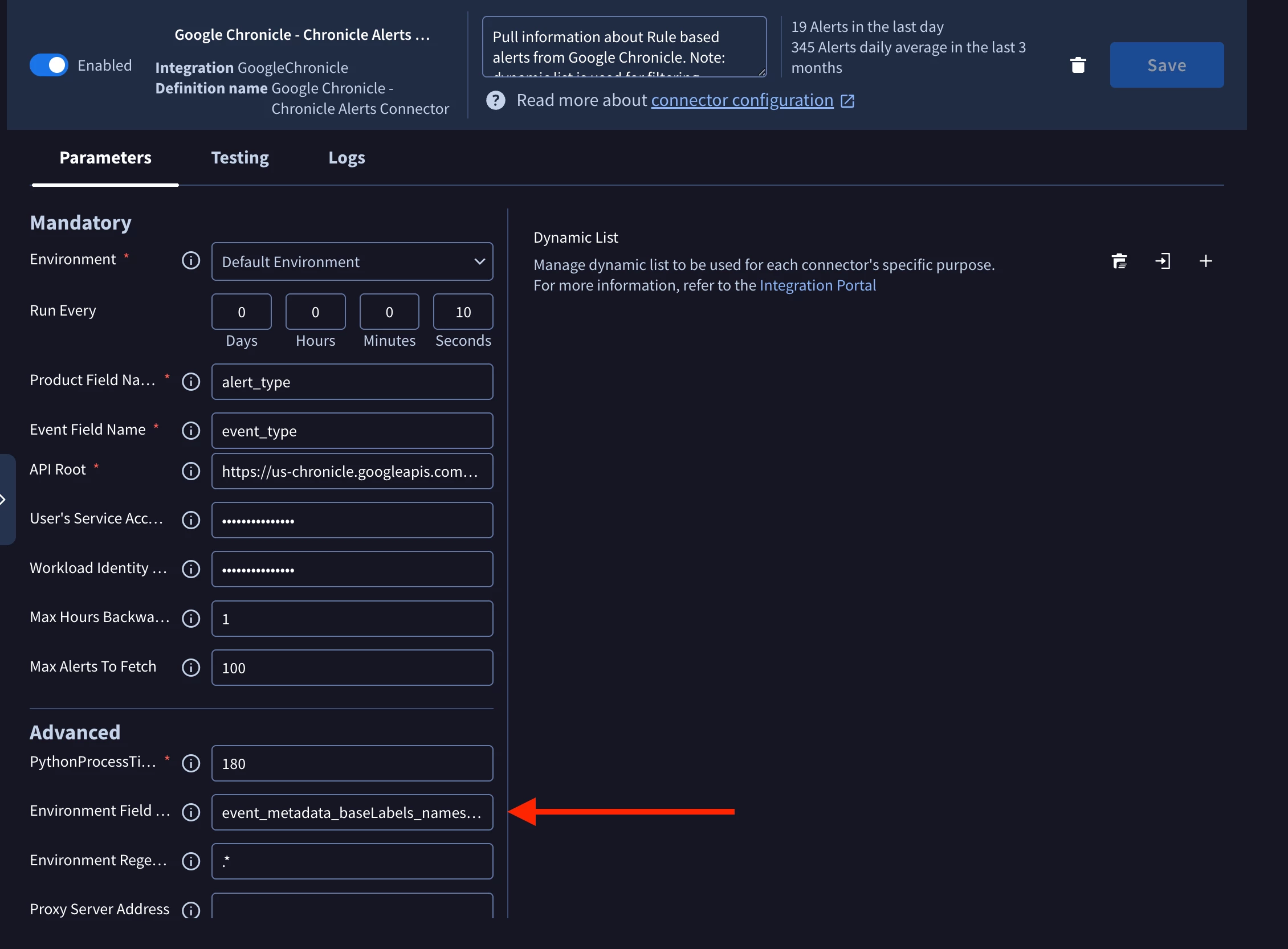
Figure 4 — The SOAR-side control: the Chronicle Alerts Connector's Environment Field Name (highlighted), defaulting to event_metadata_baseLabels_namespaces_1 — the namespace field the connector reads on each incoming alert to route it to the matching environment.
One slug, every layer
Here is the move that makes all three tractable at once:
For each tenant, choose a single short identifier (a slug) and use that exact string, byte for byte, in all places the platform needs a tenant key:
- the namespace stamped on the tenant's telemetry at ingestion,
- the Data RBAC scope that gates access to that namespace,
- the SOAR environment name (or its alias as a fallback) that routes the tenant's cases,
- and, the extra one, the Bindplane project that holds the tenant's collector configuration.
Four different platform mechanisms, each consuming the same string as its key. The design permits the namespace driving ingestion tagging and correlation boundaries, the scope designates access limits, the SOAR environment allocates playbooks and alerts in a well-defined group and drives SIEM alert routing, and the Bindplane project enhances control-plane management and isolation.
When all four read the same value, there is exactly one tenant identifier in the system and nothing to translate between layers.
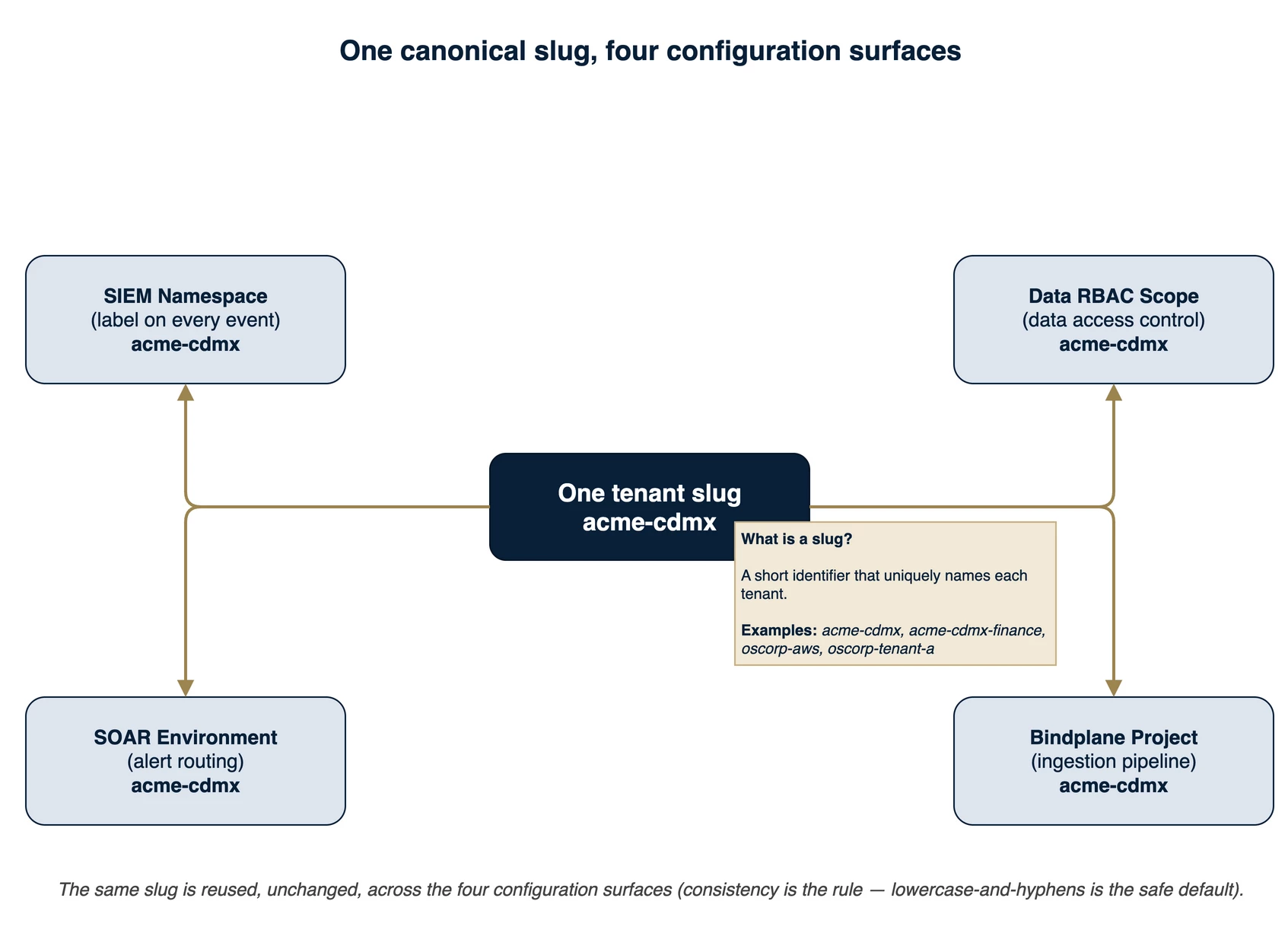
Figure 5 — One slug, four surfaces. The same string (here acme-cdmx) is the namespace label, the Data RBAC scope name, the SOAR environment name, and the Bindplane project name.
The discipline pays off most when anything breaks. An access misconfiguration, a misrouted case, or a tenant leak are all traceable with a single search across the four configuration surfaces when the strings are identical. When they differ, you are translating between four local dialects under incident pressure, which is precisely when you do not want to be.
The slug itself
From my own experience (and best practices), a slug is lowercase letters and digits with the hyphen as the only separator, and it must start with a letter. The strictest of the four surfaces is the Data RBAC scope name, and that is the one that pins the pattern down. The platform validates a scope name against ^[a-z]([a-z0-9-]{0,61}[a-z0-9])?$: a leading lowercase letter, then up to 63 characters of lowercase letters, digits, and hyphens, ending in a letter or digit, with no leading or trailing hyphen, no underscores, and no dots. Hold every slug to that pattern and it satisfies all four surfaces at once.
The slug is also hierarchical. Its shape is <org>[-<unit>[-<subunit>…]], where each hyphen-separated segment names a level: the organization, then an optional unit inside it, then an optional sub-unit, and so on as deep as you need (though, I would try to keep it up to a sub-unit. Going further can make things harder to manage). What a level means is deliberately up to you. A unit can name a cloud, a geography, or an organizational division, whichever reflects how the tenant's data actually needs to be separated.
Warning: In my own experience, this is always the hardest part... naming things. But remember that once you decide on a slug pattern and apply it, you cannot revert it. Data RBAC scope creation is irreversible, and events ingested with custom labels cannot be overridden. At least not from the end-user side.
A worked cast makes this concrete:
| Slug | Reads as |
acme | ACME, the whole organization |
acme-gcp | ACME, the workloads in Google Cloud |
acme-cdmx | ACME, the Mexico City office |
acme-cdmx-finance | ACME, Mexico City, the finance sub-unit |
oscorp-aws | OSCORP, the workloads in AWS |
oscorp-tenant-a | OSCORP, business tenant A |
The same scheme names a cloud (acme-gcp), a place (acme-cdmx), and a place within a place (acme-cdmx-finance). One convention covers all of them, and the hierarchy is legible at a glance.
A namespace is a boundary, not just a label
Why allow sub-levels at all? Because the namespace is not only a routing tag. In Google SecOps it is a correlation boundary for the entity graph. The platform introduces asset namespaces precisely to handle assets that share an identifier across different network segments, the classic case being two sites that both use the same private IP range (again, you should read Manage asset namespaces).
When two events carry different namespaces, the platform treats their assets as distinct. A search for an IP that exists in both returns two separate asset views, one per namespace, each showing only its own activity. Identities, hostnames, and other entities inherit the same separation. So if a single tenant has internally overlapping identifiers (a production host and a dev host reusing an address, or the same service-account name in two domains) and you stamp them with one flat namespace, the entity graph silently fuses two different machines into one and your correlation is quietly wrong.
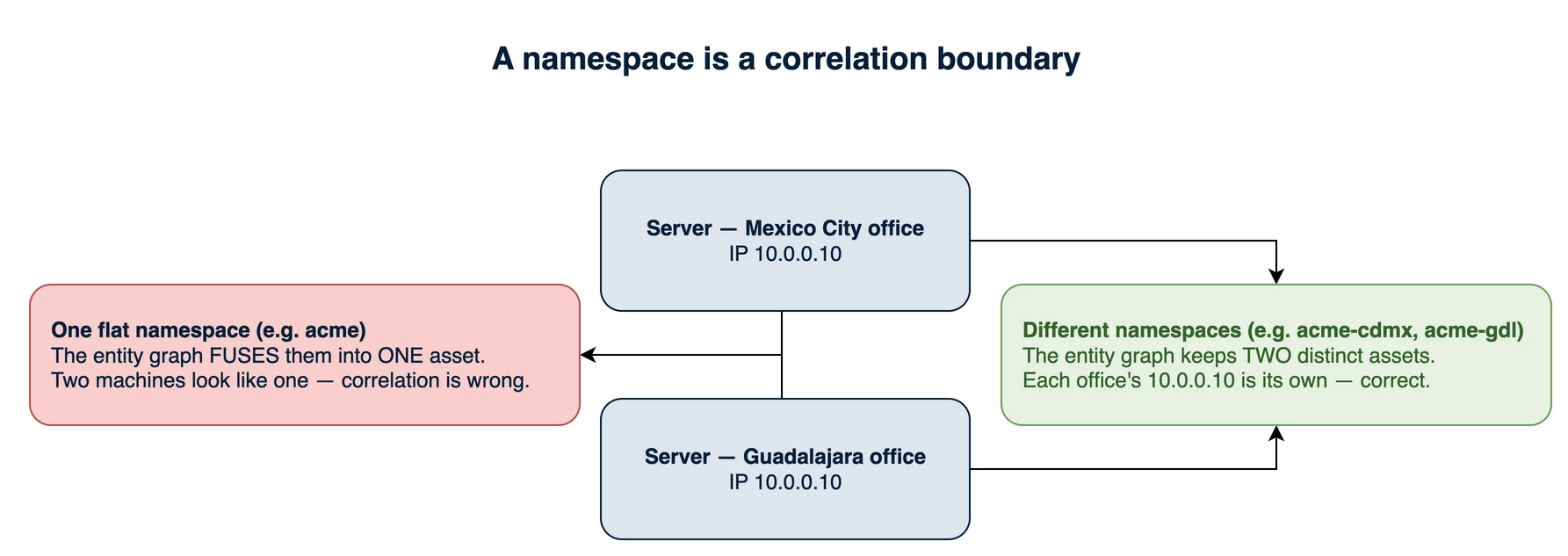
Figure 6 — A namespace is a correlation boundary. Two on-premises servers in different offices reuse 10.0.0.10; distinct namespaces (acme-cdmx, acme-gdl) keep them as two assets in the entity graph, where one flat namespace would silently fuse them.
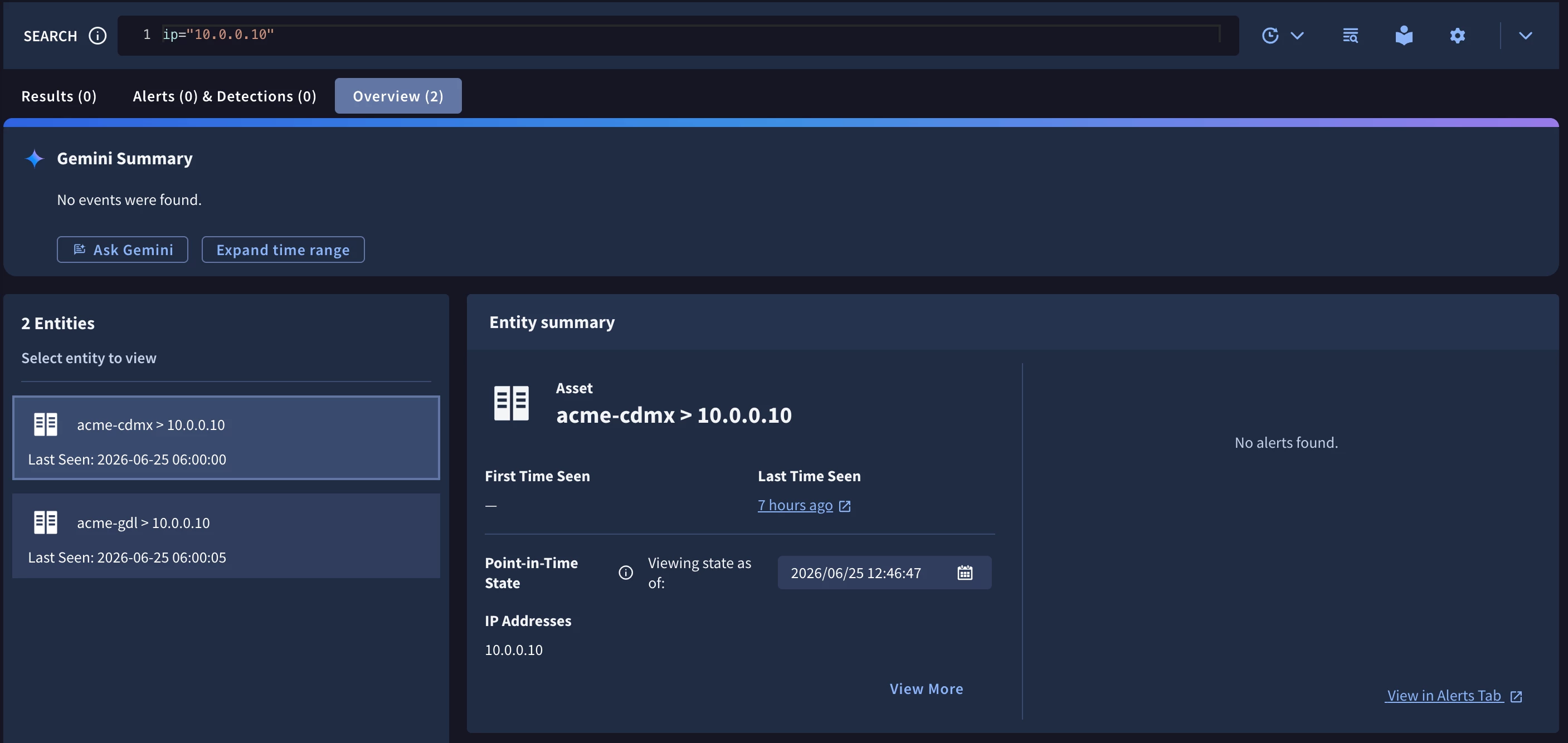
Figure 7 — The same boundary, live in the product. The Overview for the shared IP 10.0.0.10 resolves two separate Asset entities, one per namespace (acme-cdmx, acme-gdl), instead of one fused asset.
The sub-level is how you prevent that without inflating your tenant count. A tenant with no internal overlap can use a bare acme namespace. A tenant whose internal environments must not be correlated together gets one slug per environment, all sharing the acme- prefix. You draw the line where identifiers actually collide, not by a blanket rule.
Granting access at any level
Because the slug is hierarchical, it gives you a natural language for access at any granularity (You could even define a slug like <org>-<unit>-<group> for example). Granting an analyst all of ACME means every acme-* namespace. Granting them only ACME's Mexico City office means acme-cdmx (and everything beneath it). Granting them a single sub-unit means one exact slug. The hierarchy is the access model. You pick the level, and you have named the grant.
There is one important detail about how the platform turns that intent into enforcement, and it is worth knowing now even though we set it up properly in Part 3 (and why scripting and automating this whole process is very important).
As we already explained, control of what data you can see in Google SecOps is governed by Data RBAC, but Data RBAC scopes are what let you define the specific profiles for users and groups. You might expect to write a scope "user X can see data tagged with namespace acme-*" and have it match the whole subtree by prefix. However, Google SecOps Data RBAC does not work that way.
A scope enumerates the exact namespace values it covers, with no wildcard. So "all of ACME" is expressed by listing all ACME's namespaces in one scope, and incorporating a new ACME unit means adding its slug to that scope. The reason to mention it here is that it shapes how you design the hierarchy: keep any grant you intend to manage as a single unit to a set of namespaces you can comfortably enumerate and maintain. Part 3 will make this concrete.
Choose the slug carefully, because renames are expensive
Just to make sure you don't miss this: A namespace stamp lives on an event forever! (or until retention ages it out).
The platform does not retag historical events when you rename, and the asset view, the entity graph, and your detection history are all keyed on the tag that was written at ingestion time.
Therefore, it is important to understand the implications of renaming slugs. In the case of the event data for example, it splits a tenant in two for the life of your data retention. One asset view covers the period before the rename, another covers the period after, and they do not merge. Detections that filter on the old namespace see only the old data, detections on the new namespace see only the new, and anything that must span both has to name both (although multi-tenant-designed rules can minimize this risk). At the SOAR layer, historical cases stay filed under whatever environment they were routed to at the time, but these can be manually moved between environments.
The practical rule that follows is to spend a little thought up front rather than pay the rename later. If a tenant might plausibly grow a sub-division, give it a level now. A small reserved suffix such as -main or -core for a tenant that has no meaningful sub-division today but might tomorrow costs you a few characters and buys forward compatibility without a rename event. Also, keep in mind that if you decide to delete a Data RBAC scope, the name you used cannot be reused again.
Reserve a couple of slugs for yourself
By the way, if you are the holder of the Google SecOps instance, you can definitely (and should) have two internal tenants that deserve slugs of their own and must not collide with any customer. The first is your own SOC, carrying your infrastructure telemetry and your playbooks. The second is a validation tenant, carrying synthetic data you use to test scope changes, playbook edits, and new detections before they reach a real customer. Following the same scheme, for us, those become zevorus-soc and zevorus-dev. Both fit the access model cleanly, and both make your operator-wide grants straightforward to define as a single list of internal slugs.
Note: We actually went a bit further and created what we call a "sandboxed instance", by creating tenants for each one of our engineers. Now each one of us holds its own piece of the Google SecOps instance!
What's next
That is the foundation: multi-tenancy is three independent isolation problems, and a single hierarchical slug, used identically across namespace, scope, environment, and project, is the thread that ties them together and keeps them traceable.
The hard part is making it true on the wire. Part 2 takes up the first plane, ingestion, and the question every service provider eventually has to answer: how do you get each tenant's telemetry into your instance, correctly tagged, without trusting machines you do not control and without leaking the ingestion credential that lets anyone write into your SIEM? That is where the architecture gets interesting, and where we have something proven on the wire to show.









