

Hi All,
I wanted to understand how this default filters work
when i try its not working so
i wanted to understand how and where Default filters works if global filter is enabled / disabled
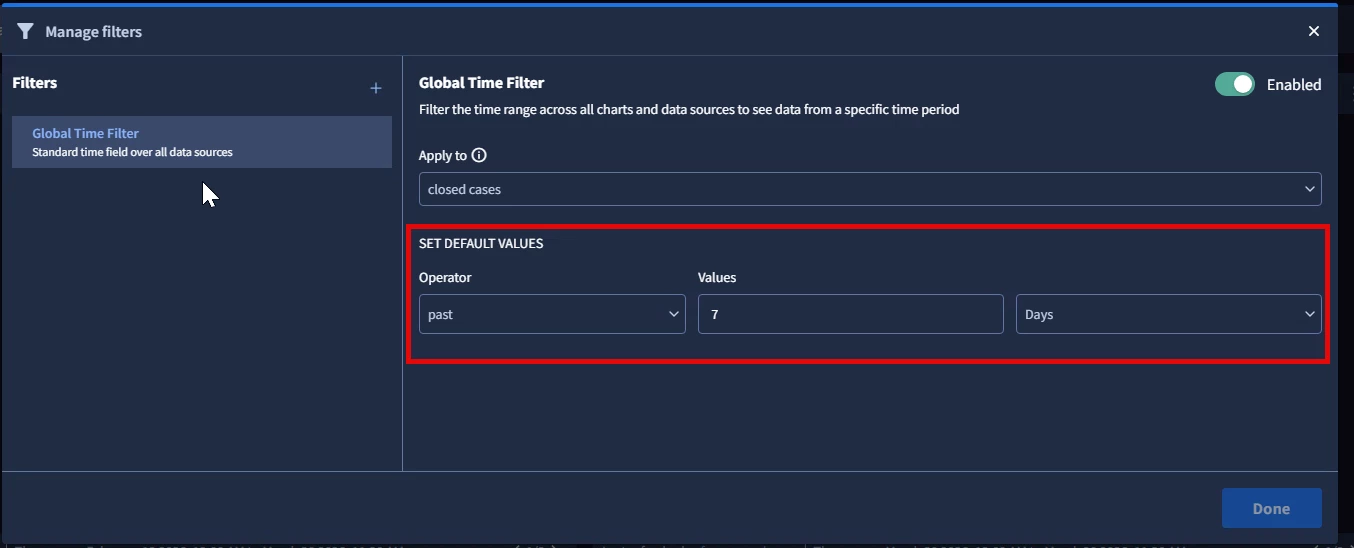

Hi All,
I wanted to understand how this default filters work
when i try its not working so
i wanted to understand how and where Default filters works if global filter is enabled / disabled
Best answer by AaronR
Hi
When the Global Time Filter toggle is flipped on, the dashboard tries to apply a unified time range to your data.
Initial Load: When anyone opens this dashboard, the system automatically applies the default time range (e.g., past 7 days) to the charts you specified.
User Flexibility: While viewing the dashboard, users can still click the time selector to change the range to something else (like "past 24 hours") to investigate specific events.
The Reset: If the user leaves the dashboard and comes back, the global time filter snaps right back to your configured default of the "past 7 Days".
When you turn the toggle off, the dashboard stops trying to unify the timeframes.
Global Default is Ignored: Deactivating the toggle completely disables the Global Time Filter. The "past 7 Days" default you set in this menu will not apply to anything.
Chart-Level Settings Take Over: Instead of a global time range, every individual chart on your dashboard will revert to its own specific, hardcoded time range that was set when the chart was originally built. For example, if one widget was built to always show "Last 30 Days" and another "Last 24 Hours," they will display exactly that.
The Use Case: You typically disable the global filter when you intentionally want different widgets on the same page to show entirely different time scales (like comparing an hourly trend right next to a yearly overview).
If your global filter is Enabled but you are still seeing charts that aren't updating to the past 7 days, the culprit is almost always the Apply to dropdown.
The global filter only overrides the charts specifically selected in that list (in your screenshot, it is currently only applied to "closed cases").
If a chart on your dashboard is not selected in that dropdown, it will completely ignore the global "past 7 Days" setting and default back to its own individual settings.
More information on dashboard filters, including the permissions required, can be found in our docs.
Enter your E-mail address. We'll send you an e-mail with instructions to reset your password.





