
Hi folks,
I have come up with a requirement wherein I require to store the API response for an IOC in the SOAR platform. If the same IOC is queried within 24 hours, I would use the stored data. However, if the time duration between consecutive API calls exceed 24 hours, then I need to update the stored data by making a new API call.
Is this possible in Chronicle SOAR ? There are couple of options that I have looked: Custom Lists, and Context Data. But I could not find any comprehensive documentation for these.
Can anyone guide me on how do I accomplish this, and if this is possible ?
Also, I am open to any recommendations for any updates in the flow.
Thanks.

Solved
Need to store API response data in the SOAR platform
 +7
+7- Bronze 5
Best answer by josemarin
Hey @preet_mehta
You are on the right Path. I would recommend using Custom Lists. Custom lists are an easy way to store data. These are some of the guidelines to working with custom lists:
- Custom lists in SOAR are single value: meaning each entry would consist of a single value/string. Because of that, I recommend using a structured form, since you are already thinking of storing an API response, you can go with a JSON string.
- You can classify custom lists in Categories - Makes it easier to organize and filter your data if you are using multiple custom lists for different use cases.
I recommend you package your logic in a Block that can go through the entire logic, and then you can reuse that in any playbook. You will need to install the power-ups from the marketplace if you haven't done so yet.
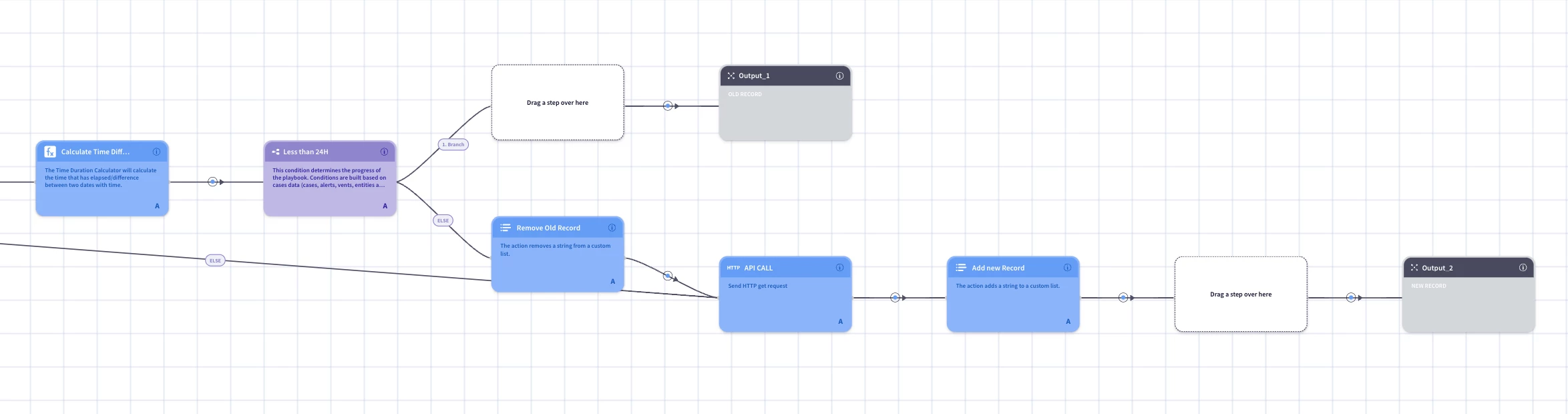
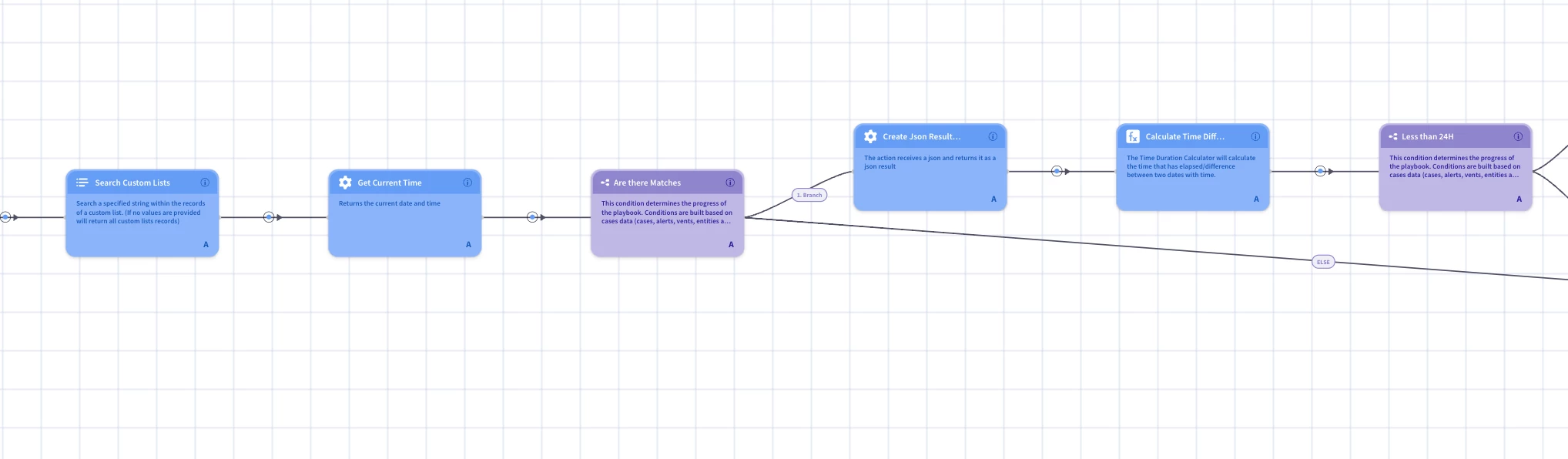
You can use "IOC-DATA" as a category. This is the flow you can use:
- Use the search "Search Custom Lists" under the "Lists" powerups. This allows you to search for a specific string in a List Category. If you are doing this for one single IOC, you can use the IOC as the string to search. If you are using more than one IOC at a time, you can leave the string blank to retrieve all records for the category and then filter in a different step.
- Get current time ("Get Current Time" tools powerup)
- Check if you have matching results. If not, execute your API Call and save the result as a record to your list. The structure can be:
{"ioc":"{IOC Value}", "date":"{CurrentDate Result}", "data":"{API Response}"}. - If there are matches: use the buffer action to create a JSON result from the entry in the custom list - this will let you work with the different fields.
- Compare the time in the match vs the current time: there are different ways of doing this, depending on the time format. If an epoch timestamp, a simple arithmetic operation would work; if working with datetime formats, you can use the "Time duration Calculation" to get the difference between both times.
- If the difference is more than 24 hours: delete existing record from the list, execute your API Call and save the result to your list and output the result of the API to the block. If not, use the match as output to the block.
This is a general flow you could try. Depending on specifics like multiple IOCs, consistency of the data, integrations being used, etc., you might need to make some changes or add some additional steps.





Enter your E-mail address. We'll send you an e-mail with instructions to reset your password.