



We are excited to announce that Google SecOps Agentic Chat has officially reached Public Preview!
⚡ Overview (TL;DR)
Google SecOps Chat has been completely re-architected from a single-turn assistant into a multi-turn Agentic Chat built on the Agent Development Kit (ADK) 2.0 and Model Context Protocol (MCP) for advanced tool calling and platform integrations.
Security analysts can now investigate security incidents across multiple conversational turns, query live tenant state using 24+ foundational SIEM, SOAR, and Automated Triage tools, generate validated YARA-L 2.0 and UDM Search queries, and resolve complex platform "How-To" Q&A via Gemini Cloud Assist with inline source citations.
Additionally, with built-in service account authentication and full Customer-Managed Encryption Keys (CMEK) compliance, regulated enterprises and third-party IdP (Okta/SAML) customers can use Agentic Chat and documentation Q&A out-of-the-box without requiring individual GCP IAM role bindings for end-users.
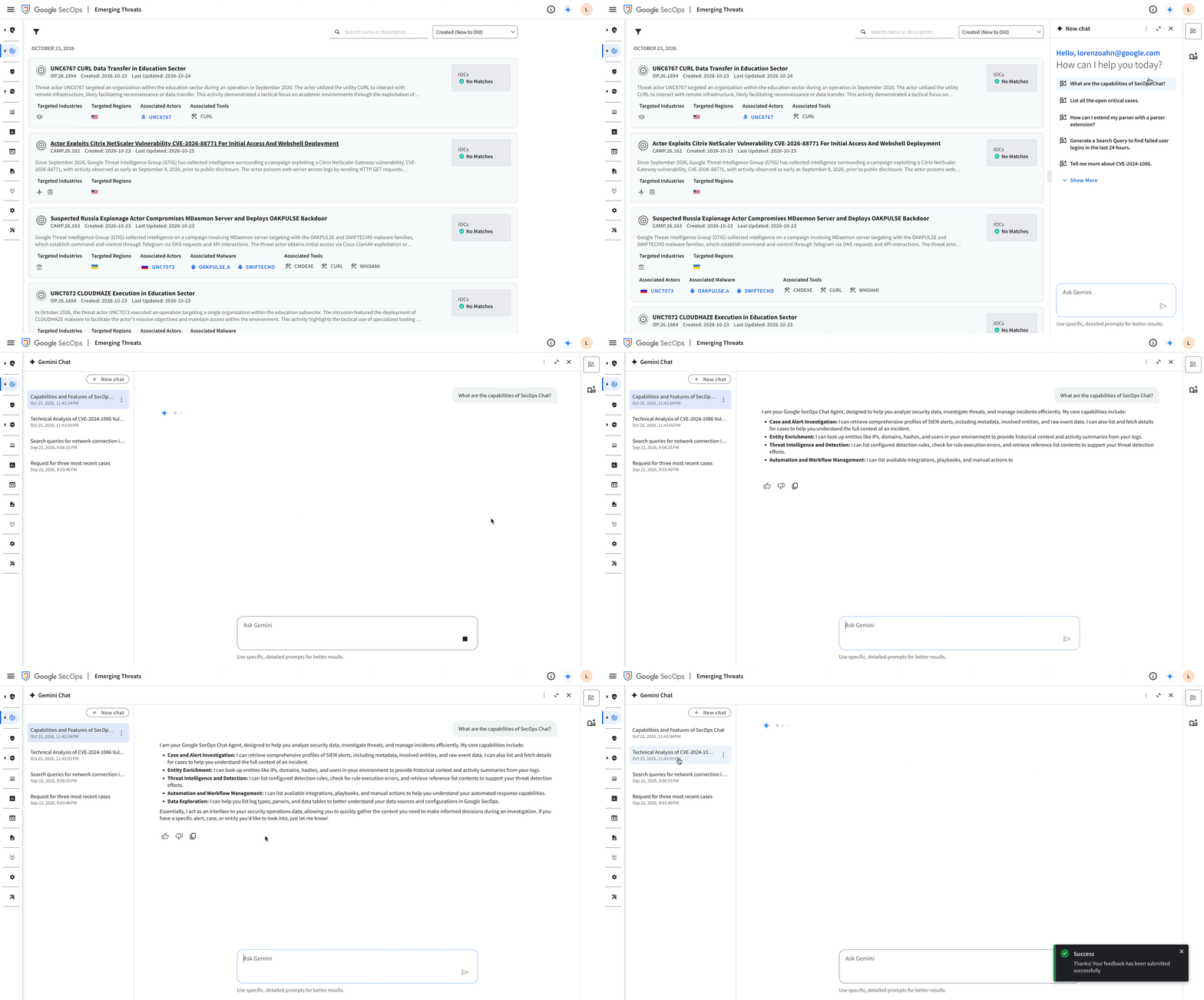
What’s New in Public Preview?
Building upon extensive Private Preview validation and customer workshops, this release delivers major architectural and user experience advancements across investigation workflows, knowledge grounding, and enterprise compliance:
- 🧠 Multi-Turn ADK Reasoning: Powered by the Agent Development Kit (ADK), the agent maintains deep conversational context across multi-step investigations, dynamically selecting and chaining tools to answer follow-up questions and pivot across data sources.
- 🛠️ 24+ Live SIEM, SOAR & Triage MCP Tools: Directly queries live tenant data across key capabilities:
- Cases & Alerts: List cases (list_cases), inspect alert details (get_case_alert), and review case comments (list_case_comments).
- Entity & Threat Enrichment: Summarize entities (summarize_entity), check IoC matches (get_ioc_match), and retrieve alert data (fetch_alert_data).
- SIEM Content & Rules: Generate and refine UDM Search queries (generate_yl_search) and YARA-L 2.0 rules (generate_yl_rule), list detection rules (list_rules), inspect rule execution errors (list_rule_errors), view parsers and log types (list_parsers, list_log_types), and inspect data tables and reference lists (list_data_tables, get_reference_list).
- SOAR Automation: Browse playbooks (list_playbooks), integrations (list_integrations), integration actions (list_integration_actions), and enrichment actions (fetch_enrichment_actions).
- Automated Triage Reports: Retrieve the latest automated triage investigations and reports for alerts (get_alert_latest_investigation, get_investigation_by_id, get_agent_settings).
- 📚 Enhanced "How-To" Q&A via Gemini Cloud Assist with Zero-Touch Auth: Grounds product and workflow answers in official Google SecOps documentation with clickable inline citations. Authenticated automatically at the tenant level so third-party IdP (Okta/SAML) analysts need zero additional GCP IAM permissions.
- 💡 UX Enhancements & Context-Aware Prompt Suggestion Chips: Features a redesigned chat drawer with dynamic, context-aware starter prompts tailored to the active console view (harvesting context such as caseId, alertId, or ruleId), structured markdown and table rendering, and streamlined conversational responses without repetitive follow-up prompt clutter.
- 🔐 Enterprise CMEK Compliance & Strict Read-Only Guardrails: Full support for Customer-Managed Encryption Keys (CMEK) across session persistence, grounding, and caching—unblocking regulated enterprise tenants while enforcing strict read-only tool guardrails.
What’s the Difference? (Legacy Chat vs. New Agentic Chat)
This release overhauls the architecture, tool ecosystem, and answer quality of Chat in Google SecOps:
| Feature | Legacy SecOps Chat | New SecOps Agentic Chat (Public Preview) |
|---|---|---|
| Core Architecture | Single-turn intent routing with static templates. | Multi-turn ADK reasoning loop with dynamic tool chaining and persistent session memory. |
| Live Platform Tools | Limited coverage; unable to chain SIEM, SOAR, Parser, and Triage tools together. | 24+ native MCP tools spanning SIEM (UDM/YARA-L, Rules, Parsers, Data Tables), SOAR (Cases, Playbooks, Integrations), and Triage Reports. |
| Platform "How-To" Q&A | Legacy documentation search with lower citation coverage. | Gemini Cloud Assist grounding delivering high factual accuracy and clickable inline source citations. |
| 3P IdP / SAML Permissions | Required manual GCP IAM bindings for end-users on the underlying project. | Zero-touch tenant service account integration enables documentation Q&A out-of-the-box with zero end-user GCA IAM roles. |
| Conversational UX | Frequent repetitive follow-up prompt suggestions. | Clean multi-turn responses with dynamic, context-aware prompt suggestion chips. |
| CMEK Support | Not supported on CMEK-enabled enterprise tenants. | Full CMEK compliance across chat storage, grounding, and caching. |
Example Prompts to Try
Once you enable Agentic Chat, try chaining multi-step questions in a single conversation:
- "Show me the highest-priority open cases right now, and summarize the alerts and comments in the most recent one."
- "Are there any automated triage investigation findings for alert ID [ALERT_ID]? Summarize the key entities involved and check if any match known IoCs."
- "List any detection rules that have execution errors, and help me write a YARA-L 2.0 rule to detect suspicious PowerShell encoded commands."
- "What data tables and reference lists do we have available, and how can I reference them in a YARA-L rule?"
- "What integrations and enrichment actions are configured in our SOAR environment?"
Known Limitations in Public Preview
- 🔒 Read-Only Tool Posture (Write Tools in Progress): In Public Preview, Agentic Chat strictly executes read-only (GET/LIST) tools and query/rule generation (generate_yl_search, generate_yl_rule). It does not mutate production state (such as closing cases, modifying detection rules, or triggering live containment actions) without analyst execution in the console.
- ⏳ Human-in-the-Loop (HITL) for Write Actions: Interactive confirmation cards for mutating SOAR and SIEM actions are currently under development and targeted for upcoming General Availability (GA) and follow-on milestones.
- 🌐 Tenant RBAC Enforcement: Live SIEM and SOAR tools strictly enforce the logged-in analyst's existing Google SecOps IAM and SOAR RBAC permissions (roles/chronicle.viewer, editor, admin, and SOAR Case/Playbook permissions).
Eligibility & How to Get Started
This feature is available to all Google SecOps Enterprise and Enterprise Plus customers across supported operational regions (including CMEK-enabled tenants):
- Due to wave-wise rollout, availability is staggered progressively across regions.
- Existing Private Preview customers are automatically transitioned to the Public Preview experience.
- Analysts can activate the experience immediately using the "Agentic Chat" toggle inside the SecOps Chat pane.
- No extra setup is required for standard tenants—end-users only need their existing Google SecOps IAM and SOAR RBAC roles.
- Learn more: Check out the Gemini in Google Security Operations documentation.
What’s Next?
As we work toward General Availability (GA), we are actively developing:
- ✋ Human-in-the-Loop (HITL) Write Actions: Enabling controlled, analyst-approved write operations (such as adding case comments, executing enrichment/containment playbooks, and saving detection rules) with explicit confirmation guardrails.
- 🎯 Expanded Context-Aware Console Integration: Deeper page-level context harvesting across SecOps console surfaces so Agentic Chat proactively surfaces relevant investigation actions for the exact entity, alert, rule, or case on screen.
- 🤝 Multi-Agent Orchestration (A2A): Seamless handoffs between Agentic Chat and specialized domain sub-agents (Threat Hunting, Parser Generation, and Detection Rule Tuning).
We’d love to hear your thoughts! Turn on the Agentic Chat toggle in your console and let us know in the comments below how it’s working for your team and what workflows you’d like to see next.
