Solved

Parsing Syslog With Nested JSON

  • December 15, 2025
  • 3 replies
  • 75 views

Rmoss
Forum|alt.badge.img+3

Hi,

How do I parse out “data_user_agent” in the below the nested JSON ? The log is Syslog with a JSON object:

<190>Dec 9 19:55:40 test-local-primary test_audit:

{

"actor_ip": "1.1.1.1,

"action": "login",

"created_at": [removed by moderator] ,

"data": {

"user_agent": "Mozilla/5.0 (Macintosh Intel Mac OS X 10.15 rv:145.0) Gecko/20100101 Firefox/145.0",

"method": "POST",

"@timestamp": [removed by moderator] ,

"category_type": "Authentication",

}

}

My parser is as follows but it doesn’t pick up anything for the “data_user_agent” field.

filter {

mutate {

replace => {

"data_user_agent" => ""

}

}

mutate {replace => {"event.idm.read_only_udm.metadata.event_type" => "GENERIC_EVENT"}}

if [data_user_agent] != "" {

mutate {

replace => {

"data_user_agent.key" => "data_user_agent"

"data_user_agent.value.string_value" => "%{data_user_agent}"

}

merge => {

"event.idm.read_only_udm.additional.fields" => "data_user_agent"

}

}

}

if [data_user_agent] != "" {

mutate {

replace => {

"event.idm.read_only_udm.network.http.user_agent" => "%{data_user_agent}"

}

}

}

statedump {}

mutate {

merge => {

"@output" => "event"

}

}

}

STATEDUMP:

Internal State (label=):

{
"@collectionTimestamp": {
"nanos": 0,
"seconds": [removed by moderator]
},
"@createTimestamp": {
"nanos": 0,
"seconds": [removed by moderator]
},
"@enableCbnForLoop": true,
"@onErrorCount": 0,
"@output": [],
"@timestamp": {
"nanos": 0,
"seconds": [removed by moderator]
},
"@timezone": "",
"data_user_agent": "",
"event": {
"idm": {
"read_only_udm": {
"metadata": {
"event_type": "GENERIC_EVENT"
}
}
}
},
"hostname": "test-local-primary",
"message": "\u003c190\u003eDec 9 19:55:40 test-local-primary test_audit: \n{\n \"actor_ip\": \"1.1.1.1\",\n \"action\": \"login\",\n \"created_at\": [removed by moderator] ,\n \"data\": {\n \"user_agent\": \"Mozilla/5.0 (Macintosh Intel Mac OS X 10.15 rv:145.0) Gecko/20100101 Firefox/145.0\",\n \"method\": \"POST\",\n \"category_type\": \"Authentication\"\n }\n}",
"time": "Dec 9 19:55:40"
}
Best answer by JeremyLand

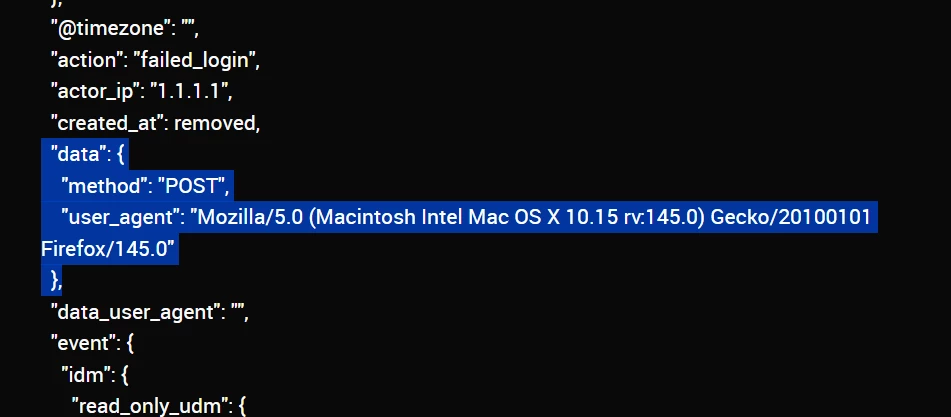
Looking at your statedump it shows that the the `data` object and its children `user_agent` and `method` were extracted, but are left nested:
 

This is the normal extraction behavior and can be addressed by updating how you reference those in the rest of your parser when you check for the fields existence and then when you assign your label value.
 

To reference nested keys for a conditional statement you’ll put each element in [ ] , so your if would change:
if [data_user_agent] != ""   →  if [data][user_agent] != ""

Then when you load the value from that key into your label you use dot notation inside the curly brackets. So in your replace you’ll change
"%{data_user_agent}"  →  "%{data.user_agent}"

3 replies

JeremyLand
Staff
Forum|alt.badge.img+7
  • Staff
  • December 17, 2025

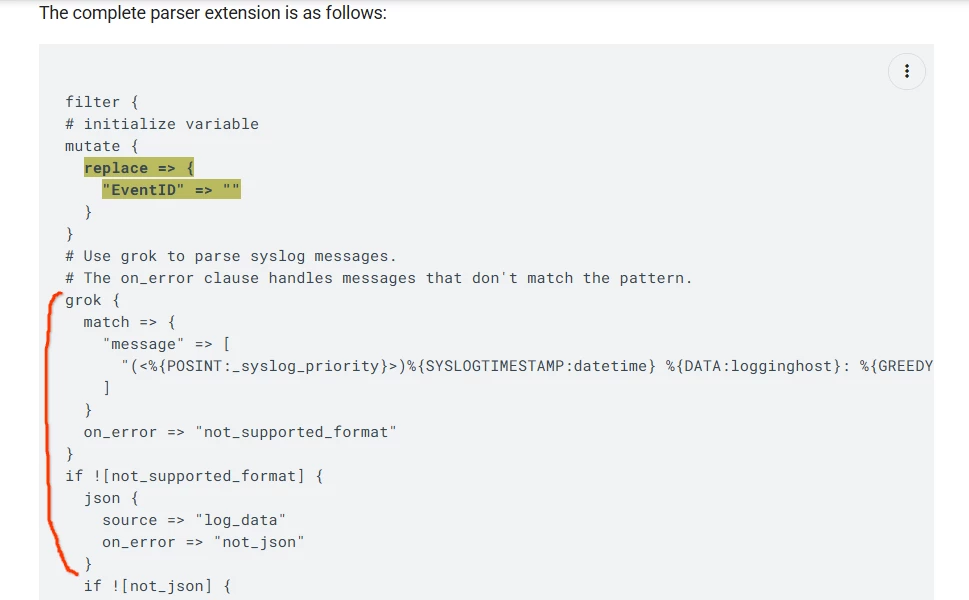
Hi, looks like you are missing 2 sections in your parser.  Since your log is JSON with a syslog header (lots of our documentation calls this SYSLOG+JSON) the first step is to use a grok statement to seperate the syslog portion from the JSON data.  Once you have those separated you can use the JSON extractor to automatically split out the rest of the JSON into values the rest of the parser can read easily.

This is a fairly common pattern and we have an example here that shows these put together
https://docs.cloud.google.com/chronicle/docs/event-processing/parser-extension-examples#code-snippet-and-grok-decoration

There is more explanation in that example but here is the bit you’ll need to adapt:

Once you have that working you should be able to get the rest of the way by modifying the code you have to read data from the extracted JSON fields,  those field names and their values will show up in your statedump.


Rmoss
Forum|alt.badge.img+3
  • Author
  • New Member
  • December 17, 2025

Thanks.  I have tried this but its never able to unnest the data in the “data_user_agent” object. So the values  like “actor_ip” and "action": "login"  are parsed out but not anything that’s nested within the “data” object

{
  "actor_ip": "1.1.1.1,
  "action": "failed_login",
  "data": {
    "user_agent": "Mozilla/5.0 (Macintosh Intel Mac OS X 10.15 rv:145.0) Gecko/20100101 Firefox/145.0",
    "method": "POST",
  }
}


I changed the parser as follows and its able to parse “actor_ip” and “action” values but not “data_user_agent” value


filter {


mutate {

  replace => {

    "data_user_agent" => ""

    "action" => ""

    "actor_ip" => ""

  }

}


grok {

    match => {

      "message" => [

        "\\<\\d+\\>%{SYSLOGTIMESTAMP:time} %{HOSTNAME:hostname} %{WORD:event}\\:%{GREEDYDATA:json_data}"

      ]

    }

    on_error => "not_json_data"

  }


  if [json_data] != "" {

    json {

      source => "json_data"

      array_function => "split_columns"

      on_error => "not_json_data"

    }

  }


if [action] != "" {

    mutate {

      replace => {

        "event.idm.read_only_udm.metadata.product_event_type" => "%{action}"

      }

    }

  }


if [actor_ip] !="" {

  mutate {

      merge => {

          "event.idm.read_only_udm.principal.ip" => "actor_ip"

          }

          on_error => "principal.ip_merge_error"

  }

}


if [data_user_agent] != "" {

    mutate {

        replace => {

            "data_user_agent_label.key" => "data_user_agent"

            "data_user_agent_label.value.string_value" => "%{data_user_agent}"

        }

        merge => {

            "event.idm.read_only_udm.additional.fields" => "data_user_agent_label"

        }

    }

}


if [data_user_agent] != "" {

  mutate {

    replace => {

      "event.idm.read_only_udm.network.http.data_user_agent" => "%{data_user_agent}"

    }

  }

}


statedump {}


mutate {

  merge => {

    "@output" => "event"

  }

}

}


STATEDUMO is as follows:

Internal State (label=):

{
  "@collectionTimestamp": {
    "nanos": 0,
    "seconds": removed
  },
  "@createTimestamp": {
    "nanos": 0,
    "seconds": removed
  },
  "@enableCbnForLoop": true,
  "@onErrorCount": 0,
  "@output": [],
  "@timestamp": {
    "nanos": 0,
    "seconds": removed
  },
  "@timezone": "",
  "action": "failed_login",
  "actor_ip": "1.1.1.1",
  "created_at": removed,
  "data": {
    "method": "POST",
    "user_agent": "Mozilla/5.0 (Macintosh Intel Mac OS X 10.15 rv:145.0) Gecko/20100101 Firefox/145.0"
  },
  "data_user_agent": "",
  "event": {
    "idm": {
      "read_only_udm": {
        "metadata": {
          "product_event_type": "failed_login"
        },
        "principal": {
          "ip": [
            "1.1.1.1"
          ]
        }
      }
    }
  },
  "hostname": "test-local-primary",
  "json_data": " {\"actor_ip\":\"1.1.1.1\",\"action\":\"failed_login\",\"created_at\":removed,\"data\":{\"user_agent\":\"Mozilla/5.0 (Macintosh Intel Mac OS X 10.15 rv:145.0) Gecko/20100101 Firefox/145.0\",\"method\":\"POST\"}}",
  "message": "\u003c190\u003eDec  9 19:55:40 test-local-primary test_audit: {\"actor_ip\":\"1.1.1.1\",\"action\":\"failed_login\",\"created_at\":removed,\"data\":{\"user_agent\":\"Mozilla/5.0 (Macintosh Intel Mac OS X 10.15 rv:145.0) Gecko/20100101 Firefox/145.0\",\"method\":\"POST\"}}",
  "not_json_data": false,
  "principal": {
    "ip_merge_error": false
  },
  "time": "removed
}


JeremyLand
Staff
Forum|alt.badge.img+7
  • Staff
  • Answer
  • December 17, 2025

Looking at your statedump it shows that the the `data` object and its children `user_agent` and `method` were extracted, but are left nested:
 

This is the normal extraction behavior and can be addressed by updating how you reference those in the rest of your parser when you check for the fields existence and then when you assign your label value.
 

To reference nested keys for a conditional statement you’ll put each element in [ ] , so your if would change:
if [data_user_agent] != ""   →  if [data][user_agent] != ""

Then when you load the value from that key into your label you use dot notation inside the curly brackets. So in your replace you’ll change
"%{data_user_agent}"  →  "%{data.user_agent}"


Rmoss
Forum|alt.badge.img+3
  • Author
  • New Member
  • December 18, 2025

Thanks for the explanation. It works now