

Question

Problem Updating Incident Tags with Microsoft Graph Security Integration

  • January 9, 2026
  • 2 replies
  • 42 views

Dominik_Albrink
Forum|alt.badge.img+2

Hello everyone,


I’m trying  to add Custom Tags to Defender Unified Portal Alerts. 
Prior to the migration I was able to do this with the Sentinel Connector after the SIEM Migration into Defender the only action I can find is “Update Alert” from the GraphApi Integration.

Is the Update Alert Action working on Incidents or Alerts?
As far as I can see only on Incidents you can update Tags ->Update incident - Microsoft Graph v1.0 | Microsoft Learn
not on Alerts. When trying to update an Incident I get this:
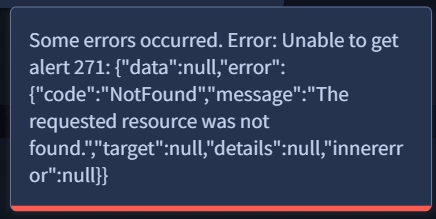
The Incident does exist:



Best regards


2 replies

Eoved
Forum|alt.badge.img+8
  • Bronze 2
  • January 11, 2026

Hi,
You may need to work with a combination of multiple integrations and actions.
If you navigate in the SecOps Marketplace, you will see that there are more Microsoft Defender connectors.
See the following references:
https://docs.cloud.google.com/chronicle/docs/soar/marketplace-integrations/microsoft-365-defender#update_incident
https://docs.cloud.google.com/chronicle/docs/soar/marketplace-integrations/microsoft-defender-atp#update_alert


Dominik_Albrink
Forum|alt.badge.img+2

HI thanks for the reply,


I’ve already checked and tried those connectors but as far as I see  none of these offer the ability to add a custom Tag to an Incident or Alert:


The only one I can find is the “Graph Securtity API “

https://docs.cloud.google.com/chronicle/docs/soar/marketplace-integrations/microsoft-graph-security#update_alert

stating update an Alert giving me the Option to Tag an Alert

which should regarding to the Microsoft API only be possible for an Incident and not for an Alert.
Update incident - Microsoft Graph v1.0 | Microsoft Learn

This confuses me, and the SOAR action does not work against either Incident or Alert.


