Question

Querying Windows Event Logs by Host in SecOps

  • January 16, 2026
  • 3 replies
  • 51 views

Forum|alt.badge.img+1

Hi Folks,

I’m new to SecOps and still getting familiar with the platform’s functionality. Apologies if this is a basic question, but I believe it will be helpful not only for me but also for others who are beginning their SecOps journey.


I’m looking for guidance on how to search logs in SecOps for the following requirement:

We have onboarded Windows servers via Bindplane, and I want to run a query to list all logs coming from a specific Windows server.

Currently, we are using a query similar to the one below (Partial query) :

metadata.log_type = "WINEVTLOG"
$host = strings.coalesce(principal.asset.hostname, principal.hostname)

However, we are observing an issue where we have onboarded only 50 Windows servers, but the query returns more than 50 host values. Upon initial review, these additional hosts appear to be introduced during parsing (exact cause not yet confirmed).

In Splunk, we typically rely on the host field to retrieve all logs from a specific server/device. Could someone please advise on the equivalent approach in SecOps to accurately search and filter logs that are genuinely originating from a particular Windows server?

Any guidance or best practices would be greatly appreciated.


Thanks 

Karthik

3 replies

jstoner
Staff
Forum|alt.badge.img+23
  • Staff
  • January 16, 2026

The asset hostname is a good field to get that hostname value so all of that looks good. My lab environment also used Bindplane agents so as I look at this, I would expect if the Bindplane agent is on a device that would be the hostname that you get associated with that system.


It makes me wonder if windows event forwarding (wef) is occurring and at least one of those systems is a windows event collector (wec) that may be causing other hostnames to show up?

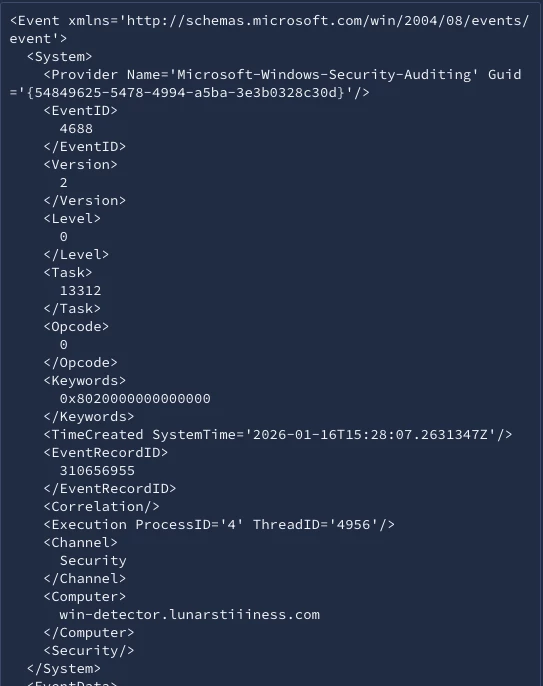
In the raw log, I believe that the value in Event/System/Computer will generate the hostname in the parser. Hope this helps.


Forum|alt.badge.img+1
  • Author
  • New Member
  • January 16, 2026

Thanks for the response ​@jstoner 

In our environment there is no windows event forwarding (wef) collector. but still the host count is more.


chrisd2
Forum|alt.badge.img+9
  • Bronze 5
  • January 23, 2026

Hello KarthikTech,

I believe you want to use intermediary.hostname when filtering on “the host sending the logs” with Windows hosts :)

Even with WEC/WEF, it does not mess with intermediary.hostname, and using it I can reliably group my results by host when running queries.