
I am trying to create a detection rule that looks at O365 for suspicious inbox rule creation. As part of the logic, I need to check if the “recipients” are internal/allowed.
There are 3 fields which this fall under, but for simplicity sake, I’m looking at security_result.rule_labels["ForwardTo"] where it can have multiple recipients with the value of “ [removed by moderator] ; [removed by moderator] ; [removed by moderator] ”
I have a regex that matches strings where every semicolon-delimited entry is @domain.com. The not inverts it, so rule should only fire when at least one external domain exists.
not $e.security_result.rule_labels["ForwardTo"] = /^(\s*[\w\.\+\-]+@domain\.com\s*;?\s*)+$/
Tested this pattern with https://regex101.com/r/CyngH4/1 and it captures the domain. The not should invert the result for exclusion, but I am still getting events with the domain.com
Can anybody provide help how to properly do this? Thank you

Regex filter not working for multivalue fields

 +5
+5- Bronze 3
Best answer by jstoner
There were a couple of redactions by moderator in the question so I’ve tried to adapt my lab instance to what you have and show you what I am seeing and then we can figure out where the issue it.
I created two inbox rules where the from field was the trigger. Because of that my field of interest is security_result.rule_labels["From"]
The two example values I have from events in those fields are as follows. Notice one has three distinct domains in it and the other has my the same domain name for all three.
"HenriettaM@xxxxx.onmicrosoft.com;george@yahoo.com;bill@gmail.com"
"heather.glenn_admin@lunarstiiiness.com;tim.smith_admin@lunarstiiiness.com;dan.cooper@lunarstiiiness.com"
In this rule example, I am using your regex but I swapped in my domain that is the same for all three. I also have a functional equivalent using re.regex commented out above for reference. I get the same results either way.
rule rule_inbox_rule {

  meta:
    author = "Google Cloud Security"

  events:
    $e.metadata.product_name = "Office 365"
    $e.metadata.product_event_type = "New-InboxRule"
    //not re.regex($e.security_result.rule_labels["From"], `^(\s*[\w\.\+\-]+@lunarstiiiness\.com\s*;?\s*)+$`)
    not $e.security_result.rule_labels["From"] = /^(\s*[\w\.\+\-]+@lunarstiiiness\.com\s*;?\s*)+$/

  condition:
    $e
}
I get one detection, that is the rule that uses the 3 users in the first line, none of whom have my lunarstiiiness.com domain.
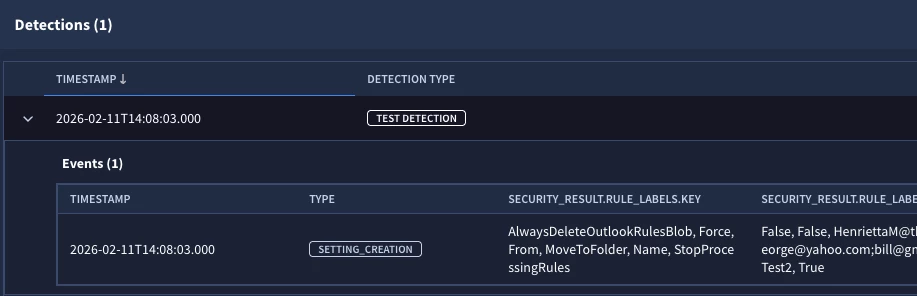
Let’s try the rule again only this time, I have selected the onmicrosoft.com domain as the one that is my “internal” domain. When I do this and re-run the rule, I get both of the above rows in the results.
rule rule_inbox_rule {

  meta:
    author = "Google Cloud Security"

  events:
    $e.metadata.product_name = "Office 365"
    $e.metadata.product_event_type = "New-InboxRule"
    //not re.regex($e.security_result.rule_labels["From"], `^(\s*[\w\.\+\-]+@onmicrosoft\.com\s*;?\s*)+$`)
    not $e.security_result.rule_labels["From"] = /^(\s*[\w\.\+\-]+@onmicrosoft\.com\s*;?\s*)+$/

  condition:
    $e
}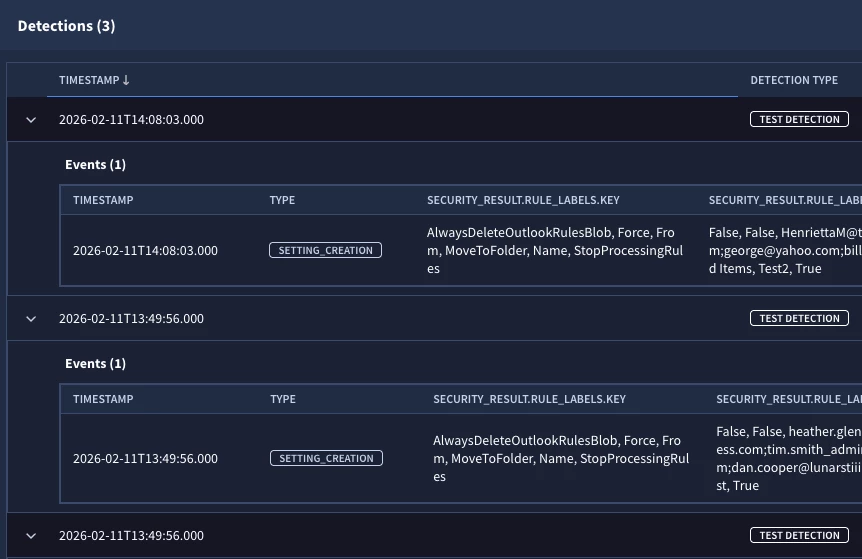
Based on this, it appears that the rule is operating as expected, that is when all three have the same supplied domain, we don’t trigger, however when any of the three have something that doesn’t match out domain, we trigger.
Maybe I am missing something and happy to look at this further with additional information. We could do re.capture or re.capture_all to extract the domains and then do some analysis there but I am not sure if that is needed.





Enter your E-mail address. We'll send you an e-mail with instructions to reset your password.