

Question

Remote SecOps MCP server: all SOAR-backed tools return "Internal error encountered." on one instance, while SIEM tools work fine

  • July 21, 2026
  • 2 replies
  • 28 views

kataro
Forum|alt.badge.img

Hi all,

We operate multiple Google SecOps instances and use the managed remote MCP server (chronicle.<region>.rep.googleapis.com/mcp, negotiated protocol version 2025-11-25) from an AI agent. On one specific instance, every SOAR-backed tool fails, while the same tools work fine on our other instance. This is not agent-specific — it reproduces with direct, bare MCP tool calls (minimal arguments, no LLM involved).

Symptom — on the affected instance, with only customerId / projectId / region / pageSize: 1:

tool: list_cases
→  isError: true, "Internal error encountered."

Same result with/without filter ("Status='OPENED'") and orderBy — all argument variants fail identically.

Side-by-side (identical bare calls on both instances):
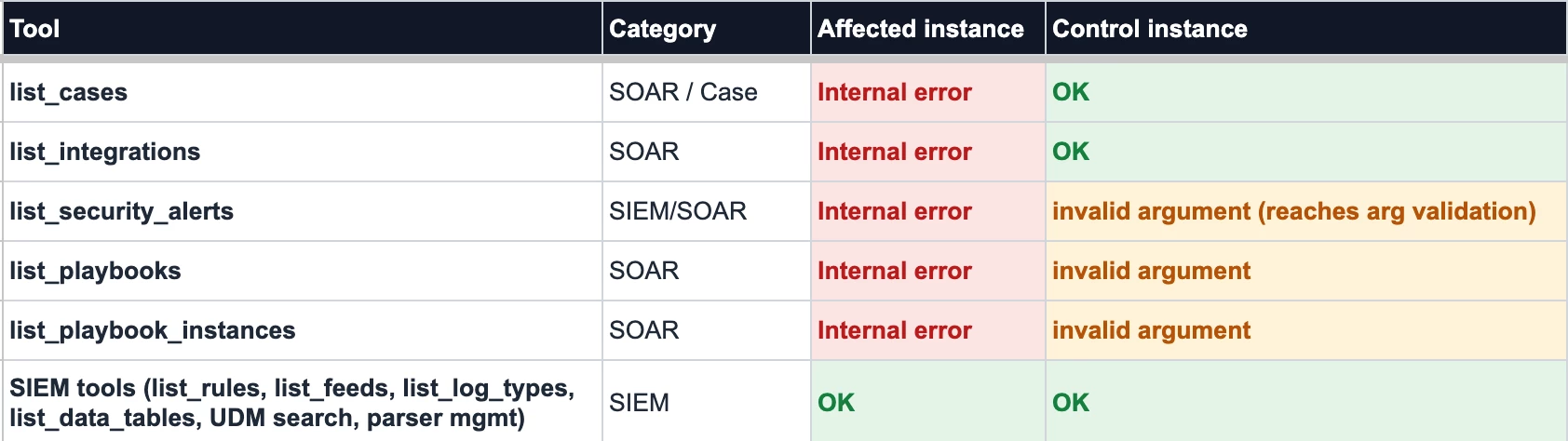


What we've ruled out:

1. Caller permissions — the same service account runs all SIEM tools successfully on the affected instance, so MCP authorization passes. And when we deliberately call with an SA that lacks access, we get an explicit PERMISSION_DENIED with a troubleshooter URL — a clearly different failure shape.
2. The SOAR instance itself — direct REST calls to the SOAR's own API (AppKey auth) return HTTP 200 on the affected instance. The SOAR is healthy.
3. Argument syntax — the control instance returns "invalid argument" for the same under-specified calls, i.e. its backend at least reaches argument validation. The affected instance fails with an opaque Internal error before validation.

Our working hypothesis: the affected instance's SIEM↔SOAR unified-platform binding is not (fully) provisioned, so the MCP backend cannot route case-management calls to SOAR — while the control instance, provisioned as a unified platform from the start, routes fine.

Questions:
1. Has anyone seen this pattern — SIEM MCP tools fine, all SOAR MCP tools returning bare "Internal error encountered."?
2. Is there a way to check/verify the SIEM↔SOAR binding state for an instance from the customer side (console or API)?
3. Is enabling that binding something we can self-serve, or does it require a provisioning request through support/partner channels?

Thanks!

2 replies

whathehack81
Forum|alt.badge.img+6

Your migration/provisioning hypothesis looks reasonable, with one terminology adjustment: I would verify the affected tenant’s SOAR-to-Google-Cloud migration and Chronicle API provisioning state, rather than only looking for a generic SIEM↔SOAR binding.

The remote SecOps MCP documentation states that customers using SOAR APIs must first migrate SOAR to Google Cloud. The legacy SOAR AppKey API and the Google Cloud Chronicle Cases API are different execution paths, so a successful AppKey request confirms that the legacy SOAR service is healthy, but it does not confirm that the resource-oriented Chronicle API backend used by list_cases is available for that tenant.

I would run the underlying Chronicle API method directly with the same service-account token:

GET https://chronicle.<region>.rep.googleapis.com/v1beta/
projects/<project>/locations/<location>/instances/<instance>/cases?pageSize=1

The documented method is projects.locations.instances.cases.list and requires chronicle.cases.get.

Interpretation:

  • Direct Chronicle API succeeds, but MCP fails: likely an MCP routing/tool implementation defect.
  • Direct Chronicle API returns the same internal error: likely tenant migration, provisioning, or instance-resource association below MCP.
  • Direct Chronicle API returns PERMISSION_DENIED: review chronicle.cases.get, the project-to-instance association, and the SOAR IAM migration state.
  • Direct Chronicle API returns NOT_FOUND: verify the project, location, instance identifier, region endpoint, and that the tenant is linked to that Google Cloud project.

There does not appear to be a documented customer-facing API that exposes a simple “SIEM↔SOAR binding status.” Customer-visible indicators would be:

  1. Whether the tenant has completed the SOAR migration to Google Cloud.
  2. Whether the SOAR administration area exposes the IAM migration controls.
  3. Whether the Chronicle API is enabled on the linked project.
  4. Whether the resource-oriented v1beta Cases API succeeds.

One minor point: Status is not listed as a supported filter field in the current cases.list documentation. That could explain an INVALID_ARGUMENT response on the control tenant, but it cannot explain the affected tenant’s failure because the request also fails without a filter.

If the affected instance has not completed the Google Cloud SOAR migration—or the direct Chronicle Cases API fails with the same internal error—this probably needs the Google SecOps account, partner, or support team. Google documents the actual SOAR platform migration as a scheduled process performed by Google after the customer completes the preparation steps; it is not purely an IAM toggle.

For escalation, include:

  • affected and working instance identifiers
  • linked project IDs and regions
  • UTC timestamps from identical requests
  • complete MCP response and HTTP headers
  • any Google request or trace identifier
  • direct v1beta cases.list results from both instances
  • confirmation of each tenant’s SOAR migration status

That comparison should give support enough evidence to route this to tenant provisioning rather than general IAM or SOAR API troubleshooting. 🔥
 🚀


whathehack81
Forum|alt.badge.img+6

Your migration/provisioning hypothesis looks reasonable, with one terminology adjustment: I would verify the affected tenant’s SOAR-to-Google-Cloud migration and Chronicle API provisioning state, rather than only looking for a generic SIEM↔SOAR binding.

The remote SecOps MCP documentation states that customers using SOAR APIs must first migrate SOAR to Google Cloud. The legacy SOAR AppKey API and the Google Cloud Chronicle Cases API are different execution paths, so a successful AppKey request confirms that the legacy SOAR service is healthy, but it does not confirm that the resource-oriented Chronicle API backend used by list_cases is available for that tenant.

I would run the underlying Chronicle API method directly with the same service-account token:

GET https://chronicle.<region>.rep.googleapis.com/v1beta/
projects/<project>/locations/<location>/instances/<instance>/cases?pageSize=1

The documented method is projects.locations.instances.cases.list and requires chronicle.cases.get.

Interpretation:

  • Direct Chronicle API succeeds, but MCP fails: likely an MCP routing/tool implementation defect.
  • Direct Chronicle API returns the same internal error: likely tenant migration, provisioning, or instance-resource association below MCP.
  • Direct Chronicle API returns PERMISSION_DENIED: review chronicle.cases.get, the project-to-instance association, and the SOAR IAM migration state.
  • Direct Chronicle API returns NOT_FOUND: verify the project, location, instance identifier, region endpoint, and that the tenant is linked to that Google Cloud project.

There does not appear to be a documented customer-facing API that exposes a simple “SIEM↔SOAR binding status.” Customer-visible indicators would be:

  1. Whether the tenant has completed the SOAR migration to Google Cloud.
  2. Whether the SOAR administration area exposes the IAM migration controls.
  3. Whether the Chronicle API is enabled on the linked project.
  4. Whether the resource-oriented v1beta Cases API succeeds.

One minor point: Status is not listed as a supported filter field in the current cases.list documentation. That could explain an INVALID_ARGUMENT response on the control tenant, but it cannot explain the affected tenant’s failure because the request also fails without a filter.

If the affected instance has not completed the Google Cloud SOAR migration—or the direct Chronicle Cases API fails with the same internal error—this probably needs the Google SecOps account, partner, or support team. Google documents the actual SOAR platform migration as a scheduled process performed by Google after the customer completes the preparation steps; it is not purely an IAM toggle.

For escalation, include:

  • affected and working instance identifiers
  • linked project IDs and regions
  • UTC timestamps from identical requests
  • complete MCP response and HTTP headers
  • any Google request or trace identifier
  • direct v1beta cases.list results from both instances
  • confirmation of each tenant’s SOAR migration status

That comparison should give support enough evidence to route this to tenant provisioning rather than general IAM or SOAR API troubleshooting. 🔥
 🚀

I hope this finds you well, and you get a solutuion….🧠
