Hi all,
We operate multiple Google SecOps instances and use the managed remote MCP server (chronicle.<region>.rep.googleapis.com/mcp, negotiated protocol version 2025-11-25) from an AI agent. On one specific instance, every SOAR-backed tool fails, while the same tools work fine on our other instance. This is not agent-specific — it reproduces with direct, bare MCP tool calls (minimal arguments, no LLM involved).
Symptom — on the affected instance, with only customerId / projectId / region / pageSize: 1:
tool: list_cases
→ isError: true, "Internal error encountered."
Same result with/without filter ("Status='OPENED'") and orderBy — all argument variants fail identically.
Side-by-side (identical bare calls on both instances):
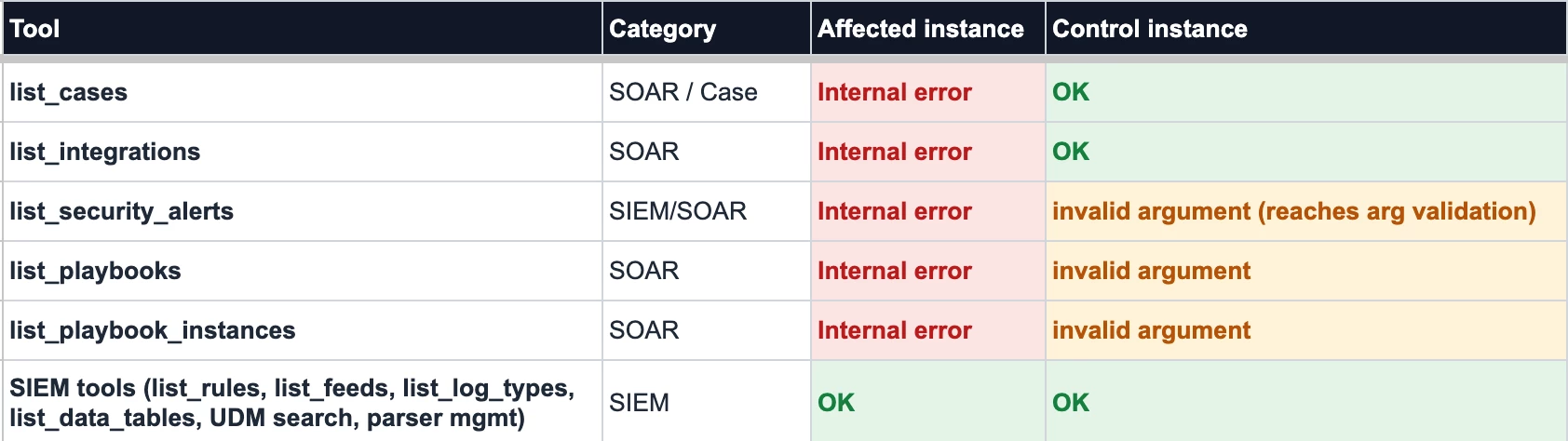
What we've ruled out:
1. Caller permissions — the same service account runs all SIEM tools successfully on the affected instance, so MCP authorization passes. And when we deliberately call with an SA that lacks access, we get an explicit PERMISSION_DENIED with a troubleshooter URL — a clearly different failure shape.
2. The SOAR instance itself — direct REST calls to the SOAR's own API (AppKey auth) return HTTP 200 on the affected instance. The SOAR is healthy.
3. Argument syntax — the control instance returns "invalid argument" for the same under-specified calls, i.e. its backend at least reaches argument validation. The affected instance fails with an opaque Internal error before validation.
Our working hypothesis: the affected instance's SIEM↔SOAR unified-platform binding is not (fully) provisioned, so the MCP backend cannot route case-management calls to SOAR — while the control instance, provisioned as a unified platform from the start, routes fine.
Questions:
1. Has anyone seen this pattern — SIEM MCP tools fine, all SOAR MCP tools returning bare "Internal error encountered."?
2. Is there a way to check/verify the SIEM↔SOAR binding state for an instance from the customer side (console or API)?
3. Is enabling that binding something we can self-serve, or does it require a provisioning request through support/partner channels?
Thanks!