Question

semantic analysis: pivot event variable is not properly bounded

  • January 15, 2026
  • 6 replies
  • 25 views

Forum|alt.badge.img+1

Hello everyone,  hope you're all having a great day!

I tried searching on documentations and in this forum for this specific message but had no success.

I'm currently working in the following detection (Parameters were made generic for sharing purposes). 

The objective of this rule is to detect any occurrence of Event2 for which, in a 24 hours span previous to it's timestamp, there's no Event1 with a mutually shared eventcasenumber value;


events:

$e1.metadata.log_type = "logsource"

$e1.metadata.product_event_type = "event1"

$e1.metadata.product_event_type = $event1


$e2.metadata.log_type = "logsource"

$e2.metadata.product_event_type = "event2"

$e2.metadata.product_event_type = $event1


$e1.additional.fields["eventcasenumber"] = $e2.additional.fields["eventcasenumber"]


match:

$event2 over 24h after $event1


condition:

#e1 = 0 and #e2 > 0


I'm getting the following error and I couldn't find any reference in documentations or in posts here, I have no clue what it actually means. 


semantic analysis: pivot event variable $event1 is not properly bounded


Does anyone knows what this error means and how to "bound" the pivot event variable?


Compiling works fine if a remove the "after $event1" portion of Match, but this line proved essential for proper grouping of logs based on my testings.

Without it, grouping of events is messed up and it alerts event2 occurrences that clearly have a matching Event1 within a 24h timespan with shared eventcasenumber.


For context:

  • Event1 and 2 are related to a support action from the system, so they must share a common eventcasenumber;
  • Event1 is an authorization for Event2 to happen;
  • Event1 authorization is valid for 24hours and multiple Event2 are permitted in a 24hours span. 
  • After 24 hours a new Event1 log is expected. It may share the same casenumber as previous Event1 authorizations.


Appreciate any light you can shed, thanks all! 

6 replies

jstoner
Staff
Forum|alt.badge.img+23
  • Staff
  • January 15, 2026

There are a few things I will call out to get this to compile correctly, but there are probably additional iterations and tweaks that will need to be made to get this to an end state you are shooting for.

-The match variable called $event2 does not exist in the events section. It needs to be defined. Currently the only placeholder variable that you have defined is $event1 which could be used as the match variable.

-In the match section you have a sliding window. If you are looking for non-existence of $e1 I’m not sure if I would use that as the trigger for the window

-In the condition section, the  logic for non-existence is likely to be something like !$e1 and $e2, basically no e1 exists and e2 does exist.

-Here is where you can find additional info on non-existence queries: https://docs.cloud.google.com/chronicle/docs/yara-l/condition-syntax#requirements_for_non-existence_queries


Here is an example of a non-existence rule that somewhat aligns to the direction you are going

rule non_existence_example {

meta:
author = "Google Cloud Security"

events:
$e1.metadata.log_type = "WINDOWS_SYSMON"
$e1.metadata.product_event_type = "1"
$e1.principal.hostname = $host

$e2.metadata.log_type = "WINDOWS_SYSMON"
$e2.metadata.product_event_type = "3"
$e2.principal.hostname = $host

$e1.principal.process.product_specific_process_id = $e2.principal.process.product_specific_process_id

match:
$host over 24h

outcome:
$et1 = array_distinct($e1.metadata.product_event_type)
$et_count1 = count($e1.metadata.product_event_type)
$et2 = array_distinct($e2.metadata.product_event_type)
$et_count2 = count($e2.metadata.product_event_type)

condition:
!$e1 and $e2
}


Forum|alt.badge.img+1
  • Author
  • Bronze 1
  • January 15, 2026

Hey Jstoner, thanks a lot for the quick reply! 
 

The match variable called $event2 does not exist in the events section. 

That was totally my bad, typo on the placeholder, it should be $event2 instead of $event1 on $e2. Thanks for pointing that out. Also thanks for the documentation reference! 


If I understood correctly, the problem causing the error message then is that I'm configuring my Match window to rely on looking at a $e1 event as a starting point to monitor for subsequent occurrences of $e2, but on Condition I'm stating that I do not want to match $e1, which conflicts. Is this interpretation correct? 


I'm still having issues with the rule output and logic, I'm not sure if I should open a new topic for this or if it can be discussed here. I'll add the info anyway, but if it's best that I open a new topic for that, please let me know and ignore the context below.


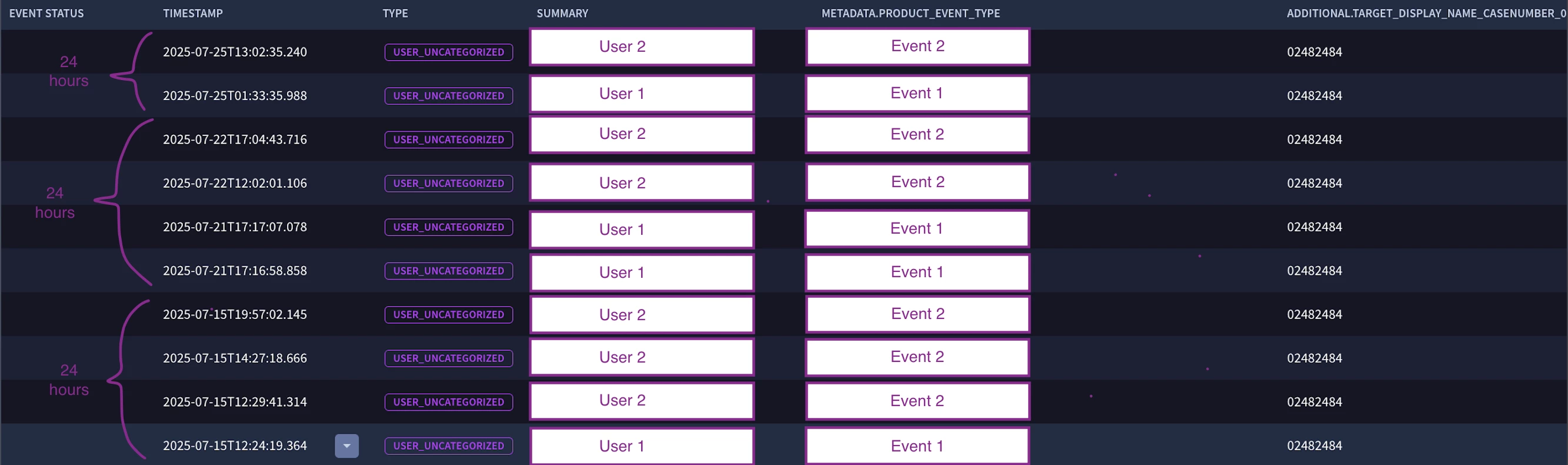
The log samples I'm working with are displayed in the following scenario. (This is an output from searching the product_event_types on SIEM search):


We have three different 24 hour timespan buckets of events, with different amounts of Events1 and 2. According to the context in my previous message, all these results are OK and do not need to be alerted, because for all Event2 occurrences there's at least one Event1 log in the referred timeframe.

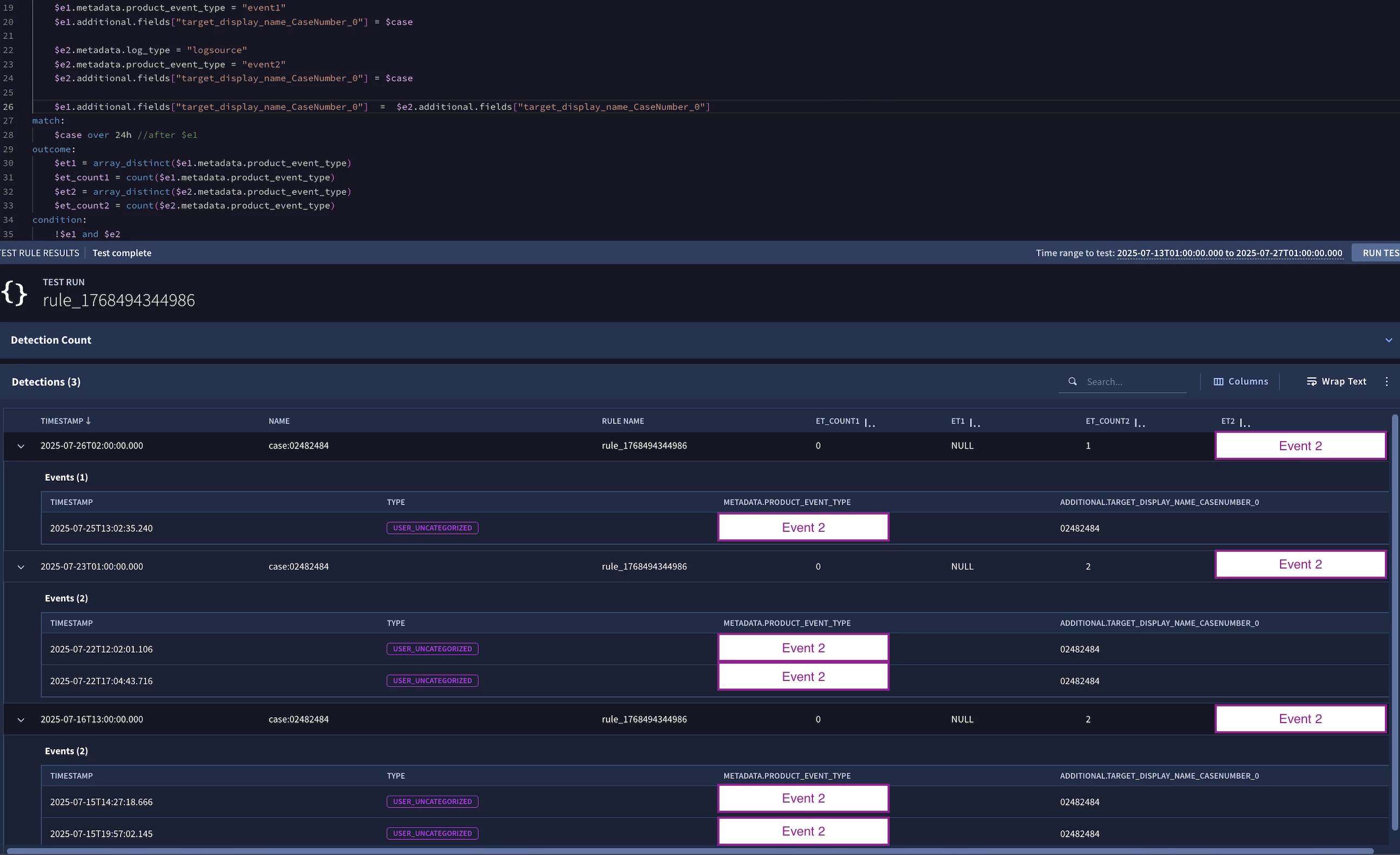
Now, when attempting to use the non-existence rule logic, this is the output detection:


The logic is resulting in a Detection pattern that's confusing me a bit, when comparing to the SIEM search results.

  • For timestamp 07/16, it looks like it combined a single occurrence of Event1 with a single occurrence of Event2, and alerted the rest of the Event2 logs in that 24 hour timespan.
  • For timestamp 07/23, it looks like it completely ignored both instances of Event1 and alerted both instances of Event2.
  • For timestamp 07/26, it looks like it completely ignored the only Event1 available in that 24 hour timespan and alerted the only Event2 in that same time.

I'm having trouble finding a workaround on the logic so that it looks into this 24 hour timespan and only alerts if there's an Event2 occurrence with no occurrence whatsoever of Event1 in it.

If you have any pointer on what I'm doing wrong here, It would be a huge help. 


Thanks again!


jstoner
Staff
Forum|alt.badge.img+23
  • Staff
  • January 15, 2026

I’m looking at the test results and they look like what i would expect, that is you get 3 hits where you have an event 2 and no event 1.


I get the issue you are talking about which is well actually there is a value in the last 24 hours. Keep in mind using over creates a hop window which is similar to a sliding window in that the same data point can exist in multiple time windows as it slides.


Another option that we recently added to the rules engine is to use a tumbling window where each data point can only exist in a single window. They keyword for tumbling windows is BY rather that OVER.


https://docs.cloud.google.com/chronicle/docs/yara-l/match-syntax#supported_time_windows


Forum|alt.badge.img+1
  • Author
  • Bronze 1
  • January 15, 2026

Jstoner man, you're the best.
Didn't know about tumbling window, practically solved the issue, this is great 🙏


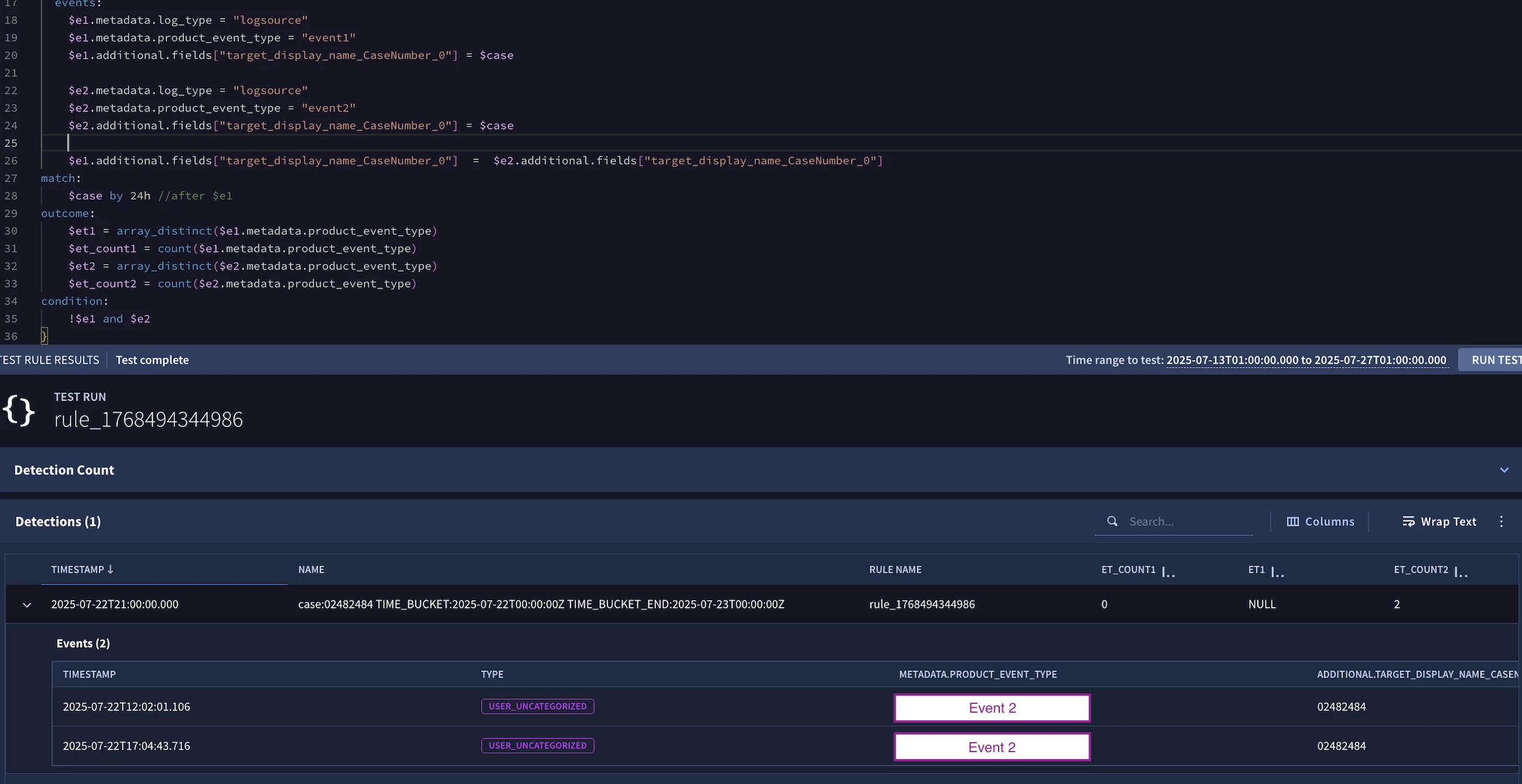
One last thing, although the grouping now is making sense as we're avoiding the overlapping data, the 07/23 detection (the one with two Event1 and two Event2) is still suffering due to it happening in a 24 hour timeframe that encompasses two different days (07/21 5PM ~ 07/22 5PM)

-----


Timebucket here is from 07/22 to 07/23, while the events happened at 07/21 and 07/22, so it figures that it was detected with the non-existence condition.

Is there anyway to circumvent this scenario with logic, or is it a cornercase that we must accept? 


jstoner
Staff
Forum|alt.badge.img+23
  • Staff
  • January 15, 2026

At the moment, our run frequency is near real (reserved for single event rules), 1 hour and 24 hour. You could set your rule to run either 1 or 24 hour frequency. There has been discussions about some additional scheduling to provide more fine grained rule running but I don’t have anything to share on that now. Also keep in mind that you can get different output from a rule test versus running the rule in production because in a test rule you are picking a specific interval and the system is chopping that time up based on that range.


Not saying this will change when you deploy the rule, but I have seen that in examples when I have had multi-event rules starting at 00:00 v 00:05 for instance.


I also included some additional rule detection delay doc info as this is handy to have as well.

https://docs.cloud.google.com/chronicle/docs/detection/detection-delays


One additional thought, I haven’t tried this yet but I’m wondering if you could add some additional logic in the events section that says 

timestamp.get_data($e1.metadata.event_timestamp.seconds) = timestamp.get_data($e2.metadata.event_timestamp.seconds)

Basically we are saying that the date would need to be the same for both. I don’t know exactly how that would work with non-existence or if it would even work with your use case but I’m trying to think of ways to knock the e1 events out of consideration, so I figured I would throw it out there.


Forum|alt.badge.img+1
  • Author
  • Bronze 1
  • January 15, 2026

I see, thanks for the information on the frequency and delay! 


One additional thought, I haven’t tried this yet but I’m wondering if you could add some additional logic in the events section that says 

timestamp.get_data($e1.metadata.event_timestamp.seconds) = timestamp.get_data($e2.metadata.event_timestamp.seconds)

Basically we are saying that the date would need to be the same for both. 


I tried testing here but got stuck in some compiling errors (compiler complained about the BY on match prompting me to use over instead, which I guess would go against the solution we worked here up to now)

Also, I agree with you that maybe this won't fit in a non-existence rule seeing as I'm looking into an $e2 without and $e1, so having the same date makes me think of a conflict similar to my initial issue with unbounded event variables, if I'm not misinterpreting something. It might fit better in a logic that doesn't monitor non-existence.

But regardless, the help you provided here was enough so we can continue developing the detection here.  

Main issue solved ✅

Huge thanks for the support and availability!