SOAR API endpoint - api/external/v1/logging/python

  • Dec 5, 2023 8:23 AM UTC
  • 4 replies
  • 220 views

_jc_
Forum|alt.badge.img+1

Hey everyone!

Has anyone had success with using this API endpoint on Chronicle SOAR to get Connector logs?

/api/external/v1/logging/python

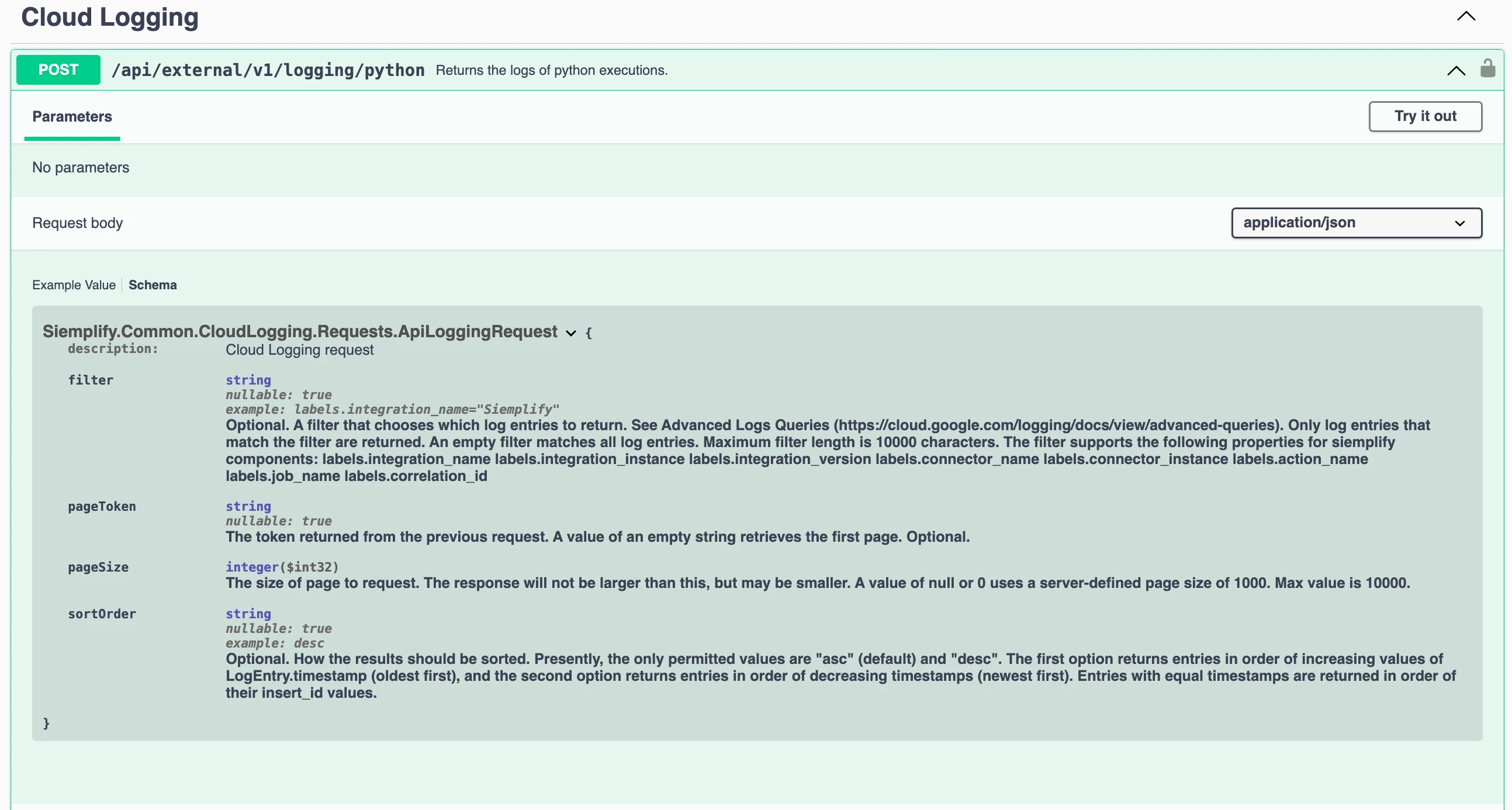
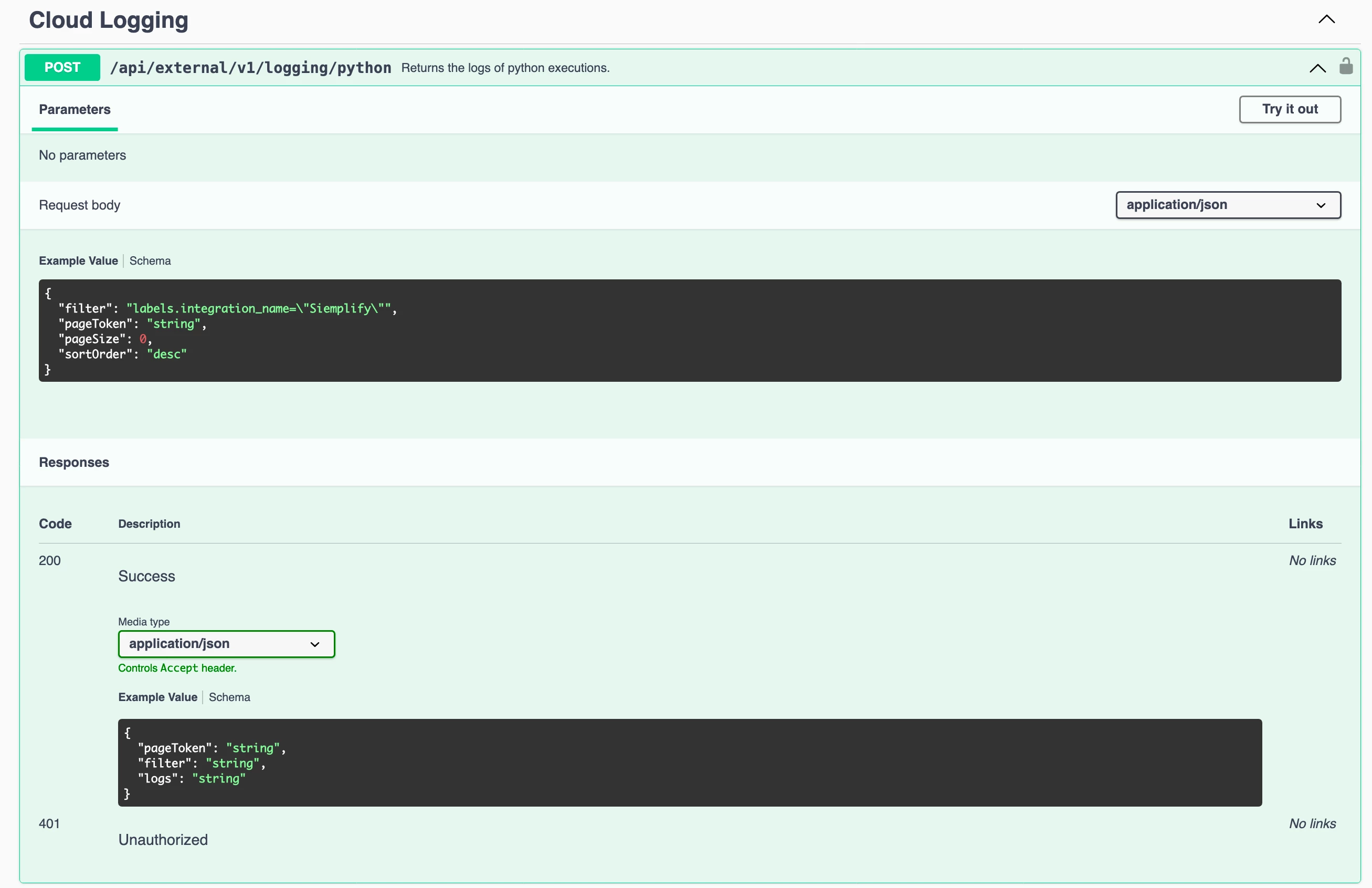
It's visible under Cloud Logging in Swagger. Swagger references the following sample config:


"filter": "labels.integration_name=\\"Siemplify\\"", "pageToken": "string", "pageSize": 0, "sortOrder": "desc"


I've been trying to adapt this to get my config working.


{ "filter": "labels.connector_name=\\"My Exchange Mail Connector v2 with Oauth Authentication\\"", "pageToken": "string", "pageSize": 0,"sortOrder": "desc" } '


In all instances, including just using the sample config, I get a 400 Bad Request error. Is there any documentation surrounding the data structures that we can use in that filter anywhere, or any instances where anyone has got a working configuration?

Thought I'd check in on this before going to Support.
 

4 replies

  • Dec 22, 2023 9:25 PM UTC

Did you try without the pageToken setting?


Forum|alt.badge.img+1
  • New Member
  • Jan 8, 2024 7:12 AM UTC

Here the Chronicle SOAR Logging API


Description of Parameters:


description: Cloud Logging request filter (string) - nullable: true - example: labels.integration_name="Siemplify" - Optional. A filter that chooses which log entries to return. See Advanced Logs Queries ( https://cloud.google.com/logging/docs/view/advanced-queries). Only log entries that match the filter are returned. An empty filter matches all log entries. Maximum filter length is 10000 characters. The filter supports the following properties for siemplify components: labels.integration_name labels.integration_instance labels.integration_version labels.connector_name labels.connector_instance labels.action_name labels.job_name labels.correlation_id pageToken (string) - nullable: true - The token returned from the previous request. A value of an empty string retrieves the first page. Optional. pageSize (integer($int32)) - The size of page to request. The response will not be larger than this, but may be smaller. A value of null or 0 uses a server-defined page size of 1000. Max value is 10000. sortOrder (string) - nullable: true - example: desc, asc - Optional. How the results should be sorted. Presently, the only permitted values are "asc" (default) and "desc". The first option returns entries in order of increasing values of LogEntry.timestamp (oldest first), and the second option returns entries in order of decreasing timestamps (newest first). Entries with equal timestamps are returned in order of their insert_id values.


Python3 Sample Request Script:


# Imports import requests import json reqUrl = "https:/{Chronicle_SOAR_Platform_BASE_Domain_TLD}/api/external/v1/logging/python" headersList = { "User-Agent": "REST Client", "AppKey": "{Chronicle_SOAR_API_KEY}", "Content-Type": "application/json" } payload = json.dumps({ "filter": "labels.integration_name=\\"{integration_name}\\"", "filter": "labels.integration_instance=\\"{integration_instance}\\"", "filter": "labels.integration_version=\\"{integration_version}\\"", "filter": "labels.connector_name=\\"{integration_connector_name}\\"", "filter": "labels.connector_instance=\\"{connector_version}\\"", "filter": "labels.action_name=\\"{integration_action_name}\\"", "filter": "labels.job_name=\\"{integration_job_name}\\"", "filter": "{}", "pageSize": 0, "sortOrder": "desc", "pageToken": "" } ) # use any one of filter for request, # parsing pageToken="" for first request, update the value if response contain value for iteration of request. response = requests.request("POST", reqUrl, data=payload, headers=headersList) return response


CURL Request Sample:


curl -X 'POST' \\ 'https:/{Chronicle_SOAR_Platform_BASE_Domain_TLD}/api/external/v1/logging/python' \\ -H 'accept: application/json' \\ -H 'AppKey: {Chronicle_SOAR_API_KEY}' \\ -H 'Content-Type: application/json' \\ -d '{ "filter": "labels.integration_name=\\"Siemplify\\"", "pageToken": "", "pageSize": 0, "sortOrder": "desc" }'


Happy Hunting.  


BRioux
  • New Member
  • Nov 13, 2026 6:59 PM UTC

With the api migration, do someone know where this endpoint would be in the future?
https://docs.cloud.google.com/chronicle/docs/soar/admin-tasks/advanced/api-migration-guide


matt-amastra
Forum|alt.badge.img+2

With the api migration, do someone know where this endpoint would be in the future?
https://docs.cloud.google.com/chronicle/docs/soar/admin-tasks/advanced/api-migration-guide

I am assuming your question arises because the documentation list this endpoint as N/A on the new API surface but you are using the old API in your environment. I am not a Googler so I can’t speak authoritatively to this but my assumption is that the SOAR logging endpoints have now been split out to each be their own endpoint by component instead of relying on filter expressions to target the particular logs you are interested in. So for example, this original thread was focused on Connector logs which can be fetched from this new endpoint:https://docs.cloud.google.com/chronicle/docs/reference/rest/v1/projects.locations.instances.integrations.connectors.connectorInstances.logs. I am not intimately familiar with what the connector logs looked like from the old endpoint, but I’d suggest testing with the new endpoint and comparing and if any of the context you need is missing, post the details here and we can explore in more depth routes to get data parity.