Question

Taking mitigation steps on a specific entity within the case

  • May 21, 2026
  • 5 replies
  • 75 views

Ryant
Forum|alt.badge.img+2

I’m trying to implement a workflow in Google SecOps SOAR where an analyst can manually select a specific IP address entity within a case and run a playbook that performs a mitigation action (e.g., block that IP).

The key requirement is that the playbook should only act on the selected entity, not all IP entities in the case.

Is there a way to trigger a full playbook execution scoped to a manually selected entity (similar to how actions can target specific entities), rather than running at the case level?

If this isn’t directly supported, what are the recommended workarounds (e.g., Entity Selection, loops, custom lists, or manual input prompts)?


For context, I’ve already explored:

- Entity Selection in playbooks

- Running actions with selected entities

- Quick/Manual actions

But I haven’t found a way to initiate a full playbook execution from a manually selected entity.

5 replies

Kyle_M
Staff
Forum|alt.badge.img+3
  • Staff
  • May 28, 2026

Hi ​@Ryant 


Great question! We cannot directly trigger a playbook scoped to a manually selected entity, but you can leverage Entity Selection and entity attributes to achieve your use case. Here is how you can set it up:

  1. Choose an Attribute - Identify a custom attribute to act as the flag. We’ll use ‘block_ip’ in our example and treat it as a boolean.
  2. Configure the Playbook - Add an Entity Selection step to the playbook or block. Set the condition to filter for entities where ‘block_ip’ equals ‘True’.
  3. Scope the Actions - Ensure your downstream actions (like your mitigation action) are scoped to the newly created entity scope.

When the analyst needs to run the playbook on manually selected entities, they will need to set the ‘block_ip’ attribute to ‘True’, then attach the playbook.  Since the attribute was set on the entity, the playbook will only act on those entities. 


Let me know if you have any questions!


Ryant
Forum|alt.badge.img+2
  • Author
  • Bronze 1
  • May 28, 2026

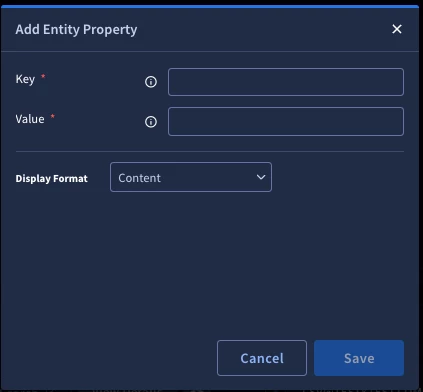
Thanks for the reply Kyle. I know there is the ability to create custom fields for the case, but I dont see any option to create custom fields/properties for entities other than manually creating the entity property on each entity.

If this is the only option I dont view this as a reasonable solution as it involves multiple clicks and typing the value as “True” on each entity.


Am I missing something?


AymanC
Forum|alt.badge.img+14
  • Bronze 5
  • May 29, 2026

Hi ​@Ryant,


We solve this via a quick action, similar to ‘Mark Entity as Suspicious’, but instead we update the entity with a custom field property (example in the below code is ‘IsCompromised’). We display this as a quick action in the case view, the Analyst clicks the quick action, perform entity selection and click execute. It will then mark those entities with ‘IsCompromised’ as ‘True’ (you can create this as a parameter, and use any entity field property).


In addition to this, it attaches a block to the case (change the ‘wf_name’, and ‘wf_id’. You can of course set these up as parameters), which then identifies those with ‘isCompromised’ as ‘True’, using the ‘Get Case Data’ action (within the ‘Tools’ response integration), to identify those that were selected via the quick action button.


Hope this helps


from ScriptResult import EXECUTION_STATE_COMPLETED
from SiemplifyAction import SiemplifyAction
from SiemplifyUtils import output_handler
import json

@output_handler
def main():
siemplify = SiemplifyAction()
siemplify.script_name = "Mark_Compromised_And_Attach_Playbook"

updated_entities = []

try:
for entity in siemplify.target_entities:
entity.additional_properties["IsCompromised"] = "True"
updated_entities.append(entity)

if updated_entities:
siemplify.update_entities(updated_entities)

count_updated = len(updated_entities)
siemplify.LOGGER.info(f"{count_updated} entities marked IsCompromised=True")

API_ROOT = siemplify.API_ROOT

wf_name = "WORK FLOW NAME"
wf_id = "WORK FLOW IDENTIFIER"
should_run_automatic = True

case_id = siemplify.case_id

alert_group_id = None

if hasattr(siemplify, "case") and siemplify.case and getattr(siemplify.case, "alerts", None):
alert_group_id = str(siemplify.case.alerts[0].alert_group_identifier)

elif siemplify.current_alert:
alert_group_id = str(siemplify.current_alert.alert_group_identifier)

siemplify.LOGGER.info(f"Selected alert_group_id: {alert_group_id}")

payload = {
"cyberCaseId": case_id,
"shouldRunAutomatic": should_run_automatic,
"wfName": wf_name,
"originalWorkflowDefinitionIdentifier": wf_id,
"alertGroupIdentifier": alert_group_id,
"alertIdentifier": None
}

siemplify.LOGGER.info(f"Attach Workflow Payload:\n{json.dumps(payload, indent=4)}")

url = f"{API_ROOT}/external/v1/playbooks/AttacheWorkflowToCase"
response = siemplify.session.post(url, json=payload)
response.raise_for_status()

response_data = response.json()

siemplify.end(
json.dumps({
"entities_updated": count_updated,
"workflow_attached": response_data,
"selected_alert_group_id": alert_group_id
}, indent=4),
count_updated,
EXECUTION_STATE_COMPLETED
)

except Exception as e:
if hasattr(e, "response") and e.response is not None:
siemplify.LOGGER.error(e.response.text)

siemplify.LOGGER.exception(e)
siemplify.end(f"Error executing action: {e}", str(e))


if __name__ == "__main__":
main()


Kind Regards,

Ayman


Ryant
Forum|alt.badge.img+2
  • Author
  • Bronze 1
  • June 3, 2026

Thanks AymanC. I got something like this working, but ran into another roadblock. It appears to run fine the very first time you run it on a case, but once the playbook is attached it will not allow you to run it for additional entities after the fact. Do you know of any way to re-run an already attached playbook via the api/custom action?


AymanC
Forum|alt.badge.img+14
  • Bronze 5
  • June 4, 2026

Thanks AymanC. I got something like this working, but ran into another roadblock. It appears to run fine the very first time you run it on a case, but once the playbook is attached it will not allow you to run it for additional entities after the fact. Do you know of any way to re-run an already attached playbook via the api/custom action?

Hey ​@Ryant,


Not tested this myself, but for V1 endpoints there’s two:


/api/external/v1/playbooks/RerunBlock

/api/external/v1/playbooks/RerunPlaybook


Kind Regards,

Ayman