


Hello! I’ve found a behavior that tripped me up for a while, so I thought I’d share it here to see if it’s normal and expected, or if other people have found the same behavior and have workarounds for it, or at least can keep it in mind if doing similar things.
So, it appears that when using SOAR placeholders to insert an alert variable that contains a ISO-8601 formatted string, the mere act of inserting the [Event.detection_outcomes_timestampField] placeholder reformats it into YYYY-MM-DDThh:mm:ss+00:00 (it drops any fractional seconds, and forces the timezone to UTC expressed as +00:00). This surprised us, because we were explicitly formatting those timestamps in the YARA-L search (in the outcome block, using the timestamp.get_timestamp function https://docs.cloud.google.com/chronicle/docs/detection/yara-l-2-0-functions/timestamp-get_timestamp) so they’d contain millis and be in our local timezone. Besides, timestamp.get_timestamp states that its output is a string, not some special DATETIME object, so I’d expect strings to never be altered just by inserting them with a placeholder.
We have a YARA-L search that looks like this:
outcome:
    $date_incident = timestamp.get_timestamp(max($e.metadata.event_timestamp.seconds), "%Y-%m-%dT%H:%M:%S.000%z", "America/Guayaquil")
    $date_detection = timestamp.get_timestamp(timestamp.current_seconds(), "%Y-%m-%dT%H:%M:%S.000%z", "America/Guayaquil")
which creates alerts with the date_incident and date_detection outcome variables in the specified format, so far so good:
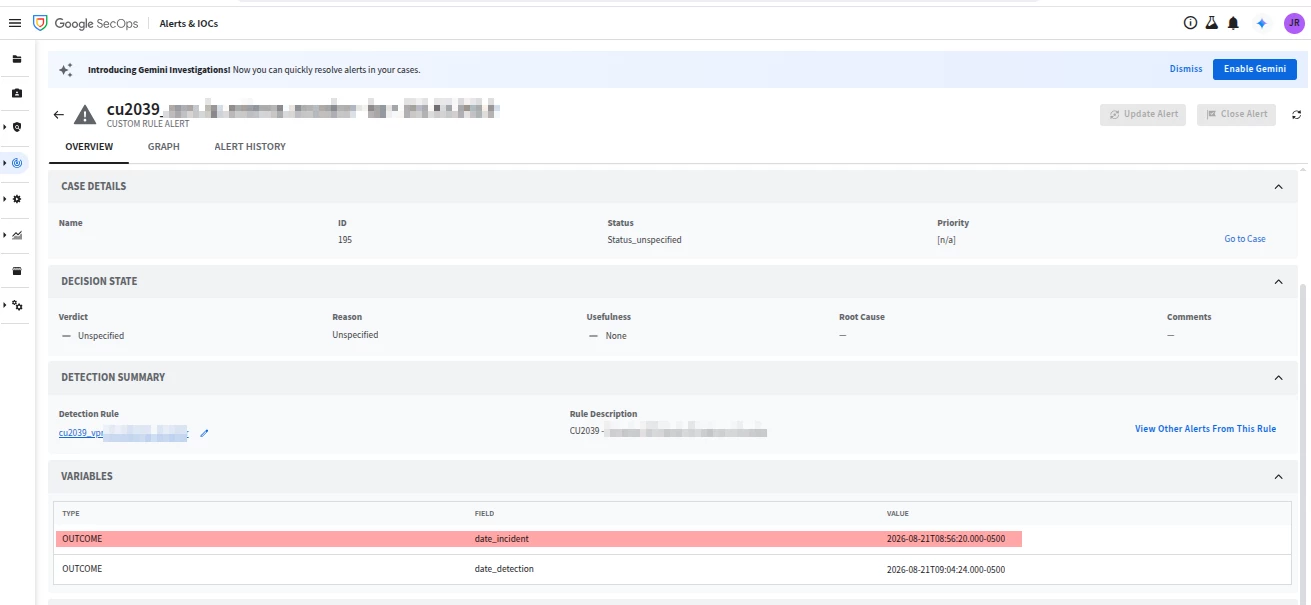
I’d expect the outcome variables to be just plain raw opaque strings from here on, so inserting them via SOAR placeholders would just write the exact same characters that I see in the alert’s data. Then, on a HTTP step on a SOAR playbook, we have this as part of a JSON body:
"date_incident": "[Event.detection_outcomes_date_incident]",
"date_detection": "[Event.detection_outcomes_date_detection]"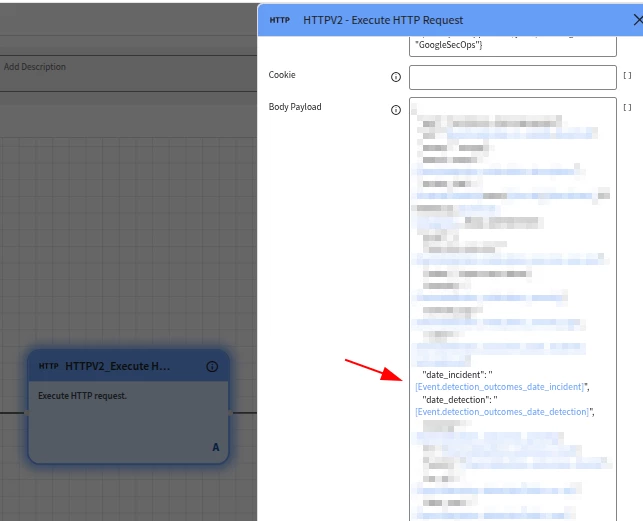
I’d expect that to just insert the date_incident and date_detection outcome variables, which would be strings and therefore would just be printed as-is into the output. However, that’s not what I see, and when running that step, the JSON body is rendered as follows:
"date_incident": "2026-08-21T13:56:20+00:00", "date_detection": "2026-08-21T14:04:24+00:00"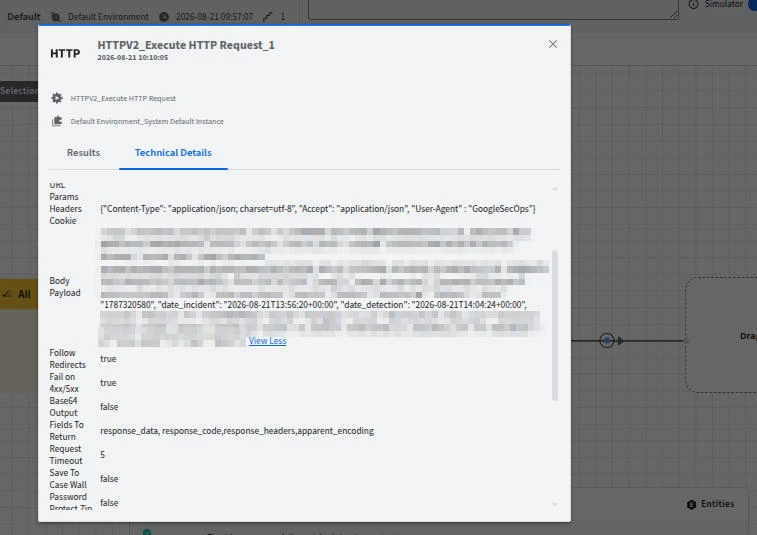
The timezone has been set to +00:00 (as opposed to the timezone that we manually set in the YARA-L rule, which was recorded in the alert’s outcome variables), the numerical value of the hour of day has changed (to match the changed timezone), and there are no longer milliseconds in the printed timestamp (sure, the date_incident and date_detection variables had .000 as the millis, but I’d expect them to be printed out by the placeholder, if it’s just treating the variables as strings)
We also see that same format in our destination system, so it isn’t just a display bug in the the Technical Details tab of the Simulator, it’s actually what is being sent out on the HTTP body:
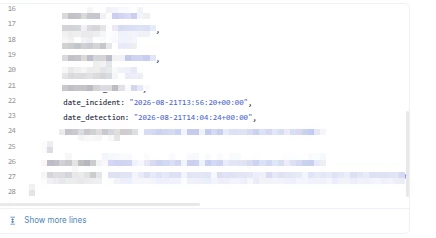
So, from what I can see, all timestamp-ish fields (alert variables) that you attempt to use in placeholders will always come out expressed in UTC, and in yyyy-MM-DDThh:mm:ss+00:00 format? This can be an issue for other (destination) systems, e.g. Jira https://developer.atlassian.com/cloud/jira/service-desk/rest/intro/#fieldformats requires date/time fields to contain a milliseconds part, even if all zeros (e.g. “2015-11-18T14:39:00.000+1100” must have the .000 before the timezone), so this magical reformatting means that now SecOps can’t directly create a Jira ticket (and yes, there’s probably a Jira integration in the Content Hub, but still, and there may be other less known/in-house destinations that will require HTTP requests). Or the fact that timestamps always come out in UTC means that it wouldn’t be possible to send an email to the user stating that “At 2026-08-21T12:20 your time, ...” because writing “At [Event.detection_outcomes_date_incident] your time” will display the Greenwich hour, even if the alert took care to express the time in the user’s local timezone in the $date_incident outcome variable.
Has anyone else experienced the same thing? For now, since we don’t need the actual milliseconds (so .000 is OK) and we can tolerate timestamps being expressed in UTC rather than our local timezone, we’ve taken to using placeholders like this: [Event.detection_outcomes_date_incident | replace("+00:00", ".000+00:00")] This (very hackily) converts “2026-08-21T13:56:20+00:00” into “2026-08-21T13:56:20.000+00:00”, by inserting .000 just before the timezone. But it still feels surprising to have a string variable be magically reformatted into a fixed time format when the incoming string looks like a timestamp.
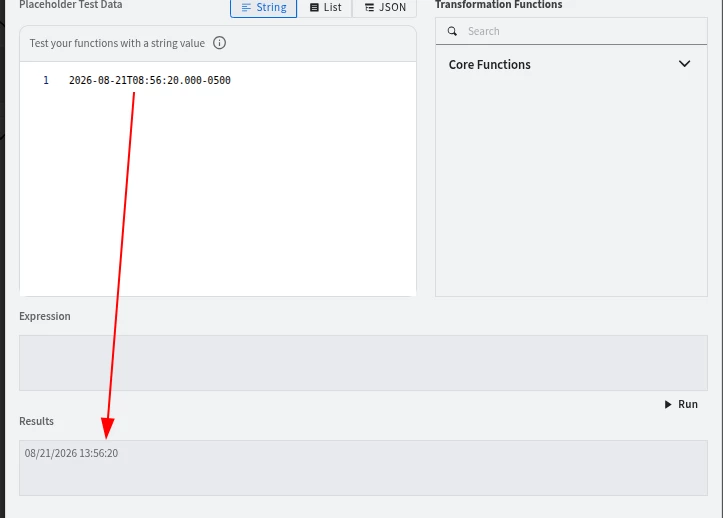
Furthermore (i just found out while attempting to understand the problem above), the Expression Builder also has some weirdness there. If you write “2026-08-21T08:56:20.000-0500” (without the quotes) in the Placeholder Test Data field, and just click the Run button, you get out “08/21/2026 13:56:20“, so it clearly reformatted the string into another, not-user-controlled format. I’d expect that, if the Expression field is empty, that should just pass through whatever was in the Test Data field into the Results field, with no changes performed. Instead, it appears to have parsed the input as a date, changed it to US-style date (month/day/year), the time separated by a space rather than the ISO-8601 T, there’s no longer a timezone specifier, and it has been re-expressed in UTC:
However, if you now add the filter | replace("+00:00", "+00:00") in the Expression field (which should do absolutely nothing, as it’s just replacing X by X), it now has a different output “2026-08-21T13:56:20.0000000+00:00” (now with microseconds and the timezone changed to UTC and explicitly shown, the previous one with no filter did change the timezone to UTC but didn’t print it):
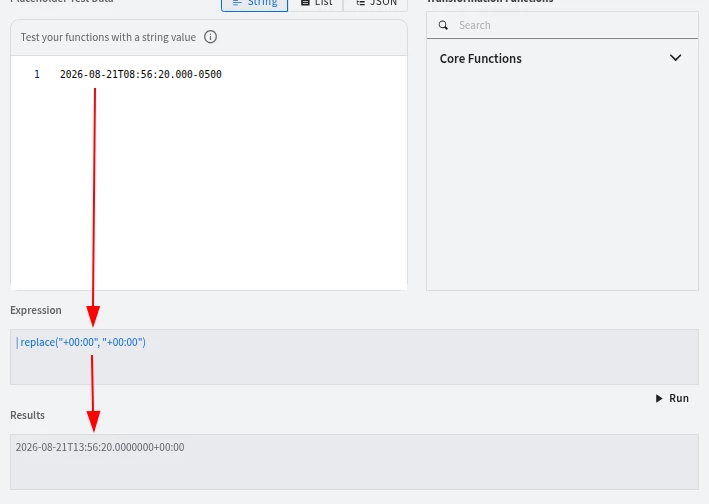
And, even weirder, neither of those outputs match what you get when actually running the playbook with that placeholder! Inserting [Event.detection_outcomes_date_incident] as a placeholder generates a string like “2026-08-21T13:56:20+00:00”



