

Solved

Triger alert at a specific time

  • January 26, 2026
  • 4 replies
  • 63 views

Forum|alt.badge.img+2

Hi, 


I have a rule created that is to see the users that have used vpn after business hours for the day adn this is for informational purposes only and i want this to be triggered only once per day at a certain time. Eg: 12 AM. 

how can i set this time

i have made the metch section to be 24 hours, but i want to know how i can set a specific time like 12 am for the rule to be triggered. 
Best answer by cmmartin_google

Hi ​@ShaliniPerera 

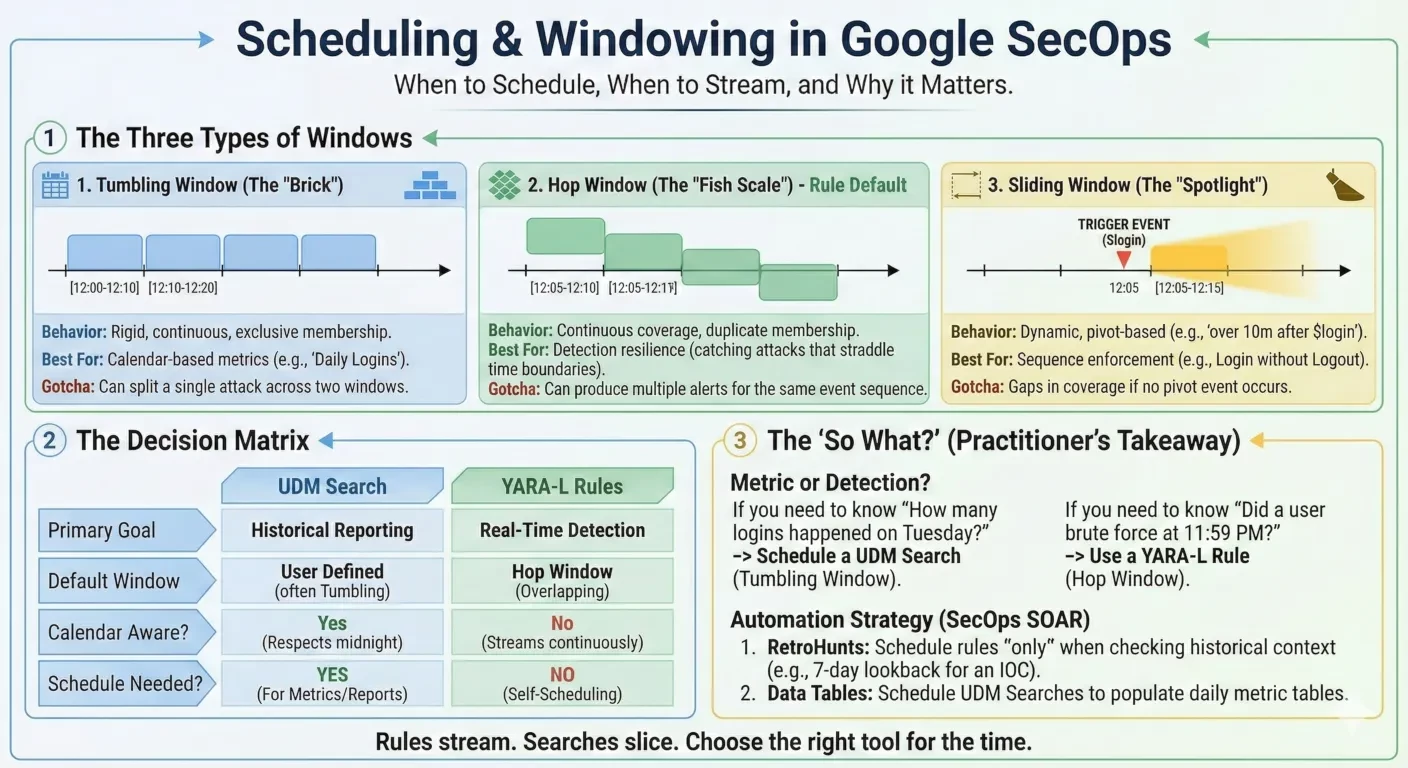
This was an interesting question, and after looking into it I ended up writing a blog post about the topic: 

https://medium.com/@thatsiemguy/windowing-and-scheduling-2be63779cd0a

I explore the difference types of Windowing capabilities in Google SecOps, and so if you in effect need to create calendar day metrics then using scheduled UDM Searches may be the most optimal approach, but if time precision (the detection window start and end time) are not an issue, you can use a Hop Windows in YARA-L with an over by 1d, and then apply time based filters to exclude working hours, so in effect no scheduler would be needed.


4 replies

Jyotimoyhaz
Forum|alt.badge.img
  • Bronze 1
  • January 26, 2026

Make a specific time


Forum|alt.badge.img+2
  • Author
  • Bronze 1
  • January 26, 2026

Make a specific time

Hii, thank you for replying. can you explain a bit more on this please. 


Jyotimoyhaz
Forum|alt.badge.img
  • Bronze 1
  • January 26, 2026

You can make trigger time as 8pm for example no need to go for 12am as simple as that


Forum|alt.badge.img+12

Hi ​@ShaliniPerera 

This was an interesting question, and after looking into it I ended up writing a blog post about the topic: 

https://medium.com/@thatsiemguy/windowing-and-scheduling-2be63779cd0a

I explore the difference types of Windowing capabilities in Google SecOps, and so if you in effect need to create calendar day metrics then using scheduled UDM Searches may be the most optimal approach, but if time precision (the detection window start and end time) are not an issue, you can use a Hop Windows in YARA-L with an over by 1d, and then apply time based filters to exclude working hours, so in effect no scheduler would be needed.

