
Solved

Upwind default parser documentation link returns 404

  • August 11, 2026
  • 1 reply
  • 37 views

phlucas
Forum|alt.badge.img

Hi team,

I noticed an issue with the Google SecOps documentation for the Upwind default parser.

The Upwind integration is currently listed on the Supported default parsers page with the ingestion label UPWIND:


https://docs.cloud.google.com/chronicle/docs/ingestion/parser-list/supported-default-parsers
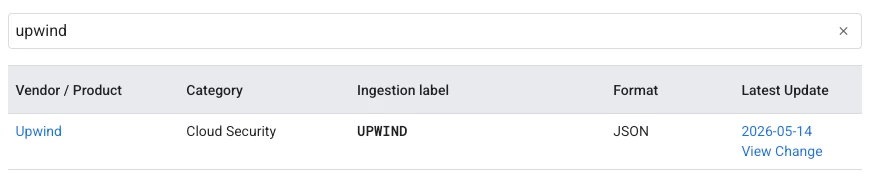
 

However, when clicking Upwind to access the parser/integration setup documentation, the following page returns a 404 – Page not found:

https://docs.cloud.google.com/chronicle/docs/ingestion/default-parsers/upwind


Could you please confirm whether the documentation URL has changed or if the Upwind setup guide is currently unavailable?

Best answer by thineth_dasun

Hi @phlucas,

Thank you for flagging this broken documentation link!

This usually happens when the documentation team updates the URL structure or when a newly added default parser guide is still undergoing indexing/publishing across the Google Cloud SecOps docs.

Here are a few quick steps to get around this in the meantime:

  1. Verify Ingestion Label in SecOps UI: Since the UPWIND ingestion label is actively listed in the default parsers table, the parser itself is supported. You can configure data ingestion directly from your Google SecOps Settings > Ingestion > Feeds using the UPWIND ingestion label with the expected JSON payload format.

  2. Report via Documentation Feedback: Scroll down to the bottom of the Supported Default Parsers page and click "Send Feedback" or "Is this page helpful? -> No" to submit a broken link report directly to the Technical Writing team for a quick fix.

I've also flagged this issue so the Google Cloud Documentation team can review and restore the Upwind parser setup guide URL.                                   

1 reply

thineth_dasun
Forum|alt.badge.img+6
  • Bronze 4
  • Answer
  • August 11, 2026

Hi @phlucas,

Thank you for flagging this broken documentation link!

This usually happens when the documentation team updates the URL structure or when a newly added default parser guide is still undergoing indexing/publishing across the Google Cloud SecOps docs.

Here are a few quick steps to get around this in the meantime:

  1. Verify Ingestion Label in SecOps UI: Since the UPWIND ingestion label is actively listed in the default parsers table, the parser itself is supported. You can configure data ingestion directly from your Google SecOps Settings > Ingestion > Feeds using the UPWIND ingestion label with the expected JSON payload format.

  2. Report via Documentation Feedback: Scroll down to the bottom of the Supported Default Parsers page and click "Send Feedback" or "Is this page helpful? -> No" to submit a broken link report directly to the Technical Writing team for a quick fix.

I've also flagged this issue so the Google Cloud Documentation team can review and restore the Upwind parser setup guide URL.