Solved

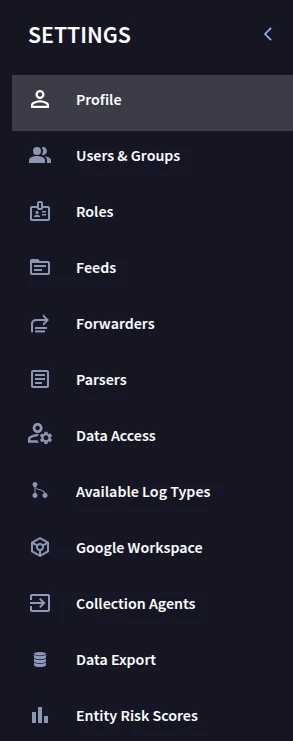
Where is the Data Retention tab in SecOps SIEM Settings?

  • September 30, 2025
  • 6 replies
  • 116 views

ar3diu
Forum|alt.badge.img+8

Hi,


I can't find the Data Retention tab in the SecOps SIEM Settings, even as an administrator. Where else can I check the retention interval for logs in the SIEM?

 

Best answer by James_E

The new feature is expected to be rolled out starting 10/2. The rollouts take a little bit, so if you don’t see it by Friday, check early next week.

6 replies

dnehoda
Staff
Forum|alt.badge.img+16
  • Staff
  • October 1, 2025

There is not one - this needs to be done by your CS or account team.  


James_E
Staff
Forum|alt.badge.img+8
  • Staff
  • Answer
  • October 1, 2025

The new feature is expected to be rolled out starting 10/2. The rollouts take a little bit, so if you don’t see it by Friday, check early next week.


ar3diu
Forum|alt.badge.img+8
  • Author
  • Silver 2
  • October 2, 2025

So apparently if you add settings/data-retention to the secops URL, it will open the Data Retention page in SIEM Settings.


James_E
Staff
Forum|alt.badge.img+8
  • Staff
  • October 2, 2025

This could be the case for some as it rolls out. I still get a 404 when I navigate to settings/data-retention.


AymanC
Forum|alt.badge.img+13
  • Bronze 5
  • October 23, 2025

Hi ​@ar3diu,


For us, even after the roll-out data it wasn’t visible, we raised a support ticket and was able to see the page in the UI. If you still don’t see it in the UI (Although you can navigate it via adding it in the URL as mentioned), it may be worth raising a support ticket.


Kind Regards,

Ayman


ar3diu
Forum|alt.badge.img+8
  • Author
  • Silver 2
  • October 24, 2025

Thanks ​@AymanC !




