Yara-L Query error

  • May 28, 2025
  • 6 replies
  • 53 views

Forum|alt.badge.img+8

Hello Im performing a search based on data table an im getting this error 
Error: Search has encountered an error and could not load data. Please try again, and contact support if this error continues.

events:
$e.metadata.log_type = "SENTINELONE_ALERTS"
$e.security_result.threat_name != ""

(
$e.principal.hostname = /^B|^F|^C|^D/ nocase 
AND $e.principal.ip in %auto_data_table_network_xx_country_xxx.cidr 
)

What i have to change in my Query ? thanks

6 replies

JeremyLand
Staff
Forum|alt.badge.img+7
  • Staff
  • May 28, 2025

Your search syntax looks correct (assuming the data type is actually set to CIDR on the %auto_data_table_network_xx_country_xxx.cidr column)

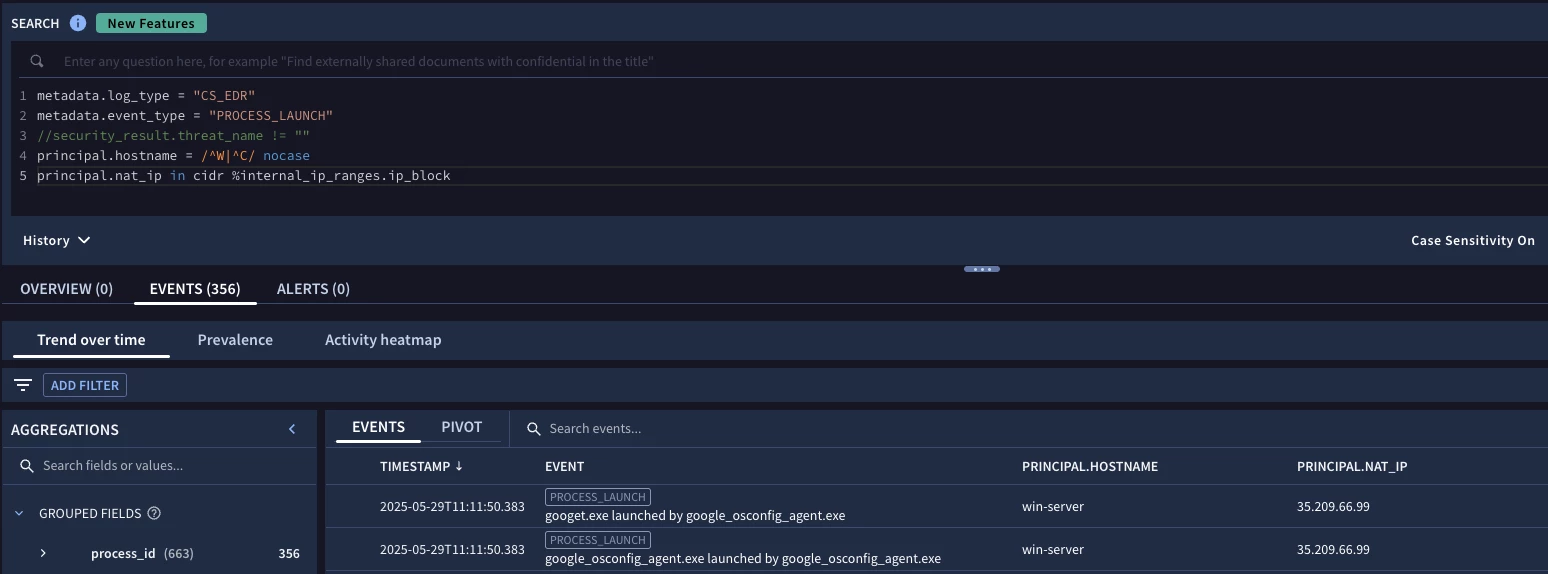
Can you try to toggle the search case sensitivity (by the timerange selector on the right) to 'on'?
When I test this query in my lab I noticed an error where the search compiler incorrectly tries to call a nocase on the `in cidr` if that is set to the default 'off', and toggling allowed the query to execute.  If that doesn't resolve the issue you may need to submit a support case for further investigation.


jstoner
Staff
Forum|alt.badge.img+22
  • Staff
  • May 28, 2025

I'm going to make a few assumptions including the data table you created has a data type of CIDR for the column of interest. I will also mention that if there isn't other parenthesis in the search you don't need the ones you have.

That all said, $e.principal.ip in cidr %auto_data_table_network_xx_country_xxx.cidr is the syntax you should be using for a column match with data tables.


Forum|alt.badge.img+8
  • Author
  • Silver 2
  • May 28, 2025

Yes the type of column is CIDR. no need to change it to string ?
I removed the paranthesis and still getting the same error


jstoner
Staff
Forum|alt.badge.img+22
  • Staff
  • May 28, 2025

The keyword cidr is missing from your query based on what you showed me, take a look at the above message and note the placement in bold


chrisd2
Forum|alt.badge.img+9
  • Bronze 5
  • May 29, 2025

The keyword cidr is missing from your query based on what you showed me, take a look at the above message and note the placement in bold


Hello @jstoner , if the DT column is typed as CIDR the `cidr` keyword is not needed (source).
I think that it is a bug, I could replicate like @JeremyLand and turning the UI setting `Case sensitivity On` got rid of the error popup that appears when it is set to `Off`


jstoner
Staff
Forum|alt.badge.img+22
  • Staff
  • May 29, 2025

Alright, lots to unpack here, thanks for the much closer reading of the doc @chrisd2, I got to the section above that for the content I've built and thought it was a continuation of the behavior of the reference lists and didn't see that additional update.

Case Sensitivity appears to be the culprit. I moved this over the rules engine and it worked fine as well. Note I left CIDR in there as old habits die hard but it does in fact work with or without it as long as the data type for the column is set to CIDR.