
Hi,
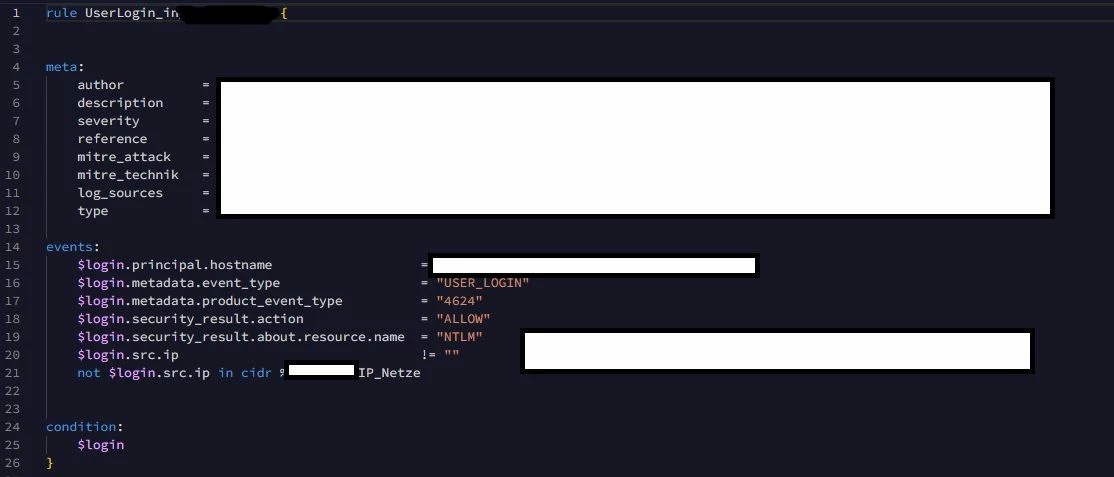
i have wrotten a new Rule, but it shows always 2 or more Events/Alerts. I want to see only one Event at a succesfully Login. I have posted Screenhot. How can i configure it?
Best regards


 +1
+1Hi,
i have wrotten a new Rule, but it shows always 2 or more Events/Alerts. I want to see only one Event at a succesfully Login. I have posted Screenhot. How can i configure it?
Best regards
Best answer by jstoner
In the original email, you mention multiple events/alerts. As I read through this thread, as Dan points out, we can't solve multiple 4624 events from Microsoft being logged (at least not at the rule level), but we can roll those multiple events being generated into a single detection/alert using the match section in a rule.
By adding a placeholder variable(s) in the events section, like these for example
$login.target.user.userid = $userid

$login.principal.hostname = $hostname
We could then add a match section
match:
  $hostname over 5m

match:
  $userid over 5m

match:
  $hostname, $userid over 5m
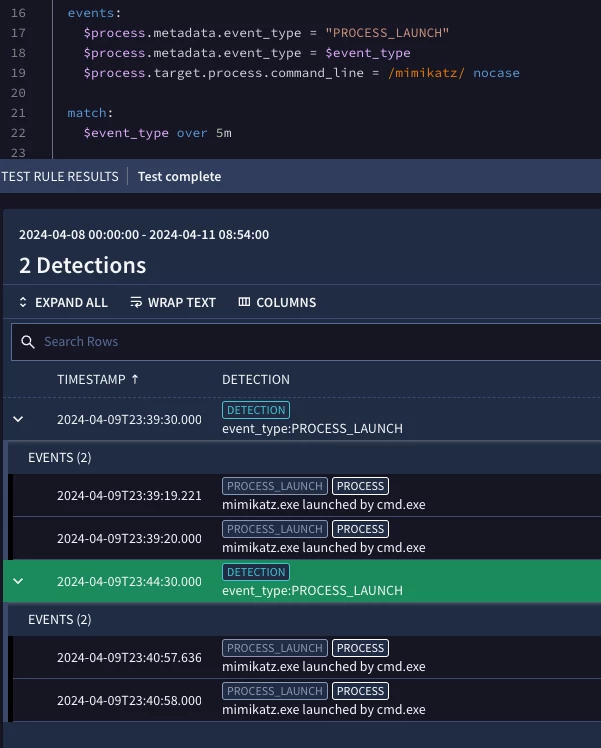
And the result would be that all events that match the criteria in the event section are grouped by whatever value(s) are in the match section over the defined period of time.
Here is a quick video on aggregation that might be helpful: https://www.googlecloudcommunity.com/gc/Chronicle-Best-Practices/Getting-to-Know-Chronicle-SIEM-Aggregating-events-in-rules/ta-p/635507
This isn't like for like, but an example on mimikatz and process launches that might help as well.
Enter your E-mail address. We'll send you an e-mail with instructions to reset your password.






