



Author: Ivan Ninichuck
Introduction
Multiple Environments in Google SecOps SOAR (Security Orchestration, Automation, and Response) serve as critical logical containers, enabling robust data segregation, controlled access, and specialized automation workflows. Leveraging environments is a best practice for organizations and Managed Security Service Providers (MSSPs) seeking to run diverse security operations from a single platform instance. By treating a single instance as a multi-tenant architecture, organizations can maintain a "Single Pane of Glass" for high-level oversight while enforcing strict boundaries at the operational level. This architecture prevents data leakage, simplifies compliance auditing, and allows for the safe simultaneous execution of disparate security mandates.
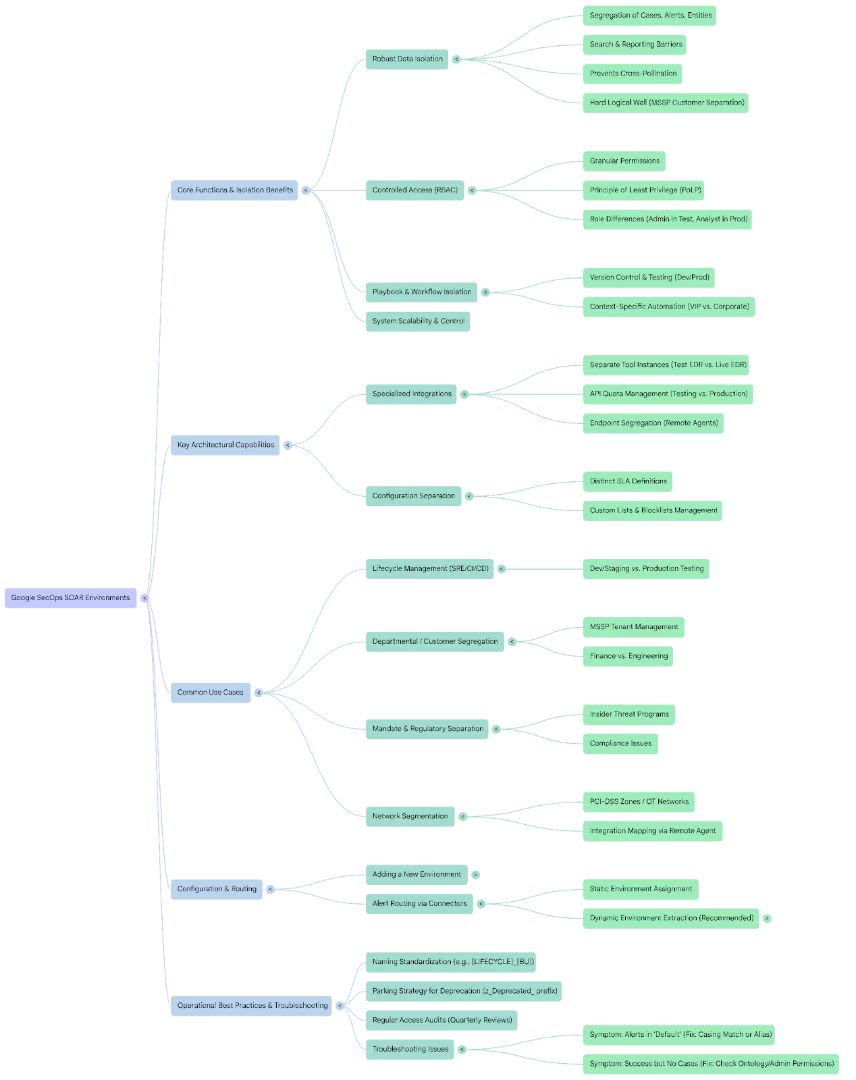
Concept Overview: Benefits of SOAR Environments
Environments provide a powerful layer of control and isolation, ensuring that different security teams, customers, or stages of development can operate independently while utilizing the same platform. Beyond simple organization, this architecture offers critical technical advantages regarding system performance and API management.
Isolated Cases and Playbook Usage
Playbooks and case management workflows can be tailored and deployed specifically to an environment, ensuring that the appropriate automated and manual response steps are executed only on the relevant alerts and cases.
- Version Control and Testing: This isolation allows engineers to modify a playbook in a "Development" environment without affecting the active version running in "Production."
- Context-Specific Automation: A phishing playbook in a "Corporate" environment might trigger an unconditional password reset, whereas the same playbook in a "VIP/Executive" environment might trigger a "White Glove" manual approval task first. The environment tag dictates which logic block executes, preventing operational errors.
Complete Data Isolation
Environments achieve data segregation, meaning cases, alerts, and entities ingested into one environment are logically isolated from others. Users can only view and interact with data residing in environments to which they are assigned access.
- Search and Reporting Barriers: When an analyst runs a global search or generates a report, the results are strictly filtered by their environment permissions. This is crucial for preventing "Cross-Pollination" of data, ensuring that an analyst working on a highly sensitive HR investigation cannot accidentally correlate that data with standard IT alerts, and vice versa.
- Wall of Separation: In MSSP scenarios, this acts as a hard logical wall, guaranteeing that Customer A's intellectual property or threat intelligence hits are never visible to Customer B's analysts.
Role-Based Access Control (RBAC)
Access rights are tied to environments. Administrators can dictate precisely which environments a user or security role can access, ensuring strict control over sensitive data and production workflows.
- Granular Permissions: You can assign a user the "Administrator" role in a "Testing" environment (giving them full freedom to break and fix configurations) while assigning that exact same user a "Read-Only" or "Tier 1 Analyst" role in the "Production" environment. This implements the Principle of Least Privilege (PoLP) effectively across the SOC lifecycle.
Specialized Integrations
Integrations (connectors and actions) can be installed and configured specifically for chosen environments. This allows different environments to connect to different instances of third-party tools (e.g., a Development environment connects to a test EDR instance, while Production connects to the live EDR instance).
- API Quota Management: This is critical for system health. If you have a sandbox environment running aggressive stress tests, you can configure it to use a separate API key or a completely different instance of a threat intelligence provider. This ensures that testing activities do not exhaust the API rate limits required for live, production security monitoring.
- Endpoint Segregation: It allows for the mapping of specific "Remote Agents" to specific environments. An integration running on an agent inside a restricted network segment (like a PCI-DSS zone) can be tied exclusively to the "PCI" environment within SOAR.
Configuration Separation
Many SOAR configuration settings and specific system preferences—can be different across environments, providing granular control over the operational experience.
- SLA Definitions: You can define different Service Level Agreements (SLAs) per environment. A "Critical Infrastructure" environment might have a 15-minute response SLA, while a "Corporate IT" environment might have a 4-hour SLA. These are configured specifically under Settings > Environments > SLA.
- Custom Lists and Blocklists: You can manage distinct blocklists or custom entity lists (like "VIP Users" or "Critical Servers") for each environment. This ensures that a server considered "Critical" in the Production environment does not trigger false positives if a server with the same hostname exists in the Staging environment.
Step-by-Step Guide to Adding a New Environment
- Navigate to Settings: In the Google SecOps SOAR console, navigate to SOAR Settings (often found under an Administration or Gear icon)
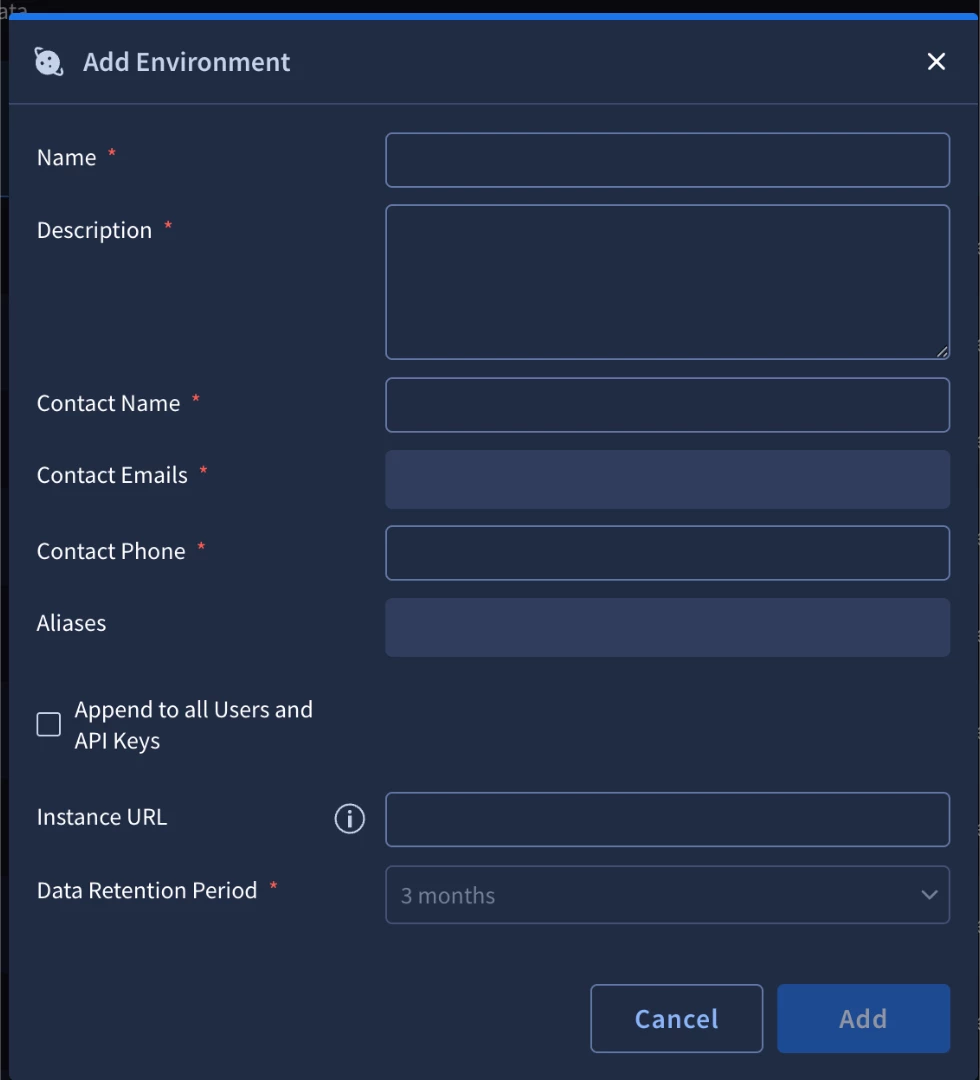
- Access Environments: Go to Organization > Environments.
- Add Environment: Click the + icon (or Add Environment) to open the configuration dialog.
- Define Properties:
- Enter a Name for the new environment (e.g., Staging, Customer_A_Prod). Choose a naming convention that allows for easy sorting (e.g., PROD_Finance, TEST_Finance).
- (Optional) Define an Alias Name if the environment name must match a specific tenant or identifier used in a third-party integration. This is particularly useful if your SIEM sends a simplified tenant ID (like T-101) but you want the display name in the SOC to be readable (like Acme_Corp). The Alias allows the connector to map T-101 to Acme_Corp automatically.
- Configure Access (Optional): Select the option to Append to all Users and API Keys if you want to automatically grant access to this new environment to all existing users and integrations.
- Warning: If left unchecked, you must manually assign users and API keys to the new environment via the User Management section. However, for sensitive environments (like "Insider Threat"), you should never check this box, as it would immediately grant visibility to all current users.
- Create: Click Add to finalize the new environment.
Common Use Cases for Multiple Environments
Environments are not merely a feature for large organizations; they are foundational for managing complexity, compliance, and lifecycle management within the SOC.
Regulatory and Mandate Separation
Multiple teams could be using SecOps that have very different needs. For example, a team focused on data loss prevention, compliance issues, or other narrow mandates would need a very different type of investigation workflow and stricter data protection than might be the case for common usage by general SOC analysts. Environments ensure these workflows and data protection settings remain strictly separated.
- Insider Threat Programs: These investigations often involve sensitive employee data that standard SOC analysts should not see. By creating a dedicated "Insider Threat" environment, access can be restricted to a handful of vetted investigators, ensuring that standard admin activity or alert triage does not expose internal personnel investigations.
Departmental/Customer Segregation (MSSP)
For large organizations, distinct needs and configurations across departments (e.g., Finance vs. Engineering) may warrant separate environments. This simplifies the organization of playbook triggers and investigation steps where a lot of variation is needed. This use case is especially critical for an MSSP (Managed Security Service Provider) using different environments to separate and manage different customers.
- Tenant Management: For an MSSP, an environment equals a "Tenant." This allows for unique branding, reporting, and customer portals per environment. It also facilitates "Bring Your Own License" (BYOL) models, where Customer A provides their own VirusTotal API key for their environment, distinct from the MSSP’s shared license.
Software Reliability Engineering (SRE) / Lifecycle Management
This is one of the most common and beneficial use cases. It is standard practice to have a Dev/Staging environment where new alerts, detection rules, and response playbooks can be safely tested, tweaked, and debugged before pushing validated content into the Production environment.
- The CI/CD Pipeline for SOAR: Security Engineers can build a playbook in "Dev," simulate alerts to trigger it, and verify the output. Once validated, they can use the IDE or Marketplace features to export the package and import it into "Production." This reduces the risk of a broken playbook causing an outage in the live SOC.
Network Segmentation and Restricted Zone Access (OT/PCI)
A highly technical use case for environments is bridging the gap between a cloud-based SOAR instance and isolated, high-security on-premise networks, such as PCI-DSS zones or Operational Technology (OT) networks.
- The Architecture: You can deploy a "Remote Agent" (a lightweight forwarder) directly inside a restricted zone (e.g., a locked-down manufacturing network). You then create a dedicated Environment in SOAR (e.g., OT_Production) to represent this zone.
- Integration Mapping: Within the OT_Production environment, you configure your integrations (like Firewall controls or Active Directory) to execute specifically via that internal Remote Agent.
- Secure Execution: This setup allows the cloud-based SOAR to orchestrate actions inside the restricted network without opening inbound firewall ports. The Remote Agent maintains a secure outbound connection to the SOAR cloud. When a playbook runs in the OT_Production environment, the action instructions are tunneled down to the agent, executed locally behind the firewall, and results are sent back up. This maintains strict network segmentation while enabling centralized automation.
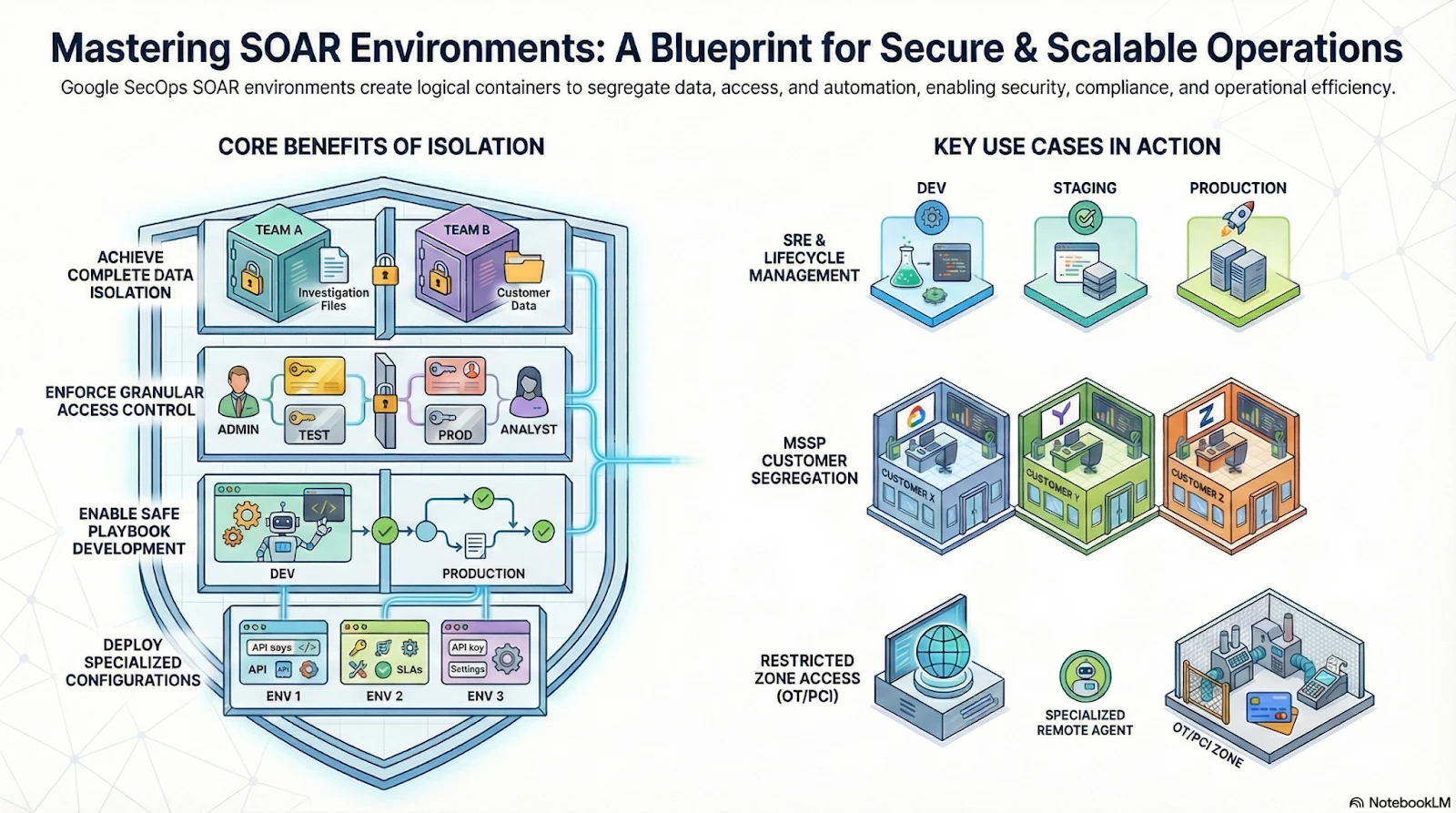
Operational Best Practices for Environment Management
To maintain a healthy SOAR instance, administrators should adhere to strict lifecycle management policies for their environments.
1. Naming Standardization
Inconsistent naming conventions are the leading cause of regex routing failures.
- Bad Practice: Naming environments ad-hoc, such as Finance, prod-hr, and TESTING_IT.
- Best Practice: Adopt a strict hierarchical naming schema, such as [LIFECYCLE]_[BU]_[REGION]. Examples: PROD_FINANCE_US, TEST_HR_EU. This makes regex matching predictable and simplifies sorting in the UI.
2. The "Parking" Strategy for Deprecation
When an environment is no longer needed (e.g., a customer churns or a project ends), deleting it immediately deletes all associated case data and logs.
- Recommendation: Rename the environment with a z_Deprecated_ prefix (e.g., z_Deprecated_CustomerA). This pushes it to the bottom of your environment list, preventing accidental selection while preserving data for audit retention periods.
3. Regular Access Audits
Environments with high sensitivity (Insider Threat, Executive Protection) should undergo quarterly access reviews. Administrators should verify that the "Append to all Users" setting remains disabled and that only specific users have been manually added to the allowlist for that environment.
Dynamic Alert Routing via Connectors (Regex Pattern)
Alerts are ingested into SOAR via Connectors. Connectors are configured to pull data from sources like a SIEM or EDR, and you must tell the connector which environment to place the incoming alerts into. While simple setups can use a 1-to-1 mapping, enterprise setups require intelligent routing.
The most flexible way to route alerts is to use dynamic routing based on the alert data itself, which leverages regular expressions.
Static Environment Assignment
In the connector configuration (SOAR Settings > Ingestion > Connectors), you can simply select a fixed environment (e.g., Production) from the Environment dropdown field. All alerts ingested by this connector will go to that environment. This is best for dedicated connectors (e.g., a connector that only talks to the "Development" SIEM instance).
Dynamic Environment Extraction (Recommended)
To route alerts dynamically based on their content, you must use two parameters:
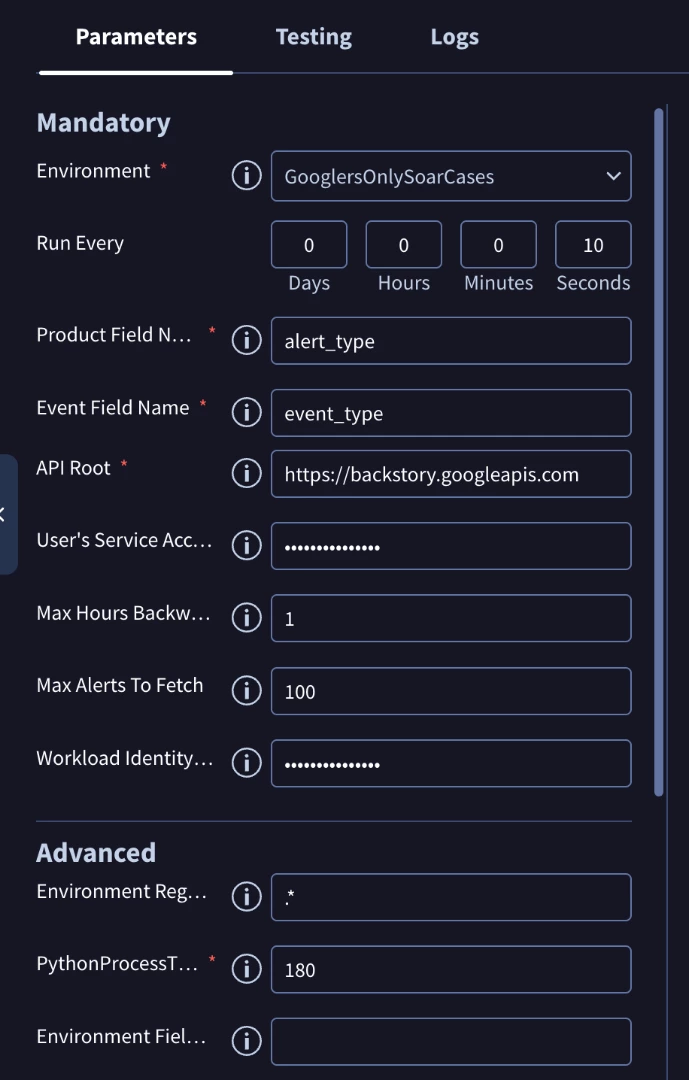
- Environment Field Name: Enter the JSON key (or field name) from the ingested alert data that contains the environment-defining value. For example, if your alert has a field like "tenant_id": "TA-456", you would enter tenant_id here. If the field is nested, ensure you use the correct dot-notation path supported by the integration.
- Environment Regex Pattern: This is the powerful component. You provide a regular expression pattern to run on the value extracted from the Environment Field Name field. This allows you to manipulate or extract a specific segment of the value.
Practical Regex Scenarios
Example 1 (Simple Match):
If the field value in the log is the exact environment name (e.g., "source": "Production"), use .* as the pattern. The connector will attempt to match the full value to an environment name defined in your SOAR settings. If the names do not match exactly (case-sensitive), the alert may fall back to the Default Environment defined in the connector.
Example 2 (Extraction/Capture Groups):
If the field value is acme-prod-us but your environment name is simply acme-prod, you could use a regex pattern with a capture group like (acme-prod).* to extract just the environment name. The matched group becomes the environment destination.
- Input: server-log-finance-001
- Desired Environment: finance
- Regex: server-log-(.*?)-\d+
- Result: The system extracts finance and routes the alert to the finance environment.
Example 3 (Prefix Removal for MSSPs):
Managed providers often receive alerts tagged with complex customer codes.
- Input: CUST_99_CocaCola
- Desired Environment: CocaCola
- Regex: CUST_\d+_(.*)
- Result: The routing logic ignores the prefix and ID, strictly routing based on the client name extracted in the capture group.
Troubleshooting Common Environment Issues
When configuring dynamic environments, several common issues can prevent alerts from appearing in the expected location.
Symptom 1: Alerts appearing in "Default" Environment
If alerts are routing to the Default Environment instead of the target, the Regex capture group likely failed to match.
- Diagnosis: Check the Connector logs. If the system cannot find a match for the extracted string (e.g., it extracted finance-prod but the environment is named Finance-Prod), it will fail open to Default.
- Fix: Ensure casing matches exactly, or use case-insensitive flags in your regex if supported. Ensure the Alias field in the Environment settings is populated if the source data uses an ID code instead of a name.
Symptom 2: Connector shows "Success" but no cases created
This often happens when the Environment exists, but the Ontology or Mapping for that specific environment has not been configured.
- Diagnosis: Check Settings > Ingestion > Discovery. If the environment is new, the incoming events might be sitting in the Discovery queue waiting for mapping approval.
- Fix: Verify that the "Append to all Users" checkbox was selected during creation. If not, the Administrator account you are using might not actually have permission to view the new environment, making it appear empty.
Conclusion
The utilization of multiple environments is a cornerstone of scalable and resilient security operations within Google SecOps SOAR. By strictly segregating data, tailoring access, and customizing automation workflows, you ensure that high-stakes activities like production responses are protected from development testing, and that specialized security teams or MSSP customers maintain necessary isolation.
Beyond basic segregation, the advanced application of environments facilitates complex use cases like Network Segmentation and sophisticated SRE lifecycle management. Mastering the configuration of dynamic routing via connector regex patterns is key to establishing an efficient, hands-off ingestion pipeline that places every incoming alert into its correct operational context automatically. Properly architected environments turn a chaotic stream of global alerts into organized, secure, and compliant operational lanes.
