



Author: Hafez Mohamed
In the first and second parts we covered the basics of UDM parsing thoroughly. By this point it is assumed that the readers have familiarity with the most common Gostash functions, so in this part the pace is going to be faster.
We will focus on more advanced JSON tokenizations like deduplication, mapping additional fields, then using loops to develop a catch-all no-look parser, then finish the guide by developing a mini-parser extension for an existing GCP Parser to expand UDM fields and overwrite some of the existing mappings.
Advanced Tokenization:
Log Sample
This is the log sample that will be used across this guide -unless stated otherwise- ;
{
  "timestamp": "2025-01-11T12:00:00Z",
  "event_type": "user_activity",
  "user": {
    "id": 12345,
    "username": "johndoe",
    "profile": {
      "email": "john.doe@example.com",
      "location": "New York",
		"VIP" : true
    },
    "sessions": [
      {
        "session_id": "abc-123",
        "start_time": "2025-01-11T11:30:00Z",
        "actions": [
          {"action_type": "login", "timestamp": "2025-01-11T11:30:00Z", "targetIP":"10.0.0.10"},
          {"action_type": "search", "query": "weather", "timestamp": "2025-01-11T11:35:00Z", "targetIP":"10.0.0.10"},
          {"action_type": "logout", "timestamp": "2025-01-11T11:45:00Z", "targetIP":"10.0.0.11"}
        ]
      },
      {
        "session_id": "def-456",
        "start_time": "2025-01-11T12:00:00Z",
        "actions": [
          {"action_type": "login", "timestamp": "2025-01-11T12:00:00Z", "targetIP":"192.168.1.10"}
        ]
      }
    ]
  },
  "system": {
    "hostname": "server-001",
    "ip_address": "192.168.1.100"
  },
"Tags": ["login", "search", "query", "logout" ,"login"]
}
Hierarchical Error Flag
Implement a Hierarchical Error Flag |
| Task: Collect all parsing errors under a common JSON key error. |
| filter { json { source => "message" array_function => "split_columns" on_error => "_error.jsonParsingFailed"} mutate {replace => {"probe"=>"%{eventName}"} on_error=> "_error.missingField.eventName" } statedump {} } |
| Snippet from statedump output: "_error": { "jsonParsingFailed": false, "missingField": { "eventName": true |
| 1. When on_error clause is used, it is a good idea to use a composite error token, i.e. Using this approach will make tracing errors in STATEDUMP output easier as the errors could be traced under a single field _error. |
Dates
The date statement accepts the name of a JSON string field, and returns a timestamp to be used in one of the UDM timestamp (type is google.protobuf.Timestam) fields (metadata.event_timestamp, metadata.ingested_timestamp, metadata.collected_time,..etc).
The statement can try multiple date formats until one of them succeeds, which is very useful to avoid consuming so much time analyzing the specific date time format
| Time Notation | Sample Values | Date Format in date statement |
| Year | 2025 No Year | yyyy Use the “rebase=>true” parameter in date to let the engine fill in the year based on the current time. |
| Month | 03 Sep | MM MMM |
| Day | 18 Thu | dd, EEE |
| Time | 07:00:00 07:00:00 pm (12-hours) 07:00:00.123 07:00:00 +0000 07:00:00 +00:00 07:00:00 America/Los_Angeles | HH:mm:ss hh:mm:ss a HH:mm:ss.SSS HH:mm:ss.SSS Z HH:mm:ss.SSS ZZ HH:mm:ss.SSS ZZZ |
| Timestamp | 2025/08/18T07:00:00Z 2025/08/18T07:00:00.123Z 2025/08/18T07:00:00.1234567890Z | yyy-MM-dd’T’HH:mm:ssZ or ISO8601 yyy-MM-dd’T’HH:mm:ss.SSSZ yyy-MM-dd’T’HH:mm:ss.SSSSSSSSSSZ |
| Epoch | 17583092 17583092000 | UNIX UNIX_MS |
Convert The String Fields into Timestamp Tokens |
| Task: Convert all the applicable strings into timestamp data type tokens |
| Log Sample: { "timestamp_ISO8601": "2025-09-19T23:59:59.123Z", "timestamp_epoch": 172635900, "timestamp_epochMilli": "1758308528" } |
| filter {
json { source => "message" array_function => "split_columns" on_error => "error.jsonParsingFailed"} mutate {replace => {"event.idm.read_only_udm.metadata.event_type" => "GENERIC_EVENT"}}
date { match => ["timestamp_ISO8601", "ISO8601"] target=> "event.idm.read_only_udm.metadata.collected_timestamp" on_error=> "_error.conversion.timestamp_ISO8601" timezone=> "America/New_York"} date { match => ["timestamp_epoch", "UNIX"] target=> "event.idm.read_only_udm.metadata.ingested_timestamp" on_error=> "_error.conversion.timestamp_epoch" timezone=> "America/New_York"} date { match => ["timestamp_epochMilli", "UNIX_MS"] target=> "event.idm.read_only_udm.metadata.event_timestamp" on_error=> "_error.conversion.timestamp_epochMilli" timezone=> "America/New_York"}
mutate {merge => { "@output" => "event" }} statedump {} } |
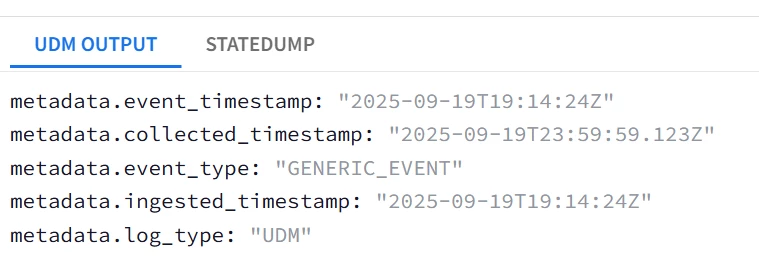
| Snippet from statedump output and UDM: all tokens are printed "@output": [ { "idm": { "read_only_udm": { "metadata": { "collected_timestamp": { "nanos": 123000000, "seconds": 1758326399 }, "event_timestamp": { "nanos": 0, "seconds": 1758309264 }, "event_type": "GENERIC_EVENT", "ingested_timestamp": { "nanos": 0, "seconds": 1758309264 } } } } } ],
|
| Notice that the successful conversion will have the form of <UDM timestamp field>.nanos/seconds not a string and not an integer. Also note that epoch timestamps are strings in the input not float. |
Checking for JSON Keys Existence
In the previous guides, replace was used to probe or check the existence of string single-valued JSON fields, Now we turn our attention into checking the existence of repeated (Arrays) string and repeated composite fields using loops, then a universal method using copy to check the existence of any field regardless of its type.
Check if a JSON field exists regardless of its type |
| Task: Confirm if the fields user and employee exist and determine their types |
| filter { json { source => "message" array_function => "split_columns" on_error => "error.jsonParsingFailed"}
### Check if the field user exists, if not then raise a flag mutate {copy => {"dummy" => "user"} on_error => "_error.missingField.user.Missing" } ### If the field user exists based on the flag, then try checking if it is a repeated field or if it is a composite field with a sub_field id if ![_error][missingField][user][Missing]{ mutate {copy => {"dummy" => "user.0"} on_error => "_error.missingField.user.NotRepeated" } mutate {copy => {"dummy" => "user.id"} on_error => "_error.missingField.user.NotComposite_subfield_id" } }
### Check if the field employee exists, if not then raise a flag mutate {copy => {"dummy" => "employee"} on_error => "_error.missingField.employee.Missing" } if ![_error][missingField][employee][Missing]{ mutate {copy => {"dummy" => "employee.0"} on_error => "_error.missingField.employee.NotRepeated" } mutate {copy => {"dummy" => "employee.id"} on_error => "_error.missingField.employee.NotComposite" } }
statedump{} } |
| Snippet from statedump output: "missingField": { "employee": { "Missing": true }, "user": { "Missing": false, "NotComposite_subfield_id": false, "NotRepeated": true } } }, |
| The probes indicated the employee field does not exist, user field exists and that user is a non-repeated field and has a sub-field called user{}.id |
You can achieve the same task for non-repeated fields regardless of their types using rename or copy.
Check if ANY field name exists regardless of its type using rename and copy |
| Task: Check if the following field names exist in the log message without knowing their types ; user.id, user.identification, user.sessions, user.profile.VIP, user.profile.terminated, and user.sessions.Tags |
| filter { json { source => "message" array_function => "split_columns" on_error => "_error.jsonParsingFailed"}
####Check for field existence using copy #integer field user.id exists mutate {copy => {"dummy" => "user.id"} on_error => "_error.missingField.user.id" }
#field user.identification does not exist mutate {copy => {"probe" => "user.identification"} on_error => "_error.missingField.user.identification" }
#repeated user.sessions[*]{} exists mutate {copy => {"probe" => "user.sessions"} on_error => "_error.missingField.user.probe" }
####Check for field existence using rename #boolean field user.profilve.VIP exists mutate {rename => {"user.profile.VIP" => "probe]"} on_error => "_error.missingField.user.profile.VIP" }
#field user.profile.terminated does not exist mutate {rename => {"user.profile.terminated" => "probe]"} on_error => "_error.missingField.user.profile.terminated" }
#repeated field user.sessions.Tags[*] exists mutate {rename => {"user.sessions.Tags" => "probe]"} on_error => "_error.missingField.user.sessions.Tags" }
statedump {} } |
| Snippet from statedump output: "jsonParsingFailed": false, "missingField": { "user": { "id": false, "identification": true, "probe": false, "profile": { "VIP": false, "terminated": false }, "sessions": { "Tags": false } } } }, |
For repeated fields, you could use the following example using zero index assignment Or for loops ;
Check if an array (Multi-valued field) exists or is a null array |
| Task: Check if the tags, sessions or nonExistentArray multi-valued fields exist or is a null (empty) array. |
| filter { json { source => "message" array_function => "split_columns" on_error => "error.jsonParsingFailed"}
##Check if repeated-field Tags[*] exists or has non-null elements using “0” index mutate {replace => {"probe"=>"%{Tags.0}"} on_error=> "_error.missingRepeatedField.Tags" } #
##Check if repeated-field user.sessions[*] has non-null elements for _index,_ in user.sessions map{ mutate {replace => {"length"=>"%{_index}"} on_error=> "_error.missingRepeatedField.sessions" } # }
###Check if nonExistentArray Field Exists for _index,_ in user.nonExistentArray map{ mutate {replace => {"length"=>"%{_index}"} on_error=> "_error.missingRepeatedField.nonExistentArray" } # } mutate {copy => {"_error.missingRepeatedField.nonExistentArray"=>"_error.missingRepeatedField.nonExistentArray"} on_error=> "_error.missingRepeatedField.nonExistentArray" } #Dummy copy to probe
statedump {} }
|
| Snippet from statedump output: "missingRepeatedField": { "Tags": false, "nonExistentArray": true, "sessions": false } |
| 1. For repeated (Multi-valued) JSON simple fields like Tags[*], the same technique is used but with Tags.0 as the argument, as this will attempt to tokenize the first element of Tags , if it has a value then the field Tags exists with at least 1 element, if an error is generated then the field Tags either does not exist or is an empty array and can be ignored. 2. For user.sessions[*]{}, we cannot use the same technique as each element of sessions[*]{} is a composite element sessions[*]{}.session_id/start_time/actions[*]. The technique used will be through looping. The loop will iterate through the sessions[*]{} elements, and will tokenize the index _index as the counter. If there is an error in tokenizing index_ then sessions[*]{} is empty or does not exist. 3. What about a non-existent repeated composite field nonExistentArray[*]{} ? The technique listed in (2) cannot be used to detect non-existent arrays, i.e. this snippet for _index,_ in user.nonExistentArray map{ mutate {replace => {"length"=>"%{_index}"} on_error=> "_error.missingRepeatedField.nonExistentArray" } # } will NOT generate "_error": { "missingRepeatedField": { "nonExistentArray": true, This snippet will not generate _error.missingRepeatedField.nonExistentArray at all "_error": { "missingRepeatedField": { "Tags": false } }, So the approach is very different to fully detect the presence of repeated composite fields ; Looping, tokenizing the loop index as _index then copying it into the error probe _error.missingRepeatedField.Tags if exists (it will only exist if nonExistentArray[*]{} exists. |
JSON Values Deduplication
This section will cover how to perform deduplication on JSON values, for example collect the list of distinct actions performed by a user in all of the login sessions.
Deduplicate without Concatenation |
| Task: Concatenate all action_type in principal.process.command_line after de-duplication |
| filter { json { source => "message" array_function => "split_columns" on_error => "error.jsonParsingFailed"}
mutate {replace => {"event.idm.read_only_udm.metadata.event_type" => "GENERIC_EVENT"}}
##Initialize Regex Field used for deduplication with an empty space not a null string mutate {replace => {"regex"=>" "} }
for _, _sessions in user.sessions map { for _index, _actions in _sessions.actions { if [_actions][action_type] !~ regex { mutate {replace => {"regex"=>"%{regex}|%{_actions.action_type}"} }
## Since security_result is the only repeated field in security_result.action_type, #then replace it with temp and use the repeated element handling technique discussed in part 2 mutate {replace => {"temp.action_details"=>"%{_actions.action_type}"} } mutate {merge => {"event.idm.read_only_udm.security_result"=>"temp"} } mutate {replace => {"temp"=>""} } } } }
mutate {merge => { "@output" => "event" }} statedump {} }
|
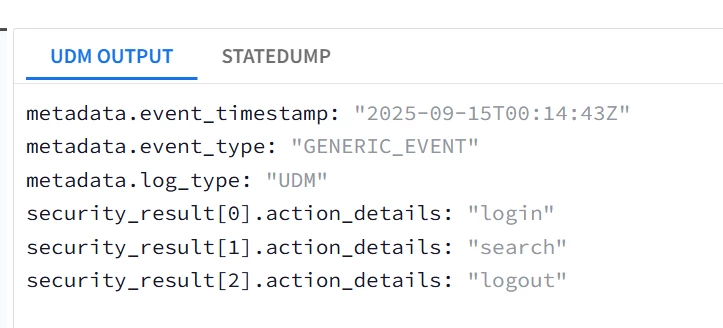
| Snippet from statedump output and UDM: all tokens are printed "@output": [ { "idm": { "read_only_udm": { "metadata": { "event_type": "GENERIC_EVENT" }, "security_result": [ { "action_details": "login" }, { "action_details": "search" }, { "action_details": "logout" } ] } } } ],
|
|
Deduplication with Concatenation the values of a String Array |
| Task: De-duplicate and Concatenate all action_type values in principal.process.command_line |
| filter { json { source => "message" array_function => "split_columns" on_error => "error.jsonParsingFailed"}
mutate {replace => {"event.idm.read_only_udm.metadata.event_type" => "GENERIC_EVENT"}}
###Initialize the UDM field, this is required here due to the concatenation process mutate {replace => {"event.idm.read_only_udm.principal.process.command_line"=>""} }
##Initialize Regex Field used for deduplication with an empty space not a null string mutate {replace => {"regex"=>" "} }
for _, _sessions in user.sessions map { for _index, _actions in _sessions.actions { if [_actions][action_type] !~ regex { mutate {replace => {"regex"=>"%{regex}|%{_actions.action_type}"} } mutate {replace => {"event.idm.read_only_udm.principal.process.command_line"=>"%{_actions.action_type}|%{event.idm.read_only_udm.principal.process.command_line}"} } } } }
mutate {merge => { "@output" => "event" }} statedump {} } |
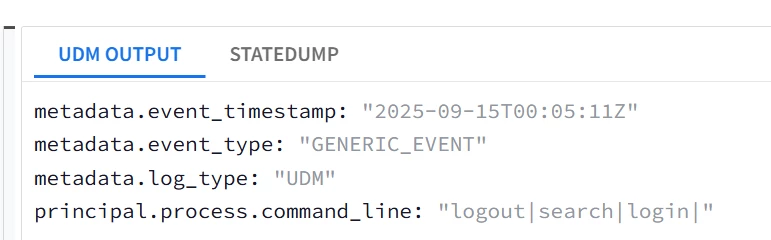
| Snippet from statedump output and UDM: all tokens are printed "event": { "idm": { "read_only_udm": { "metadata": { "event_type": "GENERIC_EVENT" }, "principal": { "process": { "command_line": "logout|search|login|" } } } } }, |
|
Remove and Drop with Tags
Remove and drop are mainly used in 2 different use cases ;
- Drop : It will drop the whole log message from the parser engine, but it will still retain the raw logic, optionally with a TAG that could be traced in the ingestion metrics.
This is very useful to indicate the difference between Parsing errors and Parser Dropped events when using the ingestion metrics schema defined here, and highlighting the drop_reason_code in a dashboard
Try this query in a dashboard (Credit goes to my colleague Jeremey Land for sharing it with me) ;
ingestion.log_type != ""
$log_type = ingestion.log_type
ingestion.drop_reason_code != ""
$drop_reason = ingestion.drop_reason_code
$start = timestamp.get_timestamp(ingestion.start_time)
$end = timestamp.get_timestamp(ingestion.end_time)
match:
$log_type, $drop_reason, $start, $end
outcome:
$count = sum(ingestion.log_count)
The drop_reason highlighted will indicate whether the drop was due to ;
- Parsing Error : CBN error.
- Intentional Drop by the Parser : Due to unsupported log type or low-security relevance. The reason will be LOG_PARSING_DROPPED_BY_FILTER: <tag value> , for example ; LOG_PARSING_DROPPED_BY_FILTER: TAG_MALFORMED_MESSAGE
Remove : It will delete a token or a field from either the JSON log or the parsed log, this is mainly used to gracefully delete repeated fields generated by the main parser code from within the parser extension (e.g. Removing a raw JSON field, UDM field, temporary tokens,... etc) , OR to remove a dependent field (e.g. you initialized a ports field, but then the event turns out to be a non-network event).
Drop the log message if a tag if it is not JSON |
| Task: DROP with a Tag = “TAG_UNSUPPORTED” |
| Log Sample : “not a json log” |
| filter { json { source => "message" array_function => "split_columns" on_error => "_error.jsonParsingFailed"} if [_error][jsonParsingFailed] { drop{ tag => "TAG_UNSUPPORTED" }} statedump{} } |
| Snippet from statedump output and UDM: (No UDM event generated, Log Dropped with a Tag in the ingestion metrics field drop_reason_code) Statedump unavailable. Please fix errors to view. |
| To see the impact of the tag, the outcome in the dashboard will look like this indicating how many logs were dropped due to the DROP statement between different time intervals ; 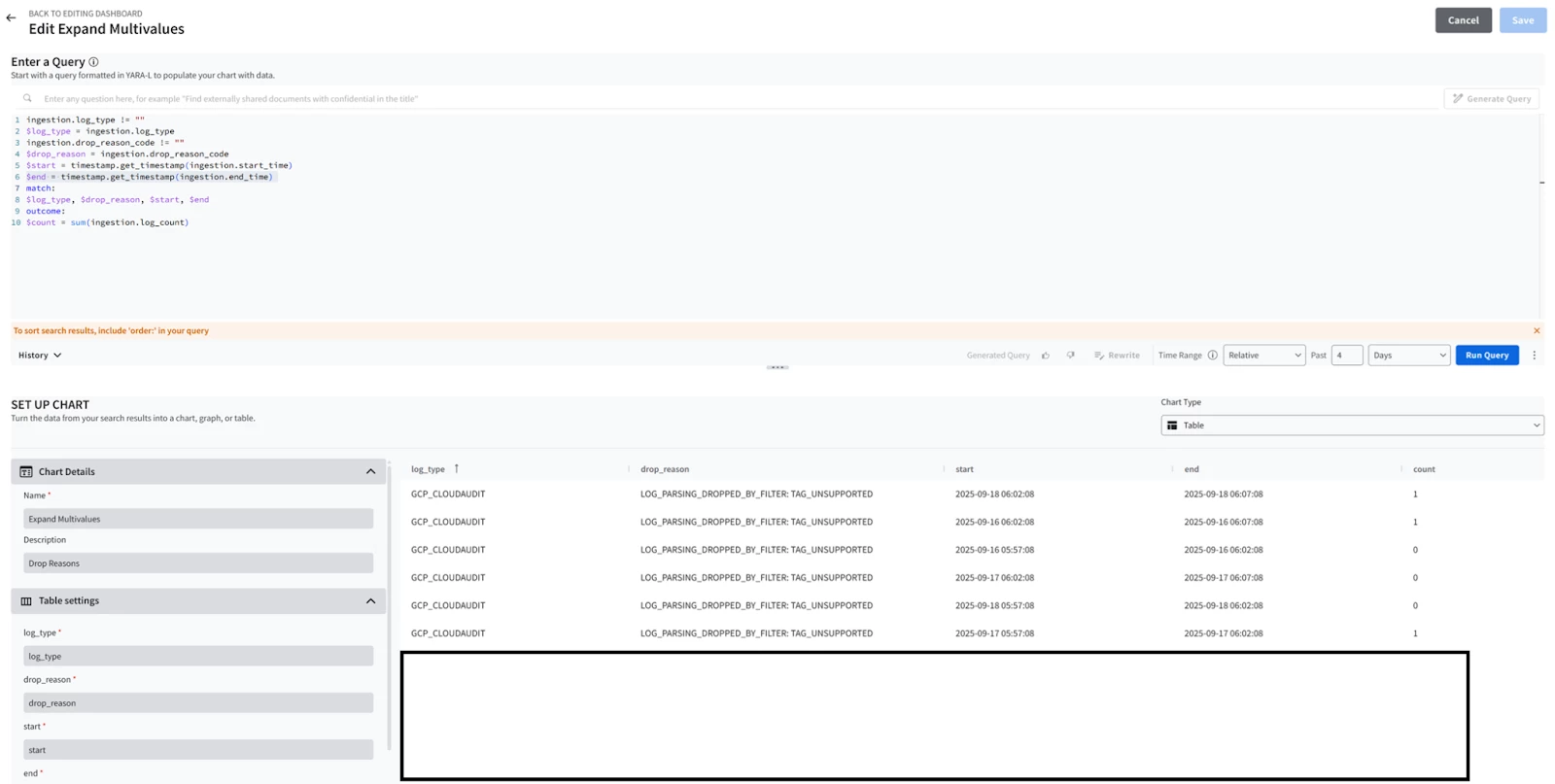
|
In these 2 sections
Capturing Non-String Tokens without Conversion using Copy/Rename
Some of the common use cases for both operators are ;
- Rename: You already have a repeated key-value field in your JSON logs and you need to capture it into a UDM repeated field like security_result ? No problem, just rename the JSON field (in this case we won’t use the array_function => “split_columns” to avoid tampering with the raw log array key-value structure).
Copy: You converted an integer field name like user.id in your JSON logs to parse it in a string field then you needed it again as an integer ? No problem, just copy user.id then convert the copied field into a string and you will have a separate copy keeping the raw JSON field structure intact.
Use Rename to Capture Fields |
| Task: Capture ALL detections fields under actions into the label datatype UDM field security_result[*]{}.detection_fields[*]{} |
| Log Sample: { "detections" : [ {"key":"IPS Signature", "value": "Port Scanning"} , {"key": "Rate Limit Rule", "value": "Abnormal Volume of TCP Syn"}] } |
| filter { #Notice here we won't use array_function to avoid destroying the detections array structure json { source => "message" on_error => "error.jsonParsingFailed"}
##Capture using renamed mutate {replace => {"tobeRenamed" => "GENERIC_EVENT"}} mutate {rename => {"tobeRenamed" => "event.idm.read_only_udm.metadata.event_type"}}
##Capture using Copy mutate {copy => {"_security_result.detection_fields" => "detections"}} ###OR Capture using Rename #mutate {rename => {"detections" => "_security_result.detection_fields"}}
mutate {merge => {"event.idm.read_only_udm.security_result" => "_security_result"}}
mutate {merge => { "@output" => "event" }} statedump {} } |
| Snippet from statedump output and UDM: all tokens are printed |
Selecting the Last element of an array
Suppose you have an array of unknown length, and you want to pick the last element ?
⇒ Loop through the array but keep overwriting your replace variable with each iteration so that you will end up with the last element.
Select the last elements of an array |
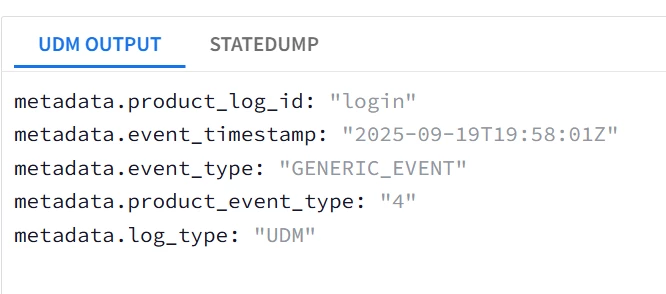
| Task: Capture the last array k-v pair in product_event_type and product.log_id |
| Log Sample: {"array": [ {"key": "login", "value": "3"} , {"key": "login", "value": "4"} ] } |
| filter {
json { source => "message" array_function => "split_columns" on_error => "error.jsonParsingFailed"} mutate {replace => {"event.idm.read_only_udm.metadata.event_type" => "GENERIC_EVENT"}} for k,_array in array map { mutate {replace => {"event.idm.read_only_udm.metadata.product_event_type" => "%{_array.value}"}} mutate {replace => {"event.idm.read_only_udm.metadata.product_log_id" => "%{_array.key}"}} } mutate {merge => { "@output" => "event" }} statedump {} }
|
|
|
Dynamic Capturing of Composite Fields
This section aims to demonstrate how to tokenize and capture composite JSON keys without prior knowledge of their names. This is accomplished by utilizing labels type fields, such as security_result[*]{}.outcomes[*].
Dynamic Capturing of Repeated Composite Field |
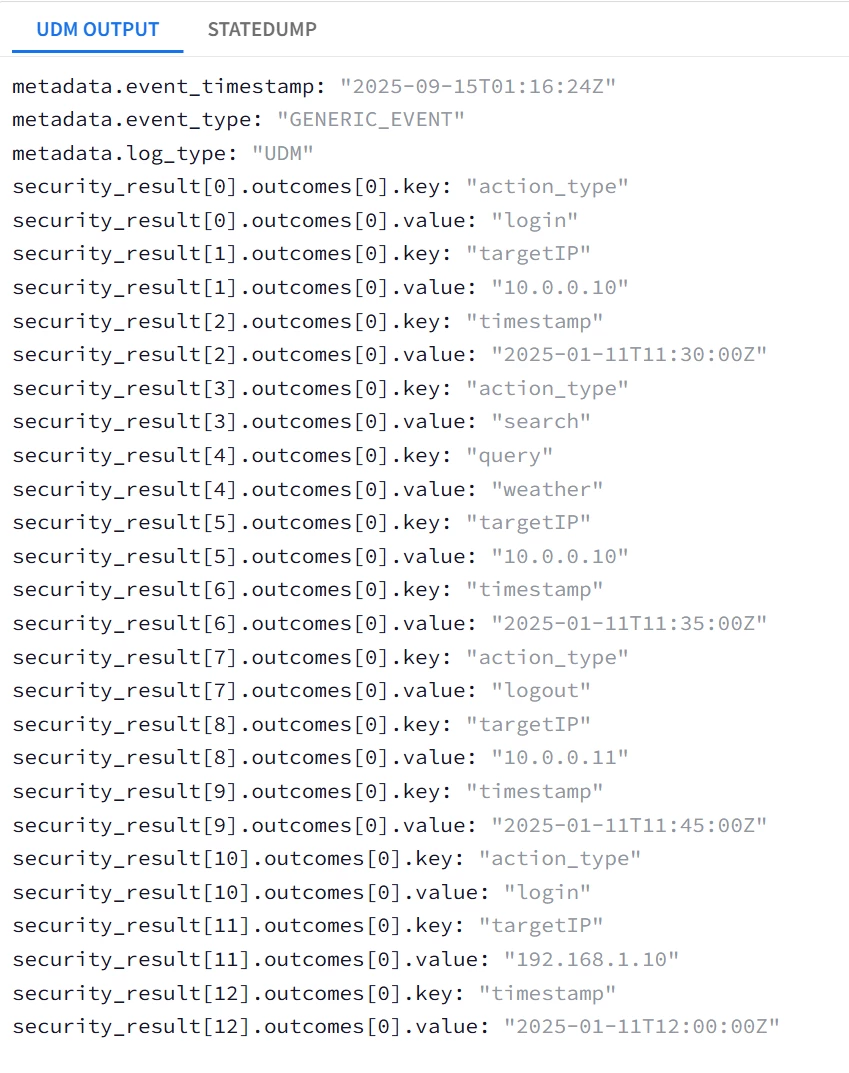
| Task: Capture ALL JSON fields under actions into the label datatype UDM field security_result[*]{}.outcomes[*]{} |
| filter { json { source => "message" array_function => "split_columns" on_error => "error.jsonParsingFailed"} mutate {replace => {"probe"=>"%{eventName}"} on_error=> "error.missingField.eventName" } #
mutate {replace => {"event.idm.read_only_udm.metadata.event_type" => "GENERIC_EVENT"}}
###Loop1 for looping through ALL sessions, i.e. user{}.sessions[*]{} for i1, _sessions in user.sessions map {
###Loop2 for looping through ALL actions, i.e. user{}.sessions[*]{}.actions[*]{} for i2, _actions in _sessions.actions map {
###Loop3 is for lopping through ALL the JSON fields under actions, i.e. action_type, timestamp, target_ip, query for i3, _value in _actions map {
##Intended UDM field is security_result[*]{}.outcomes[*]{} ; 2 Repeated fields security_result and outcomes
## outcomes is the lowest-level repeated field --> replace with a temp token _outcomes with sub-fields key and value mutate {replace => {"_outcomes.key" => "%{i3}"}} mutate {replace => {"_outcomes.value" => "%{_value}"}} mutate {merge => {"outcomes" => "_outcomes"}} mutate {replace => {"_outcomes" => ""}}
## security_result is the higher-level repeated field --> replace with a temp token _security_result with a sub-field ouctomces mutate {rename => {"outcomes" => "_security_result.outcomes"}} mutate {merge => {"event.idm.read_only_udm.security_result" => "_security_result"}} mutate {replace => {"_security_result" => ""}} } } }
mutate {merge => { "@output" => "event" }}
statedump {} } |
| Snippet from statedump output and UDM: all tokens are printed "event": { "idm": { "read_only_udm": { "metadata": { "event_type": "GENERIC_EVENT" }, "principal": { "process": { "command_line": "logout|search|login|" } } } } },
|
|
In the previous example ; all the sub-fields were captured in individual security_result.outcome, a total of 13 security_result fields.
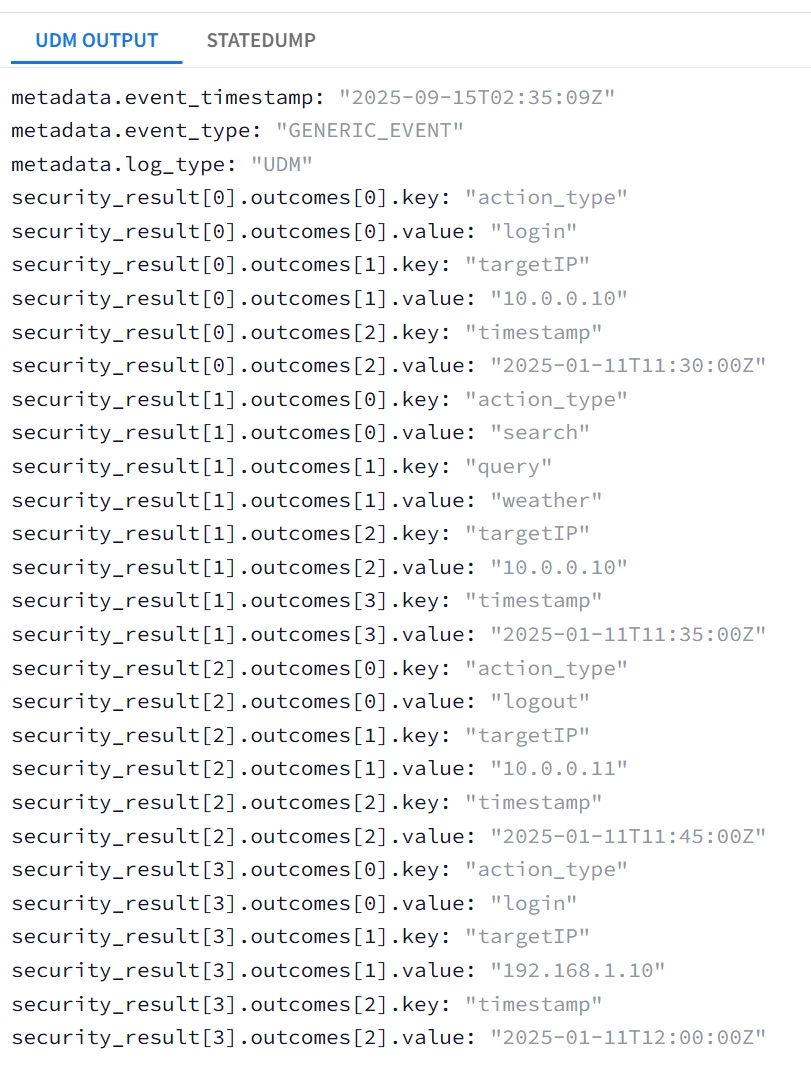
To repeat the same tokenization, but instead map the sub-fields into 4 security_result fields (one security_result field per actions), 2 security_result (one per sessions) Or 1 security_result (one per log message) ; this could be achieved by moving the security_result merge statements outside the inner loop one level at a time.
| Task: Capture ALL JSON fields under actions into the label datatype UDM field security_result[*]{}.outcomes[*]{} with each individual actions object mapped into a security_result. |
| filter { json { source => "message" array_function => "split_columns" on_error => "error.jsonParsingFailed"} mutate {replace => {"probe"=>"%{eventName}"} on_error=> "error.missingField.eventName" } #
mutate {replace => {"event.idm.read_only_udm.metadata.event_type" => "GENERIC_EVENT"}}
###Loop1 for looping through ALL sessions, i.e. user{}.sessions[*]{} for i1, _sessions in user.sessions map {
###Loop2 for looping through ALL actions, i.e. user{}.sessions[*]{}.actions[*]{} for i2, _actions in _sessions.actions map {
###Loop3 is for lopping through ALL the JSON fields under actions, i.e. action_type, timestamp, target_ip, query for i3, _value in _actions map {
##Intended UDM field is security_result[*]{}.outcomes[*]{} ; 2 Repeated fields security_result and outcomes
## outcomes is the lowest-level repeated field --> replace with a temp token _outcomes with sub-fields key and value mutate {replace => {"_outcomes.key" => "%{i3}"}} mutate {replace => {"_outcomes.value" => "%{_value}"}} mutate {merge => {"outcomes" => "_outcomes"}} mutate {replace => {"_outcomes" => ""}}
} ## Moved the security_result merge statements to be inside the actions loop Loop2 mutate {rename => {"outcomes" => "_security_result.outcomes"}} mutate {merge => {"event.idm.read_only_udm.security_result" => "_security_result"}} mutate {replace => {"_security_result" => ""}} } }
mutate {merge => { "@output" => "event" }}
statedump {} } |
| Snippet from statedump output and UDM: |
|
