



Author: Christopher Martin
In dynamic network environments, IP addresses change frequently. A security alert tied to 10.0.0.5 yesterday might refer to a completely different device than an alert tied to that same IP today.
Google SecOps DHCP Asset Aliasing solves this challenge by ingesting and analyzing Dynamic Host Configuration Protocol (DHCP) logs. By understanding the assignment, renewal, and expiration of IP leases, the system automatically resolves distinct identifiers (IPs, Hostnames, and MAC addresses) into a single, unified Asset Entity.
Why Integrate DHCP Data? (Benefits)
Without DHCP data, security analysts often have to manually correlate which device held a specific IP address at a specific time. Integrating DHCP data provides three critical benefits:
- Historical Accuracy (Time-Travel for IPs): The system builds a precise timeline of asset assignments. When you investigate an event from last week, SecOps automatically maps the IP address involved in that event to the specific device (Hostname/MAC) that held the lease at that exact moment, not who holds it today.
- Handling "IP Churn": In environments with short lease times (e.g., Guest Wi-Fi) or high mobility, devices change IPs constantly. The Aliasing engine understands DHCP lifecycle events (leases, renewals, releases) to maintain a continuous trail of activity for a single device, even as its IP changes.
- Noise Reduction & Context: The system includes intelligent logic to filter out "noisy" data (like generic hostnames that don't identify unique assets) and "declined" leases (IPs offered but not taken), ensuring your investigations focus on confirmed, active associations.
How It Works: The Logic Engine
The DHCP Asset Aliasing engine does not simply "match" logs; it actively reconstructs the state of your network using advanced logic.
1. Smart Lookback Windows
When you query for an asset's aliases, the system doesn't just look at logs from that exact moment. It understands that a DHCP lease might have been assigned days ago and is still valid.
- The "Lookback" Strategy: The engine automatically fetches DHCP records from up to 5 days prior to your investigation window
- Why this matters: If a device got a 7-day lease on Monday, and you investigate an alert on Wednesday, the system will correctly find the Monday "Assignment" log to identify the device, even though no new DHCP logs occurred on Wednesday.
2. Dynamic Lease Management
The system calculates the exact validity period of a lease using three distinct methods, ensuring it never assumes an association exists when it doesn't.
- Natural Expiration: The system respects the lease duration sent by your DHCP server (e.g., "8 hours").
- Explicit Termination: If the system sees a RELEASE log, a WIN_DELETED log (Windows DHCP), or a WIN_EXPIRED log, it immediately cuts the lease short. It does not wait for the theoretical expiration time. This ensures that if a user logs off and a new device takes the IP 5 minutes later, the system instantly tracks the switch.
- Identity Override: If a new ACK (Assignment) is seen for the same IP but a different MAC address or Hostname, the previous lease is treated as effectively terminated, and the new asset takes ownership of the IP identity instantly.
- Heuristic Safety: To prevent data errors, the system automatically shortens "Infinite" leases to a standard maximum (99th percentile duration). This prevents a misconfigured "permanent" lease from permanently corrupting asset identity data.
3. Gap Analysis
If logs are sporadic, the system intelligently fills gaps. It stitches together contiguous blocks of time where an IP belonged to a specific MAC address by inferring that—in the absence of a RELEASE or new assignment—the previous valid lease is still active (up to its maximum duration).
Configuration Requirements: What You Need to Add
To enable this feature, you must ingest DHCP logs into Google SecOps. The system supports RFC-compliant DHCP logs from standard network equipment (firewalls, routers, domain controllers).
1. Required Log Sources
You must configure your DHCP servers (e.g., Microsoft Windows DHCP, ISC DHCP, Cisco IOS, Infoblox) to forward logs to Google SecOps.
For a full list of supported DHCP server log sources, see Supported log types and default parsers | Google Security Operations
2. Important Data Fields
For the Aliasing engine to function, your log parser must populate DHCP UDM (Unified Data Model) fields.
Note: Standard Google SecOps parsers for major vendors typically handle this automatically, see DHCP UDM field list | Google Security Operations
- Assigned IP (Your IP): The IP address being assigned to the client (standard DHCP field yiaddr).
- Client MAC Address: The hardware address of the requesting device (standard DHCP field chaddr).
- Message Type: Must clearly distinguish between ACK, REQUEST, RELEASE, DECLINE, WIN_DELETED, WIN_EXPIRED.
- Tip: Ensuring your logs capture RELEASE and EXPIRED events significantly improves aliasing precision.
- Lease Duration: Helps the system determine exactly when an association expires naturally.
- Hostname: Allows the system to link the IP/MAC to a human-readable device name.
Example Use Case
Scenario: An analyst sees a "Malware Beacon" alert from IP 192.168.1.50 that occurred 3 days ago at 2:00 PM.
- Without DHCP Aliasing: The analyst attempts to ping 192.168.1.50 today, but that IP is now assigned to a lobby printer. The analyst might mistakenly investigate the printer.
- With DHCP Aliasing: The system looks back 5 days and finds the original ACK log. It sees that 192.168.1.50 was assigned to "Jane-Finance-Laptop" (MAC: AA:BB:CC:11:22:33) with a 24-hour lease. Even though the IP changed later, the system confirms that at 2:00 PM three days ago, Jane's laptop held the lease. The analyst correctly isolates Jane's laptop.
Deep Dive: DHCP Workflows & Machine Identity Impact
To understand how Google SecOps builds an asset's timeline, it helps to understand the specific DHCP "conversations" happening on your network. The system listens for specific keywords in these conversations to start, stop, or update an asset's identity.
1. Getting an IP
This is the standard process for a device joining the network.
- Workflow: Discover > Offer > Request (REQ) > Acknowledge (ACK)
- System Impact: The Aliasing Engine listens for the REQ and ACK.
- The Event: The DHCP server sends an ACK saying, "Yes, Device AA:BB:CC..., you can have IP 10.0.0.5 for 8 hours."
- The Result: The system starts a new association block. 10.0.0.5 is now linked to AA:BB:CC….
2. Releasing an IP
When a user shuts down their laptop or leaves a Wi-Fi zone, well-behaved devices tell the network they are leaving.
- Workflow: Release
- System Impact:
- The Event: The device sends a RELEASE packet saying, "I am done with 10.0.0.5."
- The Result: The system immediately terminates the association, even if the 8-hour lease hasn't expired. This is critical for accuracy; if another device takes that IP 5 minutes later, the system knows it's a different asset.
3. Keeping an IP
Devices try to keep their IP when the lease is halfway over.
- Workflow: Request > Acknowledge (ACK)
- System Impact:
- The Event: The server sends a new ACK extending the time.
- The Result: The system extends the existing association block. It confirms the device is still active and "stretches" the timeline bars you see in the UI.
4. Failures & Declines
Sometimes, an IP assignment fails.
- Workflow: Offer > Decline (or NACK)
- System Impact:
- The Event: A device detects an IP conflict and sends a DECLINE message.
- The Result: The system effectively ignores or removes the potential link. It ensures we don't falsely attribute an IP to a device that tried to use it but failed.
Standard DHCP Fields Reference
Default or Custom log parser should map these standard DHCP fields (defined in RFC 2131) to Google SecOps UDM fields. Ensuring these are correctly mapped is vital for accurate aliasing.
| Standard Field | Field Name | Description & UDM Usage |
|---|---|---|
| yiaddr | "Your" IP Address | Crucial for ACKs. This is the IP address the server is assigning to the device. mapped to: `asset.ip` (on assignment events) |
| ciaddr | Client IP Address | Crucial for Releases. The IP the device currently has and is asking to renew or release. mapped to: `asset.ip` (on request/release events) |
| chaddr | Client Hardware Address | The Anchor. This is the MAC address of the device. It is the persistent identifier that links all these IPs together. mapped to: `asset.mac` |
| Option 53 | Message Type | Defines the action (ACK, OFFER, RELEASE). This tells the logic engine what to do with the data (Start lease? End lease?). |
| Option 12 | Host Name | The self-reported name of the device (e.g., "Jane-Laptop"). mapped to: `asset.hostname` |
| Option 51 | IP Address Lease Time | How long the IP is valid for. Used to calculate the "Natural Expiration" of a session. |
From Raw Log to Asset Identity: A Practical Example
To understand how Google SecOps processes your logs, let’s look at the “Getting an IP” workflow using an ISC DHCP server. In this scenario, a laptop (host-b) successfully requests and receives an IP address from the server (host-a).
Step 1: The Request
The client device asks the server to use a specific IP address.
Raw Log Source:
<190>Dec 26 19:10:47 host-a dhcpd[3182]: DHCPREQUEST for 192.168.100.4 from 52:54:00:1b:1a:f0 (host-b) via enp7s0
Parsed UDM Representation (Simplified): In this stage, SecOps identifies the intent. Note how the hostname and MAC are captured alongside the requested IP.
| Object | UDM Key | UDM Value |
| Event Type | metadata.event_type | NETWORK_DHCP |
| DHCP Type | network.dhcp.type | REQUEST |
| Client MAC (chaddr) | network.dhcp.chaddr | 52:54:00:1b:1a:f0 |
| Request IP (ciaddr) | network.dhcp.ciaddr | 192.168.100.4 |
| Hostname | network.dhcp.client_hostname | host-b |
Logic Note: At this point, the system knows host-b wants this IP, but it hasn't officially "started" the identity block yet, as the server hasn't confirmed it.
Step 2: The Acknowledgment (ACK)
The server confirms the assignment. This is the "Source of Truth" for the Aliasing Engine.
Raw Log Source:
<190>Dec 26 19:10:47 host-a dhcpd[3182]: DHCPACK on 192.168.100.4 to 52:54:00:1b:1a:f0 (host-b) via enp7s0 lease-duration 28800 (RENEW)
Parsed UDM Representation (Simplified): Note the shift to yiaddr ("Your IP Address"), which is the formal assignment field.
| Object | UDM Key | UDM Value |
| Event Type | metadata.event_type | NETWORK_DHCP |
| DHCP Type | network.dhcp.type | ACK |
| Assigned IP (yiaddr) | network.dhcp.yiaddr | 192.168.100.4 |
| Client MAC (chaddr) | network.dhcp.chaddr | 52:54:00:1b:1a:f0 |
| Least Duration | network.dhcp.lease_time_seconds | 28800 |
Logic Note: This is the trigger. When the Aliasing Engine sees this ACK, it creates a new timeline entry: “Starting now, IP 192.168.100.4 belongs to MAC 52:54:00:1b:1a:f0 (host-b).”
The Result in SecOps
When an analyst searches for IP 192.168.100.4 during their investigation, the Aliasing Engine uses the data above to provide the following context automatically:
| Current View | Aliased Context |
|---|---|
| Indicator: | 192.168.100.4 |
| Resolved Hostname: | host-b |
| Resolved MAC: | 52:54:00:1b:1a:f0 |
| Lease Start: | Dec 26, 2025, 19:10:47 |
Real-World Enrichment: Fixing Incomplete Logs
One of the most powerful features of DHCP Asset Aliasing is its ability to "fill in the blanks" for other log sources. Many system logs (like Linux AuditD or Windows Event Logs) capture who (the user) and where (the hostname), but often miss the network context (IP or MAC address).
The Aliasing Engine is queried during UDM enrichment processing so that each UDM event merges context data with the raw log before it’s made available to search and rules. While SecOps takes a hybrid approach to enrichment (read time and write time), by leveraging write-time for DHCP aliasing, we greatly simplify the search and rule experience for users.
Example: Enriched Linux Audit Logs
The Problem: An analyst searches for activity involving a specific MAC address (52:54:00:1b:1a:f0) to track a device's movement. However, the raw Linux Audit log does not contain the MAC address, only the hostname (host-b). Without Aliasing, this log would be invisible to the search.
1. The Original Raw Log (Incomplete): Notice that addr=? is empty and no MAC address is present.
node=host-b type=USER_START msg=audit(1766776621.844:10415): pid=643652 uid=0 ... acct="root" exe="/usr/sbin/cron" hostname=? addr=? ...
2. The Automated Pivot: Google SecOps sees node=host-b. It checks the DHCP Aliasing timeline and confirms:
"At 1766776621 (the event time), host-b was assigned to MAC 52:54:00:1b:1a:f0 and IP 192.168.100.5."
3. The Enriched UDM Event: The system automatically injects the missing IP and MAC into the UDM event, making it searchable. It also tags the event to show that DHCP was the source of this new knowledge.
// The Search: finding the event by the MAC address that wasn't in the raw log
principal.asset.mac = "52:54:00:1b:1a:f0" AND metadata.event_type = "USER_LOGIN"

// The Result: A fully populated event
principal.hostname = "host-b"           // From Original Log
principal.user.userid = "root"          // From Original Log

// --- ENRICHED FIELDS (Injected by DHCP Aliasing) ---
principal.ip = "192.168.100.5"          // Found via Aliasing
principal.mac = "52:54:00:1b:1a:f0"     // Found via Aliasing
principal.asset.ip = "192.168.100.5"
principal.asset.mac = "52:54:00:1b:1a:f0"

// --- PROVENANCE (Proof of Enrichment) ---
metadata.enrichment_labels.log_types = "ISC_DHCP"
The Benefit: Your detection rules and searches can now rely on IP and MAC addresses even for log sources that don't natively capture them, significantly closing visibility gaps in your environment.
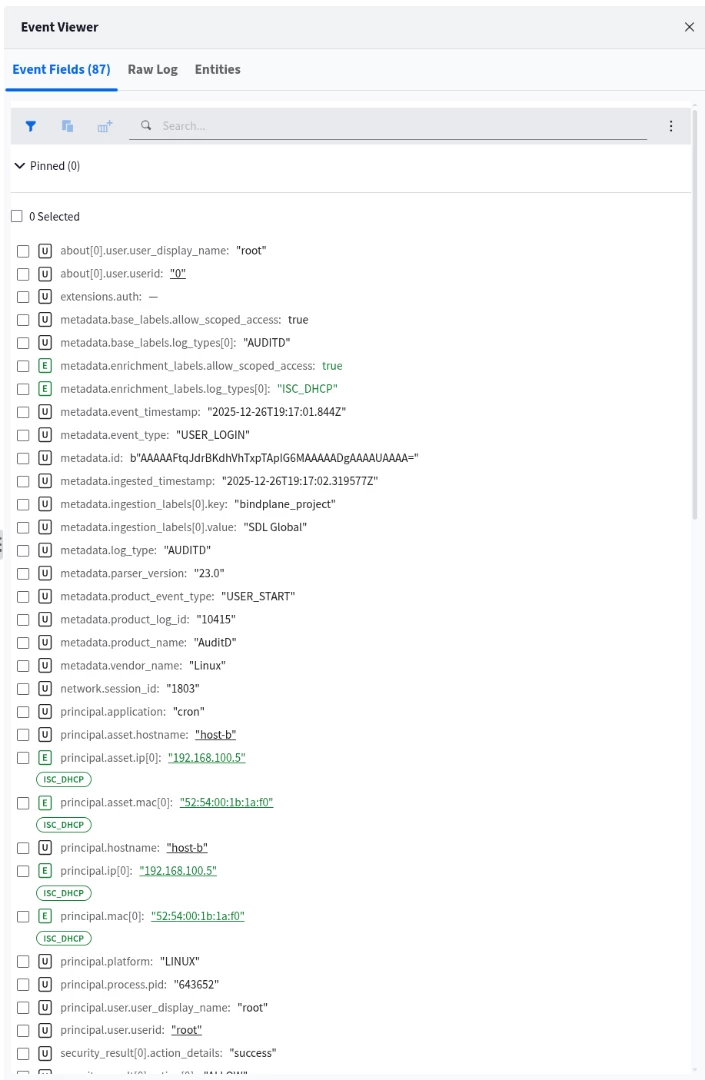
Example of DHCP Enrichment in Google SecOps using DHCP
Enterprise Nuances: Overlapping IPs & Static Hosts
To ensure data integrity in complex network environments, you must account for IP reuse and non-DHCP assets.
1. Handling Overlapping IPs (Namespaces)
Most enterprise networks use private IP ranges (e.g., 192.168.x.x or 10.x.x.x) that are reused across different physical office locations or branch sites.
- The Problem: If Office A uses 10.0.0.5 for a laptop and Office B uses 10.0.0.5 for a printer, sending both log streams to Google SecOps without differentiation will cause an Identity Collision. The system will merge the histories of these two distinct devices, creating false positives.
- The Solution: You must configure Namespaces in your log ingestion labels. By tagging Office A logs with namespace: "NY_Branch" and Office B with namespace: "LDN_Branch", the Aliasing Engine keeps the timelines completely separate, even if the IPs are identical.
Note, for more information on how Asset Namespaces work in Google Secops see, Work with Asset namespaces | Google Security Operations
Important Note: If you use Namespaces then Asset Aliasing and Enrichment will only occur for log sources also tagged in the same Namespace. A telemetry log without a Namespace tag is assigned to the default empty string namespace. Carefully evaluate and plan Namespaces before implementing this feature.
2. The Static IP "Blind Spot" vs. DHCP Reservations
It is important to distinguish between Hard-Coded Static IPs and DHCP Reservations, as they behave differently in Google SecOps.
DHCP Reservations (Supported)
If you configure a "Static Lease" or "Reservation" on your DHCP server (ensuring Printer-A always gets 10.0.0.50), this is supported.
- Why: Even though the IP never changes, the device still requests it, and the server still sends a DHCP ACK log.
- Result: Google SecOps will successfully alias these assets.
Hard-Coded Static IPs (Unsupported)
If you manually configure the IP address directly on the network interface card (NIC) of the device (common for Domain Controllers, DHCP Servers, Core Routers, and legacy OT equipment), this is NOT supported via DHCP aliasing.
- Why: These devices never initiate a DHCP conversation. No logs are generated.
- Result: These assets will remain "invisible" to the DHCP Aliasing engine.
- Best Practice: For critical infrastructure (like Domain Controllers) where hard-coding is required for reliability, use an Asset Aliasing log source such as Active Directory or a CMDB, or an EDR aliasing log source. In addition, you can use Data Tables for search or detection time based enrichment to annotate additional business or security context.
3. High-Volume "Generic" Hostnames
The system includes a safeguard to prevent "Identity Explosion" caused by generic hostnames.
- The Mechanism: If the system sees thousands of different MAC addresses claiming the exact same Hostname (e.g., generic names like "iPhone", "Android", "Kindle", or "localhost"), it may automatically blocklist that Hostname for aliasing purposes.
- Why: This prevents the system from falsely linking 5,000 different employee iPhones into a single "Asset Entity" simply because they all share the default factory hostname. The IP-to-MAC resolution remains valid, but the Hostname association is suppressed to preserve data quality.
Summary
Google SecOps DHCP Asset Aliasing transforms your DHCP logs from simple network operational data into a critical security asset. By reconstructing the "state" of your network over time, it eliminates the manual labor of correlating IPs to devices and ensures that your investigations are accurate, even in highly dynamic environments.
It bridges the gap between "An alert fired on 10.0.0.5" and "Jane's Laptop is compromised," automatically handling the complexities of lease renewals, roaming devices, and IP churn.
DHCP Onboarding Steps
To unlock this capability, follow this validation checklist:
- Audit Your Ingestion: Ensure your DHCP servers (Windows, ISC, Cisco, etc.) are forwarding logs to Google SecOps.
- Validate Your Parsers: Review your ingested data against the "Standard DHCP Fields Reference" in this guide.
- Crucial Check: Are yiaddr (Assigned IP) and chaddr (MAC Address) being populated?
- Crucial Check: Is the ACK message type correctly parsed?
- Define Namespaces: If you reuse private IP ranges across different physical sites, ensure your forwarders apply the correct namespace labels to prevent identity collisions.
- Verify the Data: Run a search for a known IP address and check the Asset View. You should see a timeline of associations populated by your specific DHCP vendor.
