



Author: Kalpana Gondi, Security Engineer | Engineering - GCP Mandiant RD/Eng
This guidance will get updated as and when new IoC Feeds or any other intel is integrated into SecOps for customer visibility.
Security Operations (SecOps) teams frequently employ detection mechanisms centered on identifying specific patterns within security event logs. While these pattern-matching rules form the bedrock of many detection strategies, their effectiveness can be significantly amplified by integrating external sources of threat intelligence. Indicator of Compromise (IoC) feeds rank among the valuable threat intelligence resources. These feeds provide timely and actionable information about known malicious entities and activities, such as malicious IP addresses, domain names, file hashes, and URLs.
This discussion provides a foundational understanding of how SecOps analysts and engineers can develop and implement security rules that strategically combine IoC feed data with observed behavioral event data within their security information and event management (SIEM) or other security analytics platforms. By correlating internal event patterns with externally sourced IoCs, organizations can proactively identify and respond to potential threats with greater accuracy and speed. This approach moves beyond solely reactive detection based on historical patterns and enables a more anticipatory security posture.
The integration of IoC feeds into SecOps detection rules allows for several key benefits:
-
Improved Detection Accuracy: Matching internal events against known IoCs reduces false positives by focusing on activities associated with confirmed threats.
-
Early Threat Detection: Identifying communication with or activity involving known malicious infrastructure or artifacts can enable early detection of attacks in progress.
-
Enhanced Alert Prioritization: Alerts triggered by IoC matches often carry a higher level of confidence and can be prioritized for immediate investigation.
-
Contextual Enrichment: IoC data can provide valuable context to security events, aiding analysts in understanding the nature and potential impact of an alert.
-
Proactive Defense: By continuously updating rules with the latest IoC information, organizations can proactively defend against emerging threats.
To effectively leverage IoC feeds in SecOps rule creation, several key considerations are important, including the selection of reputable and relevant IoC sources, the normalization and integration of IoC data into security platforms, and the development of robust correlation logic that combines IoC matches with behavioral indicators. The subsequent sections will delve deeper into these aspects, providing practical guidance on creating impactful SecOps rules that harness the power of threat intelligence.
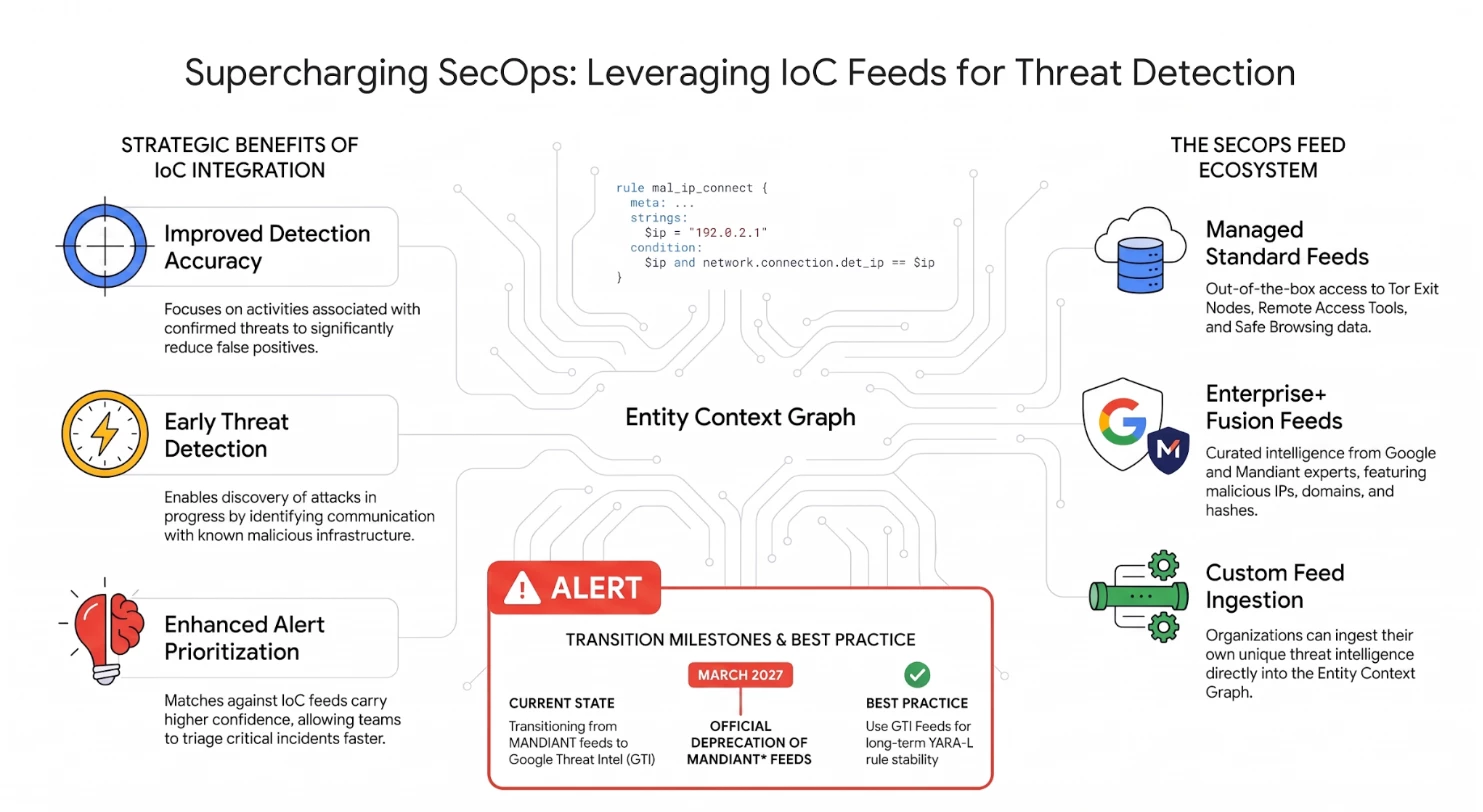
Feeds in the SecOps Environment
SecOps rules follow YARA-L syntax and UDM fields to support leveraging feeds (ingested into Entity Graph). One such field is threat_feed_name under security metadata https://cloud.google.com/chronicle/docs/reference/udm-field-list#securityresult
An IoC feed should be available for SecOps YARA-L rule via ECG (Entity Context Graph). This requires an integration of the feed into ECG and the feed should be structured according to entity graph requirements. Adding feeds to SecOps is briefly mentioned later but is not the focus of this document.
Current Feeds in SecOps
Google SecOps managed content includes several detection rules built on these feeds—for example, rules detecting connections from Tor exit nodes under Cloud-threats → AWS-Hacktools, as well as detections under Azure Defender.However, customers can add their own custom rules using the available/exposed (following) feeds.
Feeds Can be used by all SecOps customers
Following feeds are available for YL2 rules in SecOps for all the customers to consume -
-
Tor Exit Nodes: Collection of IPs that act as Tor exit nodes.
-
Remote Access Tools: Collection of malware hashes associated with Remote access tools.
-
Benign Binaries: Collection of hashes from known benign binaries.
-
WHOIS: Public dataset of domain name information.
-
Safe Browsing: Hashes related to Safe Browsing.
This overview highlights the effective utilization of Tor Exit Nodes and Remote Access Tools feeds within Google SecOps. Please refer to this article for Safebrowsing feed.
Enterprise+ Customers
Fusion Feed
Enterprise+ customers have access to fusion feeds and can benefit from additional threat intel. Fusion feed consists of IoCs(IP, Domain, Hashes and URLs) associated with malicious activities. These feeds are curated from active incident responses and triaging from Google and mandiant security experts.
Fusion feed events are matched as follows -
events:
  $context_graph.graph.metadata.product_name = "MANDIANT_FUSION_IOC"
  $context_graph.graph.metadata.vendor_name = "MANDIANT_FUSION_IOC"
  $context_graph.graph.metadata.source_type = "GLOBAL_CONTEXT"
  $context_graph.graph.metadata.entity_type = "FILE"
Note: MANDIANT* feeds are scheduled for deprecation in March 2027 (03/2027). We recommend transitioning to GTI Feeds; step-by-step migration guidance is available here.
Additional context or metadata
For contextual metadata, fusion feed comes handy with most of the additional attributes that can be leveraged in conjunction with original rule logic. Following is an example of of YL2 rule which is using the additional metadata (like confidence score and active breach information) from the fusion feed -
outcome:
   // Extract the Mandiant Automated Intel confidence score of maliciousness
   $confidence_score = max(if($context_graph.graph.metadata.threat.verdict_info.source_provider = "Mandiant Automated Intel",     $context_graph.graph.metadata.threat.verdict_info.confidence_score, 0))

   // Extract the status of the indicator as seen in a breached environment
   $breached = max(if($context_graph.graph.metadata.threat.verdict_info.pwn = true, 1, 0))
   // Intermediary outcome variable to combine conditions of intelligence extracted in the previous outcome variables.

   // Return 1 if conditions are met, otherwise return 0.
   $matched_conditions = if($confidence_score >= 80 AND $breached = 1, 1, 0)


 condition:
   // Ensure $e1, $context_graph and $matched_conditions conditions are met.
   $e1 AND $context_graph AND $matched_conditions = 1
Other Feeds
In addition to the ATI Fusion Feed, following feeds are available only for Google SecOps managed content detection rules for Enterprise+ customers. Please note that, the following feeds are not available to customers to write their own custom rules at this point.
-
Cryptomining IPs: IPs associated with unauthorized cryptocurrency mining activities.
-
C2 IPs: IP addresses identified as Command and Control (C2) infrastructure.
-
C2 Egress IPs: IP addresses used for outbound communication to malicious C2 servers.
-
Inbound Attacker IPs: IPs known for initiating inbound attacks or malicious scanning.
-
Anonymous Proxy IPs: IPs associated with anonymous proxy services used to mask attacker origins.
-
VPN IPs: A collection of IPs from VPN providers associated with malicious activity.
-
C2 Domains: Domain names used for Command and Control (C2) server infrastructure.
-
Cryptomining Domains: Domains associated with hosting or coordinating mining activities.
-
Bad Linux Binaries: A collection of hashes for known malicious binaries targeting Linux platforms.
-
Cryptomining Samples: A collection of hashes for software samples used in mining operations.
Additional details about detections based on above feeds can be found at
https://docs.cloud.google.com/chronicle/docs/detection/non-prioritized-ioc-matching-threats-category
While Google provides curated Applied Threat Intelligence (ATI) rules and feeds, these should not be viewed as a complete or sole solution for all threat intelligence requirements. Customers are encouraged to integrate their own custom threat intelligence feeds whenever their specific security needs extend beyond Google's out-of-the-box offerings.
Adding new Feeds
Customers can use SecOps supported feeds or add their own feeds which need to be ingested into the SecOps environment during the rule execution.
Following are high level references that can be used to get started on adding custom feeds -
-
Entity Ingestion - https://cloud.google.com/chronicle/docs/ingestion/ingestion-entities
-
Enrichment of Data and Aliasing - - https://docs.cloud.google.com/chronicle/docs/event-processing/overview-of-aliasing-and-enrichment
-
Writing custom parsers for your feeds - https://medium.com/@thatsiemguy/why-doesnt-chronicle-siem-have-a-default-misp-parser-d7b23ba87093
-
Using Google SecOps Parser extensions (if existing parsers do not support your requirements) - https://cloud.google.com/chronicle/docs/event-processing/using-parser-extensions
Please work with your customer support engineer on the feasibility if you would like to onboard specific feeds into the Google SecOps environment.
Writing Rules using Feeds
Once the feeds are promoted to SecOps, rules based on feeds will execute and generate security alerts based on the traffic.
Simple is_present rule
A simple is_present rule can be the detection of an IoC that exists in a feed. For example, if a customer is receiving traffic from Tor Exit nodes and would like to be alerted, the following syntax for events, can be useful:
Events:
    // event based on IP - Event Field
    $principalIp = $e.principal.ip

    // Filter Entity graph to extract feed specific details (i.e., entity fields)
    $gcti.graph.metadata.entity_type = "IP_ADDRESS"
    // Provide the specific feed name to use
    $gcti.graph.metadata.threat.threat_feed_name = "Tor Exit Nodes"
    // Feed provider name, in this context it is GCTI.
    $gcti.graph.metadata.product_name = "GCTI Feed"

    // Join the IP data - i.e., match the event’s IP with an IP in the feed
    $principalIp = $gcti.graph.entity.artifact.ip

 match:
    $principalIp over 30m
outcome:
    …
    // to get the threat_feed_name in the outcome variables
    $var = array_distinct($gcti.graph.metadata.threat.threat_feed_name)
Condition:
   $e and $gcti
…
The above example is based on the feed from GCTI (Google Cloud Threat Intelligence), Tor Exit Nodes.
Note the metadata fields that are used in the rule. One way of pointing the rule to a feed is via using the field threat_feed_name. More about supported fields can be found at UDM_Fields
Complex Rules
In addition to leveraging curated threat intel in the form of IoC feeds, YL2 rules can include additional conditions, either to enrich the detections or elaborate the detection criteria. For example, one can detect multiple login failures from a Tor (or Remote Access Tool - Feed and example attack) network to confirm that a malicious actor is trying to access the Google Workspace. Following is the sample complex rule involving multiple events -
 events:
    $failed_login_event.metadata.product_name = "login"
    $failed_login_event.metadata.product_event_type = "login_failure"
    $failed_login_event.metadata.vendor_name = "Google Workspace"
    $sus_ip = $failed_login_event.principal.ip
    $sus_target_account = $failed_login_event.target.user.email_addresses
    $sus_target_account != ""

    $torIp = $e.principal.ip

    $gcti.graph.metadata.entity_type = "IP_ADDRESS"
    $gcti.graph.metadata.threat.threat_feed_name = "Tor Exit Nodes"
    $gcti.graph.metadata.product_name = "GCTI Feed"

    // Join the IP data
    $torIp = $gcti.graph.entity.artifact.ip
    $sus_ip = $torIp

  match:
    $sus_ip over 1h

  outcome:
    $observation_threshold = 10
    $event_count = count_distinct($failed_login_event.metadata.id)
  condition:
    $failed_login_event and ($event_count >= $observation_threshold)
}
Tip: Above code constructs (outcome and condition) can further optimized with count syntax as follows -
Rule based on multiple feeds
There can be detections which would check multiple events and IoCs can be from various feeds. Rules can be written leveraging multiple feeds. Following is an example of
-
a sample which could be malicious and from remote access tools and
-
traffic is coming from Tor exit nodes.
It would be a similar rule to the above complex rule, but matching IoCs should be joined. For example, IP match from Tor Exit Nodes feed and
events:
    $targetip = $e.target.ip
    $gcti.graph.metadata.entity_type = "IP_ADDRESS"
    $gcti.graph.metadata.threat.threat_feed_name = "Tor Exit Nodes"
    $gcti.graph.metadata.product_name = "GCTI Feed"
    // Join the IP data
    $targetip = $gcti.graph.entity.artifact.ip

    $e.metadata.event_type = "PROCESS_LAUNCH"
    $e.target.process.file.sha256 != ""
    $rmm_hash = $e.target.process.file.sha256

    // Look for RMM tool samples
    $hash_feed.graph.metadata.entity_type = "FILE"
    $hash_feed.graph.metadata.vendor_name = "Google Cloud Threat Intelligence"
    $hash_feed.graph.metadata.product_name = "GCTI Feed"
    $hash_feed.graph.metadata.threat.threat_feed_name = "Remote Access Tools"
    // Join the sample data
     $rmm_hash = $hash_feed.graph.entity.file.sha256

match:
    $targetip over 10m

condition:
     $e and $gcti and $hash_feed
Conclusion
Best Practices
Performance:
Please note that, having the feed in the SecOps rule execution environment and finding the appropriate IoC can be computationally expensive. This will be even more difficult when there are multiple feeds involved. To overcome this, composite rules can be used where the initial detections can be as basic as possible and apply rule-changing to combine initial detections.
Outcome section:
- It will be useful to emit the feed(s) names that were used in the rules to be able to track back as the reason for alerts. Sometimes, feeds may consist of false positives, and the alert can act as a feedback mechanism.
- Fields extractions from the feed entities are required to be aggregated in the outcomes section due to YL2 requirements.
- Limitation on the amount of data that can be emitted in the outcome section should be considered.
Takeaways
- SecOps detections can be expanded using threat feeds and this guide highlights an overview and provides initial references and examples.
- Customers can use existing feeds, or request for new feeds or onboard their custom feeds.
