




Author: Ivan Ninichuck
1. Executive Summary: The Pivot to Entity-Centric Security
In traditional security operations environments, the "Event" has long been considered the atomic unit of analysis. Legacy SIEM deployments function by triggering rules based on specific, isolated log events; if a signature matches, an alert is created for manual investigation. However, this model is increasingly inadequate against modern Advanced Persistent Threats (APTs) and sophisticated insider threats. These adversaries rarely trigger a single "smoking gun" high-severity event. Instead, they manifest through a sequence of low-fidelity signals—a "low and slow" behavioral pattern that traditional event-centric rules often miss or drown out in a sea of false positives.
Google SecOps Risk Analytics inverts this model by establishing the Entity (User or Asset) as the primary unit of analysis. Rather than asking "Is this specific event malicious?", the Risk Engine asks "How risky is this entity right now?" by aggregating every signal, anomaly, and detection associated with it over a sliding temporal window. This pivot allows security teams to move beyond tactical, procedure-based detection toward a holistic, strategic understanding of entity behavior. This article explores the architecture of the Risk Engine, the operational workflows within the dashboard, and the engineering of precise risk scores using advanced YARA-L syntax to manipulate the engine’s behavior for maximum defensive impact.
2. The Risk Engine Architecture
To engineer effective detections, one must first understand how the engine ingests and normalizes data. The Risk Engine does not simply sum up alerts; it applies a complex decay and weighting algorithm designed to prevent alert fatigue and provide a realistic representation of risk.
2.1 The Scoring Algorithm
The core formula for calculating an Entity Risk Score (ERS) is not a simple sum. It uses a "Max + Weighted Sum" approach to prioritize the most severe findings while still accounting for volume.
{Base Risk} ={Max Finding} + (W * sum{Remaining Findings})
- Max(Finding): The single highest risk score among all active detections for that entity in the risk window.
- W (Weighting): A coefficient (default is often 0.2, configurable) that dampens the impact of subsequent alerts.
- Sum: The aggregation of all other risk scores.
Implication for Engineers: If you have 100 "Low Severity" alerts (Score 20) and one "Critical" alert (Score 90), the Critical alert establishes the baseline. The 100 low alerts add to the score incrementally but are dampened by the weighting factor W. This prevents a noisy rule from artificially inflating a risk score to infinity immediately, while ensuring that a user with many low-fidelity alerts eventually crosses a threshold of concern.
Lets apply the statements above to an example affecting a user entity over 7 days. Consider the scenario where you have a detection for credential harvesting and it has a risk score of 90 based on the conditions you placed in the rule. The user has also been observed in 25 alerts over this period of time where the risk score assigned was 30. We will assume that the default weight of 0.2 has not been modified. We simplified this calculation by assigning the same risk score of 30 to the remaining alerts. But that was just so we could use multiplication to make the calculation easier. If there were varying risk scores you would just add them together.
The calculation is given by the following:
- Find the sum of the remaining risk scores:
25(30) = 750
- Now multiply that number by the Weight value:
0.2(750) = 150
- Finally add that to the highest risk score observed for the entity
90 + 150 = 240
Base Risk Score: 240
2.2 Normalization (The 1-1000 Scale)
The Base Risk is often a raw number that can fluctuate wildly. The UI displays a Normalized Risk Score on a scale of 1–1000.
- Low: 1-300(Minor impact, monitor)
- Medium: 310-790(Warrants Attention)
- Critical/High: 800+ (Immediate investigation).
When writing YARA-L rules, you are manipulating the input to this algorithm (the Finding Score), not the final Normalized Score directly.
3. The Risk Analytics Dashboard: Operational Workflows
The UI is divided into two primary views: Behavioral Analytics and Entity Analytics.
3.1 Behavioral Analytics View
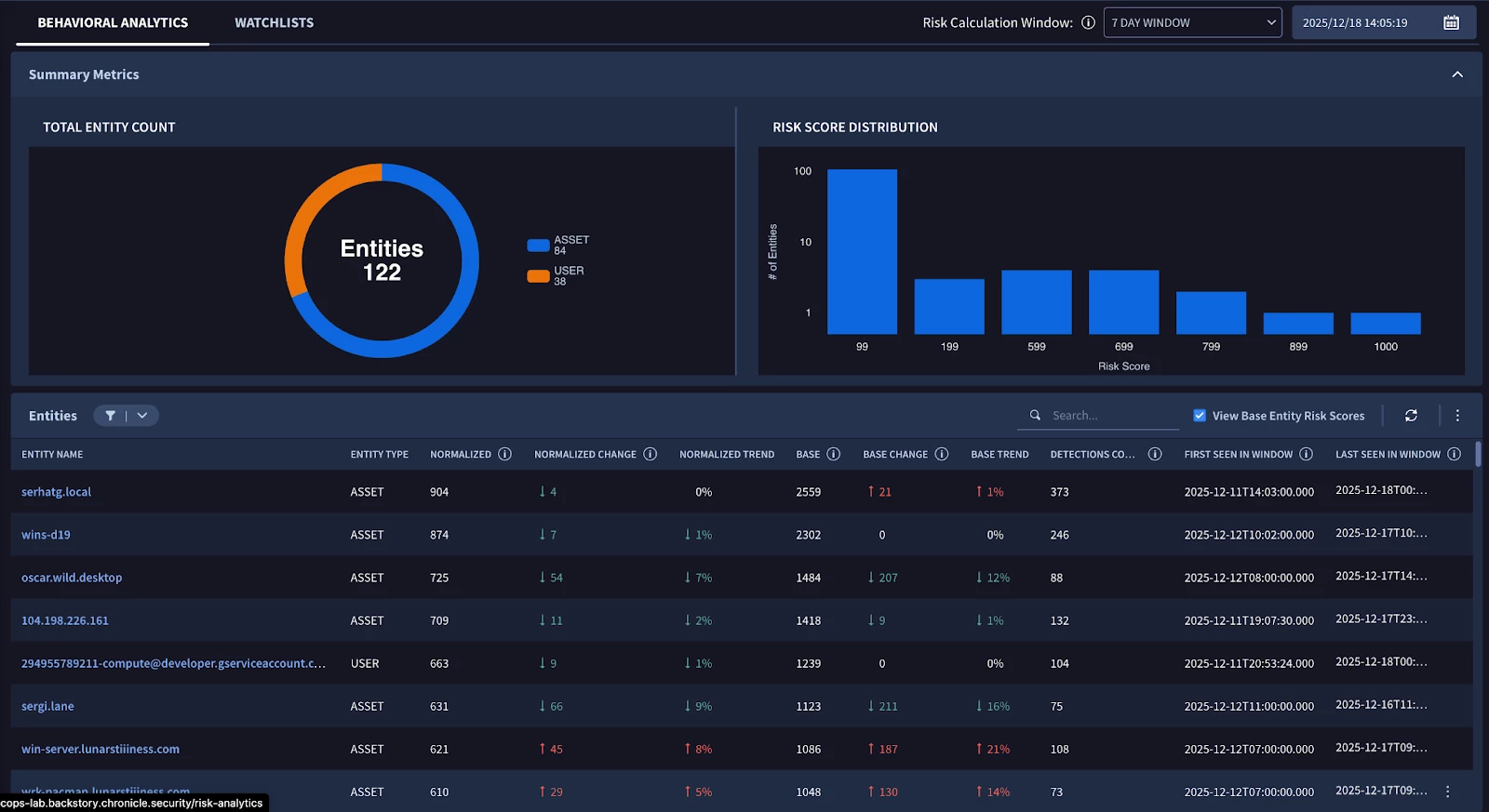
This is the "Landing Page" for the risk engine. It filters the top 10,000 most risky entities.
Located in the navigation bar under Detection > Risk Analytics, this feature visualizes trends to help you identify unusual behavior patterns at a glance. It provides deep visibility by displaying the top 10,000 highest risk entities, allowing you to prioritize the most critical threats within your environment.
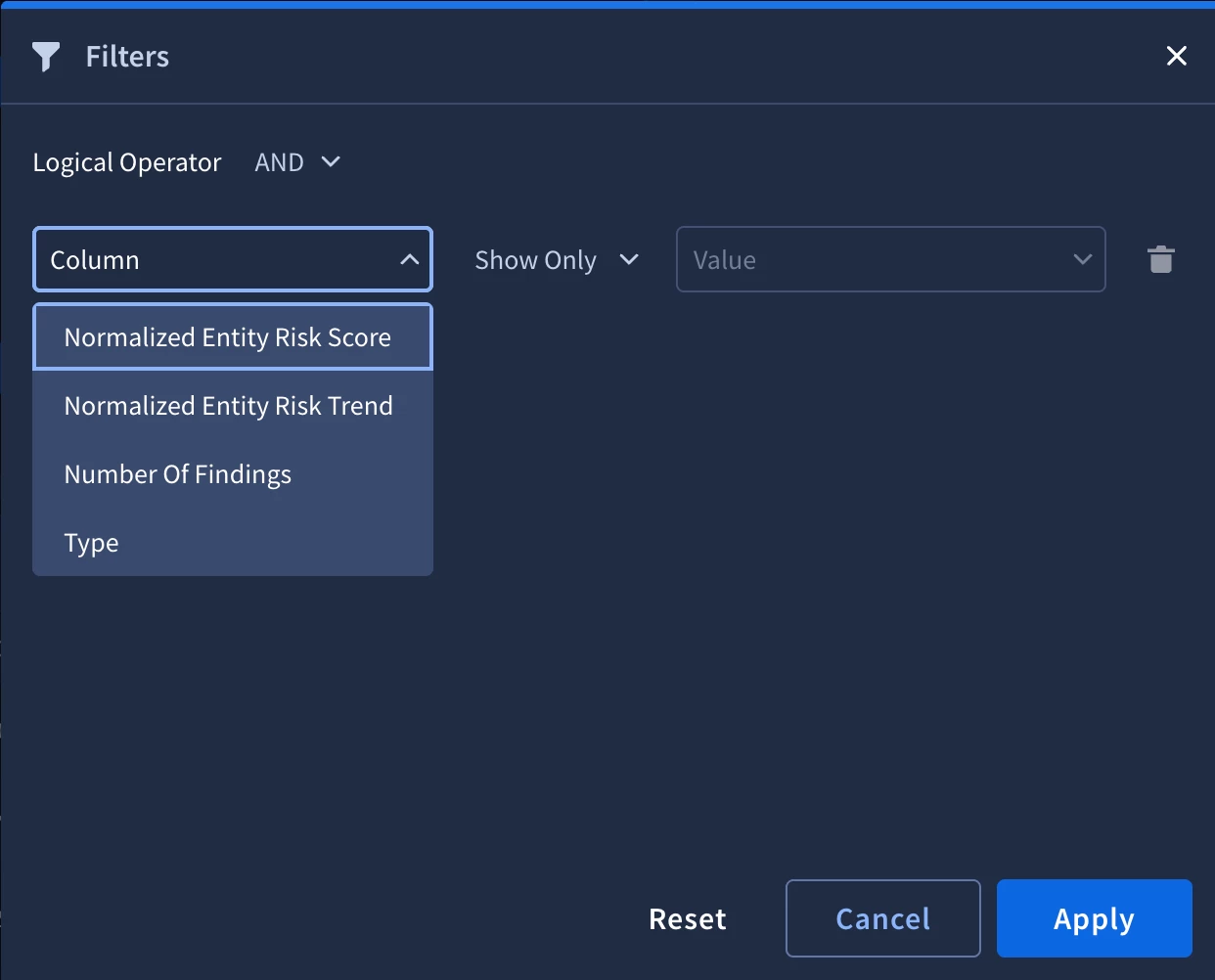
To streamline your workflow, you can use quick filters to drill down into specific investigation objectives. These filters allow you to instantly narrow your search based on critical criteria, such as the total number of findings or a significant increase in risk trends, ensuring you focus on the most impactful data first.
3.2 Entity Analytics (The Investigation Timeline)
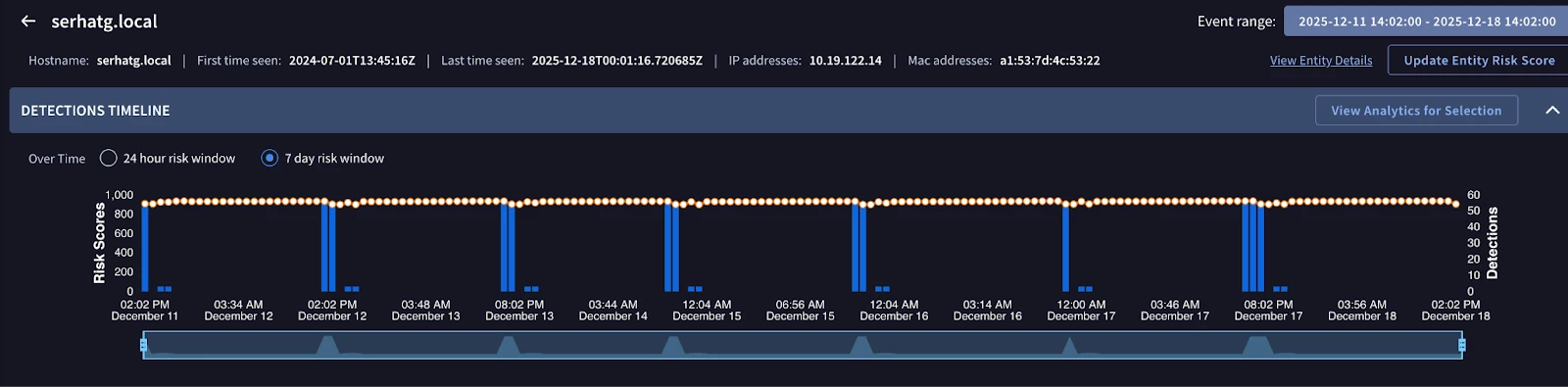
Clicking an entity opens the deep dive view.
- The Findings Timeline: This is a visual graph of risk over time.
- Analyst Workflow: Look for "Plateaus vs. Spikes".
- Spike: A sudden compromise (e.g., Malware execution).
- Plateau: A persistent infection or insider threat (e.g., constant slow data exfiltration).
- Analyst Workflow: Look for "Plateaus vs. Spikes".
Composite Detections: The UI groups related alerts into "Composite" lines if they are linked by the same detection logic or thread, reducing visual clutter.
4. Engineering Risk with YARA-L
This is the core implementation section. Standard YARA-L rules generate detections. Advanced YARA-L rules manipulate the Risk Engine.
4.1 The $risk_score Outcome Variable
To interface with the Risk Engine, you must use the special outcome variable $risk_score. If this variable is omitted, Google SecOps assigns default values (Alert = 40, Detection = 15). The rule below is an example of how to create a conditional risk score. The event itself is simple on purpose.
Syntax Pattern
Code snippet
rule dynamic_risk_scoring_example {
  meta:
    author = "SecOps Team"
    description = "Assigns risk based on asset criticality"

  events:
    $e.metadata.event_type = "USER_LOGIN"
    $e.security_result.action = "BLOCK"

  outcome:
    // The core interface to the Risk Engine
    $risk_score = max(
        // Base Score for the behavior
        35 +
        // Add 50 points if the target is a Production Server
        if($e.principal.labels.key = "environment" and $e.principal.labels.value = "PROD", 50, 0) +
        // Add 15 points if the user is an Admin
        if(re.regex($e.target.user.userid, "admin"), 15, 0)
    )

  condition:
    $e
}
Technical Breakdown:
- Dynamic Calculation: This calculation uses the max aggregation as we want to return the maximum numerical value from the calculation.
- if() Conditionals: This allows for context-aware risk. A blocked login on a dev laptop might have a risk score of 35 (Base). A blocked login on a PROD server by an Admin account becomes $35 + 50 + 15 = 100$ (Critical).
- Result: This single rule feeds the Risk Engine variable inputs, allowing the Entity Score to reflect context, not just event type.
4.2 Using Statistical Baselines (metrics.*)
Google SecOps calculates behavioral metrics automatically (UEBA). You can access these in YARA-L to detect anomalies from a baseline.
Scenario: Detect a user logging in from 5+ distinct cities in one day (Impossible Travel / VPN Anomaly).
rule ueba_impossible_travel_anomaly {
  meta:
    description = "Detects high variance in geolocation compared to user history"

  events:
    $e.metadata.event_type = "USER_LOGIN"
    $e.principal.user.userid = $user

    // Check against pre-computed metrics
    // "metrics.auth_attempts_total" is a standard UEBA metric
    $total_logins = metrics.auth_attempts_total(
        period: 1d,
        window: 30d,
        metric: event_count_sum,
        agg: sum,
        target.user.userid: $user
    )

  match:
    // Group by User over 24 hours
    $user over 24h

  outcome:
    // Count distinct geolocations in the match window
    $distinct_cities = count_distinct($e.principal.location.city)

    // Dynamic Risk: Higher risk for more cities
    $risk_score = if($distinct_cities > 5, 90,
                    if($distinct_cities > 3, 60, 0))

  condition:
    $e and $distinct_cities > 3
}
4.3 The "Risk Loop": Reading Risk in Rules
A powerful advanced technique is creating rules that trigger based on the risk score itself. This allows for "Meta-Detections."
Scenario: Trigger a SOAR playbook only if a user's normalized risk score exceeds 90 AND they access a sensitive file.
rule meta_high_risk_access {
  meta:
    description = "Triggers when an ALREADY risky entity accesses sensitive data"

  events:
    // Event 1: The File Access
    $access.metadata.event_type = "FILE_ACCESS"
    $access.principal.user.userid = $user
    $access.target.file.full_path = /.*sensitive.*/

    // Event 2: The Entity Graph Risk Data
    // We join the event stream with the Risk Engine's output
    $risk.graph.entity.user.userid = $user
    $risk.graph.risk_score.risk_score > 90

    // Time bounding the risk data (must be recent)
    $risk.graph.risk_score.risk_window_size.seconds = 86400 // 24h window

  match:
    $user over 10m

  outcome:
    $risk_score = 100 // Maximum severity because a known risky user is touching sensitive data
    $current_risk_level = max($risk.graph.risk_score.risk_score)

  condition:
    $access and $risk
}
Critical Implementation Note:
You must be careful with recursion. If this rule generates a detection with a high risk score, it feeds back into the Risk Engine, potentially raising the user's score further. To prevent feedback loops, these "Meta-Rules" are often set to alert: true but might use a static risk score output or be excluded from the base calculation via exception lists if necessary.
4.3 Risk Score Change Events
A critical advancement in entity-centric strategy is the use of the ENTITY_RISK_CHANGE UDM event type. This capability allows engineers to write rules that trigger independently of standard ingested log events, focusing instead on the output of the Risk Engine itself.
By monitoring changes in an entity's risk score directly, the detection process is abstracted away from specific, granular tactics—such as a single registry change or a specific PowerShell command. Instead, it observes the overall security posture of the entity. This abstraction enables a more rapid response to escalating threats; the system can alert on significant risk increases regardless of the specific combination of behaviors that triggered the initial scoring. This creates a more resilient defense, as it captures the cumulative impact of multiple low-severity signals that might be missed by procedure-based rules.
rule entity_only_risk_change {
  meta:
    author = "test@google.com"
    description = "Alert on entities crossing a threshold"

  events:
    // Check only Entity Risk Change events
    $e1.metadata.event_type = "ENTITY_RISK_CHANGE"

    // Check for a Risk Score change with 100 as the threshold
    $e1.extensions.entity_risk.risk_score >= 100 [cite: 17, 18, 19, 20, 21, 22, 23, 24, 25]

  outcome:
    // Reset risk score to prevent feedback
    $risk_score = 0 [cite: 27, 28]

  condition:
    $e1 [cite: 29, 30]
}
Conclusion and Next Steps
Transitioning to an entity-centric detection model is no longer optional; it is a fundamental requirement for modern security operations. By moving the focus of analysis from isolated events to the holistic behavior of users and assets, organizations can significantly reduce the noise that plagues traditional SIEM environments. The use of the ENTITY_RISK_CHANGE event type represents the pinnacle of this shift, providing a layer of abstraction that allows security teams to monitor for threats that don't fit into a single signature or procedure.
Implementing this model is an engineering discipline that requires continuous refinement of risk scores and a deep understanding of organizational context. By mastering the Risk Engine’s weighting and decay algorithms and leveraging advanced YARA-L for dynamic thresholding, security teams can align their defense with the reality of modern, sophisticated adversaries. The end result is a SOC that is not just more efficient, but one that is fundamentally better equipped to identify and neutralize the most complex threats before they can achieve their objectives.
Immediate Actions for the Engineering Team:
- Audit Default Scores: Review the Settings > Entity Risk Scores page to ensure defaults (40/15) align with your risk appetite.
- Tag Critical Assets: Ensure your context ingestion (LDAP/CMDB) is populating graph.metadata.priority or similar fields to enable the context-aware rules described in Section 4.2.
Deploy "Meta-Rules": Implement the "Risk Loop" rule (Section 4.3) to detect lateral movement by already-compromised entities.
