



Author: Chris Morris, Technical Solutions Consultant
Overview of Custom Logical Operators and Transformation Functions
Introduction:
Custom Logical Operators and Transformation Functions have been released for Google SecOps SOAR to provide security analysts with greater flexibility in playbook automation. These features allow for the creation of Python-based logic that can be tailored to specific organizational needs.
Custom Logical Operators enable the implementation of conditional checks and are supported for use in:
-
Conditions: To drive precise branching logic within a playbook.
-
Previous Action Conditions: To evaluate the success or specific output of a preceding step before continuing.
-
Entity Selection: To filter and select specific entities for targeted actions based on complex criteria.
Transformation Functions are integrated with the Expression Builder to dynamically process data payloads. They allow analysts to:
-
Parse and modify raw JSON results returned from actions.
-
Standardize and convert complex data outputs (like time formats or unit measures) to ensure consistent data ingestion in later steps.
-
Transform complex or sensitive data into safe, human-readable formats for reporting or sharing (e.g., time formats, defanging URLs, redacting PII).
In this Adoption Guide, we will explore the end-to-end process of creating Extension Packs to house these items, developing the Python logic, and testing them within the IDE and live playbooks.
Creating an Extension Pack
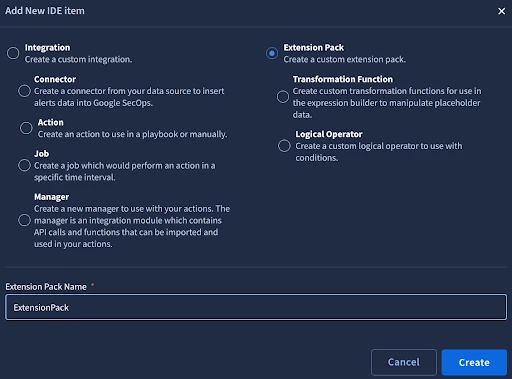
To use this feature we will start by creating an Extension Pack to hold the logical operators and transformation functions that we develop. To do so, start by going to Response > IDE and select ‘+’ to add a new item. From there, choose the Extension Pack option and provide the pack with a name, ex. ExtensionPack.
Custom Logical Operators
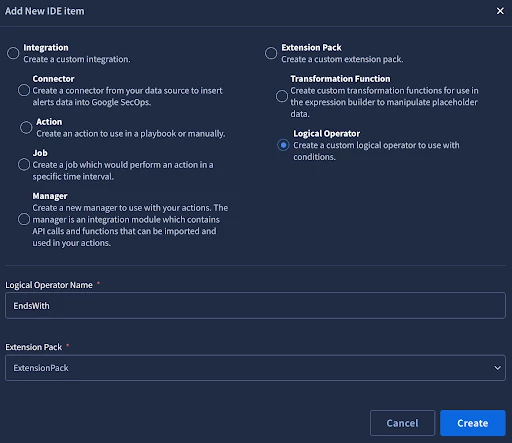
In this guide, we will start with the creation of a custom Logical Operator. To create the Logical Operator, add another IDE item, this time selecting Logical Operator. Provide the Logical Operator with a name (ex. EndsWith) and assign it to the Extension Pack you created, (ex. ExtensionPack).
When we create the Logical Operator, we are provided with a Python template that we can work with to build the functionality we need. In the code below, I have updated the logic to create a new operator to check if a value ends with a string we specify. If a case sensitive operator is preferred, replace line 11 - ‘result = str(left_side_param).lower().endswith(str(right_side_param).lower())’ with ‘result = str(left_side_param).endswith(str(right_side_param))’.
from SiemplifyLogicalOperator import SiemplifyLogicalOperator

def main():
    logical_operator = SiemplifyLogicalOperator()

    left_side_param = logical_operator.extract_param("Left Side")
    right_side_param = logical_operator.extract_param("Right Side")

    # Add custom logical operator logic here
    if left_side_param is not None and right_side_param is not None:
        result = str(left_side_param).lower().endswith(str(right_side_param).lower())
    else:
        result = False

    logical_operator.LOGGER.info("Finished executing the logical operator")
    logical_operator.end(result)

if __name__ == "__main__":
    main()
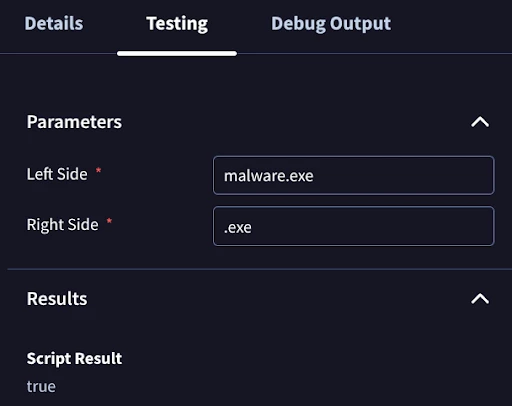
After enabling the operator, we can test in the IDE on the testing tab. In the example below, I have entered malware.exe as the Left Side parameter and to check if the string ends with .exe, I have entered .exe as the right side parameter. The Script Result returns as True indicating our parameters matched based on the custom logical operator we created.
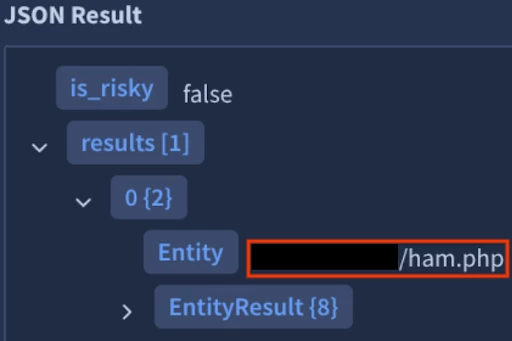
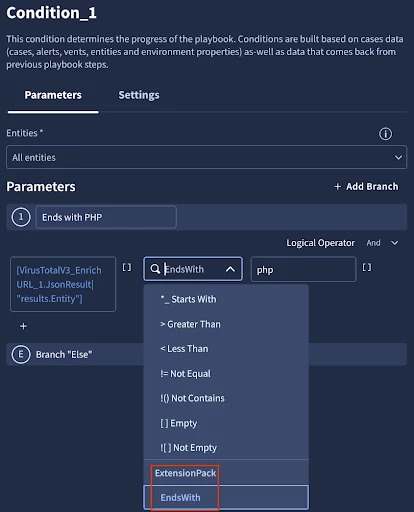
With our testing complete in the IDE, we can now test the Logical Operator in a playbook. In the below image, I have a JSON result for a URL ending in php.
I have added a Condition to my playbook, so I can use the new Operator. As you can see, in addition to the prebuilt Logical Operators, we can now see the Ends With operator that we just created under our Extension Pack. We’ll select it and set the right side of the condition to php to check if the value from our JSON result from earlier ends in php.
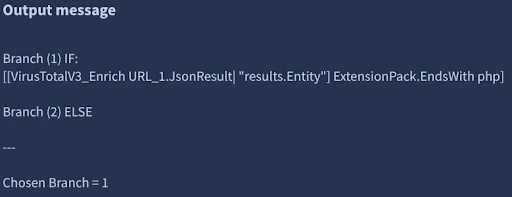
Next, we run a simulated alert and can see that the Operator worked as expected, Branch 1 was chosen.
We’ll walk through one more Logical Operator example before moving on to custom Transformation Functions. To start, we’ll create another Logical Operator in the IDE and paste in the code for an operator that performs a regex match:
from SiemplifyLogicalOperator import SiemplifyLogicalOperator
import re

def main():
    logical_operator = SiemplifyLogicalOperator()

    text_to_search = str(logical_operator.extract_param("Left Side"))
    regex_pattern = str(logical_operator.extract_param("Right Side"))

    result = False

    if text_to_search and regex_pattern:
        try:
            # re.search for pattern match anywhere in the string
            # replace w re.match to force matching from the beginning only
            match = re.search(regex_pattern, text_to_search, re.IGNORECASE)

            # convert match object to boolean
            result = bool(match)
        except re.error:
            # if invalid regex, fail gracefully
            result = False

    logical_operator.LOGGER.info("Finished executing the logical operator")
    logical_operator.end(result)


if __name__ == "__main__":
    main()
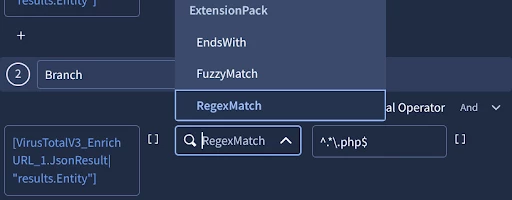
We’ll use our new operator in a condition. Similar to the last example, for testing here, I am using the operator to do a regex match for a string ending in .php:
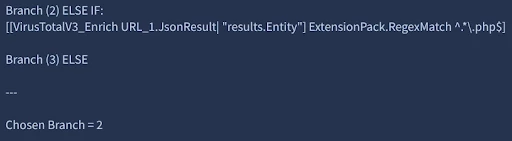
After testing, the correct branch was chosen:
Custom Transformation Functions
With our first Logical Operators created, we’ll now take a look at Transformation Functions. With the Extension Pack from earlier created, we can now create a custom Transformation Function. From the SOAR IDE, add a new IDE item, and select Transformation Function, provide it with a name (ex. defangUrl), assign it to your Extension Pack (ex. ExtensionPack), and select Create.
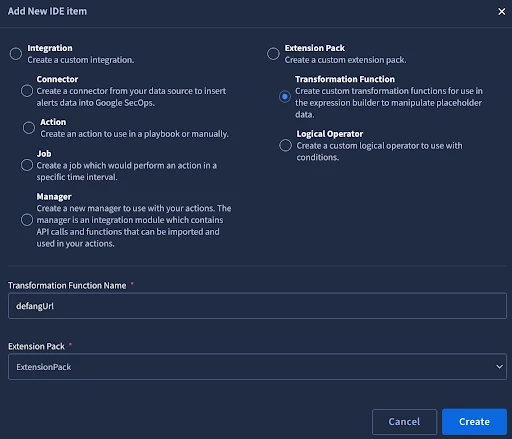
Like with the custom Logical Operator we created earlier, we are provided with a template for the Transformation Function that we can build on. In the code below, I have updated the logic to create a new function to defang a URL as a simple first example.
from SiemplifyTransformer import SiemplifyTransformer

def main():
    transformer = SiemplifyTransformer()
    # The value coming from the playbook
    input_val = str(transformer.extract_param("input"))

    # Check if input exists
    if input_val:
        # Replace http with hxxp, dot in the domain with [.] to prevent resolution
        result = input_val.replace("http", "hxxp").replace(".", "[.]")
    else:
        result = input_val

    transformer.LOGGER.info(f"Defanged {input_val} to {result}")
    transformer.end(result)

if __name__ == "__main__":
    main()
After enabling the operator, we can test in the IDE on the testing tab. In the example below I am going to enter https://www.google.com/ and defang the URL so it cannot be directly accessed without first manipulating it. We do this to prevent potentially malicious URLs from being made clickable if, for example, we choose to send a summary of the alert out via email or a chat message.
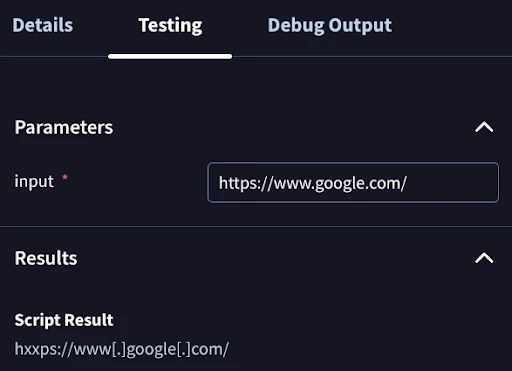
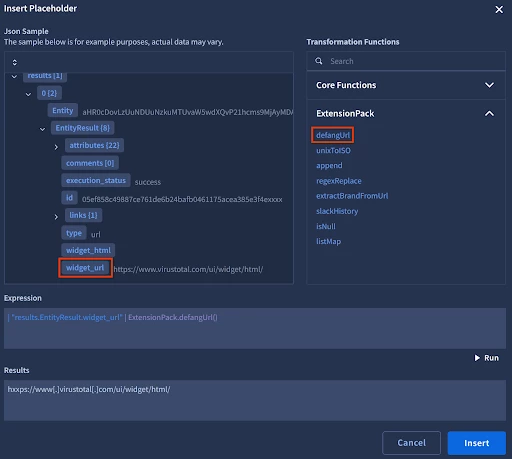
From the screenshot, we can see that the function successfully took our URL and defanged it. We can now test the function within a playbook. In this example, I have the JSON result of a VirusTotal action. The URL here is harmless, but helps to illustrate how the function works. From the expression builder, I select widget_url and then my defangUrl function to build the expression. I then select Run to test my results. I can now select Insert to add this to my playbook.
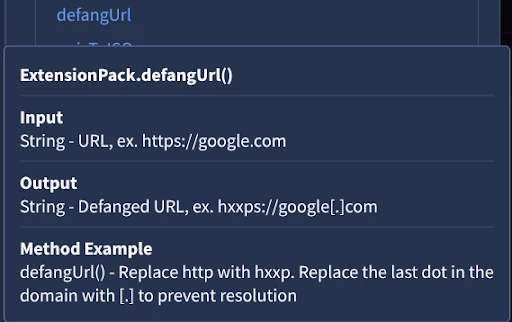
One other item to call out here is typically when we hover over a Transformation Function in Expression Builder we are provided with documentation on its use. We can do the same for our custom functions when we create them. In the IDE, on the Details tab, we can specify Expected Inputs and Outputs as well as a Usage Example. For the defangURL function, I might enter something like this:
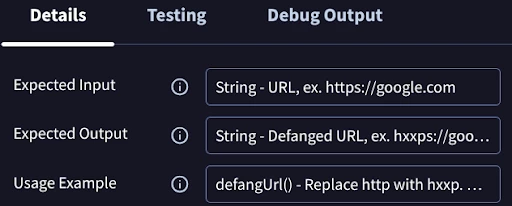
Hovering over the function in the Expression Builder, we can now see this documentation:
On to a second example, in Expression Builder today, we have a function to convert ISO time to Unix. We do not have one to do the opposite - convert Unix to ISO, but can create a new function to accomplish this. We’ll add a new Transformation Function in the IDE again, provide it with a name (I chose unixToISO), and assign it to an Extension Pack. Now we can enter in our code:
from SiemplifyTransformer import SiemplifyTransformer
from datetime import datetime, timezone

def main():
    transformer = SiemplifyTransformer()
    input_val = transformer.extract_param("input")

    try:
        epoch = float(input_val)

        if epoch > 10**14:  # Microseconds
            epoch = epoch / 1_000_000.0
        elif epoch > 10**11:  # Milliseconds
            epoch = epoch / 1_000.0

        dt = datetime.fromtimestamp(epoch, tz=timezone.utc)

        # Format to ISO 8601: YYYY-MM-DDTHH:MM:SS.mmmZ
        # %f gives 6 digits (microseconds), slice to 3 for milliseconds
        iso_str = dt.strftime('%Y-%m-%dT%H:%M:%S.%f')[:-3] + 'Z'
        result = iso_str

    except Exception as e:
        transformer.LOGGER.error(f"Could not convert timestamp {input_val}: {e}")
        # Return original value so the playbook doesn't break on a null
        result = input_val

    transformer.end(result)

if __name__ == "__main__":
    main()
We’ll test this in the IDE:
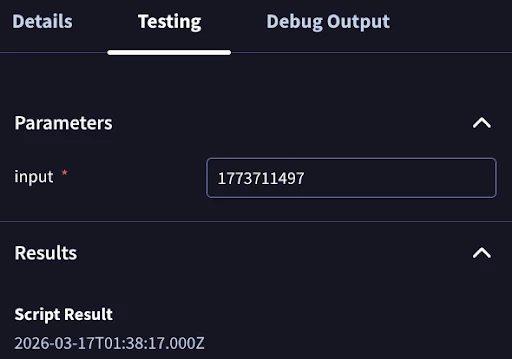
We’ve now converted the time into a format that our analysts can easily read. Our new function is now ready for use in our SOAR playbooks.
We’ll walk through one more Transformation Function example for performing a regex replace. Create the new function, provide it a name (ex. regexReplace) and assign it to your Extension Pack. Unlike the custom Logical Operators we initially reviewed, with Transformation Functions we can create additional parameters for use in our functions. These parameters are created under the Details tab, by selecting +. Create two additional parameters, pattern and replacement.
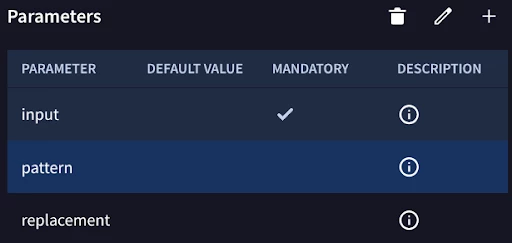
Editing the pattern parameter to see further details:
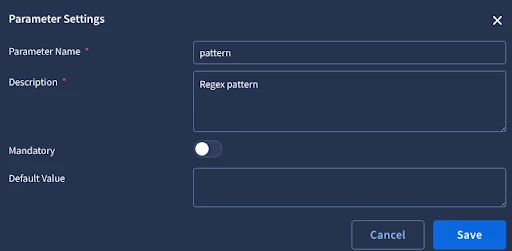
Next, we’ll add in our code for a custom function that we can use to perform a regex replacement. Note we are extracting the values of the pattern and replacement parameters we added, in addition to our default input parameter.
from SiemplifyTransformer import SiemplifyTransformer
import re

def main():
    transformer = SiemplifyTransformer()

    # 1. Extract Parameters
    # 'input' is the data from the playbook (e.g., a file path or log)
    input_val = str(transformer.extract_param("input"))
    # 'pattern' is the Regex to find
    pattern = transformer.extract_param("pattern")
    # 'replacement' is what you want to swap in
    replacement = transformer.extract_param("replacement") or ""

    result = input_val

    if input_val and pattern:
        try:
            # 2. Perform the Replace
            result = re.sub(pattern, replacement, input_val, flags=re.IGNORECASE)
        except Exception as e:
            transformer.LOGGER.error(f"Regex Replace failed: {e}")
            result = input_val

    transformer.LOGGER.info(f"Regex Replace finished. Result: {result}")
    transformer.end(result)

if __name__ == "__main__":
    main()
Now we’ll test our new function:
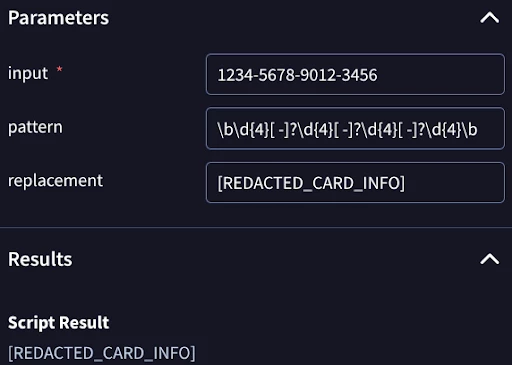
As an example, we have a string representing a credit card number and a pattern designed to match that string and replace it with [REDACTED_CARD_INFO]. We see this function worked as expected after checking our Script Result.
Conclusion
Custom Logical Operators and Transformation Functions provide extensible control over SecOps SOAR, allowing you to tailor playbook execution and manipulate your data using Python-based Extension Packs.
As demonstrated in this guide, these features empower your security operations in two key ways:
-
Custom Logical Operators: Enable highly specific conditional checks, such as regex matching or string evaluation, to drive precise playbook branching across Conditions, Previous Action Conditions, and Entity Selection.
-
Transformation Functions: Dynamically process, clean, and format data payloads directly within the Expression Builder. These allow you to take raw outputs from previous actions and reshape them into standardized, human-readable formats for subsequent steps, complete with custom parameters and inline documentation.
Ultimately, these capabilities empower you to build highly adaptable playbooks that seamlessly align with your organization's unique logic and data requirements.
