



Author: Gaurav Sood
Modern security operations require a standardized and efficient way to collect, refine, and export telemetry data from diverse environments into Google Security Operations (SecOps). This document provides a comprehensive adoption guide for Bindplane, that would help the teams get insights into the technicalities involved with Bindplane implementation. By following the structured implementation workflow and field-tested best practices detailed here, teams can ensure a robust, scalable, and cost-effective logging architecture.
High-Level Bindplane Concepts
Bindplane - Where does it fit in the SecOps ecosystem?
Bindplane is a telemetry pipeline designed to collect, refine, and export logs from various sources into Google Security Operations (SecOps). It provides a management layer (Bindplane console) and data transport mechanism (OTEL Agents) that standardizes how security data reaches Google SecOps.
In the Google SecOps ecosystem, it fits into the Data Ingestion layer in the following ways:
1. Unified Management Layer
-
Centralized Control: It provides a management server that allows you to manage all your collector deployments across Cloud or on-premises from a single interface.
-
Fleet Management: It simplifies the configuration, starting, stopping, and monitoring of collectors (agents) across your entire infrastructure.
2. Data Refinement & Optimization
It helps manage the cost and quality of data before it is stored:
-
Filtering: Users can drop/filter logs that match specific regular expressions (e.g., noisy debug logs) to reduce ingestion volume.
-
Transformation: It can add, move, or rename fields and parse data (KV, JSON, CSV, XML) to ensure logs are in a usable format for security analysts.
-
Redaction: The Enterprise edition supports PII masking to ensure sensitive data is removed before ingestion.
Bindplane Licence/Edition tiers
SecOps customers are entitled to below Bindplane License tiers
-
Bindplane (Google Edition): Included at no extra charge for all Google SecOps customers.
-
Bindplane Enterprise (Google Edition): Included for Google SecOps enterprise plus customers, offering advanced features like PII masking and deduplication.
The primary difference between the two versions is that Bindplane Enterprise (Google Edition) which is included with Google SecOps Enterprise Plus adds advanced features like PII masking, log deduplication, and the ability to route data to non-Google destinations during SIEM migrations (for 12 months).
Components of a typical Bindplane deployment
A typical Bindplane deployment consists of two main components that work together to manage your data ingestion into SecOps.
-
Bindplane Collector: This is an open-source agent (based on the OpenTelemetry Collector) that you install on-premises or in the cloud. It is responsible for the actual "work": collecting logs from sources (like Windows Event Logs or Syslog), refining them, and exporting them to Google SecOps.
-
Bindplane Server: This is a centralized management platform.It allows you to manage, monitor, and configure your entire fleet of collectors from a single interface (either in the cloud or on-premises).
Bindplane Ingestion Architecture
Bindplane acts as the "bridge" between your log sources and Google SecOps through several architectures:
-
Direct to API: One or more Collectors can send logs directly to the Google SecOps ingestion API.
-
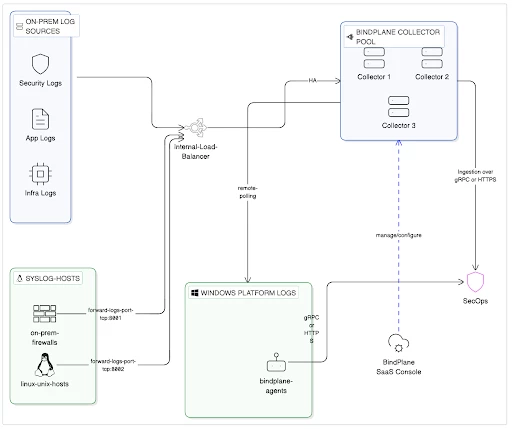
Gateway Mode: For large-scale deployments, collectors can send data to a gateway collector that aggregates and routes the data. This deployment architecture is a recommended approach and a best practice for high-throughput environments.
Below is a high level deployment architecture. Please note that you can choose any port numbers you like as listening posts on the Collector or Gateway.
Setting-up/Deploying Bindplane
Just like any enterprise deployment, setting up the bindplane involves planning. Successful implementation requires coordination between network, security, and infrastructure teams to ensure all prerequisites are met before the first collector is deployed.
Pre-Implementation Checklist
Please refer to the below important checklist items:
-
Deployment Architecture: Defining the structural layout of Bindplane components is a critical first step based on organizational scale and security requirements.
-
Bindplane Management Server Architecture: Organizations must choose between a self-hosted instance (installed in a cloud or on-premises) for full control, or a SaaS offering for reduced management overhead.
-
OTEL Architecture: Determine whether to deploy individual OTEL agents on every host or utilize a gateway collector model. Gateway collectors are recommended for high-throughput environments and large-scale deployments to aggregate and route data efficiently. These gateways should be placed behind a load balancer to ensure high availability and prevent disruptions in log transmission. Also when the collectors are deployed in Gateway mode, the Bindplane collector configuration on each of the individual collectors should be the same.
-
-
SecOps Destination: Select the appropriate ingestion endpoint for your environment. You can choose the Data Plane API (HTTPS) for standard web-based ingestion or the Legacy Ingestion API (gRPC) if your deployment requires batch-level ingestion labels or specific backward compatibility.
-
Capacity Planning: This will be the most important exercise to determine how many collectors you would need. Please refer to the Bindplane documentation on capacity planning
https://docs.bindplane.com/production-checklist/bindplane-otel-collector/sizing-and-scaling
-
Bindplane Licence: Obtain a Bindplane License Key from your Google Contact.
-
Ingestion API keys: Get the ingestion API key based on the ingestion endpoint that you select.
For Data Plane API (HTTPS) use the below mentioned instructions to create a required ingestion key.https://docs.bindplane.com/how-to-guides/google-secops/google-secops-configuring-the-https-dataplane-api-protocol
For Malachite ingestion endpoint (gRPC):
a) Sign in to your Google SecOps console.
b)Navigate to SIEM Settings > Collection Agents.
c)Click Download Ingestion Authentication File. This file contains the credentials (apikeys.json) needed to authenticate your API client.
-
Map log sources: Map all log sources to their supported Bindplane source types (such as Syslog, Windows Event Logs, or TCP) and decide whether to deploy agents directly or use a centralized Gateway Collector for aggregation.
List of all Bindplane sources can be found below:
https://docs.bindplane.com/integrations/sources
List of all SecOps log types can be found below:
https://docs.cloud.google.com/chronicle/docs/ingestion/parser-list/supported-default-parsers
Also map the port numbers that you would be using for each of the log types. An outcome of this exercise may look something like this:
| SecOps Log Type | Bindplane Source | Port Number | OTEL Deployment |
| CHECKPOINT_FIREWALL | Syslog | 8000 | Collector Gateway |
| CISCO_ASA_FIREWALL | 8001 | ||
| WINEVTLOG | Windows event | 8002 | Single Collector Agent |
-
Network Connectivity: Refer to Bindplane documentation for network connectivity requirements based on your deployment architecture.
Implementation Workflow
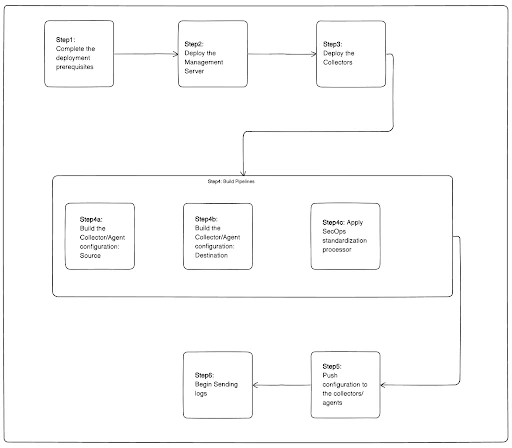
Here we are going to discuss these implementation steps at a high level:
1. Setup Management Server: Install the Bindplane OP server, which serves as the centralized control plane for your fleet. You can choose to install a self-hosted instance within your environment for full architectural control, or utilize the SaaS offering at app.bindplane.com to reduce management overhead. During setup, you must initialize the server with a license key; Google SecOps customers are entitled to a "Google Edition" key, while Enterprise Plus customers can obtain a "Bindplane Enterprise (Google Edition)" key to unlock advanced features like PII masking and non-Google routing.
Bindplane provides flexible options for deploying self-managed Gateways across various environments:
-
Virtual Machines
-
Kubernetes
-
Docker containers
-
Google Cloud Marketplace
-
AWS EC2 instances
-
Ansible-based automation
Detailed instructions of setting these up can be found in Bindplane documentation:
https://docs.bindplane.com/deployment
2. Deploy Collectors: Install the Bindplane Agent (based on the OpenTelemetry Collector) on target endpoints or dedicated gateway servers using provided installation scripts for Linux or Windows.
The installation packages for the respective platform can be found in the Bindplane console
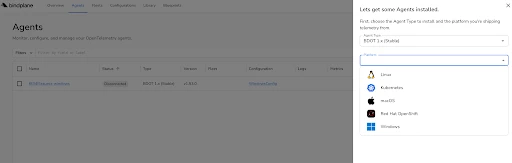
Once you select the platform from the dropdown (in this case Linux), you can get the exact command to run on the endpoint for installation.
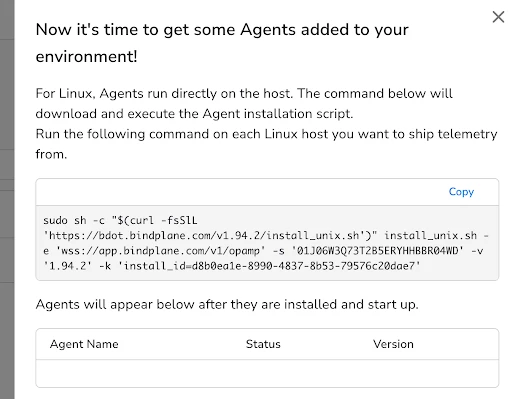
For large-scale environments, it is a recommended best practice to deploy collectors in a gateway mode to aggregate and route data efficiently. These gateway collectors should be positioned behind a load balancer to ensure high availability and prevent disruptions in log transmission. During installation, several command-line switches are available to customize the deployment, such as -x for specifying a proxy server and -k for applying resource labels used for fleet management.
Once the agent is installed, it registers itself to the Bindplane OP management server.
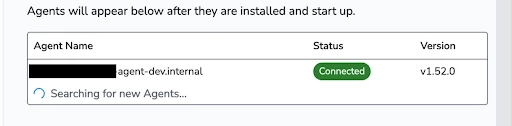
3. Configure Pipelines: Use the Bindplane console to create configurations that define your sources, processors (such as the SecOps Standardization processor for mapping log types), and destinations.
A pipeline consists of three core nodes: Sources, Processors, and Destinations.
Sources (The Origin)
Sources define where the telemetry originates. List of all Bindplane sources can be found below:
https://docs.bindplane.com/integrations/sources
For Google SecOps, it is a best practice to collect logs in their raw, unparsed format (e.g., enabling the "Raw Logs" option for Windows Events).
-
Common Sources: Windows Events, Syslog, TCP/UDP, Linux Files, and SQL databases.
-
Action: Click Add Source in the pipeline configuration card and select the appropriate source type.
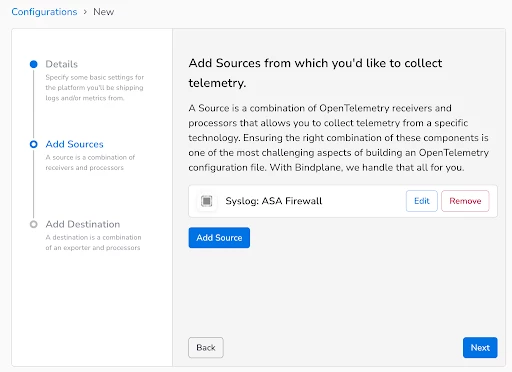
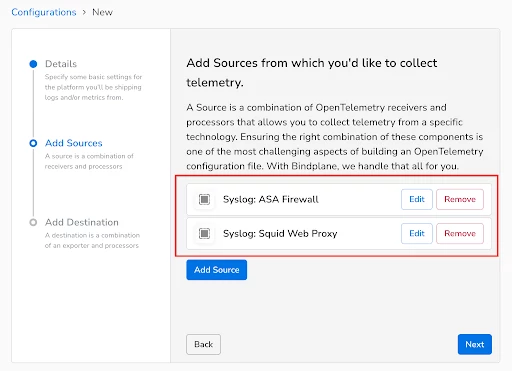
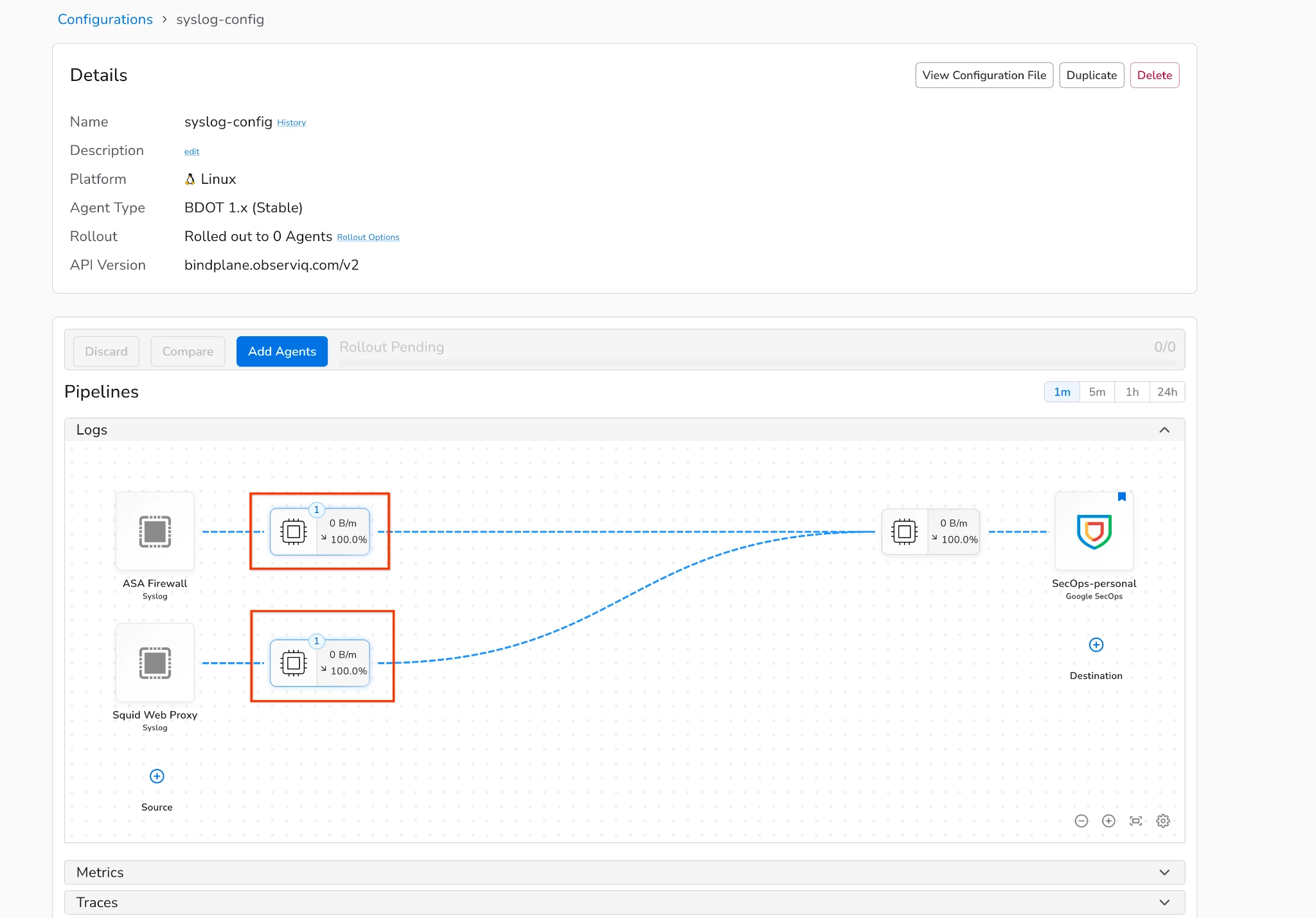
Your environment may require multiple sources within a single configuration. For instance, when collecting logs via syslog from both an ASA Firewall and a Squid Web Proxy, you must account for their unique log types in SecOps: CISCO_ASA_FIREWALL and SQUID_WEBPROXY. To handle this, add two distinct syslog sources to your configuration file, assigning a unique listening port to each log type.
We will click on Configuration and the select
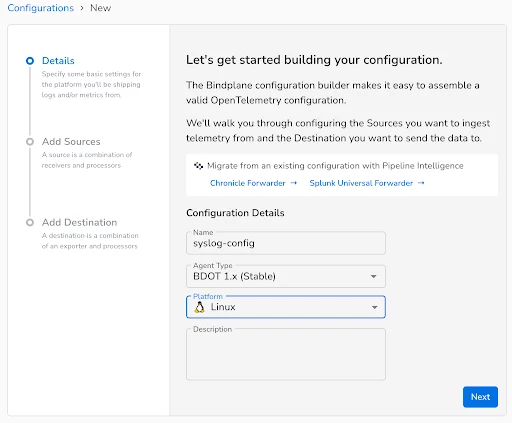
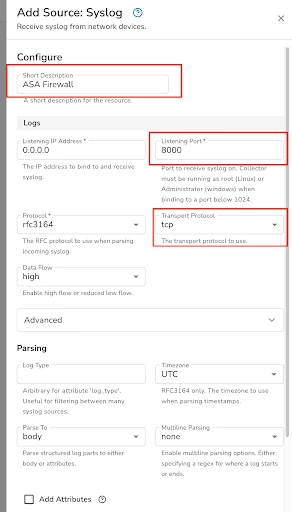
Now we add our first Syslog source and name it as ASA Firewall. This source will listen on port TCP 8000 for incoming ASA logs.
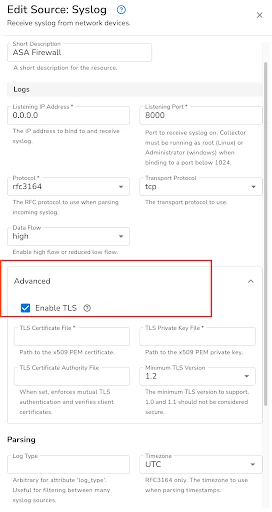
Optionally for security and compliance requirements, you have an ability to enable TLS for secure log transfer to this source.
Leave all other configurations as default and hit save.
Similarly we will add one more Syslog source for Squid Web Proxy that listens on port TCP 8001.
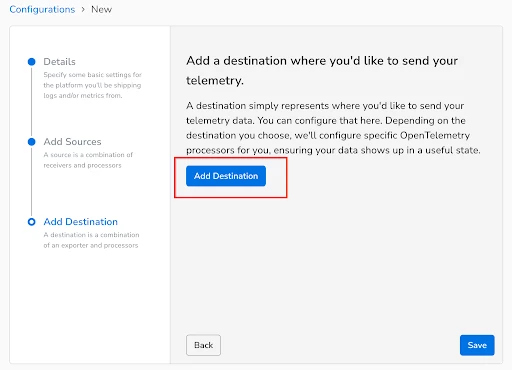
Next up, we will add a SecOps destination to the Configuration file.
Destinations (The Target)
The destination is the final endpoint for your data.
-
Configuration: Click Add Destination and select Google SecOps.
We will name the destination as Google-SecOps
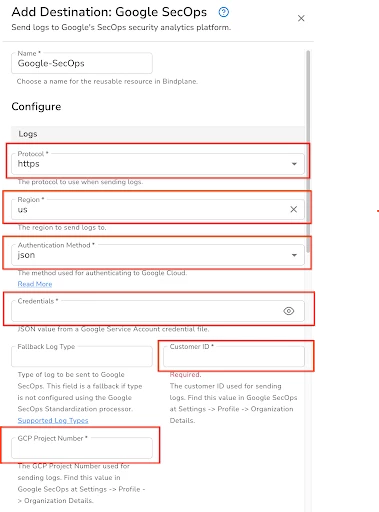
All the configuration settings highlighted in Red are required.
Protocol: Select https if you want to send logs to Chronicle Dataplane API or select gRPC if you would want to send logs to malachite ingestion api endpoint.
Region: Region where your SecOps tenant is deployed
Authentication Method: json
Credentials: paste the contents of json file
Customer ID: Customer ID associated to your SecOps tenant
GCP Project Number: GCP Project number tied to your SecOps tenant.
Within the advanced settings, make sure Enable Retry on Failure is selected.
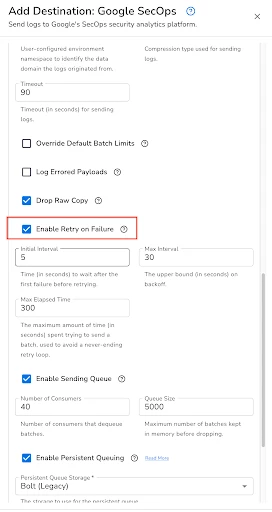
Once you have made these settings save the configuration.
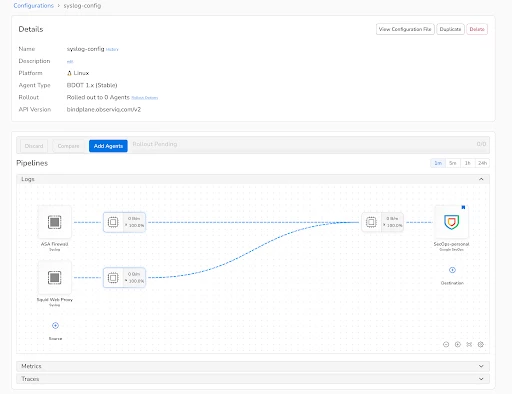
Next up will we add a processor after each source before sending the logs to SecOps.
Processors (The Transformation)
Processors sit between your source and destination to filter, transform, or enrich data. Below is the list of all the processors that are supported by Bindplane
https://docs.bindplane.com/integrations/processors
While Bindplane offers a vast array of available processors, the Google SecOps Standardization Processor is the essential component required for every source that transmits logs to SecOps.
-
Use this processor to explicitly set the log_type (Ingestion Label). This tells Google SecOps which specific parser to use (e.g., SQUID_WEBPROXY, CISCO_ASA_FIREWALL).
-
It also allows you to add Namespaces (to separate data domains) and custom Ingestion Labels for metadata.
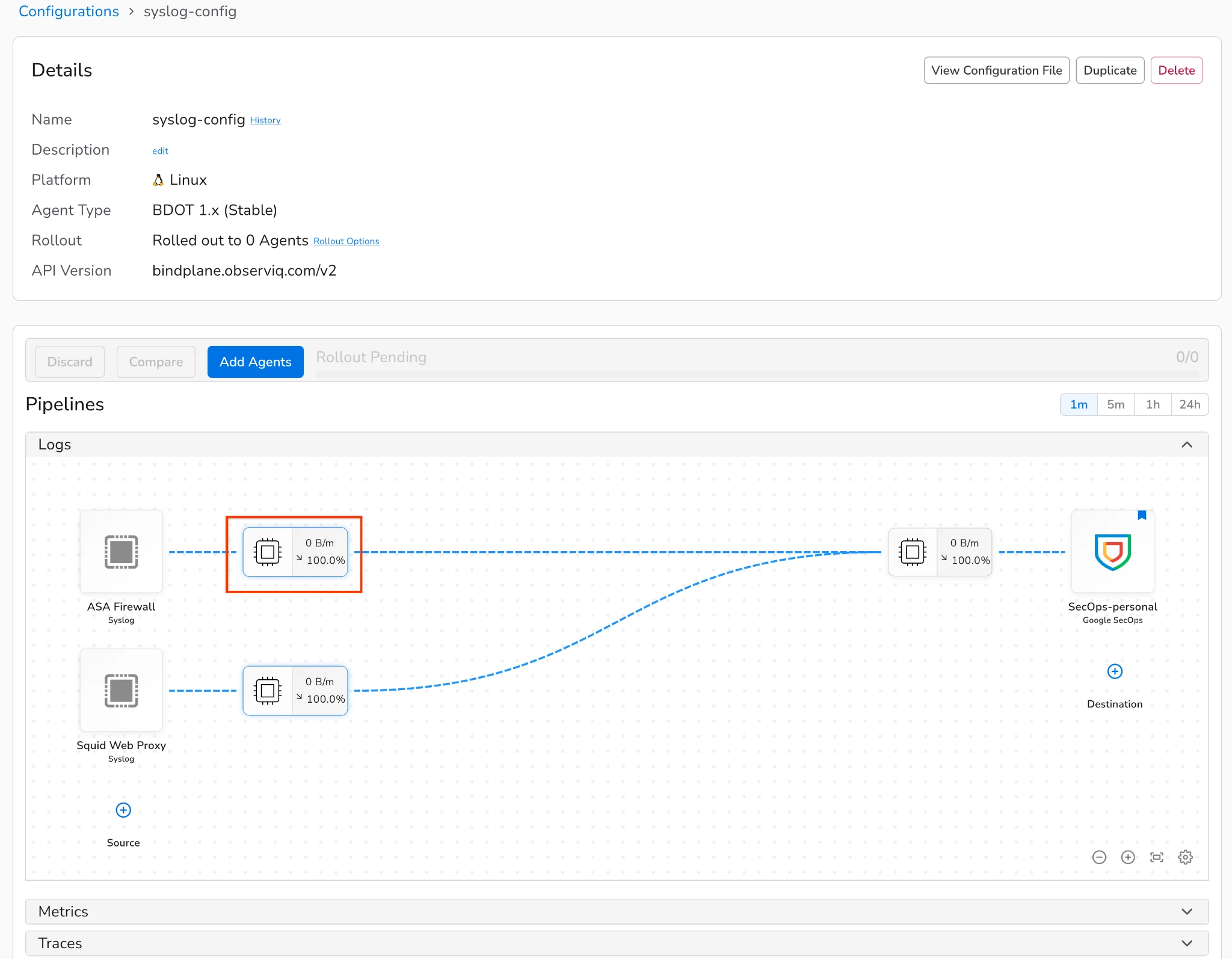
Within your configuration, click to add processor for ASA Firewall as shown below.
Search for Google SecOps Standardization
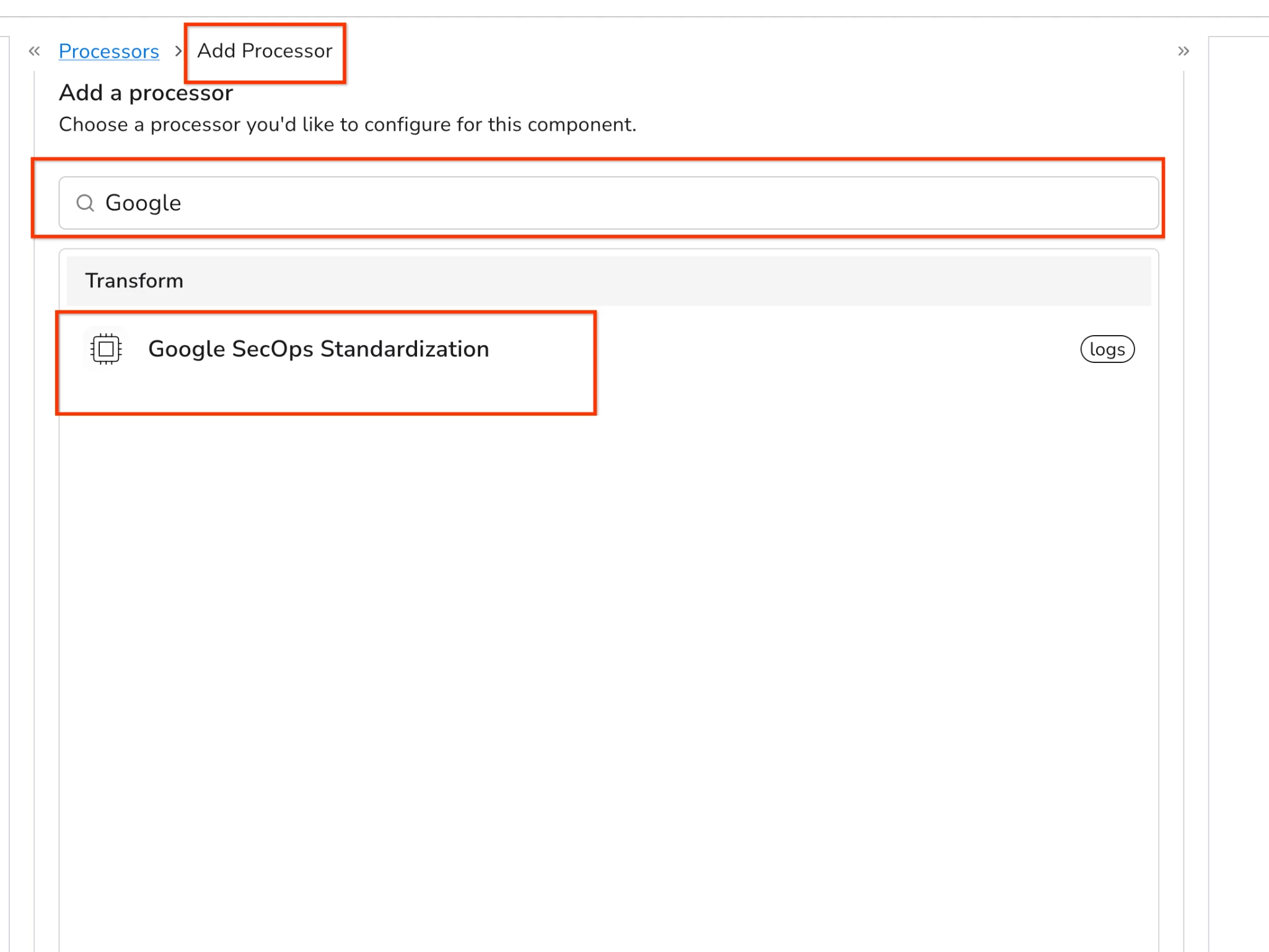
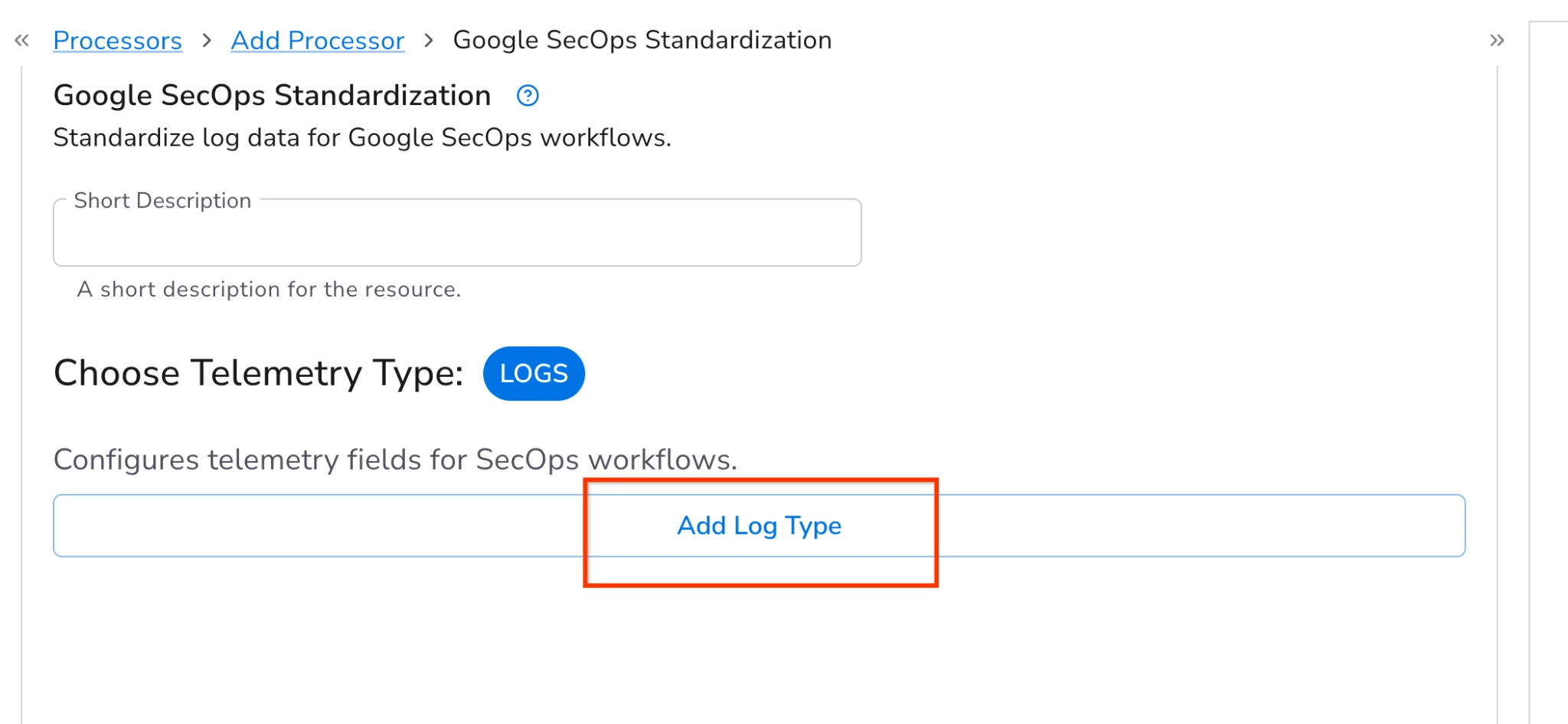
Select the SecOps Standardization processor and select Add Log Type
Next up, set the log type to CISCO_ASA_FIREWALL.
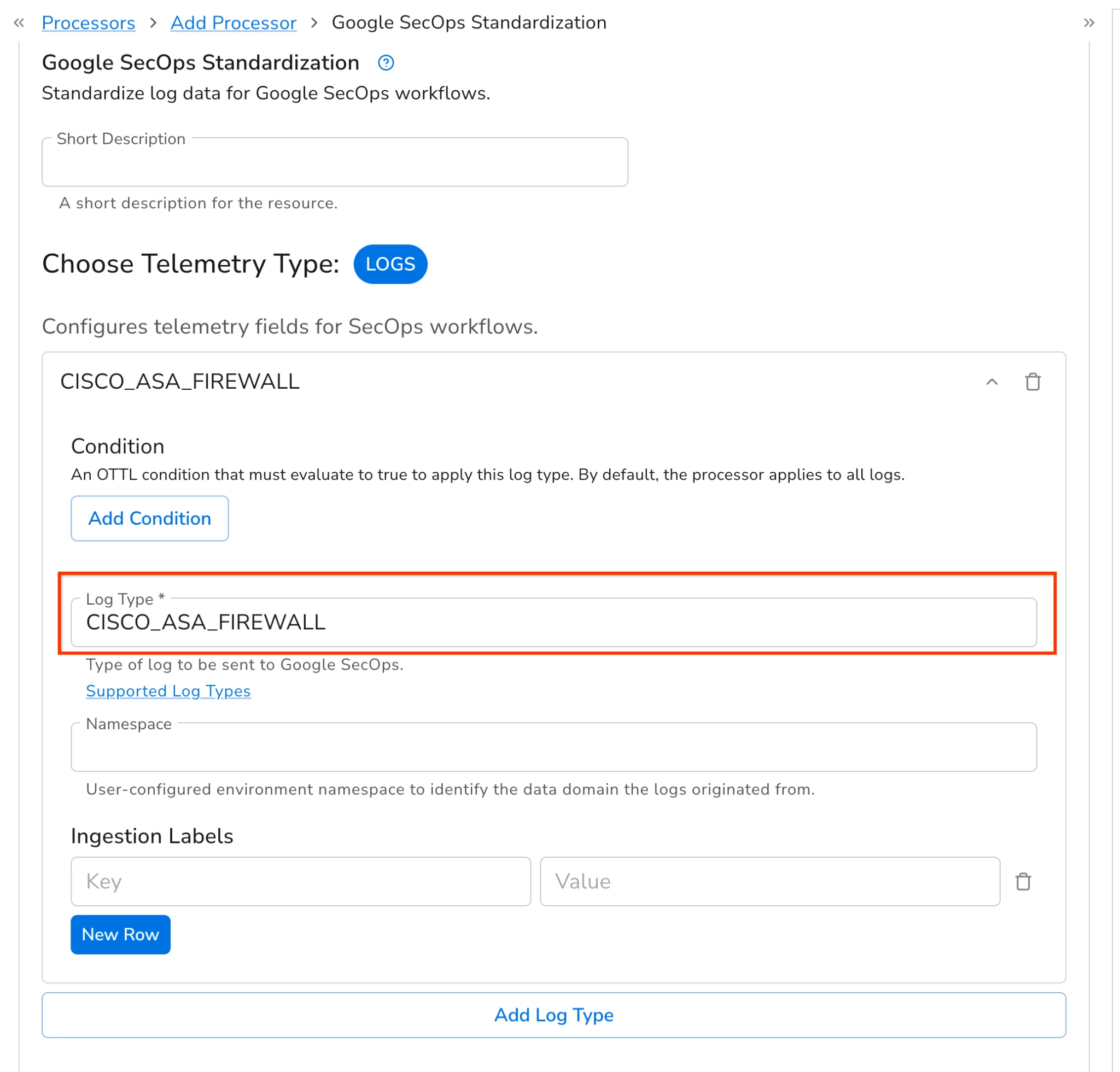
To ensure SecOps can normalize incoming logs, it is critical to select the appropriate log type. Failing to do so will result in normalization errors. A comprehensive list of compatible log types is available here:
https://docs.cloud.google.com/chronicle/docs/ingestion/parser-list/supported-default-parsers
Additionally, you can utilize this processor to configure Ingestion labels and Namespaces. These attributes are mapped directly into their corresponding UDM fields during the normalization process.
Apply these same steps to the Squid Web Proxy source you previously established. Once completed, your final configuration should resemble the following example:
4. Monitor & Optimize: The configuration is now complete and ready to be pushed out to the collectors. Click on add agents to push this configuration to the respective Collector or gateway. Once the configuration is pushed out, you can start sending the logs to your Bindplane collector or gateway. Validate data flow in the SecOps console and utilize Bindplane processors for advanced data reduction, PII masking, or filtering to manage ingestion costs as needed.
Lessons from the field/ best practices
Drawing from successful enterprise deployments, the following best practices ensure a robust and efficient Bindplane architecture for Google SecOps:
-
Prioritize Gateway Mode for Scale: For high-throughput environments, deploying collectors in a gateway mode is a recommended best practice. This aggregates data efficiently and, when positioned behind a load balancer, ensures high availability for log transmission.
-
Thorough Review of the Pre-deployment Checklist: The checklist provided for pre-deployment has been carefully curated. It is essential to go through it carefully and verify that every listed requirement is fully met.
-
Preserve Raw Log Integrity: For effective normalization in Google SecOps, it is a best practice to collect logs in their raw, unparsed format (e.g., enabling the "Raw Logs" option for Windows Events). This allows the SecOps parsers to function as intended without interference from pre-parsing.
-
Standardize with Internal PKI: When configuring TLS for secure log transfer, it is recommended to use certificates issued by an internal PKI over self-signed certificates. This approach is more secure, easier to manage, and typically aligns with mature organizational security policies.
-
SecOps Standardization processor: Always use the Google SecOps Standardization Processor to explicitly set the log_type. This ensures that SecOps utilizes the correct specific parser (e.g., CISCO_ASA_FIREWALL), preventing normalization errors.
-
Additional Best Practices by Bindplane : Please review and incorporate the best practices that are documented by Bindplane wherever possible.
https://docs.bindplane.com/how-to-guides/google-secops/using-google-secops-with-bindplane-best-practices
Conclusion
Below infographic gives a quick summary of this guide.
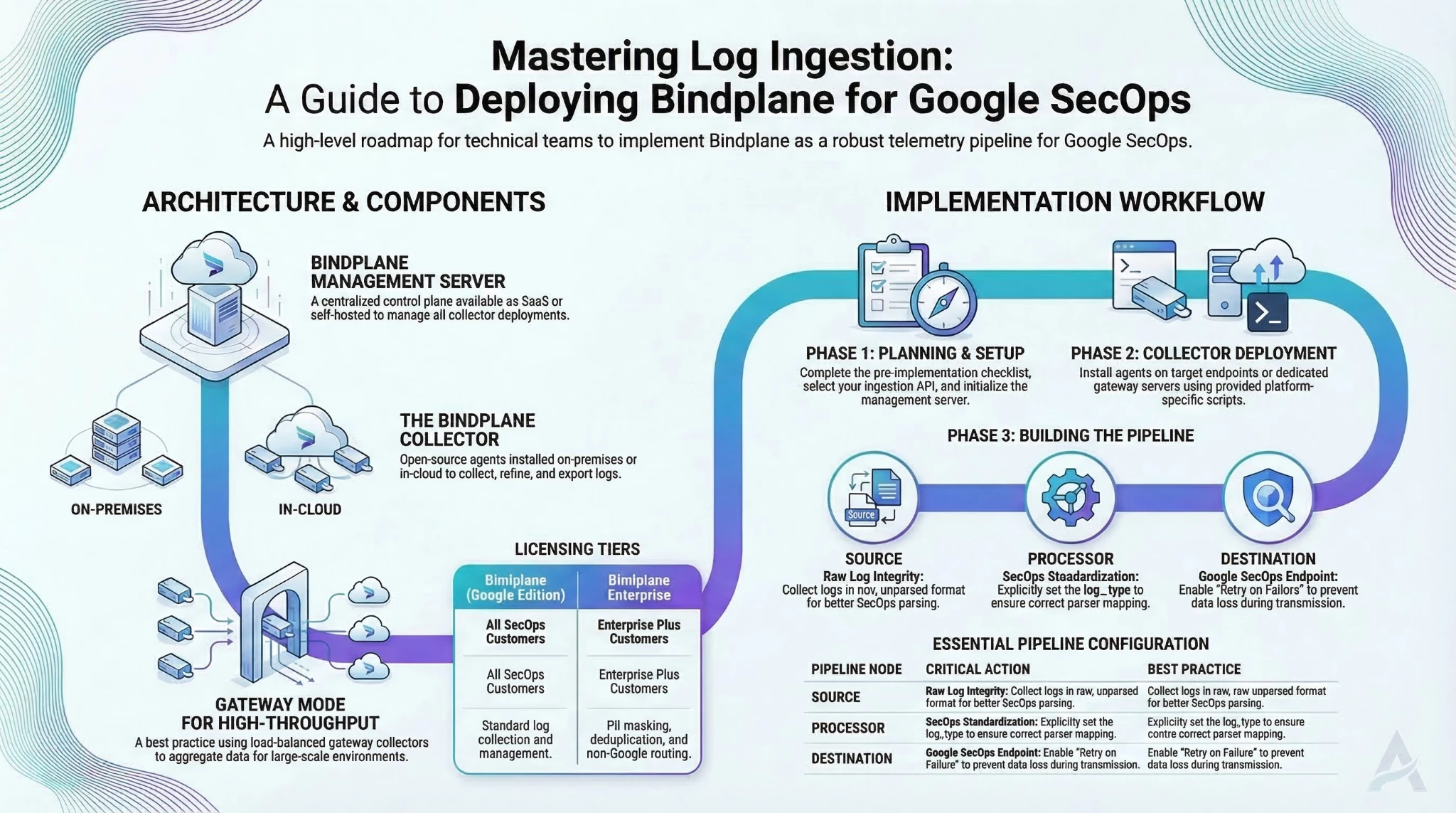
Bindplane serves as a critical telemetry pipeline within the Google SecOps ecosystem, standardizing data ingestion through its management server and OpenTelemetry-based collectors. By following the structured deployment workflow—from server setup and collector deployment to pipeline configuration, organizations can efficiently refine, filter, and route security logs. Adhering to field-tested best practices, such as utilizing gateway mode for high-throughput environments and implementing the SecOps Standardization processor, ensures a robust, scalable, and cost-effective logging architecture for security operations.