





Author: Chris Morris, Technical Solutions Consultant
Introduction:
When properly configured, comprehensive audit logging serves as a critical capability within Google SecOps, providing security teams with complete visibility into administrative and operational actions performed within the SIEM. Because audit logging for Google Cloud services often requires specific configuration to capture the full scope of user activity, establishing these logs creates a vital record of system changes, ensures accountability, supports compliance requirements, and aids in the troubleshooting of platform configurations.
Audit logs enable the continuous monitoring of Configuration and Data Management activities, allowing administrators to track modifications such as:
-
Feed Management: The creation, modification, or disabling of data feeds to ensure ingestion pipelines remain uninterrupted and secure.
-
Parser Updates: Changes to customized parsers, providing an audit trail for how raw logs are extracted and normalized into UDM.
-
Reference Data Operations: Modifications to data tables used to drive detection logic and enrich alert context.
Additionally, audit logs track critical Detection and Investigation workflows, ensuring oversight of operational activities. They capture events including:
-
Retrohunts: The execution, parameters, and management of Retrohunt jobs utilized to scan historical data for new indicators of compromise.
-
Rule Lifecycle Management: The creation, modification, testing, and deployment status changes of YARA-L detection rules.
In this Adoption Guide, we will provide a curated collection of ready-to-use UDM queries designed to surface many of these specific administrative actions. For each activity covered, we have included the exact query alongside screenshots of the expected results so you know exactly what the log output will look like. These queries can be run directly in UDM Search, utilized to build custom monitoring dashboards, or even adapted into YARA-L detection rules to automatically alert on sensitive platform modifications.
Admin Activity vs. Data Access Logs
It is important to note that the queries in this guide focus primarily on surfacing write events (e.g., creating or updating a feed) rather than read events (e.g., viewing or listing feeds).
While Admin Activity logs capture these critical write operations by default once configured, you can also optionally enable Data Access logs to monitor read activity if your compliance or security policies require it. To do so, from the GCP console, navigate to IAM & Admin > Audit Logs, select the Chronicle API and configure, for example:
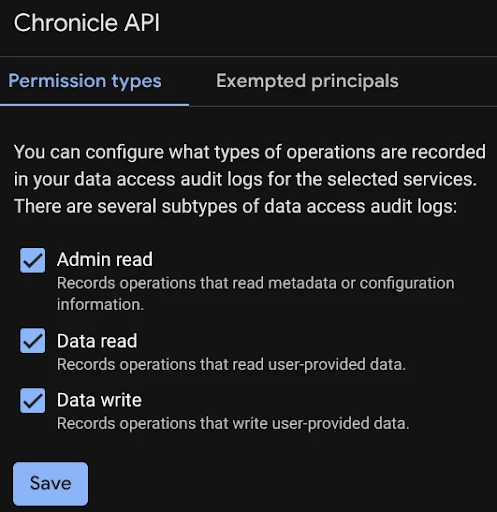
For detailed instructions on enabling and configuring these specific log types for your environment, please refer to the Google SecOps Audit Logging documentation.
Ingestion
Before you can query your audit logs, you must ensure they are actively flowing into Google SecOps. This ingestion is handled natively through GCP Direct Ingestion.
While many organizations already have this pipeline configured as part of their initial platform deployment, you can follow the instructions here to confirm or set up Direct Ingestion if you are not sure.
In the GCP Console, navigate to SecOps and then the Ingestion tab. Make sure that your organization is selected and the ‘Sending data to Google Security Operations’ switch is enabled.
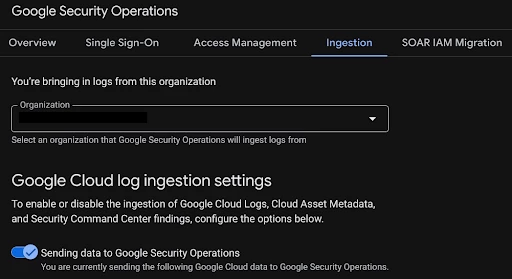
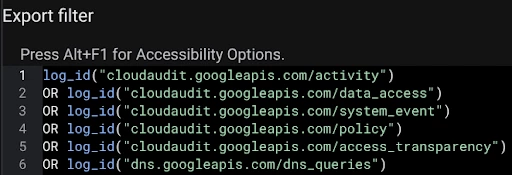
Further down on the page you will see the export filter configuration that tells GCP what logs to send to SecOps. If you opt to enable Data Access logs and wish to send those, make sure OR log_id("cloudaudit.googleapis.com/data_access") is in your export filter. If you only wish to send Data Access logs for SecOps and not for all of your GCP logs, instead use OR (log_id("cloudaudit.googleapis.com/data_access") AND protoPayload.serviceName = "chronicle.googleapis.com").
Queries and Results:
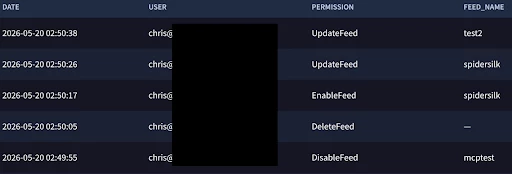
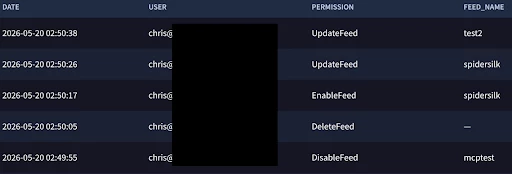
We’ll start with a query that looks at changes made to SecOps Feeds. While the specific events and target objects will change depending on the activity we are auditing, the core structure of our UDM queries remains consistent. Here is a breakdown of what each section does:
-
Base Filters (metadata.log_type and metadata.product_name): These lines ensure the search is strictly looking at Google Cloud Audit Logs, filtering out all other security telemetry to focus solely on platform administrative actions.
-
Action Filter (metadata.product_event_type): This line uses a regular expression to pinpoint the exact administrative activities we want to track (e.g., creating, modifying, or deleting a feed). (Note: This regex will change in each section of this guide based on the specific actions we are monitoring).
-
Variable Extraction ($date, $user, $permission, etc.): These lines extract key data points from the log and assign them to variables for our output. We also use a regex capture function (re.capture) to neatly extract just the action name. (Note: The target object variable, such as $feed_name, will change depending on the focus of the query).
-
Output Formatting (match): This section dictates which columns will be displayed in the final search results. By calling the variables defined above, it shapes the raw logs into a clean, readable table.
-
Sorting (order): This line sorts the final results by the $date variable in descending order (desc), ensuring the most recent administrative activities always appear at the top of your screen.
Feed Changes
metadata.log_type = "GCP_CLOUDAUDIT"
metadata.product_name = "Google Cloud Platform"
metadata.product_event_type = /CreateFeed$|DeleteFeed|DisableFeed|EnableFeed|GenerateSecret|UpdateFeed/
$date = timestamp.get_timestamp(metadata.event_timestamp.seconds)
$user = principal.user.userid
$permission = re.capture(metadata.product_event_type , `\w+$`)
$feed_name = security_result.associations.name


match:
   $date, $user, $permission, $feed_name


order:
   $date desc
Log Types
metadata.log_type = "GCP_CLOUDAUDIT"
metadata.product_name = "Google Cloud Platform"
metadata.product_event_type = /CreateLogType/
$date = timestamp.get_timestamp(metadata.event_timestamp.seconds)
$user = principal.user.userid
$permission = re.capture(metadata.product_event_type , `\w+$`)


match:
   $date, $user, $permission


order:
   $date desc
Data Tables
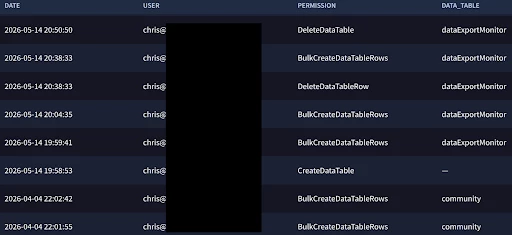
metadata.log_type = "GCP_CLOUDAUDIT"
metadata.product_name = "Google Cloud Platform"
metadata.product_event_type = /AsyncDataTable|CreateDataTable|DeleteDataTable|ReplaceDataTable|UpdateDataTable/
$date = timestamp.get_timestamp(metadata.event_timestamp.seconds)
$user = principal.user.userid
$permission = re.capture(metadata.product_event_type , `\w+$`)
$data_table = re.capture(target.resource.name, `dataTables/([^/]+)`)


match:
  $date, $user, $permission, $data_table


order:
  $date desc
Parser and Parser Extension Changes
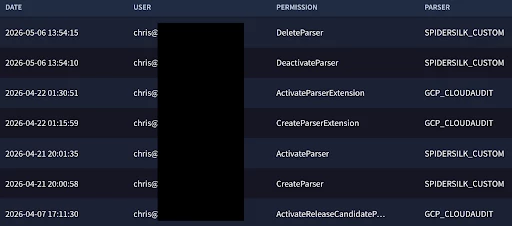
metadata.log_type = "GCP_CLOUDAUDIT"
metadata.product_name = "Google Cloud Platform"
metadata.product_event_type = /ActivateParser|ActivateReleaseCandidateParser|CreateParser|DeactivateParser|DeleteParser/
$date = timestamp.get_timestamp(metadata.event_timestamp.seconds)
$user = principal.user.userid
$permission = re.capture(metadata.product_event_type , `\w+$`)
$parser = re.capture(target.resource.name, `logTypes/([^/]+)`)


match:
   $date, $user, $permission, $parser


order:
   $date desc
IAM Policy Updates
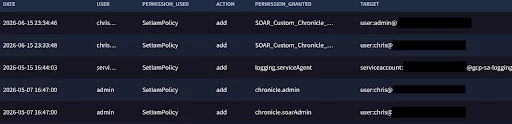
For tracking IAM changes, we will want to focus on changes to the GCP project we use for SecOps, at least for the use case of this adoption guide. To do that, you will need to update the target.cloud.project.name = "BYOP-Project-Name" line to the name of your GCP project.
metadata.log_type = "GCP_CLOUDAUDIT"metadata.product_event_type = /UpdateRole|UpdateSubject|SetIamPolicy/
target.cloud.project.name = "BYOP-Project-Name"
$date = timestamp.get_timestamp(metadata.event_timestamp.seconds)
$user = principal.user.userid
$permission = re.capture(metadata.product_event_type , `\w+$`)
$action = principal.user.attribute.roles.description
$role = principal.user.attribute.roles.name
$target = target.user.email_addresses
match:
$date, $user, $permission, $action, $role, $target
order:
$date desc
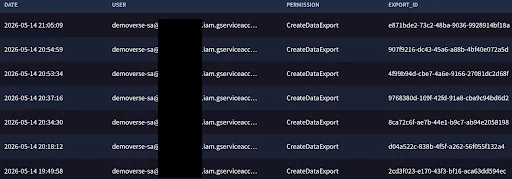
Data Export
metadata.log_type = "GCP_CLOUDAUDIT"
metadata.product_name = "Google Cloud Platform"
metadata.product_event_type = /CancelDataExport|CreateDataExport/
$user = principal.user.userid
$date = timestamp.get_timestamp(metadata.event_timestamp.seconds)
$permission = re.capture(metadata.product_event_type , `\w+$`)
$export_id = re.capture(target.resource.attribute.labels.value, `dataExports/([a-fA-F0-9]{8}-[a-fA-F0-9]{4}-[a-fA-F0-9]{4}-[a-fA-F0-9]{4}-[a-fA-F0-9]{12})`)
$export_id != ""


match:
  $date, $user, $permission, $export_id
order:
  $date desc
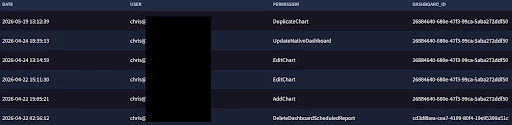
Dashboards & Scheduled Reports
metadata.log_type = "GCP_CLOUDAUDIT"
metadata.product_name = "Google Cloud Platform"
metadata.product_event_type = /AddChart|CreateDashboardScheduledReport|CreateNativeDashboard|DeleteDashboardScheduledReport|DeleteDashboard|DuplicateChart|DuplicateDashboardScheduledReport|DuplicateNativeDashboard|EditChart|ExportNativeDashboard|ImportNativeDashboard|RemoveChart|UpdateNativeDashboard/
$date = timestamp.get_timestamp(metadata.event_timestamp.seconds)
$user = principal.user.userid
$permission = re.capture(metadata.product_event_type , `\w+$`)
$dashboard_id = re.capture(target.resource.name, `([a-fA-F0-9]{8}-[a-fA-F0-9]{4}-[a-fA-F0-9]{4}-[a-fA-F0-9]{4}-[a-fA-F0-9]{12})$`)


match:
  $date, $user, $permission, $dashboard_id


order:
  $date desc
Retrohunts
metadata.log_type = "GCP_CLOUDAUDIT"
metadata.product_name = "Google Cloud Platform"
metadata.product_event_type = /CreateRetrohunt/
$user = principal.user.userid
$date = timestamp.get_timestamp(metadata.event_timestamp.seconds)
$permission = re.capture(metadata.product_event_type , `\w+$`)
$rule_id = re.capture(target.resource.name, `rules/([^/]+)`)


match:
  $date, $user, $permission, $rule_id


order:
  $date desc

Detection Rule Changes
metadata.log_type = "GCP_CLOUDAUDIT"
metadata.product_name = "Google Cloud Platform"
metadata.product_event_type = /CreateRule|DeleteRule|ModifyRules|UpdateRule$/
$date = timestamp.get_timestamp(metadata.event_timestamp.seconds)
$user = principal.user.userid
$permission = re.capture(metadata.product_event_type , `\w+$`)
$rule_id = strings.coalesce(re.capture(target.resource.name, `rules/([^/]+)`), re.capture(target.resource.attribute.labels.value, `ru_.*`))


match:
   $date, $user, $permission, $rule_id


order:
   $date desc

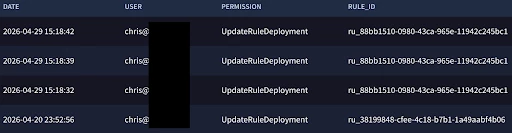
Detection Rule Deployment Changes
metadata.log_type = "GCP_CLOUDAUDIT"
metadata.product_name = "Google Cloud Platform"
metadata.product_event_type = /UpdateRuleDeployment/
$date = timestamp.get_timestamp(metadata.event_timestamp.seconds)
$user = principal.user.userid
$permission = re.capture(metadata.product_event_type , `\w+$`)
$rule_id = re.capture(target.resource.name, `rules/([^/]+)`)


match:
   $date, $user, $permission, $rule_id


order:
   $date desc
Conclusion:
Configuring and actively monitoring audit logs provides critical visibility into Google SecOps SIEM, allowing you to track administrative actions and maintain the integrity of your platform.
As demonstrated in this guide, leveraging these logs empowers your security operations in two key ways:
-
Platform and Operational Oversight: Enables the precise tracking of critical system modifications, such as updates to feeds, parsers, and reference lists, as well as operational workflows like Retrohunts and YARA-L rule lifecycle management.
-
Actionable Monitoring and Alerting: By utilizing the provided UDM queries, you can actively search for specific administrative events, visualize trends through custom dashboards, and translate these queries into automated YARA-L detection rules to alert on sensitive configuration changes.
Ultimately, establishing a robust practice around auditing your SIEM ensures accountability, supports compliance requirements, and guarantees that your SecOps environment remains secure, resilient, and fully aligned with your organization's needs.
