



Author: Christopher Martin
What are Composite Detections?
Composite Detections in Google SecOps represent a powerful evolution in threat detection, allowing you to create sophisticated, multi-layered detection narratives. The core concept is simple yet effective: you can use the detections generated by one set of rules, called an Input Rule as the input for a more advanced Composite Rule.
Single and multi-event rules in Google SecOps are self contained and analyze a series of UDM events to find a specific pattern of activity. Composite Detection enhances and builds upon this capability for threat detection by allowing you to connect a series of related events over time and apply the logic across multiple rules. Instead of looking at individual, low-fidelity alerts in isolation, you can build a Composite Rule that only triggers when a specific sequence of threshold of suspicious activities is observed.
Key Terminology
The terms defined below are fundamental to understanding this guide and its usage of those terms:
- Detection: The result of a rule, which can also be referred to as an alert. In YARA-L, a "Detection" is a rule configured with ALERTING false (does not create a Case in SOAR), while a "Detection Alert" is configured with ALERTING true (creates a Case in SOAR).
- Input Rule: A YARA-L rule that generates Detections or Detection Alerts, which then serve as input for other rules in a Composite Detection chain. Any existing single-event or multi-event rule can function as an Input Rule.
- Composite Rule: A YARA-L rule that uses Detections as input, along with potentially Events or Entities, to generate new Detections or Detection Alerts. Composite rules are classified as multi-event rules and must have a match section.
- Detection Only Rule: A specific type of Composite Rule that uses only Detections or Detection Alerts as inputs.
- Preceding: Refers to a Detection or Detection Alert that occurred earlier in a sequence and serves as an input for a subsequent rule.
- Unified Data Model (UDM): The schema used by Google SecOps for normalized data.
- Entity Context Graph (ECG): Where User, Derived, and Global context sources are stored, often for Enrichment and Aliasing data.
- Type: A YARA-L rule can be of either Type:
- GCTI_FINDING, for a Google authored curated Detection
- DETECTION for a user-defined YARA-L rule.
SecOps Fundamentals
To implement Composite Detections it is important to understand the basic data and detection flow within Google SecOps:
- Raw Logs are ingested.
- They are normalized into the Unified Data Model (UDM) schema.
- UDM events can then be enriched with context from the Entity Context Graph (ECG).
The Detection Engine runs YARA-L rules against this stream of UDM data. Understanding the two primary rule types is the first step in building a composite chain:
- Single Event rules typically detect patterns within an individual event. They usually do not have a Match statement, or if they do, their condition section only checks for the existence of one event variable.
- If a Single Event rule does not include a match: statement then it will run in near real-time.
- If a Single Event rule does include a match: statement then it will use a Run Frequency, e.g., a match: statement of $X over 1m would run within 10 minutes
- Multi-Event rules correlate across multiple events over a specified time window and always have a match statement. Their condition section checks for the existence of multiple events or uses outcome variables derived from events in the match window.
Getting Started with Composite Detections
Input rules are the foundation of your Composite Rule chains, and create the initial detections that your Composite Rule will analyze.
To begin you can either create a new or re-use an existing YARA-L rule, or use Google SecOps out of the box Curated Detections.
Composite rules draw data primarily from the detection dataset, i.e., Detections created by Input Rules. To reference a detection field in a Composite Rule you use the detection keyword as the source.
Note, when writing an Input rule you may commonly see the label $e or $e<x> used to refer to event blocks within the event: section, or the label the label $g or $g<x> used when accessing the Entity Context Graph. With Composite Detections a common label used is $d of $d<x> to refer to detection blocks within the event: section in a YARA-L rule. These labels are, however, arbitrary and you can name them as you see fit, e.g., using more description values.
Composite Rules use the Detection schema, for example to access the rule_id value of a given Detection you would use $d.detection.detection.rule_id, or to access a specific outcome variable you would use $d.detection.detection.outcomes["outcome_name"]
Establishing Join Keys in Composite Rules
Before starting to write a Composite Rule it is important to understand how to connect related detections, and that can be achieved using any of the following mechanisms:
- Rule Labels (Meta)
- Variables
- Outcome Variables
- Match Variables
- Detection Fields
- Collection Elements
How and which you use is dependent on the type and way your YARA-L rule is written, they are not mutually exclusive and can be mixed together and used in combination.
Here is an example JSON representation of a Detection that shows all these mechanisms, with the exception of Collection Elements which is discussed later on in this guide:
{
  "alert": {
    "type": "RULE_DETECTION",
    "detection": [
      {
        "ruleName": "single_event_with_match",
        "ruleId": "ru_b14666fa-4a0c-4266-be65-69b812b615ec",
        "ruleVersion": "ru_b14666fa-4a0c-4266-be65-69b812b615ec@v_1751548277_476367000",
        "alertState": "ALERTING",
        "ruleType": "SINGLE_EVENT",
        "detectionFields": [
          {
            "key": "hostname",
            "value": "10.1.2.3",
            "source": "udm.principal.asset.ip"
          }
        ],
       "ruleLabels": [
          {
            "key": "alerting",
            "value": "true"
          },
          {
            "key": "input_rule",
            "value": "false"
          },
        ],
        "outcomes": [
          {
            "key": "risk_score",
            "value": "0"
          }
        ],
        "ruleSetDisplayName": "single_event_with_match",
        "variables": {
          "risk_score": {
            "type": "OUTCOME",
            "value": "0",
            "int64Val": "0"
          },
          "hostname": {
            "type": "MATCH",
            "value": "10.1.2.3",
            "sourcePath": "udm.principal.asset.ip",
            "stringVal": "10.1.2.3"
          }
        }
      }
    ],
In order to understand how and when either outcome or variables are output by an Input or Detection only rule, imagine a single-event Input rule with the following logic:
   $e.metadata.event_type = "NETWORK_DNS"
   $e.principal.asset.ip = "10.1.2.3"
The below table shows three different ways of writing this same Single event YARA-L rule, and captures which rule will result in populating either a match and/or outcome sections. The table also demonstrates which syntax will result in a Single event rule being considered as either a Near real-time rule, or having a Run Frequency.
| Rule | 1: Hostname as an Outcome variable | 2: Hostname as a Placeholder variable | 3: Hostname as a Match variable |
| Rule Type | Single Event / Near real-time | Single Event / Near real-time | Single Event / Run Frequency of 10 minutes |
| rule single_event_with_outcome { meta: events: $e.metadata.event_type = "NETWORK_DNS" $e.principal.asset.ip = "10.1.2.3" outcome: $risk_score = 0 $hostname = array_distinct($e.principal.asset.ip) condition: $e } | rule single_event_wo_match_with_variable { meta: events: $e.metadata.event_type = "NETWORK_DNS" $e.principal.asset.ip = "10.1.2.3" $e.principal.asset.ip = $hostname outcome: $risk_score = 0 condition: $e } | rule single_event_with_match { meta: events: $e.metadata.event_type = "NETWORK_DNS" $e.principal.asset.ip = "10.1.2.3" $hostname = $e.principal.asset.ip match: $hostname over 1m outcome: $risk_score = 0 condition: $e } | |
| Detection Fields | n/a | n/a | "detectionFields": [ { "key": "hostname", "value": "10.1.2.3", "source": "udm.principal.asset.ip" } ], |
| Outcome | "outcomes": [ { "key": "risk_score", "value": "0" }, { "key": "hostname", "value": "10.1.2.3", "source": "udm.principal.asset.ip" } ], | "outcomes": [ { "key": "risk_score", "value": "0" } ], | "outcomes": [ { "key": "risk_score", "value": "0" } ], |
| Variables | "variables": { "risk_score": { "type": "OUTCOME", "value": "0", "int64Val": "0" }, "hostname": { "type": "OUTCOME", "value": "10.1.2.3", "sourcePath": "udm.principal.asset.ip", "stringSeq": { "stringVals": [ "10.1.2.3" ] } } | "variables": { "risk_score": { "type": "OUTCOME", "value": "0", "int64Val": "0" } } | "variables": { "risk_score": { "type": "OUTCOME", "value": "0", "int64Val": "0" }, "hostname": { "type": "MATCH", "value": "10.1.2.3", "sourcePath": "udm.principal.asset.ip", "stringVal": "10.1.2.3" } } } |
From this results table we can see that Rules 1 and 2 are Single Event rules operating in near real-time. It should be noted that Rule 2, which incorporates a placeholder variable ($hostname) within the event: section, is not preserved in the Detection's output.
This is an important point; if you intend to utilize a Near real-time rule, you should employ the outcome section to persist variables from your Input rules to your Composite Rules, which would enable you to use either of the following syntax as Join Key logic:
$d.detection.detection.outcomes["hostname"] = $hostname
Or
$d.detection.detection.variables["hostname"] = $hostname
Alternatively, you can use Collection Elements on Single event rules, and this topic is discussed in more detail in the next section.
Rule 3, a Single Event rule, employs a Run Frequency due to its match statement, indicating it is not a near real-time rule. Consequently, this rule incorporates a match variable within the outcome section and features a dedicated Detection Fields section. This configuration allows a Composite Rule to utilize either of the following syntax options to establish a Join key between detections:
$d.detection.detection.variables["hostname"] = $hostname
Or
$d.detection.detection.detection_fields["hostname"] = $hostname
An alternative approach to variables and outcomes is to use Collection Elements, the ability to directly access key value pairs from the UDM Event or Entities associated with the Detection itself.
Using Collection Elements
An alternative mechanism exists for generating a Join Key within a Composite Rule, utilizing UDM Event values within a Detection, which are accessible via the Collection Elements object.
Presented below is an illustration of a YARA-L Detection in JSON format, highlighting its detection schema, collectionElements, and references. Given that this Detection originates from UDM Event data, the UDM Event responsible for its generation is accessible.
{
  "detections": [
    {
      "type": "RULE_DETECTION",
      "detection": [
        {
          "ruleName": "single_event_with_outcome",
          "ruleId": "ru_8209d7c4-223f-4a56-a4d8-d51767ea60d1",
          "ruleVersion": "ru_8209d7c4-223f-4a56-a4d8-d51767ea60d1@v_1751549565_321615000",
          "alertState": "NOT_ALERTING",
          "ruleType": "SINGLE_EVENT",
          "ruleLabels": [
          ],
          "outcomes": [
            {
              "key": "risk_score",
              "value": "0"
            },
            {
              "key": "hostname",
              "value": "10.1.2.3",
              "source": "udm.principal.asset.ip"
            }
          ],
          "variables": {
            "risk_score": {
              "type": "OUTCOME",
              "value": "0",
              "int64Val": "0"
            },
            "hostname": {
              "type": "OUTCOME",
              "value": "10.1.2.3",
              "sourcePath": "udm.principal.asset.ip",
              "stringSeq": {
                "stringVals": [
                  "10.1.2.3"
                ]
              }
            }
          }
        }
      ],
      "createdTime": "2025-07-05T06:51:22.702593Z",
      "id": "de_318b11ff-0197-d69b-fbde-e971ea7a15be",
      "timeWindow": {
        "startTime": "2025-07-05T06:50:44.743989Z",
        "endTime": "2025-07-05T06:50:44.743989Z"
      },
      "collectionElements": [
        {
          "references": [
            {
              "event": {
                "metadata": {
                  "eventTimestamp": "2025-07-05T06:50:44.743989Z",
                  "eventType": "NETWORK_DNS",
                  "vendorName": "Acme",
                  "productName": "Acme DNS",
                  "productEventType": "ip",
                  "ingestedTimestamp": "2025-07-05T06:50:46.191950Z",
                  "id": "AAAAAOKGvHtcm6ePfosmXA/xMu0AAAAAAQAAAAAAAAA=",
                  "logType": "UDM",
                  "baseLabels": {
                    "logTypes": [
                      "UDM"
                    ],
                    "customLabels": [
                      "network-dns"
                    ],
                    "allowScopedAccess": true
                  },
                  "enrichmentLabels": {
                    "logTypes": [
                      "AZURE_AD_CONTEXT"
                    ],
                    "allowScopedAccess": true
                  }
                },
                "principal": {
                  "hostname": "johndoe-macbook",
                  "ip": [
                    "10.1.2.3"
                  ],
                  "mac": [
                    "22:a3:f5:b7:f2:fb"
                  ],
                  "asset": {
                    "productObjectId": "doejane",
                    "hostname": "johndoe-macbook",
                    "ip": [
                      "10.1.2.3"
                    ],
                    "mac": [
                      "22:a3:f5:b7:f2:fb"
                    ],
                    "deploymentStatus": "ACTIVE"
                  }
                },
                "network": {
                  "applicationProtocol": "DNS",
                  "dns": {
                    "questions": [
                      {
                        "name": "logging.googleapis.com",
                        "type": 1
                      }
                    ],
                    "answers": [
                      {
                        "data": "142.250.153.95"
                      }
                    ]
                  }
                }
              }
            }
          ],
          "label": "e"
        }
      ],
      "detectionTime": "2025-07-05T06:50:44.743989Z"
    }
  ]
}
This introduces an additional mechanism for creating a Join Key in a Composite Rule by utilizing the direct UDM Event fields.
rule example_usage_of_collection_element_to_access_a_hostname_from_a_udm_event {

  meta:
  events:
    $d.detection.collection_elements.references.event.principal.hostname = $hostname
    $d.detection.detection.rule_name = $rule_name

  match:
    $hostname, $rule_name over 1m

  outcome:
    $risk_score = 0

  condition:
    $d
}
Note that a Collection Element can also be other UDM model types, such as an Entity.
Using Rule Labels
In a YARA-L rule, the meta: section serves to house rule labels and various key-value pairs. Rule labels are instrumental in directly cataloging extensive rule-related information, as well as providing orthogonal environmental context.
The following is an example of a YARA-L rule and its corresponding meta Rule Labels:
rule windows_system_non_browser_telegram_dns_request {
  meta:
    author = "Google Cloud Security Community"
    description = "Detects an a non-browser process interacting with the Telegram API which could indicate use of a covert C2."
    severity = "LOW"
    reference = "https://www.virustotal.com/gui/file/ba8ca198dfe7b6b7abe8b6d04baae00b8732e3bd024ecf824f80aeb0e49a394f/behavior"
    alerting = "false"
    tactic = "TA0011" //Command and Control"
    technique = "T1102" //Web Service
    composite_detection_input = "true"
    composite_detection_category = "windows_network"
...
Rule Labels can be leveraged for filtering or joining Input or Detection rules within a Composite Rule. For instance, observe the two specific key-value pairs in the aforementioned rule:
   composite_detection_input = "true"
   composite_detection_category = "windows_network"
These elements can be utilized in a Detection-only rule to filter and ensure that solely specified Input Rules are evaluated against the matching criteria:
rule consumer_windows_multiple_malware_indicators {

  meta:
    author = "Google Cloud Security Community"
    description = "Composite Rule rule looking form multiple malware related behaviours on Windows on the same host"
    severity = "MEDIUM"
    priority = "MEDIUM"
    alerting = "true"

  events:
    $d.detection.detection.rule_labels["composite_detection_input"] = "true"
    $d.detection.detection.rule_labels["composite_detection_category"] = /^windows/
    $hostname = $d.detection.detection.variables["hostname"]

    match:
        $hostname over 1h
For more information on this topic see the Google Cloud Security Community post: https://www.googlecloudcommunity.com/gc/Community-Blog/New-to-Google-SecOps-Building-a-Rule-Using-Meta-Labels/ba-p/909021
Considering Latency of Detections
Latency, defined as the interval between an event's occurrence and the subsequent generation of a detection, is a critical factor for Composite Rules. To expedite the creation of a Composite Detection, careful consideration must be given to the interplay between near real-time processing and the established run frequency.
A UDM Statistical search in Native Dashboards, like below, can be used to verify the detection (event time) and creation of the Detection:
detection.detection.rule_name = /single_event_/
detection.detection.rule_name = $rule_name
detection.detection.rule_type = $rule_type
detection.created_time.seconds = $created
detection.detection_time.seconds = $detected
match:
  $rule_name, $rule_type
outcome:
  $event_to_detection_time_in_seconds = sum($created - $detected)
  $event_to_detection_time_in_minutes = math.round(sum($created - $detected) / 60,2)
Analysis of this query's results indicates that a single event rule utilizing a match statement necessitates several minutes for detection creation, whereas single event rules lacking a match statement generate a detection within one minute.
| rule_name | rule_type | event_to_detection_time_in_seconds | event_to_detection_time_in_minutes |
| single_event_wo_match_with_variable | SINGLE_EVENT | 43 | 0.72 |
| single_event_with_outcome | SINGLE_EVENT | 38 | 0.63 |
| single_event_with_match | SINGLE_EVENT | 422 | 7.03 |

Please note that the time of detection creation is not tied to the match window but rather to the subsequent execution of the scheduled run frequency. Therefore, it may occur within a timeframe ranging from 1 to the maximum match window duration.
Correlate Multiple Alerts Originating from the same Host using a Composite Rule
Here is an example YL2 Composite Rule that looks for more than 1 unique Detection (rule_id) on the same Host within an hour:
rule composite_rule_multiple_alerts_same_hostname {

  meta:
  events:
    $d.detection.detection.rule_id = $rule_id
    $d.detection.detection.variables["hostname"] = $hostname

  match:
    $hostname over 1h

  outcome:
    $risk_score = 0
    $matching_rules = array_distinct($d.detection.detection.rule_name)
    $matching_rules_count = count_distinct($d.detection.id)

  condition:
    #rule_id > 1
}
Running this rule will generate a Detection of Detections, with the child elements (or collectionElements) being available via a nested expansion as viewed in the SecOps user interface.
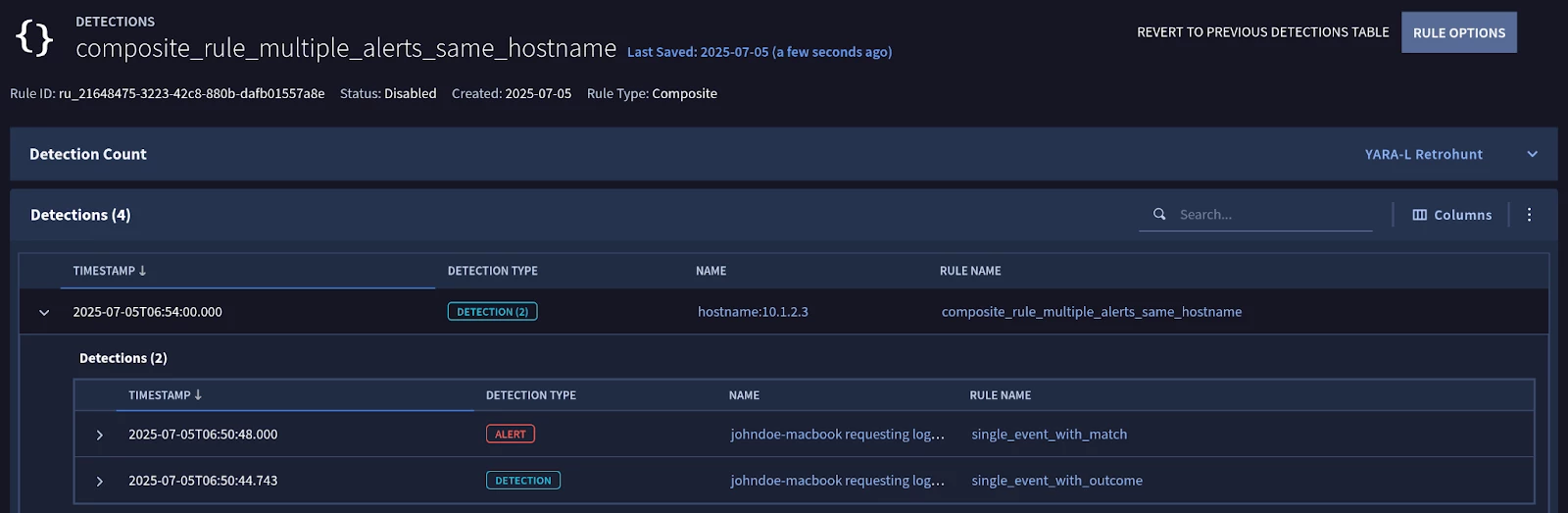
A JSON representation of the Composite Rule detection is as follows:
{
  "detections": [
    {
      "type": "RULE_DETECTION",
      "detection": [
        {
          "ruleName": "composite_rule_multiple_alerts_same_hostname",
           "ruleId": "ru_21648475-3223-42c8-880b-dafb01557a8e",
          "ruleVersion": "ru_21648475-3223-42c8-880b-dafb01557a8e@v_1751704433_589407000",
          "alertState": "NOT_ALERTING",
          "ruleType": "MULTI_EVENT",
          "detectionFields": [
            {
              "key": "hostname",
              "value": "10.1.2.3"
            }
          ],
          "outcomes": [
            {
              "key": "risk_score",
              "value": "0"
            },
            {
              "key": "matching_rules",
              "value": "single_event_with_match, single_event_with_outcome"
            },
            {
              "key": "matching_rules_count",
              "value": "2"
            }
          ],
          "variables": {
            "matching_rules_count": {
              "type": "OUTCOME",
              "value": "2",
              "int64Val": "2"
            },
            "hostname": {
              "type": "MATCH",
              "value": "10.1.2.3",
              "stringVal": "10.1.2.3"
            },
            "risk_score": {
              "type": "OUTCOME",
              "value": "0",
              "int64Val": "0"
            },
            "matching_rules": {
              "type": "OUTCOME",
              "value": "single_event_with_match, single_event_with_outcome",
              "stringSeq": {
                "stringVals": [
                  "single_event_with_match",
                  "single_event_with_outcome"
                ]
              }
            }
          },
          "detectionDepth": "1"
        }
      ],
      "createdTime": "2025-07-05T08:35:15.696642Z",
      "id": "de_d0afeecf-e477-7817-7f21-e86c42dfd4c4",
      "timeWindow": {
        "startTime": "2025-07-05T05:54:00Z",
        "endTime": "2025-07-05T06:54:00Z"
      },
      "collectionElements": [
        {
          "references": [
            {
              "id": {
                "namespace": "RULE_DETECTIONS",
                "stringId": "de_318b11ff-0197-d69b-fbde-e971ea7a15be"
              }
            },
            {
              "id": {
                "namespace": "RULE_DETECTIONS",
                "stringId": "de_4c9108ec-490f-0156-abb7-ca2e2a26a307"
              }
            }
          ],
          "label": "d"
        }
      ],
      "detectionTime": "2025-07-05T06:54:00Z"
    }
  ]
}
To enhance the example rule and add more specific controls on what rules it may include or exclude you can use the following approaches:
- Explicitly include or exclude specific rules
To not accidentally create a feedback loop you could exclude the rule’s own rule_id as follows:
 events:
    $d.detection.detection.rule_id = $rule_id
    $rule_id != "ru_21648475-3223-42c8-880b-dafb01557a8e"
    $d.detection.detection.variables["hostname"] = $hostname
- Use meta keys for dynamic inclusion or exclusion
A more flexible approach is to implement meta key value pairs for more fine grained targeting of which Input or Detection only Rules a Composite Rule should match against.
For example, if you have specific rules you would want to matching in a Composite Rule you could add meta keys like below into each Input Rule:
  meta:
   input_rule = "true"
   composite_detection = "single_event_test"
And then in the Composite Rule update the filtering logic as follows:
 events:
    $d.detection.detection.rule_labels["input_rule"] = "true"
    $d.detection.detection.rule_labels["composite_detection"] = "single_event_test"
    $d.detection.detection.rule_id = $rule_id
    $d.detection.detection.variables["hostname"] = $hostname
- Include or exclude Detection only rules
Alternatively, if you didn’t want to update every potential Input Rule you could explicitly filter out any Detection-only rules by calling the detection_depth field. The detection_depth field is only added to a Detection-only rule, and so this provides an effective way to ensure your Composite Rule does not create a feedback loop.
$d.detection.detection.detection_depth = 0
Using Curated Detections with Composite Rules
The out of the box detection content provided by Google Cloud Security in Google SecOps are called Curated Detections, and can be used in Composite Detections.
Using a Curated Detection within a Composite Rule is fundamentally no different than using a custom YARA-L Input Rule you have authored, but with the notable differences the type value for a Curated Detection will be GCTI_FINDING as compared to DETECTION for a user defined YARA-L rule.
To configure a Composite Rule that triggers a Detection Alert when a specified hostname variable is observed in a minimum of X distinct detections or detection alerts within a 1-hour timeframe, the following YARA-L rule can be implemented:
rule ACME_CD_MULTIPLE_CURATED_DETECTIONS_BY_HOSTNAME {

  meta:
    author = "Google Cloud Security Community"
    description = "Composite Rule for multiple Curated Detections on the same Hostname above the given threshold."
    severity = "LOW"
    priority = "LOW"
    input_rule = "false"
    alerting = "true

  events:
    $d.detection.type = "GCTI_FINDING"
    $d.detection.detection.rule_id = $ruleId
    $ruleId != "ru_cb2ee3d8-8e2e-4d07-95f9-d1ec4d013d7c"
    $hostname = $d.detection.detection.variables["hostname"]

  match:
    $hostname over 1h

  outcome:
    $risk_score = math.ceil(sum($d.detection.detection.risk_score) / count($d.detection.detection.rule_id))
    $rule_name = array_distinct($d.detection.detection.rule_name)
    $ruleSetDisplayName = array_distinct($d.detection.detection.rule_set_display_name)

 condition:
    $d and #ruleId >= 5
}
An important consideration is that because Curated Detections are written by Google, you will need to verify the variables that these rules output in order to reliably use them in your custom Composite Detections. You can do this in two ways:
- Access the YL2 logic directly through the GCP Marketplace
- Review the observed results of the matching rules within your environment.
For a manual review of observed results, utilize a Native Dashboards UDM Stats query, as detailed below:
// NATIVE DASHBOARD Query

// Filter detections by their type (e.g., "RULE_DETECTION", "GCTI_FINDING")
detection.type = $type

// Filter detections by the display name of the ruleset category
detection.detection.ruleset_category_display_name = $rulesetCategoryDisplayName

// Extract the outcome key associated with the detection
detection.detection.outcomes.key = $key

// Filter out detections with empty outcome keys
detection.detection.outcomes.key != ""

// Extract the source of the outcome
detection.detection.outcomes.source = $source

// Define the fields to include in the results
match:
     $type, $rulesetCategoryDisplayName, $key, $source

// Collect distinct values for each outcome key and store them in an array called $example_data
outcome:
     $example_data = array_distinct(detection.detection.outcomes.value)

// Order the results by outcome key in ascending order
order:
     $key asc
Note, you cannot verify outcome variables for a Curated Detection if the a Detection or Detection Alert has never been generated in your environment.
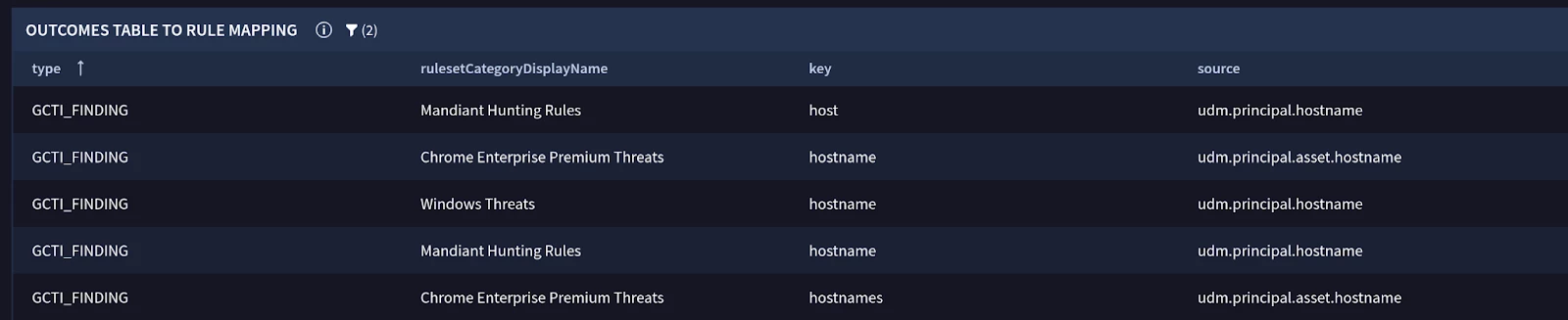
Example of verifying Variables used in Curated Detections (GCTI Findings)
Types of Composite Rules:
Composite Rules correlate multiple events to detect more complex patterns. Unlike single-event rules, they are always multi-event. You can build them in two ways: threshold-based or sequence-based.
Threshold-based Detection only rule
A threshold-based rule triggers when a specific number of detections occur for the same entity (e.g., a user or hostname) within a defined time window. The order in which the detections occur does not matter.
For example, to detect when more than 3 different low-severity access rules have triggered for the same user and host, you could write the following composite rule:
rule threshold_example_multiple_low_severity_alerts {
  meta:
    // ... metadata ...

  events:
    // Match any detection from another rule
    $d.detection.type = "RULE_DETECTION"

    // Match on low severity detections only
    $d.detection.detection.severity = "LOW"

    // Extract the rule name, hostname, and user for matching
    $ruleName = $d.detection.detection.rule_name
    $hostname = $d.detection.detection.variables["hostname"]
    $user = $d.detection.detection.variables["user"]

  match:
    // Group detections by hostname and user over 1 hour
    $hostname, $user over 1h

  condition:
    // The '#' tells the rule to count the number of *unique* values
    // for the $ruleName variable.
    // The condition is met if we see more than 3 unique rule names.
    #ruleName > 3
}
Sequence-based Detection only rule
A sequence-based rule triggers when detections from specific preceding rules occur in a defined order. This is useful for tracking attacker progression, such as a brute-force attempt followed by a successful login.
To enforce the order, you assign each preceding rule to a different event variable (e.g., $d0, $d1) and then compare their timestamps in the condition section.
For example, to detect when a series of repeated authentication failures is followed by a successful authentication from the same user and host:
rule detection_only_sequence_example_windows_repeated_failure_then_success {

  meta:
   // ... metadata ...

  events:
    // Event $d0: The preceding rule that detects multiple failed logins
    $d0.detection.type = "RULE_DETECTION"
    $d0.detection.detection.rule_name = "provider_windows_repeated_auth_failure"
    $hostname = $d0.detection.detection.variables["hostname"]
    $user = $d0.detection.detection.variables["user"]

    // Event $d1: The preceding rule that detects a successful login
    $d1.detection.type = "RULE_DETECTION"
    $d1.detection.detection.rule_name = "provider_windows_auth_success"
    $hostname = $d1.detection.detection.variables["hostname"]
    $user = $d1.detection.detection.variables["user"]

  match:
    $hostname, $user over 1h

  outcome:
    $risk_score = 0
   // Get the timestamp of the last failure event ($d0)
    $last_failure_time = max($d0.detection.detection_time.seconds)
    // Get the timestamp of the first success event ($d1)
    $first_success_time = min($d1.detection.detection_time.seconds)


  condition:
    // This is the core sequencing logic.
    // It triggers if both events exist AND the success happened at the same time
    // as, or after, the last failure.
    $d0 and $d1 and $first_success_time >= $last_failure_time
}
For accurate sequencing, always compare the detection.detection_time field.
- detection.detection_time: The time the activity actually occurred on the source device. Use this for sequencing.
- detection.created_time: The time the detection was ingested into Google SecOps.
Network delays can cause events to arrive out of order. Using detection_time ensures your rule logic is based on when the events truly happened.
Multi-stage (Hierarchical) Detections
You can chain composite rules together to create multi-stage detections, with one rule consuming the output of another. Google SecOps supports a hierarchy of up to 10 levels deep.
This capability of Composite Detections allows you to build sophisticated logic that tracks a threat over a long period. You can start with low-confidence signals, and as more evidence is gathered at each stage, you can increase the detection's severity and confidence.
For example, a three-stage detection can be built to identify a host that is persistently sending out large amounts of data, with the match window and severity increasing at each stage.
It is important to note that for longer-term detections, such as this, multi-event rules are employed rather than single-event real-time or near real-time rules.
Stage 0: Daily Large Transfer (Input Rule)
rule input_host_large_outbound_transfer {
  meta:
    author = "Google Cloud Security Community"
    description = "Stage 0 (Input): Identifies a daily large outbound network transfer from a host (e.g., >100 MB)."
    severity = "INFO" // This is just a baseline signal
    //...

  events:
    $e.metadata.event_type = "NETWORK_CONNECTION"
    $e.network.sent_bytes > 0
    $e.principal.ip != ""
    $principalHost = $e.principal.ip

  match:
    // Group all connections by the source host over a 1-day window
    $principalHost over 1d

  outcome:
    // This variable will be passed to the next stage
    $host = array_distinct($principalHost)
    $total_bytes_sent = sum($e.network.sent_bytes)

  condition:
    // Trigger if total bytes sent for the host exceeds 100 MB
    // NOTE: This threshold should be tuned for your environment.
    $e and $total_bytes_sent > 100000000
}
Stage 1: Multi-Day Persistence
Next, a Composite Detection only rule consumes the detections from Stage 0. It looks for hosts that trigger the "large transfer" detection on more than two separate days within 5 days (a working week). The severity is now elevated to LOW.
rule detection_host_large_outbound_transfer_stage_1 {
  meta:
    author = "Google Cloud Security Community"
    description = "Stage 1: Identifies hosts exhibiting repeated large outbound transfers over a 5-day period."
    severity = "LOW" // Elevated for persistent activity
    //...

  events:
    // Consumes detections from the Stage 0 rule
    $d.detection.detection.rule_name = "input_host_large_outbound_transfer"

    // Extract the outcome variables from the provider rule
    $detection_id = $d.detection.id
    $host = $d.detection.detection.variables["host"]

  match:
    // Group Stage 0 detections by host over a 5-day window
    $host over 5d

  outcome:
    // Escalate the risk score
    $risk_score = 20

  condition:
    // Trigger if there are more than 2 unique detections from Stage 0
    // The '#' counts unique values of $detection_id
    $d and #detection_id >= 3
}
Stage 2: Chronic Weekly Persistence
Finally, a third rule consumes detections from Stage 1. This rule identifies a repeat pattern of hosts that have triggered the Stage 1 alert more than once in the last 14 days. The severity is now MEDIUM.
rule consumer_host_large_outbound_transfer_stage_2 {
  meta:
    author = "Google Cloud Security Community"
    description = "Stage 2: Identifies hosts with repeated, multi-week patterns of large data exfiltration."
    severity = "MEDIUM" // Further elevated for highly persistent activity
    //...

  events:
    // Consumes detections from the Stage 1 rule
    $d.detection.detection.rule_name = "detection_host_large_outbound_transfer_stage_1"

    $detection_id = $d.detection.id
    $host = $d.detection.detection.variables["host"]

  match:
    // Group Stage 1 detections by host over a 14-day window
    $host over 14d

  outcome:
    // Escalate the risk score further
    $risk_score = 50

  condition:
    // Trigger if there are more than 1 unique detections from Stage 1
    $d and #detection_id >= 2
}
Notice how the match window can be expanded in later stages. A feeder rule might look at a 1-day window, while the final composite rule can correlate those daily alerts over the maximum 14-day window.
When utilizing a multi-event rule, a detection or detection alert will not be generated until the match window's interval duration has concluded.
Composite Detections in SOAR
Alerts originating from Composite Detections are supported within Google SecOps SOAR; however, they exhibit certain distinctions when compared to alerts derived from Single or Multi-event Detections.
All Detections and their corresponding Detection Alerts are consolidated into a singular Alert within a SOAR Case, which will be identified by an additional tag, “COMPOSITE_ALERT,” located on the SOAR Alert tab.
The associated UDM Events or UDM Entities are effectively consolidated, and the Events tab within a SOAR Case will display all UDM Events or Entities as mapped to the SOAR ontology.
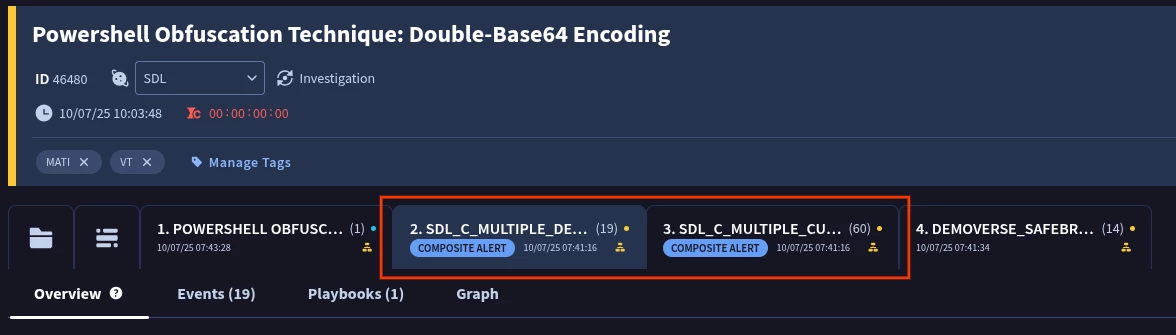
Example of a Composite Detection alert in a SOAR Case
For optimal viewing and exploration of a Composite Alert within a SOAR Case, utilize the Case Overview tab (denoted by the Folder icon), which grants access to the Composite Detections widget. This view facilitates the exploration of all associated Detections or Detection Alerts that constitute a Composite Detection, offering identical functionality and presentation to that found within the SIEM component of Google SecOps.
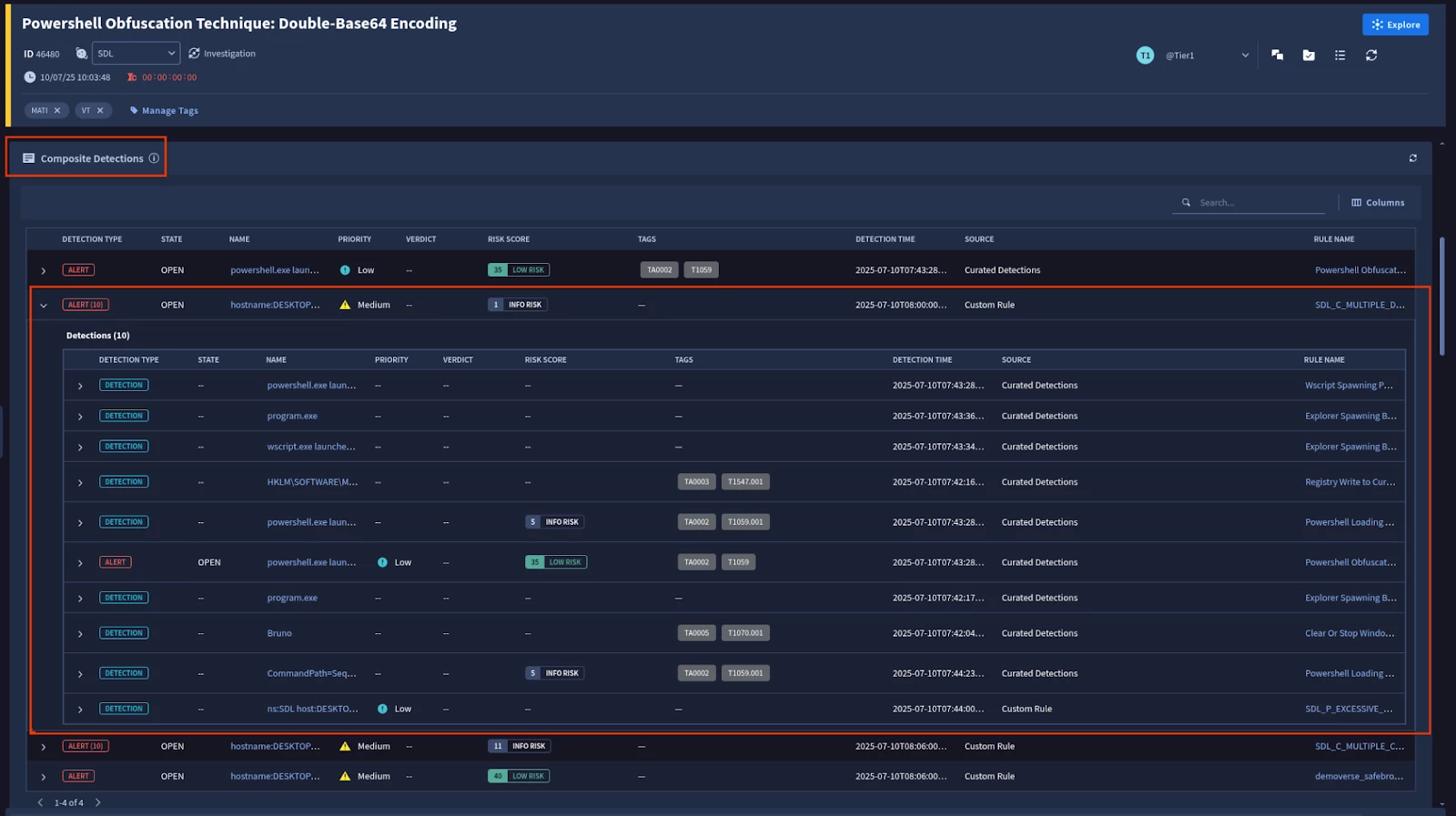
Example of the Composite Detections widgets
Composite Detections may not function with certain existing Widgets or Actions due to the differences in the underlying JSON response, specifically its nested structure. A custom implementation can be achieved by utilizing the For Loop feature within a custom Playbook to iterate over each nested JSON UDM Detection. This, in conjunction with a custom Widget or Action developed for each nested detection, can enable functionality. However, such an implementation falls outside the purview of this guide.
Advanced Considerations & Best Practices
14 Day Match Window
Composite and Detection-only rules can use a match window of up to 14 days. Given that a Detection or Detection Alert is generated only after the match interval has concluded, it is advisable to utilize constrained datasets and to base longer windowed Composite Rules on Detections only rules .
Outcome and Match Variables for Joins
While both can be used, if a preceding single-event rule does not have a match section, you can ensure the desired variable is explicitly exported as an outcome variable for it to be usable in the composite rule, or access the values directly from the UDM Entity or Event using Collection Elements.
Detection Event Limit
A Detection is limited in the number of source events it can persist for each event variable (e.g., $e, $e2) in a rule. If numerous events match a variable's conditions within the specified time window, the system will store a maximum of 10 randomly selected events for that variable in the final detection. For example, consider a rule with two event variables, $e1 and $e2. If 20 events match the conditions for $e1 and 30 events match for $e2, the resulting detection will only contain data from 10 random events from the $e1 group and 10 random events from the $e2 group.
Use rule_id for References
If your Composite Rule logic needs to refer to specific Input or Detection only rules use its rule_id value, and not its rule_name. The rule_id is a persistent, unique GUID that won't change, reducing the risk of your logic breaking if a rule is renamed or duplicated.
Suppression Keys
In a single-event Input Rule, the inclusion of a suppression_key precludes the use of a match statement, thereby necessitating the utilization of custom Outcome variables or direct UDM Collections references for effective joining within the Composite Rule.
Quotas and Limits:
- Input Rules are limited to 10,000 Detections.
- Composite Rules count towards your multi-event rule quota: 75 for Standard, 125 for Enterprise, and 200 for Enterprise+.
- Design your chains carefully to avoid generating excessive low-fidelity detections at earlier stages, as each stage that generates detections contributes to the daily quota.
- A single YARA-L rule is limited to a maximum of 25 Outcome variables
Debugging and Testing:
- The "Test Rules" feature in the UX does not persist detections to the database, which means you cannot directly use it to validate a composite rule that requires existing input detections.
- To run an entire composite chain, you must manually start retrohunts from the first rule in the sequence, wait for each run to finish, and then proceed to the next rule.
- Note, when testing to avoid matching prior versions you may wish to add a specific meta: label to each rule in the chain to avoid accidentally including prior Detection results
Tag Composite Detections in SOAR
Composite Detections are not directly searchable within SOAR Search. Therefore, the implementation of a custom Tag for identified Composite Rules can be accomplished using the subsequent methodology:
[Event.relatedDetectionIds] Not Empty AND [Event.relatedDetectionIds] Not Contains “relatedDetectionIds”
Resources
This Adoption Guide utilized the following resources, and are recommended reading to learn more on the topic:
- https://cloud.google.com/chronicle/docs/detection/composite-rules
- https://www.googlecloudcommunity.com/gc/Community-Blog/New-to-Google-SecOps-Building-Your-First-Composite-Rule/ba-p/902514
- https://www.googlecloudcommunity.com/gc/Community-Blog/New-to-Google-SecOps-Composite-Rule-Fundamentals/ba-p/901209
- https://medium.com/@thatsiemguy/composite-detections-preview-c196de9fa8bd
- https://www.googlecloudcommunity.com/gc/Community-Blog/New-to-Google-SecOps-Building-a-Rule-Using-Meta-Labels/ba-p/909021
