

Solved

cannot import an object from the same path where it was downloaded using Storage integration in Chronicle SOAR

  • August 19, 2025
  • 2 replies
  • 93 views

AfvanJaffer
Forum|alt.badge.img+5

Hey folks!

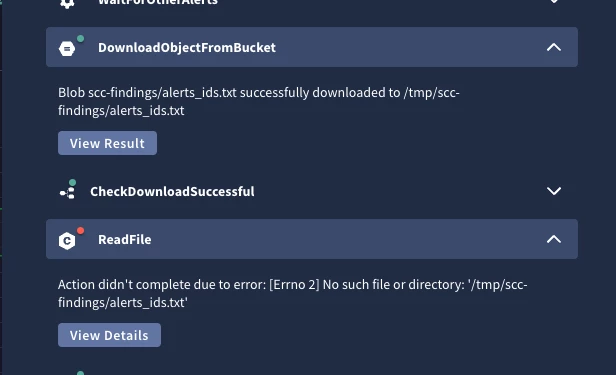
getting this issue with a lot of playbooks when run after a trigger from the alerts, I have a flow where we download file object from the gcp bucket, but right the next step cannot read the object from the intended file path(confirmed the download and import is using the same file path). Also this happens not every time, but continues to trouble the flow of the playbook 

attaching a ss here: 


Best answer by Qasim_k

I have gone through the same issue and fix in below article 
Streamlining Google SecOps Alert Ingestion into GCP Storage Bucket using Custom Action andSOAR Playbooks | Community

2 replies

Forum|alt.badge.img+8
  • Staff
  • August 19, 2025

Hello,


You can try to modify the playbook to use a persistent storage path example “/opt/siemplify/siemplify_server/Scripting/”


You may need to have this “persistent storage” setup if that doesn't work. You will need to open a support case for this. 


Qasim_k
Forum|alt.badge.img+2
  • Bronze 1
  • Answer
  • August 21, 2025


