



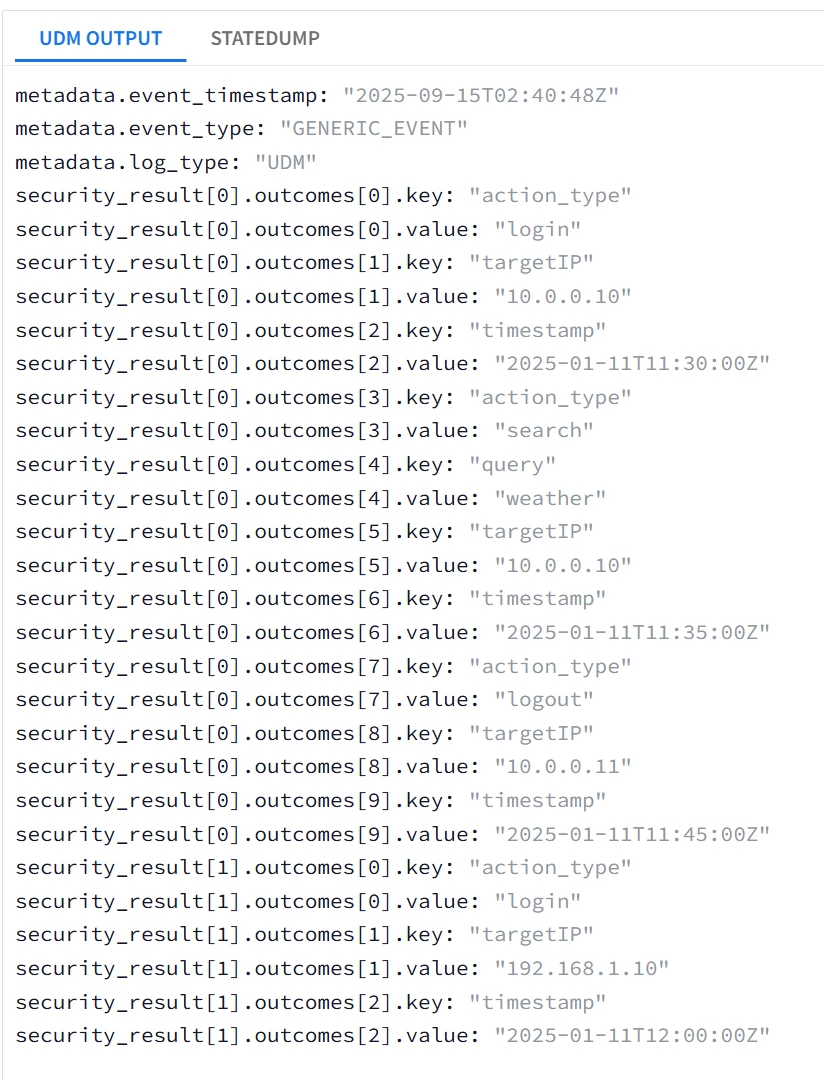
| Task: Capture ALL JSON fields under actions into the label datatype UDM field security_result[*]{}.outcomes[*]{} with each individual sessions object mapped into a security_result |
|
filter { json { source => "message" array_function => "split_columns" on_error => "error.jsonParsingFailed"} mutate {replace => {"probe"=>"%{eventName}"} on_error=> "error.missingField.eventName" } #
mutate {replace => {"event.idm.read_only_udm.metadata.event_type" => "GENERIC_EVENT"}}
###Loop1 for looping through ALL sessions, i.e. user{}.sessions[*]{} for i1, _sessions in user.sessions map {
###Loop2 for looping through ALL actions, i.e. user{}.sessions[*]{}.actions[*]{} for i2, _actions in _sessions.actions map {
###Loop3 is for lopping through ALL the JSON fields under actions, i.e. action_type, timestamp, target_ip, query for i3, _value in _actions map {
##Intended UDM field is security_result[*]{}.outcomes[*]{} ; 2 Repeated fields security_result and outcomes
## outcomes is the lowest-level repeated field --> replace with a temp token _outcomes with sub-fields key and value mutate {replace => {"_outcomes.key" => "%{i3}"}} mutate {replace => {"_outcomes.value" => "%{_value}"}} mutate {merge => {"outcomes" => "_outcomes"}} mutate {replace => {"_outcomes" => ""}}
} } ## Moved the security_result merge statements to be inside the sessions loop Loop1 mutate {rename => {"outcomes" => "_security_result.outcomes"}} mutate {merge => {"event.idm.read_only_udm.security_result" => "_security_result"}} mutate {replace => {"_security_result" => ""}} }
mutate {merge => { "@output" => "event" }}
statedump {} } |
| Snippet from statedump output and UDM: |
|
| Task: Capture ALL JSON fields under actions into the label datatype UDM field security_result[*]{}.outcomes[*]{} with all mapped into a single security_result |
| filter { json { source => "message" array_function => "split_columns" on_error => "error.jsonParsingFailed"} mutate {replace => {"probe"=>"%{eventName}"} on_error=> "error.missingField.eventName" } #
mutate {replace => {"event.idm.read_only_udm.metadata.event_type" => "GENERIC_EVENT"}}
###Loop1 for looping through ALL sessions, i.e. user{}.sessions[*]{} for i1, _sessions in user.sessions map {
###Loop2 for looping through ALL actions, i.e. user{}.sessions[*]{}.actions[*]{} for i2, _actions in _sessions.actions map {
###Loop3 is for lopping through ALL the JSON fields under actions, i.e. action_type, timestamp, target_ip, query for i3, _value in _actions map {
##Intended UDM field is security_result[*]{}.outcomes[*]{} ; 2 Repeated fields security_result and outcomes
## outcomes is the lowest-level repeated field --> replace with a temp token _outcomes with sub-fields key and value mutate {replace => {"_outcomes.key" => "%{i3}"}} mutate {replace => {"_outcomes.value" => "%{_value}"}} mutate {merge => {"outcomes" => "_outcomes"}} mutate {replace => {"_outcomes" => ""}}
} } } ## Moved the security_result merge statements outside all the loops into the main body mutate {rename => {"outcomes" => "_security_result.outcomes"}} mutate {merge => {"event.idm.read_only_udm.security_result" => "_security_result"}} mutate {replace => {"_security_result" => ""}}
mutate {merge => { "@output" => "event" }}
statedump {} } |
| Snippet from statedump output and UDM: 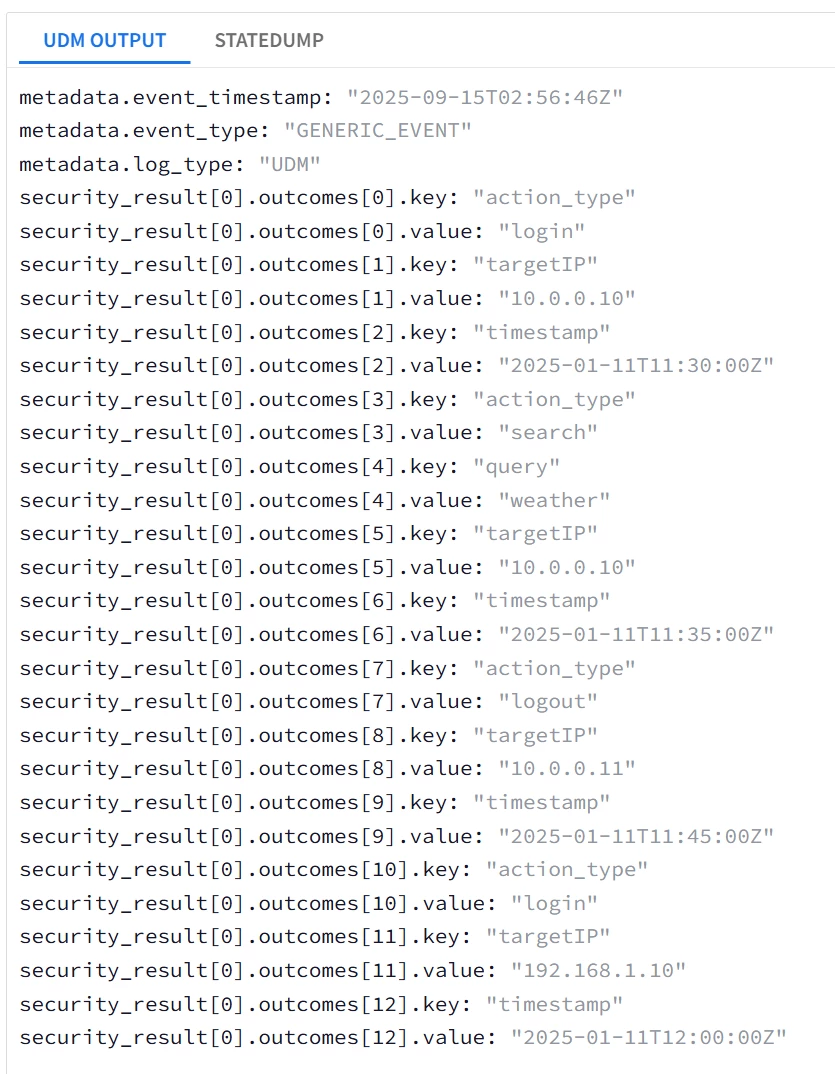
|
Mapping into UDM Additional Fields
Additional.fields[“...”] is a repeated field that was added to the UDM event schema to provide more flexibility, acting very similar to the deprecated noun.labels (nouns are any of principal, intermediary, observer or target UDM fields).Their flexibility makes them excellent candidates for usage to map fields quicker with simpler syntax.
The documentation here describes the implementation of the field, I will cover only the String (string_value), Boolean (bool_value) and Double (number_value) data types. As of the time of writing this guide ; Searching for multiple repeated additional fields (list_value) is not supported in UDM search yet.
Since Additional.fields[“...”] is a repeated field, we will use the merge statement to construct.
Mapping String, Boolean and Number fields into UDM Additional fields |
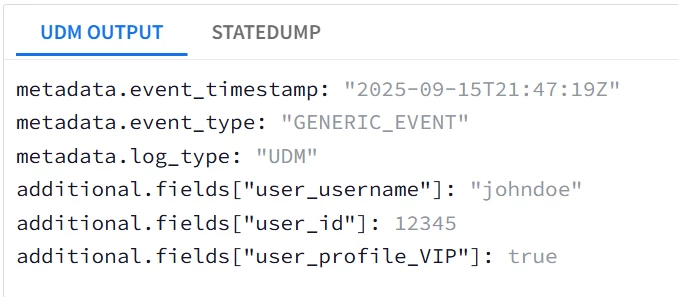
| Task: tokenize user.username, user.profile.VIP, and user.id into additional.fields[“...”] |
| filter { json { source => "message" array_function => "split_columns" on_error => "error.jsonParsingFailed"} mutate {replace => {"event.idm.read_only_udm.metadata.event_type" => "GENERIC_EVENT"}}
#Mapping the string field user.username mutate {replace => {"_temp.value.string_value" => "%{user.username}" } on_error => "_error"} mutate {replace => {"_temp.key" => "user_username" } on_error => "_error"} mutate {merge => {"event.idm.read_only_udm.additional.fields" => "_temp"}} mutate {replace => { "_temp" => "" }}
##In this block we will use Rename to capture the integer user.id and boolean user.profile.VIP fields instead of using Convert with Replace mutate {rename => {"user.id" => "_temp.value.number_value" } on_error => "_error"} mutate {replace => {"_temp.key" => "user_id" } on_error => "_error"} mutate {merge => {"event.idm.read_only_udm.additional.fields" => "_temp"}} mutate {replace => { "_temp" => "" }}
mutate {rename => {"user.profile.VIP" => "_temp.value.bool_value" } on_error => "_error"} mutate {replace => {"_temp.key" => "user_profile_VIP" } on_error => "_error"} mutate {merge => {"event.idm.read_only_udm.additional.fields" => "_temp"}} mutate {replace => { "_temp" => "" }}
mutate {merge => { "@output" => "event" }} statedump {} } |
| Snippet from statedump output and UDM: all tokens are printed "@output": [ { "idm": { "read_only_udm": { "additional": { "fields": [ { "key": "user_username", "value": { "string_value": "johndoe" } }, { "key": "user_id", "value": { "number_value": 12345 } }, { "key": "user_profile_VIP", "value": { "bool_value": true } } ] }, "metadata": { "event_type": "GENERIC_EVENT" } } } } ],
|
|
Here is an alternative version using for-loop with lesser lines
Mapping Multiple fields into UDM Additional fields using For Loops |
| Task: tokenize user.username, user.profile.VIP, and user.id into additional.fields[“...”] using for loop |
| filter { json { source => "message" array_function => "split_columns" on_error => "error.jsonParsingFailed"} mutate {replace => {"event.idm.read_only_udm.metadata.event_type" => "GENERIC_EVENT"}}
#Mapping the string field user.username mutate {replace => {"_temp._temp1.value.string_value" => "%{user.username}" } on_error => "_error"} mutate {replace => {"_temp._temp1.key" => "user_username" } on_error => "_error"}
##In this block we will use Rename to capture the integer user.id and boolean user.profile.VIP fields instead of using Convert with Replae mutate {rename => {"user.id" => "_temp._temp2.value.number_value" } on_error => "_error"} mutate {replace => {"_temp._temp2.key" => "user_id" } on_error => "_error"}
mutate {rename => {"user.profile.VIP" => "_temp._temp3.value.bool_value" } on_error => "_error"} mutate {replace => {"_temp._temp3.key" => "user_profile_VIP" } on_error => "_error"}
### for _key, _value in _temp map { mutate {merge => {"event.idm.read_only_udm.additional.fields" => "_value"} } }
mutate {merge => { "@output" => "event" }} statedump {} } |
Universal Catch-all JSON Parser
Using the flexibility of additional.fields (or any labels type field like security_result[*]{}.labels[*]{}) , it becomes possible to dynamically capture many fields into UDM without even knowing the field name.
This is done using one overarching loop (catch-all) that utilizes dynamic capturing. The implementation uses 1 loop per the JSON logs nesting level, i.e. if your logs are flat without any composite or nested field then you could use one single loop to capture almost all fields into UDM.
Also we will introduce a rarely-used argument to the json parsing statement, which is target ;
json { source => "message" array_function => "split_columns" target => "root" on_error => "error.jsonParsingFailed"}
This statement will parse the JSON logs, but will add all the fields under a parent field root. This is to allow looping through the JSON fields on the root level. This is a deviation from what was discussed earlier in Part 1 as the usage of target argument is not documented in the official documentation yet.
Capture ALL fields into UDM without knowing their name |
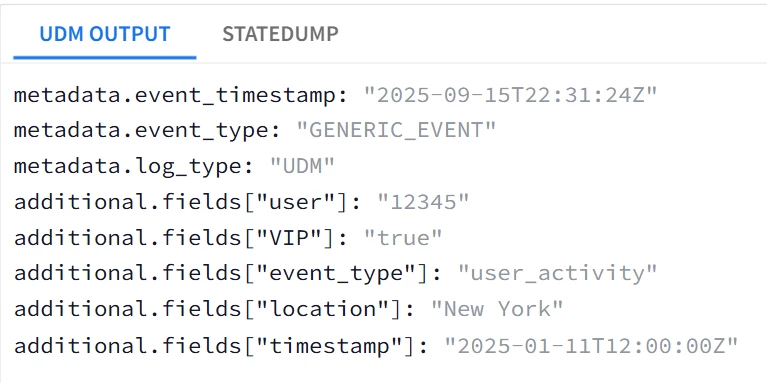
| Task: tokenize user.username, user.profile.VIP, and user.id into additional.fields[“...”] |
| Log Sample: #Using a flat log sample for this example { "timestamp": "2025-01-11T12:00:00Z", "event_type": "user_activity", "user": 12345, "location": "New York", "VIP" : true } |
| filter {
##Notice the additional keyword ; target=>"root" , Used to allow looping through the root of the JSON logs json { source => "message" array_function => "split_columns" target => "root" on_error => "error.jsonParsingFailed"} mutate {replace => {"event.idm.read_only_udm.metadata.event_type" => "GENERIC_EVENT"}}
####Loop through the Root fields of the JSON Logs for key,value in root map {
##Convert the field to string if possible mutate {convert => {"value" => "string" } on_error => "_error.conversionError"}
#No IF condition was used with the conversion error flag _error.conversionError #because string->string conversion will also generate an error and flag _error.conversionError #thus bypassing the assignment statement for readily-string fields mutate {replace => {"_add.value.string_value" => "%{value}" } on_error => "_error.not_String_SingleValue_Field"} mutate {replace => {"_add.key" => "%{key}" }} mutate {merge => {"event.idm.read_only_udm.additional.fields" => "_add"}} mutate {replace => { "_add" => "" }} }
mutate {merge => { "@output" => "event" }} statedump {} } |
| Snippet from statedump output and UDM: all tokens are printed "@output": [ { "idm": { "read_only_udm": { "additional": { "fields": [ { "key": "VIP", "value": { "string_value": "true" } }, { "key": "event_type", "value": { "string_value": "user_activity" } }, { "key": "location", "value": { "string_value": "New York" } }, { "key": "timestamp", "value": { "string_value": "2025-01-11T12:00:00Z" } }, { "key": "user", "value": { "string_value": "12345" } } ] }, |
|
This approach is not ideal, however it saves time and provides a quick parser that can be tuned later.
Now what if the log sample is nested?
Looking back at the main log sample ; we have 4 levels ; root level, root.user{}, root.user{}.sessions[*]{}, root.user{}.sessions[*]{}.actions[*]{} , so 4 loops will be utilized. Also the key field will be a concatenation to avoid re-writing of the UDM events.
Capture ALL fields into UDM without knowing their name |
| Task: tokenize all String and String-convertable fields into additional.fields[“...”] |
| filter { json { source => "message" array_function => "split_columns" target => "root" on_error => "error.jsonParsingFailed"} mutate {replace => {"event.idm.read_only_udm.metadata.event_type" => "GENERIC_EVENT"}}
for _key1, _value1 in root map { mutate {convert => {"_value1" => "string" } on_error => "_error.conversionError"} mutate {replace => {"_add.value.string_value" => "%{_value1}" } on_error => "_error.not_String_SingleValue_Field"} mutate {replace => {"_add.key" => "%{_key1}" }} mutate {merge => {"event.idm.read_only_udm.additional.fields" => "_add"}} mutate {replace => { "_add" => "" }}
for _key2, _value2 in _value1 map { mutate {convert => {"_value2" => "string" } on_error => "_error.conversionError"} mutate {replace => {"_add.value.string_value" => "%{_value2}" } on_error => "_error.not_String_SingleValue_Field"} mutate {replace => {"_add.key" => "%{_key1}_%{_key2}" }} ##Notice the concatenation of the _key1 and _key2 mutate {merge => {"event.idm.read_only_udm.additional.fields" => "_add"}} mutate {replace => { "_add" => "" }}
for _key3, _value3 in _value2 map { mutate {convert => {"_value3" => "string" } on_error => "_error.conversionError"} mutate {replace => {"_add.value.string_value" => "%{_value3}" } on_error => "_error.not_String_SingleValue_Field"} mutate {replace => {"_add.key" => "%{_key1}_%{_key2}_%{_key3}" }} ##_key3 was appended mutate {merge => {"event.idm.read_only_udm.additional.fields" => "_add"}} mutate {replace => { "_add" => "" }}
for _key4, _value4 in _value3 map { mutate {convert => {"_value4" => "string" } on_error => "_error.conversionError"} mutate {replace => {"_add.value.string_value" => "%{_value4}" } on_error => "_error.not_String_SingleValue_Field"} mutate {replace => {"_add.key" => "%{_key1}_%{_key2}_%{_key3}_%{_key4}" }} #_key1 was appended mutate {merge => {"event.idm.read_only_udm.additional.fields" => "_add"}} mutate {replace => { "_add" => "" }} } } } } mutate {merge => { "@output" => "event" }} statedump {} }
|
| Snippet from statedump output and UDM: all tokens are printed |
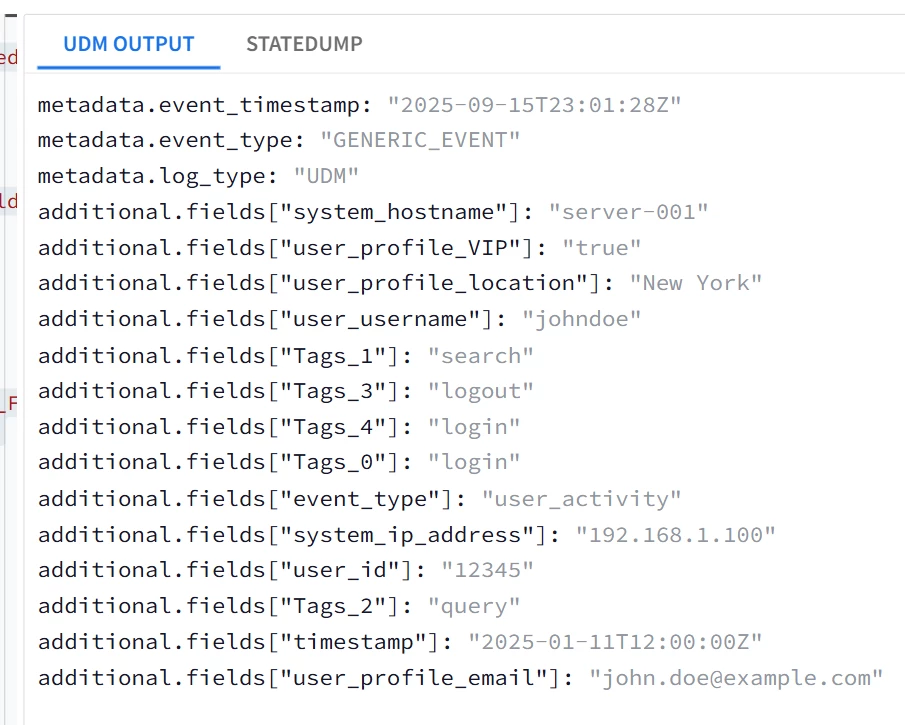
|
Generating Multiple UDM Events from A Single Log Message
Each single UDM event is generated from the parser using the special merge statement ;
Generate an Event Per Element in a Multi-value Object |
| Task: tokenize user.sessions into separate events |
| filter {
json { source => "message" array_function => "split_columns" on_error => "error.jsonParsingFailed"}
###Conversion to String Statements used outside the loop to avoid the double conversion string to string which will cause errors mutate {convert => {"user.id" => "string" }}
for _key, _sessions_ in user.sessions map {
##Common Fields between all sessions ; event type, username, user id #These events will reference the variables from outside the loop mutate {replace => {"event.idm.read_only_udm.metadata.event_type" => "GENERIC_EVENT"}} mutate {replace => {"event.idm.read_only_udm.principal.user.user_display_name" => "%{user.username}" }} mutate {replace => {"event.idm.read_only_udm.principal.user.userid" => "%{user.id}" }}
##Exclusive fields per session ; session.id, session.start_time mutate {replace => {"event.idm.read_only_udm.network.session_id" => "%{_sessions_.session_id}" }} date { match => ["_sessions_.start_time", "ISO8601"] timezone => "America/New_York" target=> "event.idm.read_only_udm.metadata.collected_timestamp" rebase => true on_error => "error.noDate"}
##Merge statement to generate event, then clear the event variable to avoid mixing the fields of the next session mutate {merge => { "@output" => "event" }} mutate {replace => {"event" => "" }}
}
statedump {} } |
| Snippet from statedump output and UDM: all tokens are printed |
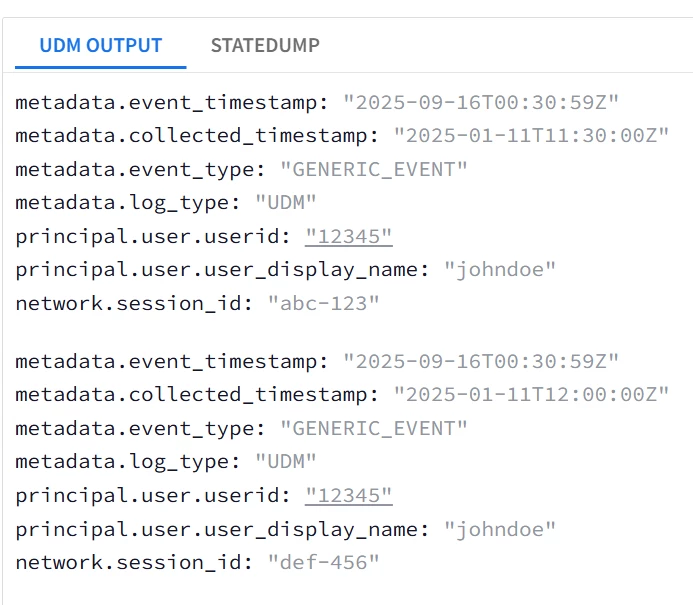
|
| Task: tokenize user.sessions into separate events without using Loops |
| filter {
json { source => "message" array_function => "split_columns" on_error => "error.jsonParsingFailed"} #Conversions first because they will be re-used later mutate {convert => {"user.id" => "string" }}
####First event object event1 mutate {replace => {"event1.idm.read_only_udm.metadata.event_type" => "GENERIC_EVENT"}} mutate {replace => {"event1.idm.read_only_udm.principal.user.user_display_name" => "%{user.username}" }} mutate {replace => {"event1.idm.read_only_udm.principal.user.userid" => "%{user.id}" }} ##Statically map the elements of the first session to event1 object date { match => ["user.sessions.0.session_id", "ISO8601"] timezone => "America/New_York" target=> "event1.idm.read_only_udm.metadata.collected_timestamp" rebase => true on_error => "error.noDate"} mutate {replace => {"event1.idm.read_only_udm.principal.user.userid" => "%{user.id}" }} mutate {replace => {"event1.idm.read_only_udm.network.session_id" => "%{user.sessions.0.session_id}" }} mutate {merge => { "@output" => "event1" }}
####Second event object event2 mutate {replace => {"event2.idm.read_only_udm.metadata.event_type" => "GENERIC_EVENT"}} mutate {replace => {"event2.idm.read_only_udm.principal.user.user_display_name" => "%{user.username}" }} mutate {replace => {"event2.idm.read_only_udm.principal.user.userid" => "%{user.id}" }} ##Statically map the elements of the second session to event2 object date { match => ["user.sessions.1.session_id", "ISO8601"] timezone => "America/New_York" target=> "event1.idm.read_only_udm.metadata.collected_timestamp" rebase => true on_error => "error.noDate"} mutate {replace => {"event2.idm.read_only_udm.principal.user.userid" => "%{user.id}" }} mutate {replace => {"event2.idm.read_only_udm.network.session_id" => "%{user.sessions.1.session_id}" }} mutate {merge => { "@output" => "event2" }} } |
| Snippet from statedump output and UDM: all tokens are printed 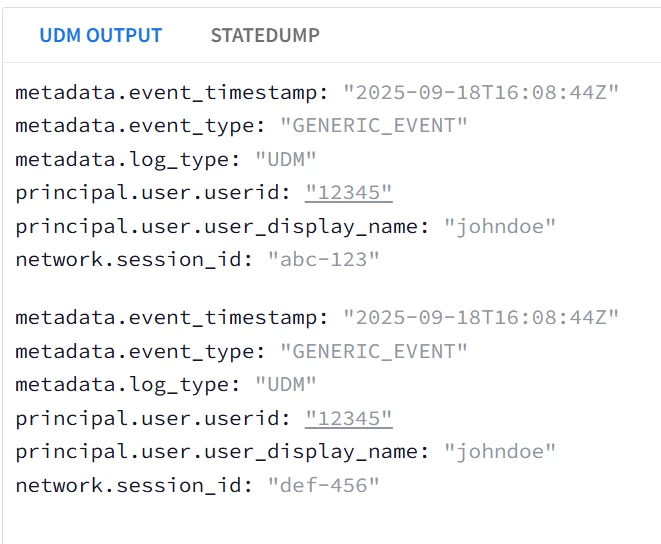
|
Parser Extensions
Uptill this point, the main discussion was about building custom parsers. However in practice most of the time you will add some tweaks on top of the existing ones, i.e. applying some custom mappings. These custom mappings are called Parser Extensions in Google SecOps SIEM.
The use case for parser extensions are mainly to ;
- Overwrite the default parser field mappings.
- Add on to the existing default parser mappings.
As of the time of writing this document ; The Parser extensions mappings when conflict with the Main parser mappings Supersedes the main parser mappings with 3 exceptions ;
- Parser Extensions cannot delete a field from the Main Parser, Only Replace it.
- Parser Extensions cannot drop a log message. A drop statement in the parser extension will effectively undo all the modifications done by the parser extension, but it will not drop the log message.
- Parser Extensions cannot append to repeated fields EXCEPT additional.fields[*]{}. It can only replace them entirely OR re-build them from the original raw log, but cannot append to any mappings constructed by the main parser if the repeated field is not additional.fields[*]{}.
| Target Field in Extension | Required Operation in Extension | Supported |
| Single-value Field | Overwrite | YES |
| Single-value Field | Add/Append | YES |
| Multi-value Fields Except additional[*].fields{} | Overwrite | YES |
| Multi-value Fields Except additional[*].fields{} | Add/Append | NO (Can be done in the UI not in Code Snippet) |
| additional[*].fields{} | Overwrite | YES |
| additional[*].fields{} | Add/Append | YES |
| DROP in Main Parser | DROP in Parser Extension | RAW Log Retained | Log Dropped |
| YES | Ignored | NO | YES |
| NO | YES | YES | NO |
The parser extension is dependent on the main parser, if the main parser for any reason drops, discards or is unable to parse the log message, then the parser extension won’t be executed at all.
The prerequisites for the parser extension are listed in this page, with some examples are listed in this page already.
The main point is to make sure that the Main Parser can parse the input logs. If the main parser failed to parse the input logs then the parser extension code won’t be executed at all. The parser extension execution is dependent and happens after the main parser successful execution. In either case the raw log will be retained.
In this example we will explore how to add a parser extension to metadata.log_type = GCP_CLOUDAUDIT.
The requirement will be to try ;
- Adding a new mapping to a single-field (supported).
- Overwrite an existing mapping (supported).
- Append to a repeated field about.labels[*]{} (not supported, only Overwrite is supported)
- Append to a repeated field additional.fields[*]{} (supported)
- Remove an existing mapping (not supported).
- Drop the Log message (not supported, it will just undo the parser extension mappings and disable it logically).
