



Author: Christopher Martin
Process Aliasing & Enrichment in Google SecOps
Process aliasing in Google SecOps helps to solve the problem of re-assembling process chains and inconsistent process identification for analysts, providing the ability to reliably reconstruct the principal’s parent (up to one level), across different security events.
- Connecting parent-child events: Often in raw logs the only link is the Parent Process ID (PPID), and to find the grandparent requires you search other logs for an event where the PPID matches the Target Process ID (PID), which is slow and error prone.
- Addressing short-lived processes: If an event is logged after the parent process has already terminated, the PPID can be recycled by the Operating System and used for a new, unrelated process, resulting in a PID reuse problem.
By mapping Operating System or Endpoint Detection & Response (EDR) that provide a Universally Unique Identifier (UUID) into the Unified Data Modem (UDM) product_specific_process_id field, Google SecOps can ensure the correct historical parent details are always retrieved.
Example 1: Process Aliasing with timeout.exe
In this example we will trace the lineage of the process timeout.exe to show how Process Aliasing works in practice.
We will be using Windows Sysmon for this example, and for context this is the full process tree that we will be analyzing.
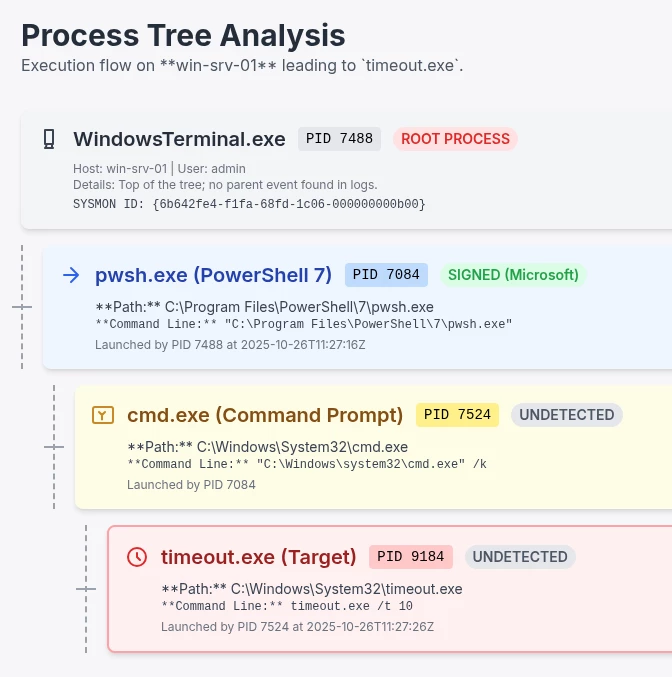
The process tree example in full we’ll be using
Let’s work in reverse and start with the launching of timeout.exe process. Here is the original Windows Sysmon Event Log in XML format:
<Event xmlns='http://schemas.microsoft.com/win/2004/08/events/event'>
  <System>
    <Provider Name='Microsoft-Windows-Sysmon' Guid='{5770385f-c22a-43e0-bf4c-06f5698ffbd9}'/>
    <EventID>
      1
    </EventID>
    <Version>
      5
    </Version>
    <Level>
      4
    </Level>
    <Task>
      1
    </Task>
    <Opcode>
      0
    </Opcode>
    <Keywords>
      0x8000000000000000
    </Keywords>
    <TimeCreated SystemTime='2025-10-26T11:27:26.0929571Z'/>
    <EventRecordID>
      482
    </EventRecordID>
    <Correlation/>
    <Execution ProcessID='9952' ThreadID='6388'/>
    <Channel>
      Microsoft-Windows-Sysmon/Operational
    </Channel>
    <Computer>
      win-srv-01
    </Computer>
    <Security UserID='S-1-5-18'/>
  </System>
  <EventData>
    <Data Name='RuleName'>
      -
    </Data>
    <Data Name='UtcTime'>
      2025-10-26 11:27:26.073
    </Data>
    <Data Name='ProcessGuid'>
      {6b642fe4-059e-68fe-f308-000000000b00}
    </Data>
    <Data Name='ProcessId'>
      9184
    </Data>
    <Data Name='Image'>
      C:\Windows\System32\timeout.exe
    </Data>
    <Data Name='FileVersion'>
      10.0.26100.1 (WinBuild.160101.0800)
    </Data>
    <Data Name='Description'>
      timeout - pauses command processing
    </Data>
    <Data Name='Product'>
      Microsoft® Windows® Operating System
    </Data>
    <Data Name='Company'>
      Microsoft Corporation
    </Data>
    <Data Name='OriginalFileName'>
      timeout.exe
    </Data>
    <Data Name='CommandLine'>
      timeout.exe  /t 10
    </Data>
    <Data Name='CurrentDirectory'>
      C:\Users\admin\
    </Data>
    <Data Name='User'>
      WIN-SRV-01\admin
    </Data>
    <Data Name='LogonGuid'>
      {6b642fe4-f1cf-68fd-7add-160100000000}
    </Data>
    <Data Name='LogonId'>
      0x116dd7a
    </Data>
    <Data Name='TerminalSessionId'>
      2
    </Data>
    <Data Name='IntegrityLevel'>
      Medium
    </Data>
    <Data Name='Hashes'>
      SHA256=106490870753D87D0C5A1B4FE83045A06518D415EC595BD1D0C30FE3ED4149C1
    </Data>
    <Data Name='ParentProcessGuid'>
      {6b642fe4-0598-68fe-f208-000000000b00}
    </Data>
    <Data Name='ParentProcessId'>
      7524
    </Data>
    <Data Name='ParentImage'>
      C:\Windows\System32\cmd.exe
    </Data>
    <Data Name='ParentCommandLine'>
      "C:\Windows\system32\cmd.exe" /k
    </Data>
    <Data Name='ParentUser'>
      WIN-SRV-01\admin
    </Data>
  </EventData>
</Event>
Timeout.exe via Windows Sysmon
From the original event we can determine the following about the process tree:
- ParentProcessGuid: 6b642fe4-0598-68fe-f208-000000000b00
- ParentProcessId: 7524
- Path Path: C:\Windows\System32\cmd.exe
- Parent Command: "C:\Windows\system32\cmd.exe" /k
launched
- ProcessGuid: 6b642fe4-059e-68fe-f308-000000000b00
- ProcessId: 9184
- Path: C:\Windows\System32\timeout.exe
- Command: timeout.exe /t 10
Let’s view that same original Windows Event rendered as a Google SecOps UDM event, without Process Aliasing data, as denoted by the Enriched column showing U(enriched):
| Enriched | UDM Key                                       | UDM Value                                                        |
|----------|-----------------------------------------------|------------------------------------------------------------------|
| U        | metadata.product_log_id                       | 482                                                              |
| U        | metadata.event_timestamp.seconds              | 1761478046                                                       |
| U        | metadata.event_timestamp.nanos                | 73000000                                                         |
| U        | metadata.event_type                           | PROCESS_LAUNCH                                                   |
| U        | metadata.vendor_name                          | Microsoft                                                        |
| U        | metadata.product_name                         | Microsoft-Windows-Sysmon                                         |
| U        | metadata.product_event_type                   | 1                                                                |
| U        | metadata.ingested_timestamp.seconds           | 1761478047                                                       |
| U        | metadata.ingested_timestamp.nanos             | 531534000                                                        |
| U        | metadata.id                                   | b"AAAAAF9ns3uj430p/Kbu/qh8pP4AAAAABgAAAAAAAAA                    |
| U        | metadata.log_type                             | WINDOWS_SYSMON                                                   |
| U        | metadata.base_labels.log_types                | WINDOWS_SYSMON                                                   |
| U        | metadata.base_labels.allow_scoped_access      | TRUE                                                             |
| U        | metadata.parser_version                       | custom-parser                                                    |
| U        | principal.hostname                            | win-srv-01                                                       |
| U        | principal.user.userid                         | admin                                                            |
| U        | principal.user.windows_sid                    | S-1-5-18                                                         |
| U        | principal.process.pid                         | 7524                                                             |
| U        | principal.process.file.full_path              | C:\\Windows\\System32\\cmd.exe                                   |
| U        | principal.process.command_line                | \C:\\Windows\\system32\\cmd.exe\" /k"                            |
| U        | principal.process.product_specific_process_id | SYSMON:{6b642fe4-0598-68fe-f208-000000000b00}                    |
| U        | principal.administrative_domain               | WIN-SRV-01                                                       |
| U        | principal.asset.hostname                      | win-srv-01                                                       |
| U        | principal.network.session_id                  | 0x116DD7A                                                        |
| U        | src.process.file.full_path                    | timeout.exe                                                      |
| U        | target.process.pid                            | 9184                                                             |
| U        | target.process.file.sha256                    | 106490870753d87d0c5a1b4fe83045a06518d415ec595bd1d0c30fe3ed4149c1 |
| U        | target.process.file.full_path                 | C:\\Windows\\System32\\timeout.exe                               |
| U        | target.process.command_line                   | timeout.exe  /t 10                                               |
| U        | target.process.product_specific_process_id    | SYSMON:{6b642fe4-059e-68fe-f308-000000000b00}                    |
| U        | target.process.integrity_level_rid            | 8192                                                             |
| U        | target.asset.software.name                    | Microsoft® Windows® Operating System                             |
| U        | target.asset.software.version                 | 10.0.26100.1 (WinBuild.160101.0800)                              |
| U        | target.asset.software.description             | timeout - pauses command processing                              |
| U        | target.asset.software.vendor_name             | Microsoft Corporation                                            |
| U        | observer.asset_id                             | 5770385f:c22a:43e0:bf4c:06f5698ffbd9                             |
| U        | observer.process.pid                          | 9952                                                             |
| U        | about.labels.key                              | Category ID                                                      |
| U        | about.labels.value                            | ProcessCreate                                                    |
| U        | security_result.summary                       | Process Create                                                   |
| U        | security_result.severity                      | INFORMATIONAL                                                    |
| U        | security_result.rule_name                     | EventID: 1                                                       |
UDM Event for timeout.exe, without Process aliasing
| Enriched | UDM Key | UDM Value |
| U | metadata.product_log_id | 482 |
| U | metadata.event_timestamp.seconds | 1761478046 |
| U | metadata.event_timestamp.nanos | 73000000 |
| U | metadata.event_type | PROCESS_LAUNCH |
| U | metadata.vendor_name | Microsoft |
| U | metadata.product_name | Microsoft-Windows-Sysmon |
| U | metadata.product_event_type | 1 |
| U | metadata.ingested_timestamp.seconds | 1761478047 |
| U | metadata.ingested_timestamp.nanos | 531534000 |
| U | metadata.id | b"AAAAAF9ns3uj430p/Kbu/qh8pP4AAAAABgAAAAAAAAA |
| U | metadata.log_type | WINDOWS_SYSMON |
| U | metadata.base_labels.log_types | WINDOWS_SYSMON |
| U | metadata.base_labels.allow_scoped_access | TRUE |
| U | metadata.parser_version | custom-parser |
| U | principal.hostname | win-srv-01 |
| U | principal.user.userid | admin |
| U | principal.user.windows_sid | S-1-5-18 |
| U | principal.process.pid | 7524 |
| U | principal.process.file.full_path | C:\\Windows\\System32\\cmd.exe |
| U | principal.process.command_line | \C:\\Windows\\system32\\cmd.exe\" /k" |
| U | principal.process.product_specific_process_id | SYSMON:{6b642fe4-0598-68fe-f208-000000000b00} |
| U | principal.administrative_domain | WIN-SRV-01 |
| U | principal.asset.hostname | win-srv-01 |
| U | principal.network.session_id | 0x116DD7A |
| U | src.process.file.full_path | timeout.exe |
| U | target.process.pid | 9184 |
| U | target.process.file.sha256 | 106490870753d87d0c5a1b4fe83045a06518d415ec595bd1d0c30fe3ed4149c1 |
| U | target.process.file.full_path | C:\\Windows\\System32\\timeout.exe |
| U | target.process.command_line | timeout.exe /t 10 |
| U | target.process.product_specific_process_id | SYSMON:{6b642fe4-059e-68fe-f308-000000000b00} |
| U | target.process.integrity_level_rid | 8192 |
| U | target.asset.software.name | Microsoft® Windows® Operating System |
| U | target.asset.software.version | 10.0.26100.1 (WinBuild.160101.0800) |
| U | target.asset.software.description | timeout - pauses command processing |
| U | target.asset.software.vendor_name | Microsoft Corporation |
| U | observer.asset_id | 5770385f:c22a:43e0:bf4c:06f5698ffbd9 |
| U | observer.process.pid | 9952 |
| U | about.labels.key | Category ID |
| U | about.labels.value | ProcessCreate |
| U | security_result.summary | Process Create |
| U | security_result.severity | INFORMATIONAL |
| U | security_result.rule_name | EventID: 1 |
Reviewing the UDM Event representation of the original Event Log we can see the UDM mapping is as follows:
- ParentProcessGuid: 6b642fe4-0598-68fe-f208-000000000b00, principal.process.product_specific_process_id = "SYSMON:{6b642fe4-0598-68fe-f208-000000000b00}"
- ParentProcessId: 7524, principal.process.pid = "7524"
- Path Path: C:\Windows\System32\cmd.exe, principal.process.file.full_path = "C:\\Windows\\System32\\cmd.exe"
- Parent Command: "C:\Windows\system32\cmd.exe" /k , principal.process.command_line = "\"C:\\Windows\\system32\\cmd.exe\" /k"
launched
- ProcessGuid: 6b642fe4-059e-68fe-f308-000000000b00, target.process.product_specific_process_id = "SYSMON:{6b642fe4-059e-68fe-f308-000000000b00}"
- ProcessId: 9184, target.process.pid = "9184"
- Path: C:\Windows\System32\timeout.exe, target.process.file.full_path = "C:\\Windows\\System32\\timeout.exe"
- Command: timeout.exe /t 10, target.process.command_line = "timeout.exe /t 10"
Or viewed as a table:
| Level | Process Name | PID | Full Path | Command | UDM Field |
| Parent Process | cmd.exe | 7524 | C:\Windows\System32\cmd.exe | "C:\Windows\system32\cmd.exe" /k (principal.process.command_line) | principal.process.pid |
| Target Process | timeout.exe | 9184 | C:\Windows\System32\timeout.exe | timeout.exe /t 10 (target.process.command_line) | target.process.pid |
At this stage there is no more information in the UDM event than was in the original Windows Event log; however, if we view that same UDM Event with Process Aliasing enabled, aka Enrichment, then we see a different picture:
| Enriched | UDM Key                                                      | UDM Value                                                        | Enrichment Source |
|----------|--------------------------------------------------------------|------------------------------------------------------------------|-------------------|
| U        | metadata.product_log_id                                      | 482                                                              |                   |
| U        | metadata.event_timestamp.seconds                             | 1761478046                                                       |                   |
| U        | metadata.event_timestamp.nanos                               | 73000000                                                         |                   |
| U        | metadata.event_type                                          | PROCESS_LAUNCH                                                   |                   |
| U        | metadata.vendor_name                                         | Microsoft                                                        |                   |
| U        | metadata.product_name                                        | Microsoft-Windows-Sysmon                                         |                   |
| U        | metadata.product_event_type                                  | 1                                                                |                   |
| U        | metadata.ingested_timestamp.seconds                          | 1761478047                                                       |                   |
| U        | metadata.ingested_timestamp.nanos                            | 531534000                                                        |                   |
| U        | metadata.id                                                  | b"AAAAAF9ns3uj430p/Kbu/qh8pP4AAAAABgAAAAAAAAA                    |                   |
| U        | metadata.log_type                                            | WINDOWS_SYSMON                                                   |                   |
| U        | metadata.base_labels.log_types                               | WINDOWS_SYSMON                                                   |                   |
| U        | metadata.base_labels.allow_scoped_access                     | TRUE                                                             |                   |
| U        | metadata.enrichment_labels.log_types                         | WINDOWS_SYSMON                                                   |                   |
| U        | metadata.enrichment_labels.allow_scoped_access               | TRUE                                                             |                   |
| U        | metadata.parser_version                                      | custom-parser                                                    |                   |
| U        | principal.hostname                                           | win-srv-01                                                       |                   |
| U        | principal.user.userid                                        | admin                                                            |                   |
| U        | principal.user.windows_sid                                   | S-1-5-18                                                         |                   |
| U        | principal.process.pid                                        | 7524                                                             |                   |
| E        | principal.process.file.sha256                                | b7bfa5ad5fb74d62ac7099f70b9d5a6d36b79f062aad4997429559955da191cc | WINDOWS_SYSMON    |
| U        | principal.process.file.full_path                             | C:\\Windows\\System32\\cmd.exe                                   |                   |
| U        | principal.process.command_line                               | \C:\\Windows\\system32\\cmd.exe\" /k"                            |                   |
| U        | principal.process.product_specific_process_id                | SYSMON:{6b642fe4-0598-68fe-f208-000000000b00}                    |                   |
| E        | principal.process.parent_process.pid                         | 7084                                                             | WINDOWS_SYSMON    |
| E        | principal.process.parent_process.file.full_path              | C:\\Program Files\\PowerShell\\7\\pwsh.exe                       | WINDOWS_SYSMON    |
| E        | principal.process.parent_process.command_line                | \C:\\Program Files\\PowerShell\\7\\pwsh.exe\""                   | WINDOWS_SYSMON    |
| E        | principal.process.parent_process.product_specific_process_id | SYSMON:{6b642fe4-0594-68fe-f108-000000000b00}                    | WINDOWS_SYSMON    |
| E        | principal.process.integrity_level_rid                        | 8192                                                             | WINDOWS_SYSMON    |
| U        | principal.administrative_domain                              | WIN-SRV-01                                                       |                   |
| U        | principal.network.session_id                                 | 0x116DD7A                                                        |                   |
| U        | src.process.file.full_path                                   | timeout.exe                                                      |                   |
| U        | target.process.pid                                           | 9184                                                             |                   |
| U        | target.process.file.sha256                                   | 106490870753d87d0c5a1b4fe83045a06518d415ec595bd1d0c30fe3ed4149c1 |                   |
| U        | target.process.file.full_path                                | C:\\Windows\\System32\\timeout.exe                               |                   |
| U        | target.process.command_line                                  | timeout.exe  /t 10                                               |                   |
| U        | target.process.product_specific_process_id                   | SYSMON:{6b642fe4-059e-68fe-f308-000000000b00}                    |                   |
| U        | target.process.integrity_level_rid                           | 8192                                                             |                   |
| U        | target.asset.software.name                                   | Microsoft® Windows® Operating System                             |                   |
| U        | target.asset.software.version                                | 10.0.26100.1 (WinBuild.160101.0800)                              |                   |
| U        | target.asset.software.description                            | timeout - pauses command processing                              |                   |
| U        | target.asset.software.vendor_name                            | Microsoft Corporation                                            |                   |
| U        | observer.asset_id                                            | 5770385f:c22a:43e0:bf4c:06f5698ffbd9                             |                   |
| U        | observer.process.pid                                         | 9952                                                             |                   |
| U        | about.labels.key                                             | Category ID                                                      |                   |
| U        | about.labels.value                                           | ProcessCreate                                                    |                   |
| U        | security_result.summary                                      | Process Create                                                   |                   |
| U        | security_result.severity                                     | INFORMATIONAL                                                    |                   |
| U        | security_result.rule_name                                    | EventID: 1                                                       |                   |
UDM Event for timeout.exe, with Process aliasing
| Enriched | UDM Key | UDM Value | Enrichment Source |
| U | metadata.product_log_id | 482 | |
| U | metadata.event_timestamp.seconds | 1761478046 | |
| U | metadata.event_timestamp.nanos | 73000000 | |
| U | metadata.event_type | PROCESS_LAUNCH | |
| U | metadata.vendor_name | Microsoft | |
| U | metadata.product_name | Microsoft-Windows-Sysmon | |
| U | metadata.product_event_type | 1 | |
| U | metadata.ingested_timestamp.seconds | 1761478047 | |
| U | metadata.ingested_timestamp.nanos | 531534000 | |
| U | metadata.id | b"AAAAAF9ns3uj430p/Kbu/qh8pP4AAAAABgAAAAAAAAA | |
| U | metadata.log_type | WINDOWS_SYSMON | |
| U | metadata.base_labels.log_types | WINDOWS_SYSMON | |
| U | metadata.base_labels.allow_scoped_access | TRUE | |
| U | metadata.enrichment_labels.log_types | WINDOWS_SYSMON | |
| U | metadata.enrichment_labels.allow_scoped_access | TRUE | |
| U | metadata.parser_version | custom-parser | |
| U | principal.hostname | win-srv-01 | |
| U | principal.user.userid | admin | |
| U | principal.user.windows_sid | S-1-5-18 | |
| U | principal.process.pid | 7524 | |
| E | principal.process.file.sha256 | b7bfa5ad5fb74d62ac7099f70b9d5a6d36b79f062aad4997429559955da191cc | WINDOWS_SYSMON |
| U | principal.process.file.full_path | C:\\Windows\\System32\\cmd.exe | |
| U | principal.process.command_line | \C:\\Windows\\system32\\cmd.exe\" /k" | |
| U | principal.process.product_specific_process_id | SYSMON:{6b642fe4-0598-68fe-f208-000000000b00} | |
| E | principal.process.parent_process.pid | 7084 | WINDOWS_SYSMON |
| E | principal.process.parent_process.file.full_path | C:\\Program Files\\PowerShell\\7\\pwsh.exe | WINDOWS_SYSMON |
| E | principal.process.parent_process.command_line | \C:\\Program Files\\PowerShell\\7\\pwsh.exe\"" | WINDOWS_SYSMON |
| E | principal.process.parent_process.product_specific_process_id | SYSMON:{6b642fe4-0594-68fe-f108-000000000b00} | WINDOWS_SYSMON |
| E | principal.process.integrity_level_rid | 8192 | WINDOWS_SYSMON |
| U | principal.administrative_domain | WIN-SRV-01 | |
| U | principal.network.session_id | 0x116DD7A | |
| U | src.process.file.full_path | timeout.exe | |
| U | target.process.pid | 9184 | |
| U | target.process.file.sha256 | 106490870753d87d0c5a1b4fe83045a06518d415ec595bd1d0c30fe3ed4149c1 | |
| U | target.process.file.full_path | C:\\Windows\\System32\\timeout.exe | |
| U | target.process.command_line | timeout.exe /t 10 | |
| U | target.process.product_specific_process_id | SYSMON:{6b642fe4-059e-68fe-f308-000000000b00} | |
| U | target.process.integrity_level_rid | 8192 | |
| U | target.asset.software.name | Microsoft® Windows® Operating System | |
| U | target.asset.software.version | 10.0.26100.1 (WinBuild.160101.0800) | |
| U | target.asset.software.description | timeout - pauses command processing | |
| U | target.asset.software.vendor_name | Microsoft Corporation | |
| U | observer.asset_id | 5770385f:c22a:43e0:bf4c:06f5698ffbd9 | |
| U | observer.process.pid | 9952 | |
| U | about.labels.key | Category ID | |
| U | about.labels.value | ProcessCreate | |
| U | security_result.summary | Process Create | |
| U | security_result.severity | INFORMATIONAL | |
| U | security_result.rule_name | EventID: 1 |
The key difference in the Process Aliased version of the UDM event is the inclusion of the principal.process.parent_process objects, i.e., the Grandparent process:
- principal.process.parent_process.pid = "7084"
- principal.process.parent_process.file.full_path = "C:\\Program Files\\PowerShell\\7\\pwsh.exe"
- principal.process.parent_process.command_line = "\"C:\\Program Files\\PowerShell\\7\\pwsh.exe\""
- principal.process.parent_process.product_specific_process_id = "SYSMON:{6b642fe4-0594-68fe-f108-000000000b00}"
So, how does Google SecOps know about PID 7084 when it was not in the original Windows XML Event Log?
The UDM product_specific_process_id process aliasing field
The answer is the special product_specific_process_id UDM Field. To quote from the official Google SecOps Documentation on how Process Aliasing works:
Use process aliasing to map a product-specific process ID (product_specific_process_id) to the actual process and retrieve details about the parent process. This function relies on the EDR event batch type.
If we review the original Windows Sysmon event for the timeout.exe process we see a specific field called ProcessGUID, a UUID (known as a GUID in Microsoft terminology).
   <Data Name='ProcessGuid'>
      {6b642fe4-059e-68fe-f308-000000000b00}
    </Data>
In order for a Log Source (metadata.log_type in UDM terms) to support the Process aliasing feature, the associated SecOps parser must have specifically been written to use the product_specific_process_id value, for example here is an excerpt of the WINDOWS_SYSMON parser mapping the UUID values into a UDM Event:
 if [EventID] == 1 {
    mutate {
      replace => {
        "target_process_guid" => "SYSMON:%{ProcessGuid}"
      }
      on_error => "process_guid_not_present_in_log"
    }

    mutate {
      replace => {
        "principal_process_guid" => "SYSMON:%{ParentProcessGuid}"
      }
      on_error => "parent_process_guid_not_present_in_log"
    }
  }
The official documentation mentions an “EDR event batch type” which is in effect that Google SecOps will index UDM Metadata Event Types of PROCESS_LAUNCH that includes a valid EDR vendor-specific process UUID into target.process.product_specific_process_id.
Inspecting the Grand Parent Process
Bringing that altogether we can then see we have a UDM event tree as follows from the single timeout.exe event:
Adding this to our prior Process Tree information and we have:
principal.process.parent_process.pid = "7084"
principal.process.parent_process.file.full_path = "C:\\Program Files\\PowerShell\\7\\pwsh.exe"
principal.process.parent_process.command_line = "\"C:\\Program Files\\PowerShell\\7\\pwsh.exe\""
principal.process.parent_process.product_specific_process_id = "SYSMON:{6b642fe4-0594-68fe-f108-000000000b00}"
launched
principal.process.product_specific_process_id = "SYSMON:{6b642fe4-0598-68fe-f208-000000000b00}"
principal.process.pid = "7524"
principal.process.file.full_path = "C:\\Windows\\System32\\cmd.exe"
principal.process.command_line = "\"C:\\Windows\\system32\\cmd.exe\" /k"
launched
target.process.product_specific_process_id = "SYSMON:{6b642fe4-059e-68fe-f308-000000000b00}"
target.process.pid = "9184"
target.process.file.full_path = "C:\\Windows\\System32\\timeout.exe"
target.process.command_line = "timeout.exe /t 10"
Let’s run a UDM Search for the new Grandparent process:
principal.process.product_specific_process_id = "SYSMON:{6b642fe4-0594-68fe-f108-000000000b00}"
or target.process.product_specific_process_id = "SYSMON:{6b642fe4-0594-68fe-f108-000000000b00}"
Why use product_specific_process_id over pid? As mentioned earlier in the introduction there is a chance of process collisions as PIDs have far lower entropy, but you could use PIDs in combination with a hostname to equally achieve the same end result.
Running this search enables us to find the original grandparent process
| timestamp                   | udm.principal.process.parent_process.product_specific_process_id | udm.principal.process.product_specific_process_id | udm.target.process.product_specific_process_id |
|-----------------------------|------------------------------------------------------------------|---------------------------------------------------|------------------------------------------------|
| 2025-10-26T11:27:20.382000Z | SYSMON:{6b642fe4-f1fa-68fd-1c06-000000000b00}                    | SYSMON:{6b642fe4-0594-68fe-f108-000000000b00}     | SYSMON:{6b642fe4-0598-68fe-f208-000000000b00}  |
| 2025-10-26T11:27:16.681000Z |                                                                  | SYSMON:{6b642fe4-f1fa-68fd-1c06-000000000b00}     | SYSMON:{6b642fe4-0594-68fe-f108-000000000b00}  |

Running this search finds the original event where our grandparent (pwsh.exe) was launched (by WindowsTerminal.exe). The aliasing feature automatically correlates this event and used its details to enrich our timeout.exe event, giving us the complete picture in a single log
New Event
- principal.process.pid = "7488"
- principal.process.file.full_path = "C:\\Program Files\\WindowsApps\\Microsoft.WindowsTerminal_1.23.12811.0_x64__8wekyb3d8bbwe\\WindowsTerminal.exe"
- principal.process.command_line = "\"C:\\Program Files\\WindowsApps\\Microsoft.WindowsTerminal_1.23.12811.0_x64__8wekyb3d8bbwe\\WindowsTerminal.exe\""
- principal.process.product_specific_process_id = "SYSMON:{6b642fe4-f1fa-68fd-1c06-000000000b00}"
launched
- target.process.pid = "7084"
- target.process.file.full_path = "C:\\Program Files\\PowerShell\\7\\pwsh.exe"
- target.process.command_line = "\"C:\\Program Files\\PowerShell\\7\\pwsh.exe\""
- target.process.product_specific_process_id = "SYSMON:{6b642fe4-0594-68fe-f108-000000000b00}"
And for context, the original timeout.exe event
- principal.process.parent_process.pid = "7084"
- principal.process.parent_process.file.full_path = "C:\\Program Files\\PowerShell\\7\\pwsh.exe"
- principal.process.parent_process.command_line = "\"C:\\Program Files\\PowerShell\\7\\pwsh.exe\""
- principal.process.parent_process.product_specific_process_id = "SYSMON:{6b642fe4-0594-68fe-f108-000000000b00}"
launched
- principal.process.product_specific_process_id = "SYSMON:{6b642fe4-0598-68fe-f208-000000000b00}"
- principal.process.pid = "7524"
- principal.process.file.full_path = "C:\\Windows\\System32\\cmd.exe"
- principal.process.command_line = "\"C:\\Windows\\system32\\cmd.exe\" /k"
launched
- target.process.product_specific_process_id = "SYSMON:{6b642fe4-059e-68fe-f308-000000000b00}"
- target.process.pid = "9184"
- target.process.file.full_path = "C:\\Windows\\System32\\timeout.exe"
- target.process.command_line = "timeout.exe /t 10"
By looking at two UDM events we have been able to see stitch together process activity that was actually written across three original Windows Events Logs, i.e., you may have noticed that we could have performed one more additional search to find the initial PROCESS_LAUNCH event, e.g.,
Read more: Adoption Guide: Process Aliasing & Enrichment in Google SecOps - Part 2
