



Author: Jeremy Land
Efficient data ingestion is the cornerstone of any successful Security Operations Center (SOC). In Google SecOps, how you bring data into the platform directly impacts your detection latency, data enrichment quality, and overall operational costs.
This guide provides a framework for selecting data sources based on the value they bring to your desired security outcomes, and then has an overview of available ingestion methods with strengths, limitations, and critical differentiators which will allow you to select the most appropriate method for your data.
Instead of going deep into all configuration options for every method this supports determining what data you should be ingesting and what approach to take, but for the specifics of how to configure any particular path you should refer to the documentation for that specific method.
Planning for Data Ingestion: A Use-Case Driven Approach
Rather than ingesting every available log, a successful strategy begins with the desired outcome. Before configuring any ingestion path, evaluate your data through the specific security outcome you are trying to achieve, then work backwards from that goal to identify the necessary detections and the specific event and context data required to drive that result.
Outcome → Playbook → Detection → Events & Entity Context
Once you have the goal and an idea of what data is required to drive your outcome you should broadly classify the data required to drive that outcome into two categories:
-
Events: Records of things that happened (e.g., firewall logs, authentication attempts, user-reported phishing).
-
Context: Additional details about entities involved in events (e.g., user department from Active Directory, asset criticality from a CMDB, or intelligence about known malicious activity from a particular IP).
SIEM vs. SOAR:
In addition to sorting your data by events vs context you should also evaluate your requirements to determine where in the pipeline they should be inserted.
-
SIEM: Data ingested to the SIEM is parsed into UDM and stored for your tenants data retention period. The parsing process allows for log data to be written as events and as context data. The ingestion process also includes a built in UDM enrichment process that will automatically add context information onto events during the ingestion process, these enriched fields are then available for search, dashboards and detections. These components and processes are optimized for quickly and efficiently sorting through large volumes of data.
-
SOAR: The primary SOAR data ingestion use case is for ingesting context after an alert has been created. This is driven by actions executed in playbooks (or manually), that are attached to alerts. This method allows for focused queries for details about a particular entity or event. Once this information has been pulled into the playbook it may be processed and used to drive additional playbook conditional logic or actions, it can also be saved to the case wall.
-
The SOAR can also ingest alert data through connectors or webhook. In the Information Security field Alerts and Events are typically treated as distinct, but conceptually an Alert is a type of event. While alerts from other systems can be ingested to SIEM or SOAR the benefits of ingesting those to SIEM; UDM enrichment, using the detection engine for filtering/allow listing, inclusion in UEBA risk scoring, and the ability to include those alerts in composite detections drive the general recommendation to ingest those events to the SIEM.
-
As you review the data required for your desired outcome you’ll need to split things up, based on where that data is needed in the detection and response pipeline.
Data that is strictly required to generate an alert will need to be ingested into the SIEM, this will typically include all your events and may include most of your context data. The data that tends to be a great fit for the SIEM is:
-
All events (things that happened)
-
Anything that can drive UDM aliasing and event enrichment .
-
Since this data ends up attached to events it can allow you to use single-event rule logic in more detection scenarios and is immediately available to analysts during investigation
-
-
Frequently referenced context data sets. Like UserID to email, group, or org structure mapping, asset relations.
-
Large data sets, like IOC risk scores, which can take advantage of the optimizations in the SIEM search/detection processes.
-
Data sources built to stream updates as they occur.
-
Data sources where licensing supports less frequent queries with larger result sets.
Context data that is required for refinement of the alert, conditional logic for response actions, or for identification of false positives could be ingested to the SIEM or by an action in a SOAR playbook. Deciding which is more appropriate can depend on many factors, reference the following broad guidelines for data that tends to be a good fit to be ingested by actions in SOAR.
-
The context data provides insight during response but is not required for triggering an alert.
-
The context source is built for querying individual records, either from a technical or licensing perspective.
-
The context data is based on analysis of artifacts from a detection (e.g. running a file detected by EDR through sandbox analysis)
-
Individual context results are not likely to be broadly referenced across multiple alerts.
Typically the data with the least obvious answer to the SIEM vs SOAR question will be context that is not strictly required for detection logic, but impacts the false positive rate. For these sources you will need to consider the relative effort to ingest to SIEM vs SOAR and and the value of preventing the false positive vs creating a case that is quickly closed during triage. If a data source would eliminate all false positives for a detection, but you only expect 1-2 detections a month and there is already a Response Integration available in the Content Hub it would make more sense to ingest that data in SOAR with a playbook action. If a data source can eliminate a subset of false positives in the Alert logic but prevent 100’s of cases a month then ingesting as SIEM data is probably the best answer.
Example use case 1:
An example here would be you have the desired outcome of blocking illicit admin changes. Based on that outcome you draft a playbook that looks for an approved change request, flag modification for manual review or potentially disable the account that made the change.
That playbook might have a few rules that trigger it, one that looks for admin escalations from unusual source IPs, and one that looks for admin escalations from people not in IT.
-
The escalations from unusual source IPs would need authentication or elevation logs with a source IP and a way to determine if that address is unusual. SecOps has built in geo_ip enrichments and ability to generate prevalence data, so we only need to worry about the auth logs.
-
The other rule needs auth/escalation logs too, but it also needs a way to determine if users are in IT. So we’ll need a source of user context which includes departmental organization or maybe just group membership.
That approved change list might seem like a good idea for ingestion to help reduce manual activity and filter out false positives for approved work, we can either handle that part in the playbook or in the detection rule.
When you come across data that could logically fit in multiple locations, consider whether it would be useful for other detections and threat hunting, and whether you need to do advanced queries or analytics on it.
If you can get your answer “Was this a scheduled approved change” with a single API query then that is probably a good fit for an action in a playbook. But if it is something that we’ll be referencing frequently or using for many other detections, like the user group membership, then it makes sense to ingest it as context data in the SIEM.
Example use case 2:
Another good example would be the desired outcome of identifying and blocking data exfiltration over dns. Working backwards from that goal we would think about the playbook; which would look for other hosts making lookups to the same domain (which may not have met the detection criteria), then potentially putting detected source hosts in quarantine and blocking further dns lookups (or any communication) to the target domain.
That playbook would be driven by multiple alerts. One that looks for excessive queries to uncommon domains (Using the metric.dns_queries_total metric function), another rule that looks for subdomain length and/or unique subdomains, and maybe a few others.
Depending on your infrastructure configuration you’ll get the DNS queries either from firewall, dns server, or endpoint logs. You may also have IOC context coming in that can help identify potentially suspicious target domains, but that IOC feed can’t contain every possible domain target, so you’ll need to add a step at the beginning of your playbook to do an investigation of the target domain.
In this scenario you would ingest your firewall, EDR, and DNS event data and your IOC context into the SIEM; but you would also need to set up a soar response integration to do that real time investigation into the target domain to pull that additional context info.
SOAR Response Integrations
Ingestion of context data into SOAR is implemented via Actions that are built into Response Integrations, each of these will have specific individual configuration requirements. These are visible on the platform by searching the Content Hub, or from the doc portal.
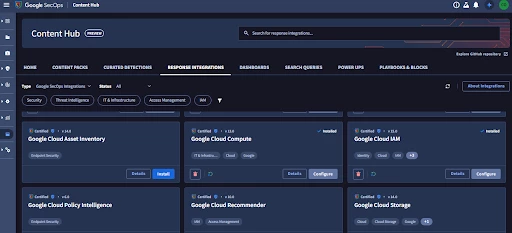
For data sources where there is not a pre built integration available it is possible to build a custom integration with custom actions to fetch the data required.
For a closer look at these integrations and action check out Adoption Guide: Understanding Integrations Actions in Depth
SIEM Ingestion
The remainder of this guide will focus on ingesting data to the SIEM.
Core Concepts
Understanding these foundational concepts is critical, as they are often difficult to change once data has been ingested.
-
LogTypes: These labels determine which parser is used to map raw logs to the Unified Data Model (UDM). Selecting the correct LogType is essential for ensuring your data is searchable and usable in detection rules.
-
Ingestion Labels are key-value pairs defined during ingest that can used for search, rules, and Data RBAC scopes. There are 2 special labels to callout as being particularly useful during ingestion.
-
Namespaces: A special label used to ensure that events and context data are correctly associated, particularly in environments with overlapping IP spaces.
-
Ingestion_source: In addition to labeling events, this label is also available in ingestion metrics, and cloud monitoring which radically simplifies the process of monitoring log sources going quiet or comparing log volumes from different sources.
-
Time and Latency: SecOps typically uses the timestamp extracted from the log itself. Data arriving more than three hours after the event is likely to cause delays in detections
-
Quota and Burst Limits: While licensed by daily ingest quota, SecOps also employs burst limits to protect platform stability. If limits are exceeded, ingest may be paused, requiring your ingestion tools to support caching and retries. The Data Ingestion and Health Dashboard in platform has visualizations to help you identify your ingest trends against these limits and if you may be approaching them. It is important to understand what happens if they are encountered.
Default Methods
By Log_Type
Most of the default logtypes have documented recommended methods for ingest, these steps are linked here: https://docs.cloud.google.com/chronicle/docs/ingestion/default-parsers/default-parser-configuration
These are the most common ingest methods utilized for that log source, but are not the only method; depending on your environment and constraints you may be able to ingest these more efficiently by another method.
By Log Location
If the logtype in question does not have a default ingest method documented typically the current location of those logs will be a key driver in the selection of ingest method. Use the table below as a starting point then evaluate that method for its effectiveness with the specifics of your data and detection requirements.
| Source Location | Recommended Method |
| GCP Logging | GCP Direct Ingest |
| SaaS Services | Third-Party API Feeds |
| Cloud Storage (General) | Storage Feeds (e.g., S3, GCS, Azure Blob) |
| Cloud Storage (Low Latency) | Message Feeds (e.g., SQS, EventHub, Pub/Sub, EventDriven Storage) |
| On-Premise Sources | Collection Agent (BindPlane) |
Overview of Available Methods
The wide variety of available methods can be broadly grouped into 4 categories:
-
GCP Direct
-
Configured in GCP console for GCP native Logs
-
-
Feeds
-
Configured in the SecOps console to fetch logs from a wide variety of sources
-
-
The Ingest API
-
Events forwarded to SecOps from another source
-
-
Agent based
-
Software for endpoints or collector systems to process logs and ship them to SecOps
-
Each of these categories has a variety of configuration options and log_source specific settings, the intent of this guide is not to detail every step for configuring these but to provide general guidance on the differences that may drive you to select or not-select a particular method. For details beyond the overview presented here I have provided links to documentation for each method.
GCP Direct Ingest
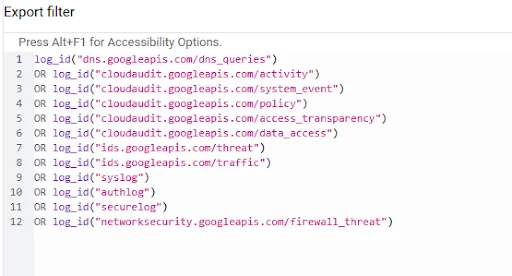
This first of these categories is having SecOps directly pick up logs from the GCP logging service for the organization attached to SecOps.
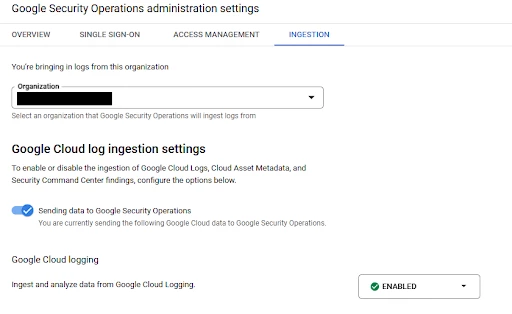
-
Strengths
-
Supports the most common security event and context data from GCP and automatically selects the appropriate log types.
-
Can be configured for multiple projects or organizations.
-
The LogScoping tool is available to auto-generate the export filter.
-
-
Limitations
-
Does not support namespace or ingestion KV labels. A broad selection of log types are supported but not all.
-
Export Filter uses ‘GCP logging query language’ syntax but is a subset of capabilities.
-
-
Supporting Documentation
Feeds
The second broad ingestion method is ‘Feeds’, this is where SecOps is “doing something” to go get your logs.
Initially this capability was limited to fetching logs from third party API or cloud storage buckets but has been expanded to include push based queues and webhooks.
There are several subtypes of feeds, but all feeds will have these capabilities in common:
-
Each feed is configured with a name, a logtype, authentication mechanism, namespace and ingestion labels (optional) in addition to per-feed configuration data.
-
Changes to feed configuration require all fields (including credentials) to be resubmitted.
-
The feed management console includes the current status and ‘last succeeded on’
-
Different feed types have different ingest schedules.
-
https://cloud.google.com/chronicle/docs/reference/feed-management-api
-
Consider the feed ingest schedule and your use case requirements when planning your ingest
-
https://cloud.google.com/chronicle/docs/administration/feed-management
-
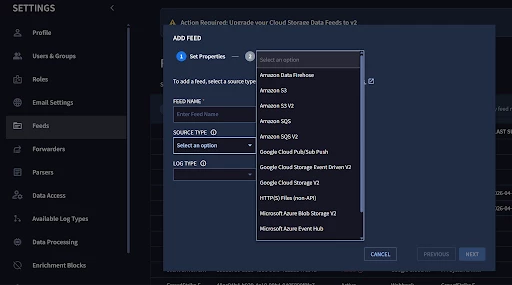
Note: We are currently in the process of migrating Cloud Storage and Streaming feeds to a newer V2 feed type and deprecating the legacy V1 type. The V2 feeds leverage the Storage Transfer Service and offer for improved reliability, scalability, and performance. More details here
Feeds: Cloud Storage and Streaming
For ingesting logs from cloud storage with the 3 major cloud providers you can use bucket style feeds, or messaging/streaming based feeds.
-
Amazon: S3, Firehose, SQS
-
Azure: Blob, Eventhub
-
GCP: CloudStorage, Pub/Sub Push, EventDrivenStorage
Note: We are currently in the process of migrating Cloud Storage and Streaming feeds to a newer V2 feed type and deprecating the legacy V1 type. The V2 feeds leverage the Storage Transfer Service and offer for improved reliability, scalability, and performance. More details here
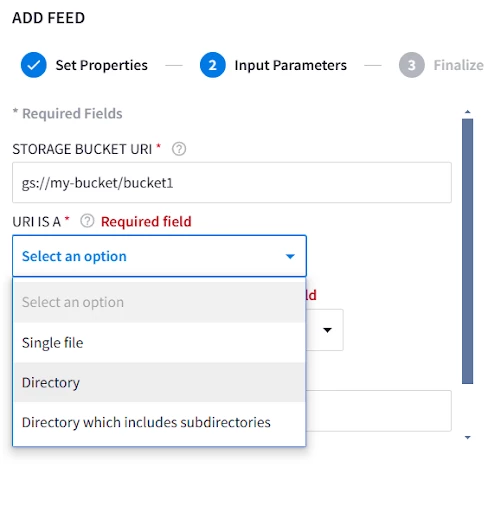
For storage style feeds; Specify the storage path, whether its a file, folder, or a folder with nested subdirectories, and whether or not you want to delete files from source after transfer
These feeds will run their ingest schedule every 15 minutes and ingest anything that has been added or modified since the last run.
For messaging and streaming based feeds the configuration is effectively a link to the queue, the storage backing it, and credentials. You also have the option of configuring delimiters if multiple logs will be included in the same message. These feeds run on a nearly instantaneous schedule and pull new logs as the message is sent from the source.
In addition to any egress fees with getting your data out of Azure or AWS, be mindful that there is typically a cost associated with operating the message queue. Even though the queue/streaming based methods will get your data into SecOps faster it may not always be the correct call based on the timeliness requirements of your use case.
Note: There are two options for feeds that leverage GCP Pub/Sub, both options have similar performance but have key differentiators in how authentication is handled. Understanding the differences in authentication will be key in selecting the best method if your log source and SecOps instance do not exist in the same GCP organization.
-
Using the ‘Google Cloud Pub/Sub Push’ method the log message is written to the Pub/Sub and a push based subscriber forwards that message to the SecOps instance. This push based subscription requires the subscription to authenticate as a service account with permissions to ingest logs into your SecOps instance.
-
When using the ‘Google Cloud Storage Event Driven V2’ method logs are written to a storage bucket, which is then configured to notify Pub/Sub of the log write. This pubsub message includes details about the entry that was written to the storage bucket instead of the actual log text. SecOps subscribes to this topic with a Pull based subscription and authenticates with the Storage Transfer Service Agent account for your SecOps project.
-
Strengths
-
Eliminate need for additional forwarding/processing infrastructure.
-
Highly redundant + scalable
-
-
Limitations
-
Storage Buckets/Blobs have 15 minute query intervals which may not be appropriate for select log sources based on your detection use case.
-
Limited support for path wildcards on Blobs/Buckets
-
Additional costs associated with operation of PubSub or message queues, and for blob/bucket storage.
-
-
Supporting Documentation
Feeds: HTTP(S) File
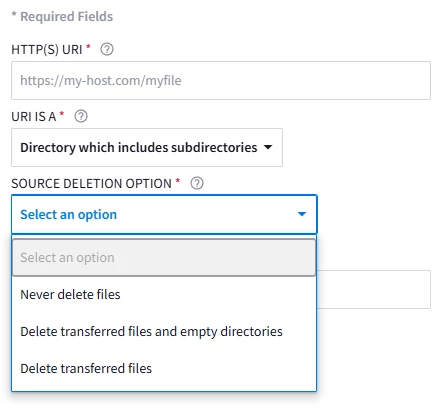
HTTP file pulls are a very basic setup. They have similar capabilities to the cloud storage feeds, just targeting a http fileserver instead.
-
Strengths
-
Low complexity direct calls to hosted file locations
-
-
Limitations
-
15-minute ingest schedule
-
No authentication
-
-
Supporting Documentation
Feeds: Third Party API
The next major type of feeds are ‘Third Party API’ ; these are integrations built to pull logs directly from the API of many popular cloud services.
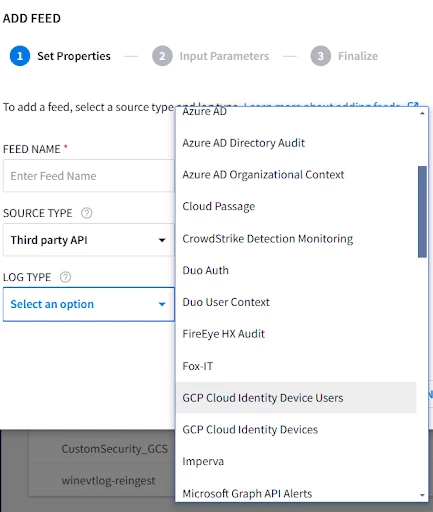
Configuration varies based on what API is being targeted but is typically straightforward; needing the URL for your tenant and credentials.
For many of these the ‘Ingest logs from specific sources’ section of our documentation, has directions on where to go in the source systems console to create the API keys and usually indicates what permissions are required.
The ingest schedule for these varies based on the target API, and are documented here. These tend to have a slower daily rate for context info and faster 1 or 5 minute schedules for event data, but make sure you take a look when setting these up and that they support your overall Mean Time To Respond (MTTR) goals.
-
Strengths
-
Runs on google infrastructure
-
Minimal configuration required
-
-
Limitations
-
Ingest schedule may not meet detection requirements
-
Most integrations lack filtering options
-
Not available for all third-party platforms
-
-
Supporting documentation
Feeds: HTTPS Webhook
The last feed type is HTTPS webhook. Webhooks are broadly supported across a wide variety of products for sending notifications.
We accept authentication either as url parameters or as headers, and can configure delimiters to split a single message into multiple events.
-
Strengths
-
Broad Compatibility
-
Supports authentication as headers or parameters
-
Configurable delimiters
-
-
Limitations
-
Simple delimiters only, no multi-event json
-
4MB/Message, 15k QPS per endpoint
-
Note: Parser max is 1MB per logline, the 4MB message limit is intended to support delimited events.
-
-
Error messages are returned with HTTP response but are not visible in SecOps console, which can make troubleshooting more challenging if your log source does not log the response.
-
You are responsible for caching and retries on HTTP 4XX/5XX errors
-
-
Supporting documentation
Ingest API
For many pre-existing logging pipeline tools the Ingest API provides a direct path for sending raw logs or pre-formatted UDM. This is also an excellent way to ingest events and context data from custom applications.
-
Strengths
-
Many 3rd party log pipeline tools have pre-built modules to use SecOps ingest API as a destination.
-
Duplicate batch protection
-
-
Limitations
-
1MB / Batch*
-
Batching must be configured by logtype
-
Credentials are created by support*
-
You are responsible for caching and retries on HTTP 4XX/5XX errors
-
-
Supporting documentation
* The regional malachiteingestion-pa endpoints allow for 1MB per batch, this limit is applied after the batch is decompressed on the SecOps side. There is also a pre-ga logs.import method on the newer chronicle api; using the new API allows for 4MB per batch.
Ingestion Scripts as Cloud Run Functions
Another option with the ingestion API is a series of prebuilt ingestion scripts we provide. These can be configured as cloud run functions which will query the 3rd party API, then upload the results to the SecOps Ingestion API
-
Strengths
-
Allows ingesting data from 3rd party API where a feed option is not available.
-
Allows control over additional query parameters that may not be present in 3rd party api feeds.
-
Can be easily reworked to run in Azure or AWS based on specifics of use case
-
-
Limitations
-
May incur additional GCP cost associated with the function running
-
Other limitations per Ingestion API
-
-
Supporting documentation
Agent-Based Collection
Note: The SecOps Forwarder is now deprecated in favor of the Collection Agent. Details on the deprecation and EOL timeline are available here: https://docs.cloud.google.com/chronicle/docs/deprecations
For centrally managed collection of on-premises sources or log collection directly from endpoints, the Bindplane collection agent is the preferred solution.
Bindplane is a telemetry pipeline that allows for collection, and refinement of logs before sending them to SecOps. All SecOps customers are entitled to ‘Bindplane (Google Edition)’. Customers with ‘Google SecOps Enterprise Plus’ are entitled to ‘Bindplane Enterprise (Google Edition)’ which adds additional capabilities around data filtering, redaction. Details on the capabilities of the different license are here: https://docs.cloud.google.com/chronicle/docs/ingestion/use-bindplane-agent#bp-differences
The collection agent supports a variety of architectures from sending logs directly from an agent, to routing through a gateway agent. The agent/gateway model is largely a theoretical distinction, The same binary is leveraged for the collection agent and gateway and a single instance of the agent software can fulfill both roles simultaneously when configured to do so. The agent includes a built in healthcheck endpoint and can be easily deployed behind in a load-balanced configuration to support high availability and high throughput requirements.
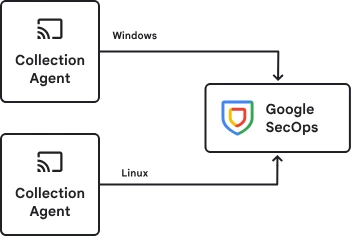
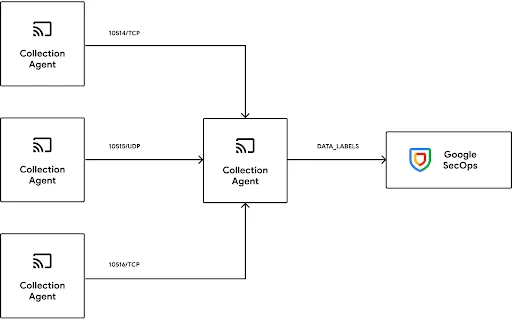
Example architecture options
The agent configuration is a yaml file that can be edited manually however it is strongly recommended to use the Bindplane server which allows for centralized management and monitoring. The Bindplane server is included with the Google Edition licenses and can be deployed in cloud or on-prem.
-
Strengths
-
Direct or gateway based upload options
-
Gateway can be deployed in load-balanced HA configuration
-
Dynamic ingestion labelling based on log contents
-
Highly configurable log processors
-
Support for complex filter logic
-
-
Limitations
-
Additional software to deploy and manage
-
-
Supporting documentation
SecOps License Utilization
Remember that SecOps tenants are licensed by how much data is ingested so it is important to keep an eye on your current ingestion rates to avoid unexpected overage charges. Your current commit and total usage are visible in the cloud billing console.
https://docs.cloud.google.com/chronicle/docs/onboard/understand-billing#track-secops-billing
In the SecOps platform there is a prebuilt ‘Data Ingestion and Health’ dashboard that provides an approximation of your throughput broken down by logtypes. This is useful for roughly determining the license consumption associated with a particular log source and monitoring for unexpected changes but be aware the cloud billing console is the actual source of truth.
Conclusion
Effective data ingestion in Google SecOps begins with a use-case driven approach, working backwards from desired security outcomes to identify necessary events and context. For most data sources there are commonly applied “default” methods but having an understanding of the pros and cons of all the available methods can ensure you can easily apply to pick the most effective option based on the specifics of your environment and security goals.
Related Topics